-
SYSTEM SEARCH
System Scanners Online:
Username: Guest
>> System Scan?
>> The Universe >
Incoming Message:
Due to system limitations searching with words of 3 or less characters will not return results. For instance; Doctor Who. This will not return results as the system is trying to search for both Doctor AND Who in which Who will not be found as it's a 3 character word. To find Doctor Who; you'd search for either Doctor or "Doctor Who".
Search Tips:
For specific searches; enclose your search with quotes. Example: "Doctor Who" or "Addams Family".
Search the Community
Showing results for tags 'wheel'.
-
Version 1.0.0
404 downloads
"Maverick VPW" vpx wheels and dmd picture if you appreciate the work, then thank you for not forgetting a "like" or a "review" , it's nice! Personal, non-commercial use only. Please contact me if you would like to use it in another way. All Logos, Copyrights and Trademarks are property of their respective owners. PROVIDED STRICTLY FOR PERSONAL / HOME USE AND NOT FOR COMMERCIAL SALE / RE-SALE OR DISTRIBUTION! -

PFimage.thumb.png.c7a299153dc5bee028653365eab5b5ce.png)
Version 1.0.0
1065 downloads
This is a mod I released a few years ago on VPinball, and never took time to re-upload here... my bad ! 😔 As this is a mod, all the credit goes to the previous authors, and you'll find their names at the top of the script. Thanks to them all. Thanks also to Franck "Mussinger" for the tips he gave me when I was doing this mod. As it was done a few years ago, this will work whatever VPX version you have 😉 ! JOE BAR TEAM is a humorous French comic about motorcycles and their proud riders, always ready to fight to prove that they are the fastest on the road... but they are less talented than they think ! To respect the original comics, the voices and writings are in French, but the love of motorcycling is international ! You'll find in the file to download a COMPLETE PACKAGE with TABLE + BACKGLASS + WHEELS + ROM (frpwr_b7) + MUSICS (metal from the 80's, because the first volumes of the comic take place in the very late 70's to mid-80's) + ALL THE MEDIAS you'll need for your frontend (video topper, backglass and table videos, backglass audio...) I hope you'll like my table mod... Keep playing real and/or virtual pinball, and make this community alive. -

Version 1.0.0
53 downloads
Dexter (Animatted) -

Version 2.0
224 downloads
5 Versions: Fade - Logo fades in and out Spin - Logo spins with sphere Logo - Logo infront of orb and remains in place whilst orb rotates Static 1 - Spinning orb but static (does not animate) Static 2 - Logo orb but static (orb does not rotate) -
Version 1.0.0
40 downloads
Quicky up clear logo wheel for Gottlieb's 1956 Derby Day I know, it's small but good resources hard to find-
- 9
-

-
- derby day
- https://www.ipdb.org/machine.cgi?gid=664
- (and 2 more)
-
Version 1.0.0
135 downloads
Wheel RimArt style Monster Bash- 2 comments
-
- 14
-
-
- wheel
- monster bash
- (and 1 more)
-
preview.thumb.png.6cf2367f5f186d46aa251711b56213fe.png)
Version 1.0.0
16 downloads
Clear logo wheel for Gottlieb's 1963 Swing-Along created by the vector master @Silversurfer Perfect for those who prefer a non-wheel type logo like Launchbox, PinballX, PinballY, et al I can't thank Jens enough for always sharing his amazing art skill with us-
- 3
-
-
- https://www.ipdb.org/machine.cgi?gid=2484
- swing along
- (and 4 more)
-

Version 1.0.0
9 downloads
Clear logo wheel created by @Silversurfer from his own vector artworks. Perfect for people and frontends that use logos instead of wheels- 2 comments
-
- 2
-
-
- https://www.ipdb.org/machine.cgi?gid=682
- clear logo
- (and 2 more)
-
wheel.thumb.png.98e3673112c22a4cbf6ca120ca95ad72.png)
Version 1.0.0
59 downloads
Wheel for PinRich's Show Boat -
Version 129
358 downloads
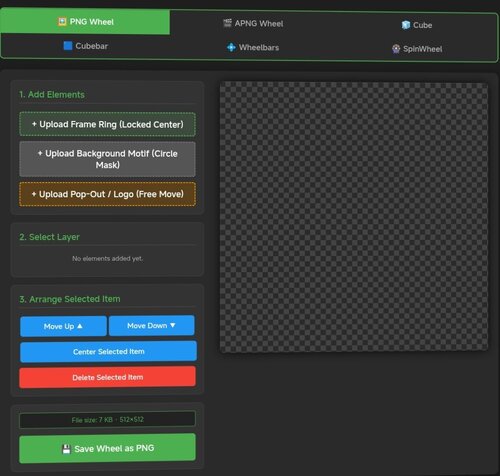
# Pinup Popper Media Creator A free, browser-based tool to create wheel art, animated wheels, 3D cube animations, wheelbars, spinning wheel animations and animated full-screen media (loading / attract screens) for Pinup Popper / virtual pinball frontends. Runs entirely offline in your browser — nothing is uploaded, no install needed. Just open the HTML file. **Seven tools in one:** 🖼️ **PNG Tab** — Design static wheel images with frame rings, motifs, pop-out effects, curved/straight text overlays, glow, scaling and masking. The background motif is freely positionable — drag and scale it under the fixed circular window to frame the image exactly how you want. Shows the exact file size before you save. 🎞️ **APNG Tab** — Build animated wheels. Add animated layers (GIF/MP4), per-layer speed and boomerang, plus ready-made animation presets (spin, pulse, glitch, hue-shift and more). Animated layers can be masked to the wheel circle, so portrait clips stay neatly inside the wheel instead of poking out. 🧊 **Cube Tab** — Create a rotating 3D cube. Put text, images, GIFs or MP4s on each of the 6 faces with Fill / Fit / Stretch options, set a custom rotation sequence, adjust speed/hold/easing, choose edge color & thickness, metallic/gloss finish, and pick from multiple presets. 🟦 **Cubebar Tab and Wheelbar Tab** — Design Pinup Popper cubebars. Choose a T-Bar (straight) or T-Arc (curved) shape, set the fill color, and add an upper and a lower image — each freely positionable with scale, opacity and rotation. Add straight or curved text labels (curved text bends along the arc) with engrave / emboss / glow effects. Exports a transparent 32-bit PNG at 1080×2160 — exactly what Popper's wheelbar accepts. 🎡 **SpinWheel Tab** — Animate the base wheel as a spinning coin or medal. Compose each side (front/back) from multiple image layers (GIF/MP4 supported, with per-layer opacity, frame range and boomerang ping-pong) and multiple text layers (curved or straight, engrave/emboss effects). Layers can sit inside the chrome ring or on top of it. Adjust spin tempo, hold time per side, axis and direction. Export as animated APNG or GIF — transparency preserved in both. ✂️ **Cutout Tab** — Cut a subject out of an image and remove its background to a transparent PNG — handy for prepping motifs, logos or character art for the other tabs. Erase areas by clicking with the Magic Wand or Chroma Key (adjustable tolerance), or draw a selection with Lasso / Polygon / Rectangle / Ellipse and choose to keep or remove what's inside. Fine-tune with an eraser brush, feathered/soft edges and edge smoothing; restore, pan and zoom as you work. Optionally trims empty borders on export. Saves a transparent PNG. 🖥️ **Screen Creator Tab** — Build animated full-screen media for any Pinup Popper display — loading screens, attract videos, backglass / DMD / topper graphics. Layer a background freely: a base color or gradient, a still image, an MP4 video and one of several animated presets (starfield, aurora, synthwave grid, rain, bokeh, rings, glitch and more) — all combinable. On top, add text, image and video layers, each freely positioned, scaled, rotated and individually animated (fade, slide, zoom, pulse, float, spin…). Edit straight on the canvas — drag to move, corner handles to scale, top handle to rotate, tap to select. Add a progress bar and a spinner (each positionable in X/Y and rotatable in 90° steps), plus scanline / vignette / glow / grain overlays and an audio track. Pick any output resolution (HD / 2K / 4K or custom), rotate the whole output 90° for portrait/rotated displays, key out a green screen on image/video layers (chroma key), and save / load your setups with full undo / redo. Exports an MP4 with audio. **Export & convert:** - Save wheels, cubes and SpinWheels as APNG (full quality) or GIF (with dithering for smooth gradients) - All exports are transparent at original dimensions - Tap "Calculate exact size" to see the real file size for both formats before exporting - Built-in converter: load any existing APNG or GIF and turn it into the other format — shows both output sizes first - Screen Creator exports an MP4 (with audio) at your chosen resolution -

Version 1.0.0
59 downloads
Star Wars Wheel -
If i could bother you with a little something of a technical difficulty here, here's what happens. If i try to replace a front end wheel just by copying and replacing the file, the front end still shows the old wheel. Now i guess there's some bug in the database that still has the old file or picture in there. You see, if i try to replace it from the media manager in PinUP Popper it works just fine and it replaces everything. The thing here is that i can't always find the 'nice' wheel from the media manager option and i would want a different kind of wheel. I am talking about a pinball table for Pinball M, or VPX, or any table actually. Oh and i have tried to go back a database earlier where i didn't even have the Pinball Midnight emulator in the menu installed, but that didn't help. I am running the PinUp Popper v1.50 and W11, if anyone has like a work-around or maybe a trick to get around this.
-

Version 1.0.0
92 downloads
Tarcisio style wheel for Super Mario Bros. Mushroom World (Gottlieb 1992) -

Version 2.0
171 downloads
Cactus Canyon - Animated Glass Orb Wheel Art- 4 comments
- 1 review
-
- 17
-
-
- cactus canyon
- glassorb
- (and 2 more)
-
Version 1.0.0
52 downloads
I wanted something special for mf doom and massive ! Artwork courtesy of Tonycoppin -
.thumb.png.95d0789d9cff9cef5d6be97e2e2c8ba2.png)
Version 1.8
5800 downloads
Virtual Pinball Media Files Folders on MEGA: VPX Attract Backglass-Over 250 for mostly original Visual Pinball X tables. A good substitute for the normal b2s backglass video file in your front end. Launch Audio is included in the folder for each table. Includes special Holiday tables. Future Pinball Attract Backglass-Actual Backglass image with added animations or video. Add a little flair to your Future Pinball collection. Future Pinball Playfield Videos-.mp4 video of playfield for use in your front end. Pinball FX3 Animated Backglass-All 99 2 screen versions with DMD/Speakergrille. 69 3 screen versions with and without FX3 logo. Best used with Pin Up Popper but they can be used with Pinball X/Y. Add these as your backglass file in Media Manager. Info here for keeping FX3 animated backglass playing when you load the table:https://www.nailbuster.com/wikipinup/doku.php?id=managing_games Full DMD-Over 800 Full DMD .mp4's. Lots of Full DMD's for Originals, EM tables and Future Pinball. Star Wars Popper Theme-My personal Star Wars Popper theme. I use this on my Star Wars themed cabinet. Phenom VPX 2 Screen Backglass-Video backglass for 2 screen users of Phenom's Kid tables. These allow your backglass video not to be blocked by your DMD for the table. Resize your DMD into the cutout. Table Wheel-Table Audio-Wheels and table audio Loading Videos-I made these for some of the Pup Packs I have in my lineup NFL Tables (Xenonph)-Full DMD for all tables. Popper playlist media for NFL tables. Instruction Cards for all 32 teams. Toppers-Topper Videos I have made Instruction Cards-Over 1300 Instruction Cards for use in your front end. Mostly EM and Original Tables. A big thank you to Inkochnito for his EM database (https://www.pinballrebel.com/pinball/cards/). Be sure to check out other instruction cards made by authors like @cheese3075@buffdriver @Kongedam @eddiemonsta @Frank_Enstein @CarnyPriest and others visit https://vpuniverse.com/files/category/91-instruction-cards/ or https://vpuniverse.com/files/category/9-hyperpin-media-packs/ (Authors - if you see anything in my MEGA belonging to you just drop me a PM and I will remove. I think I got them all out 😊) See the video from The Way of the Wrench (who inspired me to do this on my cabinet) for a tutorial on how to add to Popper https://youtu.be/RZTwHQNNqDc?si=l4nS24MQaMU9WAKP Pinball Flyers-Over 1900 pinball flyers for use in your front end. I created hundreds for tables that do not exist in real life and many that there were no pinball flyers available. I will continue to add to this as new tables are released. Add these to your front end just like the instruction cards. There is a sub folder called Popper - No Stretch will has non standard size flyers so they will not be stretched when shown in your Popper front end. A big thank you to the original table authors, artists, and others who allowed me to use their artwork. Big thank you to vogliadicane, IvanTBA, HiRez00, Cocothetrain, hauntfreaks, godisnothere, scutters, STAT, Rajo Joey, and Nick D for their work.- 15 comments
- 5 reviews
-
- 87
-
-
- future pinball
- animated backglass
- (and 28 more)
-
Version 2.0.0
72 downloads
Excellent table. -

Version 1.0.0
104 downloads
SLAYER wheel, let me know if you like 👍 -

Version 1.0.0
39 downloads
Wheel RimArt style Mass Effect-
- 4
-
-
- wheel
- mass effect
- (and 1 more)
-
PUP.thumb.png.ef4f7dfd700d6afadfcfba6009e03b94.png)
Version 1.0.0
97 downloads
Salut, Voici une wheel ACDC Luci. 2 versions disponnibles : - Wheel non-PuP - Wheel PuP version -
Version 1.0.0
47 downloads
Thank you very much for your table @deadmanworking -
Wheel.thumb.png.6ce9bbc253aae7bd32e64d2cb6a8e316.png)
Version 1.0.0
42 downloads
Excellent table ! 🙂- 1 comment
-
- 6
-
-
- fireball ii
- wheel
- (and 1 more)
-
ComfyUI.thumb.jpg.cc10840a6a437369e80477a060d11fa5.jpg)
Version 1.0.0
60 downloads
Wheel RimArt style Breakshot -
Version 1.0.0
128 downloads
Thank you very much for your table @retrorommy6604 -
.thumb.jpg.afbec040bacb0b32e1b036db5834e084.jpg)
Version 1.0.0
69 downloads
Yale (Inder 1974) Front End Media Pack Table by JP Salas: https://www.vpforums.org/index.php?app=downloads&showfile=19840 Wheel Flyer (no actual flyer is avaialble so I took some artistic license and AI to create one) Instruction Card (converted to English) Front end Audio

.thumb.jpg.9aa858d95e76ed203719a9a635ac166b.jpg)