
FP.thumb.jpg.89b84ca31758150656a13d12b20896d4.jpg)
.thumb.jpg.b23a398ac8d0611a2f65e1cf7eb55201.jpg)
.thumb.jpg.cfffd4dc6f098e6e3f1abfc82c857b35.jpg)
-
Topics
-


-
Posts
-
 For my Silent Hill Pinball video game, I now have the Alley Otherworld portion updated. I changed the playfield artwork to look bloody and rusty, and the upper playfield changes everything to look more like the nightmare alley from the game. When you get to this section of the game, it starts out dark, with only the flickering light of your lighter (which follows your ball) to see. As you progress the upper center area rotates to show a wheelchair, then a bloody table, then the little girl you are following. Then it will change to show a gruesome corpse tied up in barbwire, and the area underneath opens up to a hellfire pit, and monsters screaming at you. As you try to get away from them, they appear and block your paths. You have no weapon, so each time you hit them with your ball, they will swipe at you and make the twisted giggle sounds from SH1. You escape by entering the Under Playfield which is shown when the center video display moves out of the way to show what is underneath! Eventually the monsters overcome you, and you pass out. The game fades out, and you wake up in the foggy town again, only in a new location with a completely new layout.
 -
So.... work on my fan-made Silent Hill Pinball video game continues! For those who never heard of this project, its something I started years ago (before the Silent Hill revival) and I've been working on it here and there for years. It's changed a lot over the years as I learn new skills, and come up with new things I want to add to it. This is not a normal pinball game. As you progress through the game / story, the game's layout / content / visuals change with each location / event. From the foggy town of Silent Hill, to the nightmare Otherworld, to Midwich School, the Grand Hotel, the Hospital, etc. It's a mish-mash of different bits from SH games and the 2006 movie thrown together (made to work with what assets I can get, what works best with this game engine, stuff I simply like, etc). This is not some "lore accurate" retelling of SH1 or the movie. It's a fun fan-made work of passion made by one guy. Please try to look at it that way. Here's the updated playfield art. I create everything in good old GIMP Some in-game screenshots... New Health Bar on the bottom. The lighting will change colours to match your health status, and the flippers / ball with get more and more bloody. The upper playfield has been updated again, with new ramp shots in the corners that feed the ball beck into play. Each of the 3 main shots now have permanent magnets and "combat play sections" that hold the ball and flash lights to start combat, and attack / shoot / dodge monsters, so they can be killed and allow you to progress in the game. Their health is now shown with their own health bar lights, and they will splat blood each time they are hit. Updated Inventory / video screen and displays. Now you can see what health drink, syringes, ammo, melee weapons, etc you have. You need to enter the Inventory kicker to activate this menu and hold your ball. Then you can top up your health, change what melee and gun weapons you want active (if found), check maps, etc.
-
 Excellent work, sir! I have the real deal in the basement, if they remade it (somehow), they should really do it like this. Thanks much!
 -
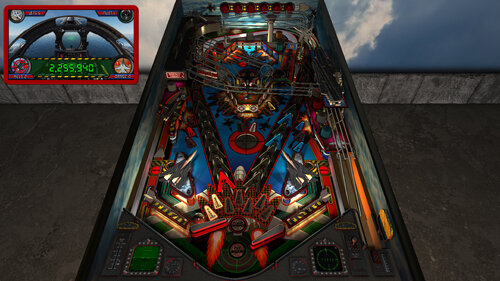
F-14 Tomcat - Afterburner (Future Pinball - BAM) 2.0 update - NOW AVAILABLE! ================================= - new art for... everything! (playfield, plastics, sidewalls, backbox, cabinet, etc) - new apron with F14 cockpit display models - new playfield models (f14 jets, enemy jets, missiles, airfield, aircraft carrier, etc) - new animated topper models - new cabinet coin door model - new RayBaked GI lighting and shadows and inserts lighting - new GI changes colour during different modes and events (TABLE OPTIONS) - music can be toggled between Modern / Classic / Afterburner (TABLE OPTIONS) - PUP DMD style can now be toggled between Modern / Afterburner (TABLE OPTIONS) - new Attract mode flyby camera sequence (TABLE OPTIONS) - new VR Room options for Attract mode and Gameplay (TABLE OPTIONS) - new Mega / MR (mixed reality) / Minimal choices for VR room (TABLE OPTIONS) - new Mega Room has large hanger with F14 jet and enemy jet - new Room has animated Beacon lighting (TABLE OPTIONS) - new Normal Map options for those who want them reduced in lower resolutions (TABLE OPTIONS) - new Ball settings (TABLE OPTIONS) - new Lighting settings (TABLE OPTIONS) - new FP DMD color options (TABLE OPTIONS) - converted ALL textures to power of two (MUCH faster "injecting textures", half the loading time) - updated startup checks for BAM / PUP / PuP-Pack version (will notify you if wrong version) - updated startup code for BAM settings and PinEvent (PinEvent VR settings should apply correctly now) - updated pup dmd and pup ssf code to work correctly with PUP v2.0 (now required for those features) - new pup ssf v2.0 ball rolling updates - code / changing rolling sounds on ramps / tracking 10 balls - new ball rolling sound mode options: OFF, FP, SSF (TABLE OPTIONS) - new volume settings for ball rolling / FP Mech Sounds / PUP SSF (TABLE OPTIONS) - new pup-pack and pup dmd v2.0 code with real time shader effects and new alpha videos! (TABLE OPTIONS) - pupstream options for left apron / right apron / mini pf screen now only show on center of apron - new Cabinet_Mode_Preset automatically hides items not needed for cabinet mode (TABLE OPTIONS) - lots of fixes and other things not covered here! ================================= Download link: https://vpuniverse.com/files/file/6088-f-14-tomcat-afterburner-pinevent-v2-fizx-33/
-
It's almost done! Here's a preview trailer to tide you over until then.
-

