-
SYSTEM SEARCH
System Scanners Online:
Username: Guest
>> System Scan?
>> The Universe >
Incoming Message:
Due to system limitations searching with words of 3 or less characters will not return results. For instance; Doctor Who. This will not return results as the system is trying to search for both Doctor AND Who in which Who will not be found as it's a 3 character word. To find Doctor Who; you'd search for either Doctor or "Doctor Who".
Search Tips:
For specific searches; enclose your search with quotes. Example: "Doctor Who" or "Addams Family".
Search the Community
Showing results for tags 'rom'.
Found 17 results
-
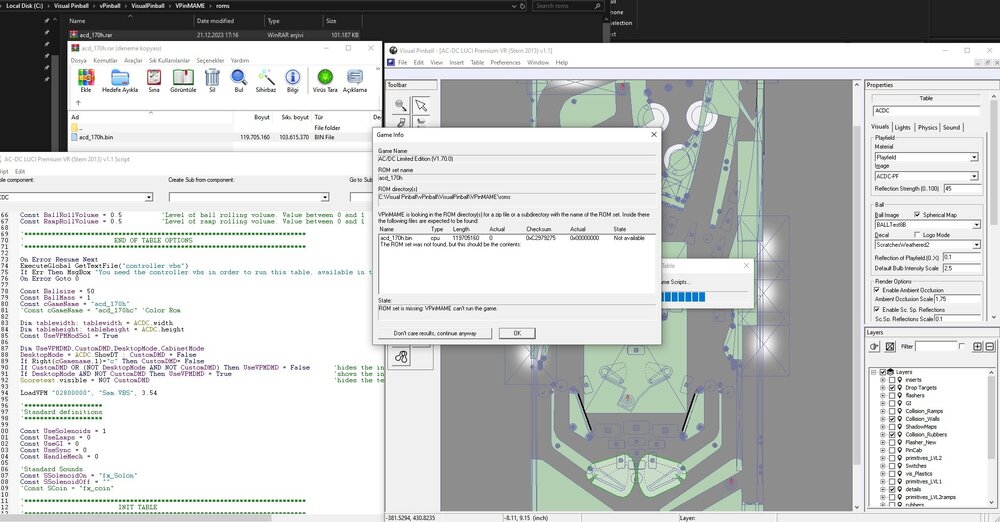
Hello everyone, i'm realy stuck here, need help. I downloaded Stern ACDC LE 1.70 game code (also Premium 1.70) and tried everything to make table work but i can't. I tried all possible variations (leaving original BIN name and zipping it acd_170h.rar OR both bin and rar same name; "acd_170h" Done this for LE and Premium codes aswell, none worked for me. I'm sharing all screens below. Can you help me please? I realy want to play this piece of art table. Best Regards,
-

Version 3.0
1040 downloads
🎯 VPX Achievement Watcher A companion app for Visual Pinball X (VPX) that adds modern achievements, live overlays, and challenges by reading VPinMAME NVRAM data. ━━━━━━━━━━━━━━━━━━━━━━━━━━━━━━ Features ━━━━━━━━━━━━━━━━━━━━━━━━━━━━━━ 🏠 Dashboard Your control center at a glance: • System Status: Is the watcher running? Is VPX active? • Session Summary: Two cards side by side: ◦ Last Run: Last table played, score, achievements unlocked, and date ◦ Run Status: Live status indicators (green/yellow/red) for Table, Session, Cloud, and Leaderboard connection • 📬 Notifications: Clickable feed with alerts for leaderboard ranks, beaten achievement records, missing VPS-IDs, and available updates. Unread count shown on tab badge. Clear All button to dismiss • 📋 Setup Status: Checklist that verifies your setup is complete — Player Name set, Cloud Sync enabled, VPS-IDs assigned, Maps loaded, Overlays configured, and Widget Controls bound. Red/yellow/green indicators with direct links to fix missing items. Shows "✅ All set!" when everything passes • Quick Actions: Restart Engine, Minimize to Tray, Quit ━━━━━━━━━━━━━━━━━━━━━━━━━━━━━━ 👤 Player Your personal player profile and summary: • Player Level: Current level and XP progress bar based on unlocked achievements • Prestige System: Reach Prestige 1–5 by unlocking 2000 achievements per star (☆ → ★) • Level Table: All levels from Rookie to VPX Elite with their achievement thresholds • 🏅 Badges: 37 collectible badges earned through gameplay milestones — unlock achievements, complete challenges, reach levels, accumulate playtime, and more • Display Badge: Choose which badge icon appears next to your name on cloud leaderboards ━━━━━━━━━━━━━━━━━━━━━━━━━━━━━━ 📈 Progress Track your achievement progress per table: • Select Table: Dropdown with all played tables (ROM-based and custom/non-ROM tables) • Global Achievements: Cross-table achievements like total playtime, tables played, manufacturer milestones — with progress bars (e.g. 12/25) • Per-Table Achievements: Each achievement listed with status (✅ unlocked / 🔒 locked) • ℹ️ Info Links: Click the info icon on any achievement to see its unlock condition, VPS table info, and unlock timestamp • Rarity Tiers: Common, Uncommon, Rare, Epic, Legendary — color-coded based on how many cloud players have unlocked each one. Rarity legend shown below progress bar • Custom Table Progress: AWEditor-created achievements are tracked separately with their own progress view ━━━━━━━━━━━━━━━━━━━━━━━━━━━━━━ 📊 Records & Stats Records every round played, session duration, and scores in the background: • 🌍 Global NVRAM Dumps: Full raw NVRAM data overview per table — all fields and values in a multi-column table • 👤 Player Session Deltas: What changed during your session — actions, score differences, playtime, and field-by-field changes ━━━━━━━━━━━━━━━━━━━━━━━━━━━━━━ ☁️ Cloud Global cloud leaderboard for achievement progress: • Category: Achievement Progress leaderboard per table • Search: Enter a table or ROM name with autocomplete (resolves table titles to ROM keys) • Fetch: Load the leaderboard — ranked list with progress bars, medals (🏆🥈🥉), player badges, date, and ℹ️ VPS info links • VPS Info Dialog: Click ℹ️ on any leaderboard entry to see linked VPS table details and achievement breakdown 💡 Tip: You can find your personal 4-digit player ID in the "System" tab. Make a note of it! If you ever install Watcher on a new PC, you can use it to restore your cloud progress. ━━━━━━━━━━━━━━━━━━━━━━━━━━━━━━ ⚔️ Score Duels Challenge other players to direct score duels on the same table! The Score Duels tab is organized into 4 sub-tabs: 🎯 My Duels • 📬 Incoming Invitations: Inbox for duel challenges from other players — accept or decline with one click • 🔕 Do Not Disturb: Toggle to stop receiving new duel invitations • ⚔️ Start New Duel: Pick an opponent and table, then send a challenge • 🔀 Auto-Match: Join the matchmaking queue — automatically matched with a player who shares at least one table (by VPS-ID). Search times out after 5 minutes • 🟢 Active Duels: Overview of all running duels with status, time remaining, and cancel option • 📜 Duel History: Past duel results with opponent, table, scores, and date 🌍 Global Feed Live feed of all active and recently completed duels across all players. 🏆 Leaderboard Top 50 players ranked by duel wins. Shows Rank, Player Name, Wins, Losses, and Win Rate (%). Players need at least 3 completed duels to qualify. Your own row is highlighted with a ★. Medals for top 3: 🥇🥈🥉. 🏆 Tournament 4-player single-elimination knockout tournaments: • Join Queue: Enter the tournament matchmaking queue (30 min timeout) • Auto-Matching: When 4 players sharing at least one table are queued, a tournament is automatically created • Bracket: 2 Semifinals → 1 Final, all played on the same randomly selected table • 2 hours per match — each duel has a 2-hour time limit • Notifications: In-app alerts for tournament start, elimination, final reached, and final result • History: Completed tournaments are saved locally with your placement (🏆 Winner, #2, #3-4) 💬 Tournament Chat: Live chat for tournament participants — real-time messages ━━━━━━━━━━━━━━━━━━━━━━━━━━━━━━ 🎨 Appearance Customize the look and feel of the entire application, organized into 5 sub-tabs: 🖼 Overlay • Global Styling: Font family, base font size, and overlay scale slider (30–300%) • Widget Placement & Orientation: Place and save screen positions for each overlay independently. Each widget has Portrait Mode (90°), Rotate CCW, Place, and Test buttons: ◦ Main Stats Overlay (with auto-close option) ◦ Achievement Toasts ◦ System Notifications ◦ Status Overlay (cloud/leaderboard feedback, can be disabled) ◦ ⚔️ Duel Notifications • 🔄 Switch All → Portrait/Landscape: Toggle all overlay orientations at once • 📄 Overlay Pages: Enable/disable individual overlay pages — Page 1 (Highlights & Score) is always active; Page 2 (Achievement Progress), Page 3 (Cloud Leaderboard), Page 4 (VPC Leaderboard), Page 5 (Score Duels) can be toggled • Custom Background: Place an overlay_bg.jpg/png next to the executable for a custom overlay background 🎨 Theme • Active Theme: Select and apply a color theme from the dropdown • Color Preview: Live preview of Primary, Accent, Border, and BG colors • Overlay Preview / Test: Test Main Stats Overlay and Achievement Toast with the current theme • Available Themes: Full list of all themes with icon, name, and description 🔊 Sound • Enable/Disable: Master toggle for sound effects • Volume: Slider (0–100%) • Sound Pack: Choose from multiple packs (Zaptron, Vex Machina, Retro, etc.) • Events Table: Per-event enable/disable toggle and preview button for each sound event ✨ Effects • GPU-accelerated visual effects with automatic CPU fallback 🐾 Mascots • 🏆 Trophie (GUI Mascot): Lives in the bottom-left corner of the main window • 🎱 Steely (Desktop Overlay Mascot): A metallic chrome pinball that lives on your desktop as an always-on-top overlay. Reacts to game events • Skins: Multiple visual skins for both mascots • Personality: Unique speech bubbles, reactions, memory, and a "bickering" system between them • Portrait Mode: Steely supports 90° rotation for cabinet screens ━━━━━━━━━━━━━━━━━━━━━━━━━━━━━━ 📺 VPC Weekly Challenge View Discord's Weekly Challenge directly on the overlay (view only). ━━━━━━━━━━━━━━━━━━━━━━━━━━━━━━ 🕹️ Controls Configure hotkeys and input bindings for the overlay and challenges: • Supports keyboard keys and joystick buttons • Bindings for overlay toggle, duel accept (left), duel decline (right), and system tray show/hide • 💡 Flipper buttons or MagnaSave buttons work best ━━━━━━━━━━━━━━━━━━━━━━━━━━━━━━ 🗺️ Available Maps Browse all supported tables and their NVRAM map status: • ✅ NVRAM Map = achievement tracking supported • ❌ No NVRAM Map = not supported yet • 🟠 Local = .vpx file found in your tables folder • Filter by local tables with NVRAM maps, search by name or ROM • Assign VPS-IDs to link tables to the Virtual Pinball Spreadsheet database • View table author extracted from .vpx file metadata ━━━━━━━━━━━━━━━━━━━━━━━━━━━━━━ 🎯 AWEditor — Custom Achievement Editor Create custom achievements for tables that don't use VPinMAME ROMs (Non-ROM / Original tables): • 📋 Tables: Scan your tables directory for tables without NVRAM maps • ✏️ Codes: Analyze table scripts, detect events, and create custom achievement rules • Export: Generates VBScript + JSON files — the table writes trigger files that the watcher detects instantly • Full Script Export: Zero manual work — AWEditor inserts all FireAchievement calls automatically ━━━━━━━━━━━━━━━━━━━━━━━━━━━━━━ ⚙️ System The System tab has 2 sub-tabs: ⚙️ General • 👤 Player Profile: Set your display name and 4-character player ID. Identity fields are locked while Cloud Sync is active • ☁️ Cloud Sync & Backup: Enable/disable Cloud Sync (validates player name and ID against cloud for uniqueness). Auto-Backup toggle, manual Backup to Cloud, and Restore from Cloud (restores achievements, VPS mapping, and CAT progress) • 🐛 Feedback & Bug Reports: Report bugs or suggestions directly from the app • 🔑 Admin Login: Log in as chat moderator for Tournament Chat moderation (admin only) 🔧 Maintenance • 📁 Directory Setup: Configure BASE, NVRAM, and Tables directories • Repair Data Folders: Fix broken or missing data directories • Force Cache NVRAM Maps: Re-download and cache all NVRAM map files • 🔄 Update Databases: Force re-download of index.json, romnames.json, vpsdb.json, and VPXTool • ⬆️ Watcher Update: Check GitHub for newer releases — downloads and installs the Setup automatically with release notes preview ━━━━━━━━━━━━━━━━━━━━━━━━━━━━━━ 🛡️ Fair Play & Anti-Cheat To keep the leaderboards fair, local saves and scores are protected by hash signatures. Matches and tournaments use a feature called NVRAM tracking. Restarting from Ball 1, pressing F3, or restarting the VPX Player will result in disqualification. ━━━━━━━━━━━━━━━━━━━━━━━━━━━━━━ Data Sources The Achievement Watcher uses the following open-source projects and data sources: Thanks to this people: • NVRAM Maps by tomlogic — https://github.com/tomlogic/pinmame-nvram-maps • vpxtool by francisdb — https://github.com/francisdb/vpxtool • VPC Data by emb417 — https://github.com/emb417/vpc-data • VPS Database by VPS Team — https://github.com/VirtualPinballSpreadsheet/vps-db • Visual Pinball & PinMAME — https://github.com/vpinball -
Version 1.0.1
1913 downloads
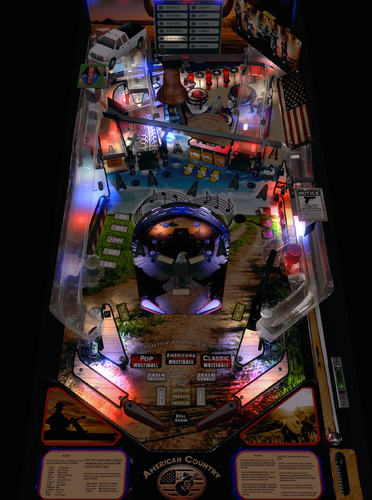
This American Country Pinball table is a re-skin of AC/DC LUCI (Stern 2013) VPinWorkshop version 1.1. Original table by Stern Pinball. I chose the AC/DC table for my Country Music mod for many reasons. I love the gameplay but sometimes I’m not in the mood for hard AC/DC music. Overall, I've tried to relax the game with country music and related sound effects while keeping the intense gameplay dynamics. I replaced the comical “abusive” AC/DC voice prompts with AI generated Johnny Cash voices. The toys map well to country music themes: Hells Bells to Liberty Bell, train to pickup truck, cannon to gun and so on. In the minigame the metaphor is you fight for freedom instead of against the devil. Instead of a Jukebox, there’s a Playlist with selected songs arranged as twelve different tags that span the themes found in Country Music. As a bonus I provide instructions to replace the Playlist with your own favorite songs. FOR PERSONAL USE ONLY AND NOT FOR COMMERCIAL SALE OR DISTRIBUTION. I extend many thanks to all who have worked on the precursors and components built into this table, including: ninuzzu, Sixtoe, hauntfreaks, Fluffhead35, nfuzzy, Apophis, Tomate, Retro27, Schlabber34, javier, DJRobX, dark, tom tower, knorr, rysr, Peter J, RustyCardores, the VPDevTeam, and more! See the included README file for more credits and attributions. Download Includes: American Country.vpx (VPX 10.7+) American Country full dmd.directb2s acd_170.zip - custom ROM acd_170.cRZ - altcolor Serum colorization file American Country Wheel.png - Frontend wheel image file American Country README.pdf - see for more details Custom ROM NOTE, you must use my custom version of acd_170.zip ROM Beta Users: If you installed a preview version of this table that used acd_170hc rom, note that i changed it to acd_170, to avoid conflicts with people’s existing installations of AC/DC. The American Country VPX pinball game requires a custom version of the acd_170h ROM named to acd_170.zip. This is NOT the same as the acd_170 rom you might find elsewhere, I’m just repurposing the file name. The custom ROM includes sound effects, voices, and music clips. Legally you should get the original Stern ROM and modify it yourself, although I’ve provided a pre-made one (for your reference only 😉) in the downloads. See the CUSTOM ROM readme file for details and instructions. Why a Custom ROM? Typically, VPinMAME lets you replace ROM sounds using altsound. I was not able to get this to work with this Stern ROM (and from my research it may not be possible with the current version of VPinMAME), so instead I have written my sounds directly into the ROM file. (If I am wrong and you know a way to use altsound with this ROM please reach out to me and I’ll redo this!). Thus, I’m using the acd_170 ROM name. Enjoy! -


Version Final
5813 downloads
Hi, I'm very happy to release a new colorisation project and this time it was a tough one : Junk Yard ! The project is now Final and I hope you will enjoy the result I really hope you will enjoy it and if so, donations will be appreciated : http://paypal.me/dtatane You can have a look at this video for a preview : -
 In the last few days I have rebuilt my computer and also completely reinstalled VP. Since I have only used a few colored ROMs so far, I thought it was about time to completely install them once as well. And since I have used almost 80 colored ROMs, I also wrote a manual for new or older users how to do this installation. It was written in German and then translated into English. I hope that everything is reasonably understandable. I would be pleased about reactions. Enjoy it. v1.1 Only a few little changes in description and actualized downloads English https://mega.nz/file/YUkxRDBA#YWB5eUcxXv2ExOFq5lm-MgP1apmsJsGQ1CBuHzHtH_0 German https://mega.nz/file/9cFiXDCS#43DWZmN13SnxQIx6PCBDjf9HZhnrKzJBadE3-vJtTp0 Anleitung zur Einrichtung von DMD-Erweiterungen und farbigen ROMs.pdf Instructions for setting up the DMD extensions and colored ROMs.pdf
- 18 comments
-
- 17
-

-
Looking for someone with experience editing ROMs to change some of the displayed DMD text / words. I'm using SWRDS rom want to change few words that show on the DMD. I used a HEX editor to change the ANSI text but that doesnt seem to change what is sent to the DMD screen. thx for the help!
-

Version 1.0.0
608 downloads
Just in time for July 4th! This altaernate ROM for the American Country Pinball table (https://vpuniverse.com/files/file/18381-american-country-vpx/) includes a playlist of patriotic American songs. Some are outright deplorable. To install, copy this file into your VPinMAME/roms/ folder, rename or remove the acd_170.zip rom file, and rename this file as acd_170.zip. (Alternatively use vpmalias.txt and change the table's script). -
Hello everyone i was wondering if pinup menu setup can give the name of the Rom in the Lauch script for visualpinball x ? if we cant, how can i see what rom i am using when i lauch a table with pinup menu or pinup menu setup ? Thanks
-

Version 1.0.0
459 downloads
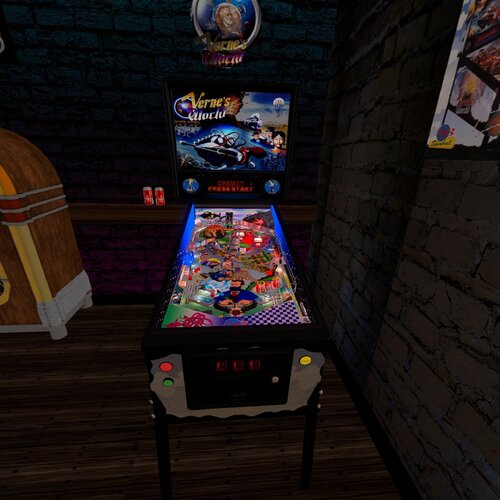
Hi, This file is based from JP Salas Table, and I only added the VR ROOM. Special Thanks to Akiles for his amazing pictures I created a new image for backglass but I take the ilumination from Wildman Backglass -
View File Vernes World (Spinball 1996) JP VR ROOM Ext2k Conversion Hi, This file is based from JP Salas Table, and I only added the VR ROOM. Special Thanks to Akiles for his amazing pictures I created a new image for backglass but I take the ilumination from Wildman Backglass Submitter Ext2k Submitted 02/07/24 Category VPX - Pinball Tables
-
View File American Country VPX This American Country Pinball table is a re-skin of AC/DC LUCI (Stern 2013) VPinWorkshop version 1.1. Original table by Stern Pinball. I chose the AC/DC table for my Country Music mod for many reasons. I love the gameplay but sometimes I’m not in the mood for hard AC/DC music. Overall, I've tried to relax the game with country music and related sound effects while keeping the intense gameplay dynamics. I replaced the comical “abusive” AC/DC voice prompts with AI generated Johnny Cash voices. The toys map well to country music themes: Hells Bells to Liberty Bell, train to pickup truck, cannon to gun and so on. In the minigame the metaphor is you fight for freedom instead of against the devil. Instead of a Jukebox, there’s a Playlist with selected songs arranged as twelve different tags that span the themes found in Country Music. As a bonus I provide instructions to replace the Playlist with your own favorite songs. FOR PERSONAL USE ONLY AND NOT FOR COMMERCIAL SALE OR DISTRIBUTION. I extend many thanks to all who have worked on the precursors and components built into this table, including: ninuzzu, Sixtoe, hauntfreaks, Fluffhead35, nfuzzy, Apophis, Tomate, Retro27, Schlabber34, javier, DJRobX, dark, tom tower, knorr, rysr, Peter J, RustyCardores, the VPDevTeam, and more! See the included README file for more credits and attributions. Download Includes: American Country.vpx (VPX 10.7+) American Country full dmd.directb2s acd_170.zip - custom ROM acd_170.cRZ - altcolor Serum colorization file American Country Wheel.png - Frontend wheel image file American Country README.pdf - see for more details Custom ROM NOTE, you must use my custom version of acd_170.zip ROM Beta Users: If you installed a preview version of this table that used acd_170hc rom, note that i changed it to acd_170, to avoid conflicts with people’s existing installations of AC/DC. The American Country VPX pinball game requires a custom version of the acd_170h ROM named to acd_170.zip. This is NOT the same as the acd_170 rom you might find elsewhere, I’m just repurposing the file name. The custom ROM includes sound effects, voices, and music clips. Legally you should get the original Stern ROM and modify it yourself, although I’ve provided a pre-made one (for your reference only 😉) in the downloads. See the CUSTOM ROM readme file for details and instructions. Why a Custom ROM? Typically, VPinMAME lets you replace ROM sounds using altsound. I was not able to get this to work with this Stern ROM (and from my research it may not be possible with the current version of VPinMAME), so instead I have written my sounds directly into the ROM file. (If I am wrong and you know a way to use altsound with this ROM please reach out to me and I’ll redo this!). Thus, I’m using the acd_170 ROM name. Enjoy! Submitter linojon Submitted 02/06/24 Category VPX - Pinball Tables
-
Version 2.0.0
104 downloads
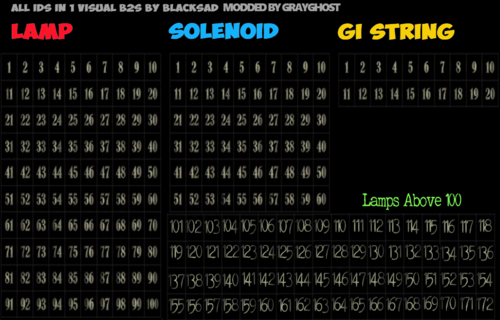
I don't know were I found this Back-Glass,but it has helped me many times in finding the Rom ID of some games. I added many new lamps as well as color coded the lamps. The original Back-Glass came from BlackSad or BlackSand not sure on the spelling, thanks BlackSad for allowing me to mod your Back-Glass. The best way to use it is to rename a copy of the table you are working on to the same as the Back-Glass, then run the pinball in question. you can then write down the numbers of the lamps. And input them into the back-glass or pinball you are working on. -
Version 1.01.1
3043 downloads
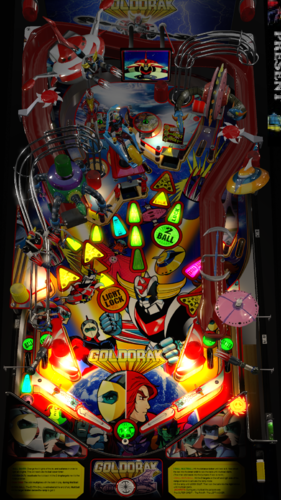
Goldorak Table created by Rom in Future Pinball now ported to VPX 10.4 The table uses UltraDMD, place the Goldorak.UltraDMD folder where the VPX tables are located Thanks: JP for help in Small DMD and the wise advice he gave me Haunfreaks for Backglass Art Stat B2B Dev team for the great work they do with the emulator and the great community. Sorry if I forgot to mention somebody :facepalm: -
View File Goldorak VPX Edition Goldorak Table created by Rom in Future Pinball now ported to VPX 10.4 The table uses UltraDMD, place the Goldorak.UltraDMD folder where the VPX tables are located Thanks: JP for help in Small DMD and the wise advice he gave me Haunfreaks for Backglass Art Stat B2B Dev team for the great work they do with the emulator and the great community. Sorry if I forgot to mention somebody :facepalm: Submitter Javier15 Submitted 09/26/2017 Category Visual Pinball 10 - Tables ROM Name Link to B2S Link to Media Pack Permission to Mod Yes VP Version v10
-
View File AllInOneBackGlassIDFinder I don't know were I found this Back-Glass,but it has helped me many times in finding the Rom ID of some games. I added many new lamps as well as color coded the lamps. The original Back-Glass came from BlackSad or BlackSand not sure on the spelling, thanks BlackSad for allowing me to mod your Back-Glass. The best way to use it is to rename a copy of the table you are working on to the same as the Back-Glass, then run the pinball in question. you can then write down the numbers of the lamps. And input them into the back-glass or pinball you are working on. Submitter grayghost27053 Submitted 10/12/2019 Category B2S Backglasses
-