
63 files
-

Sinbad (Gottlieb 1978) tutorial HD
By Rumbaabaa
This video is an in-depth tutorial for Sinbad (Gottlieb 1978), breaking down the table elements, scoring and key shots. It’s designed to fit a cabinet backglass or widescreen monitor.
The video can be found on YouTube at: www.youtube.com/@RumbaabaaPinVids.
Massive thanks to the incredible creators who make the virtual tables. This is a small thank-you, and hopefully a help to players.
13 downloads
(0 reviews)0 comments
Submitted
-

Old Chicago (Bally 1976) tutorial HD
By Rumbaabaa
This video is an in-depth tutorial for Old Chicago (Bally 1976), breaking down the table elements, scoring and key shots. It’s designed to fit a cabinet backglass or widescreen monitor.
The video can be found on YouTube at: www.youtube.com/@RumbaabaaPinVids.
Massive thanks to the incredible creators who make the virtual tables. This is a small thank-you, and hopefully a help to players.
10 downloads
(0 reviews)0 comments
Submitted
-
Mata Hari (Bally 1978) tutorial HD
By Rumbaabaa
This video is an in-depth tutorial for Mata Hari (Bally 1978), breaking down the table elements, scoring and key shots. It’s designed to fit a cabinet backglass or widescreen monitor.
The video can be found on YouTube at: www.youtube.com/@RumbaabaaPinVids.
Massive thanks to the incredible creators who make the virtual tables. This is a small thank-you, and hopefully a help to players.
12 downloads
(0 reviews)0 comments
Submitted
-
Fathom (Bally 1981) tutorial HD
By Rumbaabaa
This video is an in-depth tutorial for Fathom (Bally 1981), breaking down the table elements, scoring and key shots. It’s designed to fit a cabinet backglass or widescreen monitor.
The video can be found on YouTube at: www.youtube.com/@RumbaabaaPinVids.
Massive thanks to the incredible creators who make the virtual tables. This is a small thank-you, and hopefully a help to players.
15 downloads
(0 reviews)0 comments
Submitted
-

Eight Ball Deluxe tutorial HD.mp4
By Rumbaabaa
This video is an in-depth tutorial for Eight Ball Deluxe (Bally 1981), breaking down the table elements, scoring and key shots. It’s designed to fit a cabinet backglass or widescreen monitor.
The video can be found on YouTube at: www.youtube.com/@RumbaabaaPinVids.
Massive thanks to the incredible creators who make the virtual tables. This is a small thank-you, and hopefully a help to players.
17 downloads
(0 reviews)0 comments
Submitted
-

Atlantis tutorial HD.mp4
By Rumbaabaa
This video is an in-depth tutorial for Atlantis (Gottlieb 1975), breaking down the table elements, scoring and key shots. It’s designed to fit a cabinet backglass or widescreen monitor.
The video can be found on YouTube at: www.youtube.com/@RumbaabaaPinVids.
Massive thanks to the incredible creators who make the virtual tables. This is a small thank-you, and hopefully a help to players.
14 downloads
(0 reviews)0 comments
Submitted
-
Wheel.thumb.png.5ba343fcfb364e4162fcc13cc3b086d1.png)
Curling (Rally 1965) Media Pack
By PEandS1Ws
Front end media pack for the Curling (Rally 1965) table by klodo81 https://www.vpforums.org/index.php?app=downloads&showfile=19946
Pack includes:
Wheel
Logo Wheel
Instruction Card
Flyer
Topper/Full DMD video
Table Audio
67 downloads
-
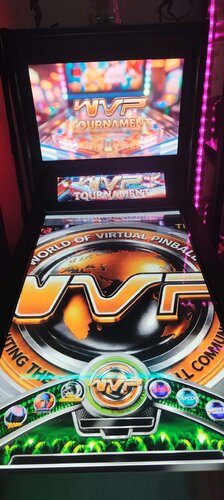
playlist World of Virtual Pinball Tournament medias playlist
By davy33
-hi i made these for me ... so i share it.
-code for sql playlist in popper who select tables for World of Virtal Pinball Tournament (WOVP):
SELECT * FROM Games WHERE visible=1 AND TourneyID like '%weekly%' ORDER BY GameDisplay
@World-of-Virtual-pinball https://worldofvirtualpinball.com/
81 downloads
(0 reviews)0 comments
Submitted
-
Wheel.thumb.png.64c095f730ab7d0a9320a4a453129d02.png)
Blue Max (Chicago Coin 1975) Media Pack
By PEandS1Ws
Front end Media Pack for the Blue Max (Chicago Coin 1975) table by @halen available at https://www.vpforums.org/index.php?app=downloads&showfile=19931
Includes:
Logo Wheel
Wheel
Instruction Card
Flyer
Topper/Full DMD Video
Table Audio
66 downloads
(1 review)0 comments
Updated
-
v1.2.thumb.png.c75f60d4e5b98fd646920b470a7a78ae.png) (3 reviews)
(3 reviews)0 comments
Submitted
-
 (2 reviews)
0 comments
Submitted
-

Cinema/Hollywood (Chicago Coin 1976) Media Pack
By PEandS1Ws
Media Pack for JP Salas' Cinema and Hollywood by Chicago Coin in 1976.
https://www.vpforums.org/index.php?s=f45585e131c83f326676e31d7b63e95c&app=downloads&showfile=19886
https://www.vpforums.org/index.php?s=f45585e131c83f326676e31d7b63e95c&app=downloads&showfile=19887
Includes:
Logo wheel
Wheel
Table Audio
Instruction Card
Flyer
Full DMD or Topper video
67 downloads
- chicago coin
- mediapack
- (and 1 more)
(0 reviews)0 comments
Updated
-
 (2 reviews)
0 comments
Updated
-
Wheel.thumb.png.d55cc08c672f957df4f83e18a12eee80.png) (2 reviews)
(2 reviews)0 comments
Updated
-
v6.20Wheel.thumb.png.868462df7ed3a4b2217cf506a02c02b2.png) (2 reviews)
(2 reviews)0 comments
Updated
-
Wheel.thumb.png.8c6ee8735e6f8588151f7757948df430.png)
-
Wheel.thumb.png.16602695e444ed968b9491089c1de862.png)
Juke Box (Chicago Coin 1976) Media Pack
By PEandS1Ws
Front End Media Pack for the JP Salas table Juke Box (Chicago Coin 1976)
https://www.vpforums.org/index.php?app=downloads&showfile=19872
Includes:
Wheel
Logo
Table Audio
Flyer
Instruction Card
Full DMD or Topper videos (2 versions)
41 downloads
(0 reviews)0 comments
Submitted
-
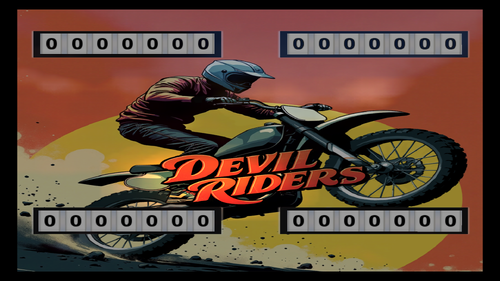
Zaccaria Pinball - Backglass Pictures - July 2026
By iwantpinball
Top Hand Deluxe
Devil Riders EM+
Future World EM+
Mystic Star EM+
Red Show EM+
77 downloads
(0 reviews)0 comments
Submitted
-
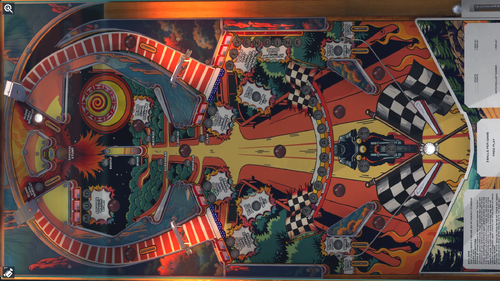
Zaccaria Pinball - Playfield Pictures - July 2026
By iwantpinball
Top Hand Deluxe
Devil Riders EM+
Future World EM+
Mystic Star EM+
Red Show EM+
59 downloads
-
Wheel.thumb.png.e3c20acb7638b1c8b05e5d667de8b02a.png)
Majorettes (Gottlieb 1964) Media Pack
By PEandS1Ws
Front end media for JP Salas' Majorettes (Gottlieb 1964) https://www.vpforums.org/index.php?app=downloads&showfile=19848
Includes:
Wheel
Logo Wheel
Table Audio
Flyer
Instruction Card
Full DMD Video
93 downloads
(2 reviews)0 comments
Submitted
-
.thumb.jpg.afbec040bacb0b32e1b036db5834e084.jpg)
Yale (Inder 1974) Media Pack
By PEandS1Ws
Yale (Inder 1974) Front End Media Pack
Table by JP Salas: https://www.vpforums.org/index.php?app=downloads&showfile=19840
Wheel
Flyer (no actual flyer is avaialble so I took some artistic license and AI to create one)
Instruction Card (converted to English)
Front end Audio
69 downloads
-
.thumb.png.95d0789d9cff9cef5d6be97e2e2c8ba2.png)
Virtual Pinball Media by PEandS1Ws
By PEandS1Ws
Virtual Pinball Media Files
Folders on MEGA:
VPX Attract Backglass-Over 250 for mostly original Visual Pinball X tables. A good substitute for the normal b2s backglass video file in your front end. Launch Audio is included in the folder for each table. Includes special Holiday tables.
Future Pinball Attract Backglass-Actual Backglass image with added animations or video. Add a little flair to your Future Pinball collection.
Future Pinball Playfield Videos-.mp4 video of playfield for use in your front end.
Pinball FX3 Animated Backglass-All 99 2 screen versions with DMD/Speakergrille. 69 3 screen versions with and without FX3 logo. Best used with Pin Up Popper but they can be used with Pinball X/Y. Add these as your backglass file in Media Manager. Info here for keeping FX3 animated backglass playing when you load the table:https://www.nailbuster.com/wikipinup/doku.php?id=managing_games
Full DMD-Over 800 Full DMD .mp4's. Lots of Full DMD's for Originals, EM tables and Future Pinball.
Star Wars Popper Theme-My personal Star Wars Popper theme. I use this on my Star Wars themed cabinet.
Phenom VPX 2 Screen Backglass-Video backglass for 2 screen users of Phenom's Kid tables. These allow your backglass video not to be blocked by your DMD for the table. Resize your DMD into the cutout.
Table Wheel-Table Audio-Wheels and table audio
Loading Videos-I made these for some of the Pup Packs I have in my lineup
NFL Tables (Xenonph)-Full DMD for all tables. Popper playlist media for NFL tables. Instruction Cards for all 32 teams.
Toppers-Topper Videos I have made
Instruction Cards-Over 1300 Instruction Cards for use in your front end. Mostly EM and Original Tables. A big thank you to Inkochnito for his EM database (https://www.pinballrebel.com/pinball/cards/). Be sure to check out other instruction cards made by authors like @cheese3075@buffdriver @Kongedam @eddiemonsta @Frank_Enstein @CarnyPriest and others visit https://vpuniverse.com/files/category/91-instruction-cards/ or https://vpuniverse.com/files/category/9-hyperpin-media-packs/ (Authors - if you see anything in my MEGA belonging to you just drop me a PM and I will remove. I think I got them all out 😊)
See the video from The Way of the Wrench (who inspired me to do this on my cabinet) for a tutorial on how to add to Popper https://youtu.be/RZTwHQNNqDc?si=l4nS24MQaMU9WAKP
Pinball Flyers-Over 1900 pinball flyers for use in your front end. I created hundreds for tables that do not exist in real life and many that there were no pinball flyers available. I will continue to add to this as new tables are released. Add these to your front end just like the instruction cards. There is a sub folder called Popper - No Stretch will has non standard size flyers so they will not be stretched when shown in your Popper front end.
A big thank you to the original table authors, artists, and others who allowed me to use their artwork. Big thank you to vogliadicane, IvanTBA, HiRez00, Cocothetrain, hauntfreaks, godisnothere, scutters, STAT, Rajo Joey, and Nick D for their work.
5796 downloads
- future pinball
- animated backglass
- (and 28 more)
-
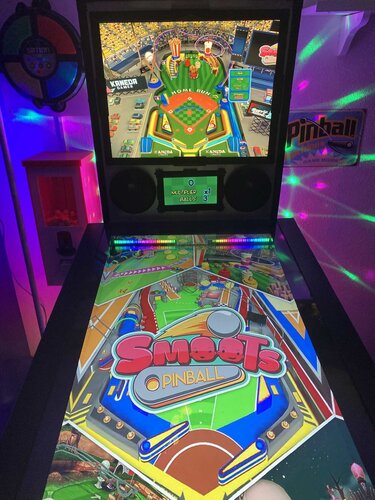
Smoots Pinball (JanduSoft 2023) Media Files & Cabinet Instructions
By SixOfTwelve
Curb your enthusiasm, it's another episode of
Let's Put Things On Cabinets That Were Never Meant To Be On Cabinets!
Oh dear. How do I put this.
Usually, the games featured in this series have something that immediately grabs me. Maybe it’s historical significance, a quirky mechanic, or simply enough charm to make me feel they deserve a place on a virtual pinball cabinet.
This is not one of those times.
Now, before anyone gets the wrong idea, Smoots Pinball was brought to my attention by user @iwantpinball, whose help with scripting and artwork for this release is hugely appreciated. Mentioning the game to me was not some grand declaration that it was a forgotten masterpiece; it was more a case of “hey, this odd little thing exists.” And, in fairness, odd little things are exactly the sort of rabbit hole this series tends to disappear into.
That said... after spending some time with it, I have to admit the game itself really didn’t win me over.
Warning: longish rant incoming.
You’d be forgiven for not knowing what a Smoot is - I certainly didn’t. Think somewhere between Nintendo Miis and Funko Pops, without the charm of either, and you’re not far off the mark. These little customizable guys starred in a whole lineup of multiplayer sports games that were released on just about every platform imaginable and received consistently lukewarm reviews across the board. Not quite shovelware, but never exactly striving for greatness either.
Now: It is a truth universally acknowledged that a gaming franchise in possession of dwindling ideas must be in want of a final cash grab. Which usually takes the form of either a kart racer or a pinball game.
And so we arrive at Smoots Pinball, proudly continuing the series’ long-standing tradition of "Yeah, that'll do."
The game features five tables themed around sports: baseball, summer games, tennis, golf - and of course that most popular sporting event of all: zombies. (And if you've ever seen Olympic-level zombieing, you know what I'm talking about.)
Sadly, Smoots Pinball really doesn't have a lot to recommend it. Yes, tables are colorful, imaginative, and fit their themes nicely. There are neat little bits of animation, like the linesman's head turning to follow the ball on the tennis table. The simple controls and unlockables may make it accessible to children who are too young to get the hang of The Twilight Zone-level complexity. The goals for each table are telegraphed clearly by blinking arrows. The music is fine. But there's a persistent sense that the developers haven't actually spent much time around real pinball tables.
For starters: Four balls. That just feels wrong. Three balls? Sure. Five balls? Also common. But four? It constantly feels like one too many, or one too few.
Then there's the nudging. You don’t get directional nudges, just a single "nudge" button. That alone would be forgivable, but there are no tilt warnings, no sounds, no feedback whatsoever. Take it too far and the flippers just stop. Good luck figuring out where the limit is.
The user interface somehow manages the impressive feat of being both too basic and awkward to use at the same time. More on that further below under "Quitting the game".
And, of course, there’s no cabinet mode. A quick look at the Steam discussions pages suggests the developers' general approach is to release a game and then quietly move on. Given that the Smoots series has also been released on PlayStation 5, PlayStation 4, Xbox Series X/S, Xbox One, and Nintendo Switch, it's pretty clear that the PC version was never a priority, much less the virtual pinball niche market. And while you certainly can play the game in portrait mode, a significant part of the screen will be cut off to the left and right, so I decided to make it playable on the backglass screen.
Sorry, folks. I did what I could to make this presentable on a cabinet, and I did pick up a few useful scripting tricks along the way (especially with resolutions and DMDExt) while I wrestled the game into submission.
But I can’t blame you for giving this one a miss.
Longish rant over. For now.
This time, there are two AutoHotkey scripts included. The main one does the usual: It pushes the game window to the backglass screen, fills playfield and DMD with decorative images, launches the game, auto-skips the intro videos and maps the controls to standard cabinet buttons. Optionally, it offers support for analog nudging and plunger use via JoyToKey, and can also use DMDExt to mirror the score display on your DMD screen.
The other script serves as a selection menu: You can pick the table you want to play, and the previous script launches much like it did before, but will continue to auto-select the desired table and auto-start a one player game. Once again, I am indebted to @iwantpinball for this part.
Also included are a number of goodies:
2 backglass images (4:3 and 16:9) a company logo 2 DMD images (one for the frontend, one as a filler image for the script) 5 instruction cards (depending on which script additions you're using) table audio (recorded directly from the game) a table image for your frontend and a filler image for the script (the same image, rotated differently for each purpose) a wheel image Most of these images were graciously provided by @iwantpinball.
Share and enjoy!
SOME MORE NOTES:
Where to get it:
Smoots Pinball is available on Steam.
How to run it:
The game should run "out of the box" on current Windows systems, but being a Steam game, the Steam client will launch along with it and hang around in the background. If you don't mind that, fine.
However, if you have an offline cabinet and want to run the game without the Steam client popping up:
Download the Goldberg Emulator and extract the steam_api64.dll. Go to the game's SmootsPinball_Data\Plugins\x86_64 folder and rename or back up the original steam_api64.dll and replace it with the one from step 1. Create a simple Notepad text file in the same folder, name it steam_appid.txt and paste the game's Steam ID into it. You can find the ID number in the URL of the game's Steam Store website. Running the game's EXE file should now work without Steam. It should be noted that use of a Steam emulator can be a legally gray area. Check your local jurisdiction and make sure you own a legal copy of the game.
Quitting the game: The hard and the easy way
To leave the game, you usually have to navigate your way back to the main menu (using flippers for left/right and magnasave buttons for up/down). Then navigate to the rightmost menu and push up (magnasave/nudge left) to light up the little ball with the x in it in the top corner. That's the game's close button. And it will still ask you one more time if you really want to leave. For this reason, I mapped an extra key (Buy-In, or 2) as an insta-killswitch that will end the game from any place.
Use of JoyToKey:
As I said above, I’ve included optional support for JoyToKey, though I’m hesitant to recommend it in this case.
First, the game only supports a single “nudge” key, so it doesn’t matter where you hit or shake the cabinet - the result is always the same.
Second, and more bizarrely, the game uses the same key for both nudging and the plunger. That means if your analog plunger has a bit of recoil when released, those extra triggered nudges can occasionally tilt the game before the ball has even left the shooter lane.
AI use disclaimer:
No AI was used in the creation of the artwork for this media pack.
However, the launch selection menu script is mostly the result of me arguing with ChatGPT until it finally cooperated.
Finally, here are two videos showing the game running on my cabinet.
Here is the version without running the selector menu first: You get to pick your own table and select your number of players. I also demonstrate the analog nudge by kneeing my cabinet in the groin. The video also shows the tedious way you have to use the exit menu to quit the game. (Also note that on a 4:3 backglass, the menus will look a bit out of place until you get to the game proper, then everything looks fine.)
And this is the version with the selector menu. It launches the table directly and starts a 1 player game. In this video you also get a better look at the DMD screen.
15 downloads
(0 reviews)0 comments
Submitted
-
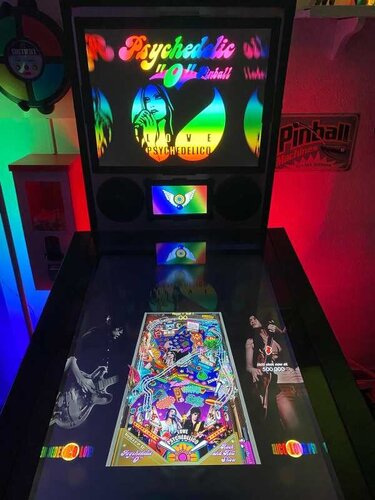
Psychedelic "O" Pinball (LittleWing 2006) Media Files & Cabinet Instructions
By SixOfTwelve
Gotta catch 'em all! Here's another episode of
Let's Put Things On Cabinets That Were Never Meant To Be On Cabinets!
A few weeks back, I put together a series of scripts to bring the pinball games of Japanese developer LittleWing to modern cabinets. As I worked my way through their catalog, one title remained frustratingly out of reach.
A game that was never sold in stores or on their website.
A game that was only ever released briefly in 2006 as a Japan-exclusive bonus disc bundled with a CD by rock duo Love Psychedelico.
A game so obscure it seemed to have vanished completely, nowhere to be found on the entire internet.
Until today.
Psychedelic “O” Pinball, the final missing title, has just surfaced on the Internet Archive, and that means it’s time for one last LittleWing media pack.
Psychedelic "O" Pinball is essentially a reskin and sound mod of LittleWing's Jinni Zeala from 2002. Music and callouts now feature Love Psychedelico's band members, and a handful of graphics have been updated, but otherwise it's the exact same game, genie theme and all. Everything I wrote about Jinni Zeala still applies here: it’s a lot of fun, but the smaller playfield does demand quick reflexes.
As before, the included AutoHotkey script handles the heavy lifting. It rotates the playfield to portrait mode, lowers the resolution to 1024×1080, fills the backglass and DMD screens with decorative images, launches the game, and maps the controls to standard cabinet buttons. Optionally, it offers support for analog nudging and plunger use via JoyToKey. I also managed to upgrade the script a little and hopefully make it more convenient to use.
And, of course, the usual bunch of media:
2 backglass images (4:3 and 16:9) a company logo (taken from Crystal Caliburn's official PDF guide) 2 DMD images (one for the frontend, one as a filler image for the script) 3 flyer images (CD front and back covers, plus the disc itself, courtesy of Internet Archive) 9 instruction cards (from the Jinni Zeala player's guide on LittleWing's website) 2 choices of table audio (recorded directly from the game) a table image for your frontend 2 wheel images to choose from
As always, the script will need a bit of tweaking to fit your setup, but don’t worry - it’s heavily annotated. Give it a proper read-through before heading to the comments for help.
I’m happy to assist where I can, but do try to meet me halfway first 😉
Share and enjoy!
SOME MORE NOTES:
Where to get it:
As mentioned, search the Internet Archive. Whether you find it or not is none of my Beeswax 😉
How to run it:
The installer is in Japanese. Just keep clicking the lower-right button, and it should guide you through.
On first launch, the game will ask for a code, which is included in the download.
Psychedelic “O” Pinball can run pretty choppy on modern systems. It uses an old DirectX version and doesn’t play nicely with portrait mode out of the box, often cutting off parts of the image.
To fix this, grab DDrawCompat from GitHub:
Download the latest release (expand “Assets” and grab the ZIP) Extract ddraw.dll into your game folder Also drop in the DDrawCompatOverlay-Psyo.ini file included in this media pack That .ini file tells DDrawCompat which resolution to use. The menu system is a bit unintuitive:
Press Esc to start (mapped to your Start button) Navigate with the flipper buttons Use Launch (Enter) to select. If the controls don’t work as expected, go to Options → Controls → Reset to Default in-game.
Highscore workaround:
Unfortunately, the high score entry uses keyboard typing instead of the usual “flipper letter select” system from earlier LittleWing titles.
To work around this, the script maps three letters plus Enter to the Coin button (5). By default, it enters N - E - W. Feel free to change that to whatever initials you prefer in the script.
AI use disclaimer:
No AI was used in the creation of the artwork for this release.
Weird final sleep-deprived thought:
I’ve typed the title Psychedelic “O” Pinball so many times now that my brain has started to read it as the name of a very eccentric Irish private detective.
Psychedelic O'Pinball, at yer service - to be sure, faith an' begorrah.
13 downloads
(0 reviews)0 comments
Submitted
-
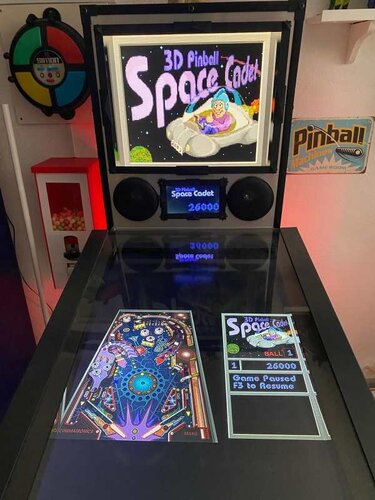
Space Cadet (Maxis 1995) Media Files & Cabinet Instructions
By SixOfTwelve
Houston,
Let's Put Things On Cabinets That Were Never Meant To Be On Cabinets!
This is the big one, kids. The OG. The granddaddy of them all. It's 3D Pinball: Space Cadet, released by Microsoft in 1995 as part of their Plus! package and bundled with every Windows operating system afterwards, up to and including Windows XP in 2001.
To call this game influential would be an understatement. It was in everyone's home, and everybody and their grandmother played it. For a lot of people, this was their first taste of virtual pinball. And the best part? It still runs on modern systems, so of course I had to give this one the special full cabinet treatment.
Yeah, but… why?
We’ve got an excellent VPX recreation by the venerable JP Salas. It got a fantastic overhaul in 2025 with @funkatron101’s Galaxy Edition. There are multiple high-quality mods out there. So why go back to the clunky old Windows version and put it on a cabinet?
I can only answer that for myself: Because it’s there. Because I wanted to see if I could - which is kind of the entire point of this series.
And because when someone steps up to the cab and says, “Hey… this reminds me of that game I used to play as a kid,” I want to be able to smile, say: “You mean this one?”, fire it up, and watch the nostalgia hit.
And honestly? It deserves to be there. Out of respect.
So, today's included AutoHotKey script makes Space Cadet run on your cab: It rotates the playfield to portrait mode, lowers the resolution to 600x800, places filler images on the backglass and DMD screens, launches the game, covers up some of the Windows-specific interfaces and maps your cabinet buttons to the appropriate keys. Optionally, it offers support for analog nudge and plunger via JoyToKey, and DMDExt support for showing the score on your DMD screen.
Brace yourselves for a space freighter full of goodies:
4 backglass images (two in 4:3, two in 16:9, featuring both original and AI reimagined art) 3 company logos (you pick: Maxis, Cinematronics or Microsoft) 2 DMD images (one for the frontend, one as a filler image for the script) 3 flyer images (shots of the Microsoft Plus! packaging, courtesy of Archive.org) a whopping 71 instruction cards (text taken from the offical rules document, fully illustrated in loving detail by myself, plus a few extra pages from an online strategy guide - this may well be the most comprehensive guide to the game out there, and it should be usable for the VPX version as well!) launch audio (the classic wormhole sound effect) a promo video (a short vintage Microsoft Plus! TV ad) table audio (recorded from the game) 2 table images (one for your frontent, one to hide the game's Windows UI during startup) a wheel image (courtesy of the Launchbox Games Database)
As always, the script will need a bit of tweaking to fit your setup, but don’t worry - it’s heavily annotated. Give it a proper read-through before heading to the comments for help.
I’m happy to assist where I can, but do try to meet me halfway first 😉
Share and enjoy!
SOME MORE NOTES:
Where to get it:
Space Cadet is no longer bundled with Windows, but it’s still easy to find online, either as part of old Windows ISOs or as a standalone download. Archive.org is probably your best starting point.
How to run it:
Amazingly, the game still runs without a hitch on modern Windows systems - or at least the later versions do. Some original Windows 95 builds floating around may not cooperate, so make sure you grab a working version and test it before wiring it up to the script.
You may need to tweak the timing of a couple of Sleep commands in the script, depending on how quickly the game launches on your system:
The first Sleep covers the time until the game’s “3D Pinball” splash screen disappears (after which the script’s loading overlay takes over) The second Sleep waits for the game to fully load before sending F4 to switch to fullscreen and remove the overlay.
A word about controls:
The Coin button acts as Pause (F3). The menu bar is hidden by the script. The Start button pulls double duty: It restarts the game (F2) and acts as Enter for high score entry. The script assumes you're using the game's default controls. With a US keyboard layout, everything should work out of the box. On other layouts, the default / key for the right flipper may cause issues. If so, remap it in-game and adjust the script accordingly. (Details are in the script comments.)
What I'm not completely happy with:
The game always launches in windowed mode and needs to be switched to fullscreen (via F4) once it’s loaded. The script handles this and hides the transition behind an overlay image.
That said, the game window will sometimes briefly pop in front of the overlay before going fullscreen. Not every time though, and I haven’t figured out why. If you crack that one, let me know.
What's not working (yet):
Right now, the setup is locked to single-player.
In theory, enabling more players should be as simple as having the script send: Alt+O → P → [1–4]
Feel free to experiment, and definitely let me know if you get it working 🙂
AI use disclaimer:
The alternate backglass was created with ChatGPT, using the original screenshot as a starting point.
Fun fact: AI is terrible at left and right hands. The Cadet’s thumbs-up hand kept switching sides like it was in a mirror universe. After about 30 iterations and corrections, this was the best result I could get. Hope you like it!
Would you like to know more?™
Absolute madman Timothy Peterson has created a YouTube playlist in which he shows how to beat every single mission the game has to offer. These videos have been invaluable to me in putting together the Instruction Cards, since the official rules document that came with the game does contain a handful of errors and unclear definitions, which have been corrected for this version.
45 downloads

1.thumb.jpg.c8fafe89b29c487b06ad753be0b95086.jpg)
1.thumb.jpg.035712ccfdacc3861449f56c361c3be9.jpg)
.thumb.png.035672ef7931d59c3dc684ea83f1bceb.png)
2.3.1Illuminated.thumb.png.d59f08a367c808304e9f057f9e71f551.png)
-Copy.thumb.png.44df5fa253474c485d923b18bba37e19.png)



.thumb.png.7a5e9e3a026f7594c6d1ac9df2f19e4e.png)
.thumb.png.55055e7ce42dcf65d19ff826232451fe.png)
.thumb.png.0ea0281371aeaa72c97a57d6d23a4701.png)
.thumb.png.00bd2e05dafeeef87d69f2132f822edc.png)



Illuminated.thumb.png.722218a7ea054173100e9e95f1d86c14.png)
.thumb.png.9ebfe4ee9eb013ea3f5eb3bebd61bfd0.png)
.thumb.png.62210070a35b7c17a997c55788736173.png)
.thumb.png.b1ad38a85a0ba72a2c9a9ae5e40698a6.png)
(Small).thumb.png.8170811aa2ded7e68e978bc63f61e0ae.png)
(Custom).thumb.png.eb65cb147fa0bbb84d125a47104f6979.png)
directb2s.thumb.png.e7367b7c1a8b45075f9e181ed5742f09.png)







FullDMD.thumb.jpg.678d0fe2a8ae378137b55880a3ae1ec1.jpg)
PuPPackFullDMD.thumb.jpg.12c2df074d850ee2c82a0ccf45727a8d.jpg)

FullDMD.thumb.jpg.588c02c67cf89d1ac933b75c0db19091.jpg)
.thumb.jpg.f65e49fdf02cf1c8cf95e84ff9b00757.jpg)

.thumb.png.b9a954bb085ec8aaef841696bd65e9d6.png)

.thumb.png.6bffcbe57b0280f277d7fb7261f3a89b.png)

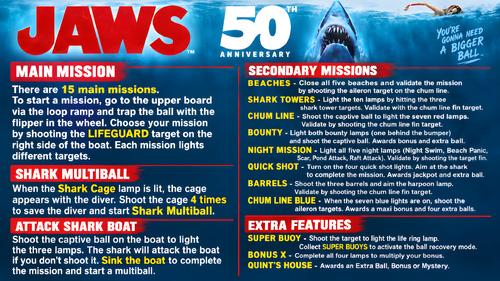
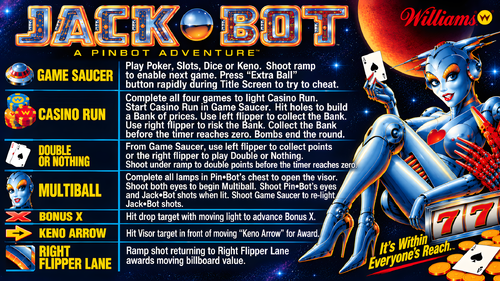




.thumb.jpg.2abec9cf73e96059a965e13ddce3e860.jpg)
.thumb.png.e798cf11dd74925690db372107cead76.png)


