

.thumb.jpg.7507b853850b9b35458e3482b3992b8c.jpg)
.thumb.jpg.119deec2fd0c702e05e9668c566951e0.jpg)
About This File
Gotta catch 'em all! Here's another episode of
Let's Put Things On Cabinets That Were Never Meant To Be On Cabinets!
A few weeks back, I put together a series of scripts to bring the pinball games of Japanese developer LittleWing to modern cabinets. As I worked my way through their catalog, one title remained frustratingly out of reach.
A game that was never sold in stores or on their website.
A game that was only ever released briefly in 2006 as a Japan-exclusive bonus disc bundled with a CD by rock duo Love Psychedelico.
A game so obscure it seemed to have vanished completely, nowhere to be found on the entire internet.
Until today.
Psychedelic “O” Pinball, the final missing title, has just surfaced on the Internet Archive, and that means it’s time for one last LittleWing media pack.
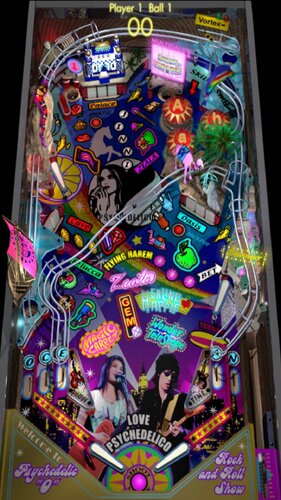
Psychedelic "O" Pinball is essentially a reskin and sound mod of LittleWing's Jinni Zeala from 2002. Music and callouts now feature Love Psychedelico's band members, and a handful of graphics have been updated, but otherwise it's the exact same game, genie theme and all. Everything I wrote about Jinni Zeala still applies here: it’s a lot of fun, but the smaller playfield does demand quick reflexes.
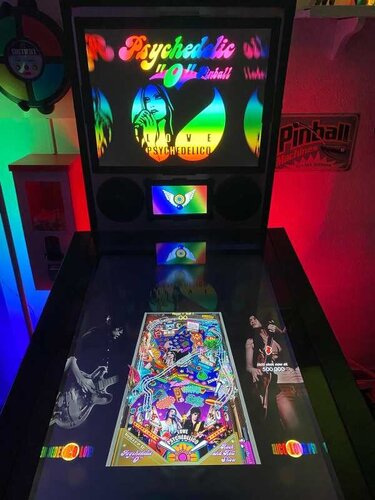
As before, the included AutoHotkey script handles the heavy lifting. It rotates the playfield to portrait mode, lowers the resolution to 1024×1080, fills the backglass and DMD screens with decorative images, launches the game, and maps the controls to standard cabinet buttons. Optionally, it offers support for analog nudging and plunger use via JoyToKey. I also managed to upgrade the script a little and hopefully make it more convenient to use.
And, of course, the usual bunch of media:
- 2 backglass images (4:3 and 16:9)
- a company logo (taken from Crystal Caliburn's official PDF guide)
- 2 DMD images (one for the frontend, one as a filler image for the script)
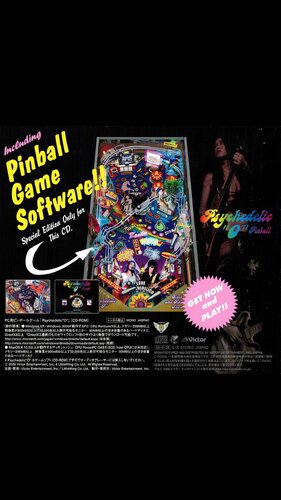
- 3 flyer images (CD front and back covers, plus the disc itself, courtesy of Internet Archive)
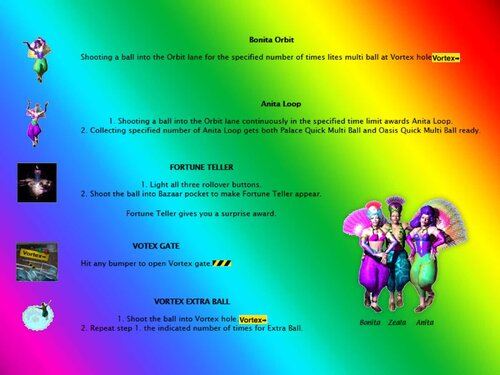
- 9 instruction cards (from the Jinni Zeala player's guide on LittleWing's website)
- 2 choices of table audio (recorded directly from the game)
- a table image for your frontend
- 2 wheel images to choose from
As always, the script will need a bit of tweaking to fit your setup, but don’t worry - it’s heavily annotated. Give it a proper read-through before heading to the comments for help.
I’m happy to assist where I can, but do try to meet me halfway first 😉
Share and enjoy!
SOME MORE NOTES:
Where to get it:
As mentioned, search the Internet Archive. Whether you find it or not is none of my Beeswax 😉
How to run it:
The installer is in Japanese. Just keep clicking the lower-right button, and it should guide you through.
On first launch, the game will ask for a code, which is included in the download.
Psychedelic “O” Pinball can run pretty choppy on modern systems. It uses an old DirectX version and doesn’t play nicely with portrait mode out of the box, often cutting off parts of the image.
To fix this, grab DDrawCompat from GitHub:
- Download the latest release (expand “Assets” and grab the ZIP)
- Extract ddraw.dll into your game folder
- Also drop in the DDrawCompatOverlay-Psyo.ini file included in this media pack
- That .ini file tells DDrawCompat which resolution to use.
The menu system is a bit unintuitive:
- Press Esc to start (mapped to your Start button)
- Navigate with the flipper buttons
- Use Launch (Enter) to select.
If the controls don’t work as expected, go to Options → Controls → Reset to Default in-game.
Highscore workaround:
Unfortunately, the high score entry uses keyboard typing instead of the usual “flipper letter select” system from earlier LittleWing titles.
To work around this, the script maps three letters plus Enter to the Coin button (5). By default, it enters N - E - W. Feel free to change that to whatever initials you prefer in the script.
AI use disclaimer:
No AI was used in the creation of the artwork for this release.
Weird final sleep-deprived thought:
I’ve typed the title Psychedelic “O” Pinball so many times now that my brain has started to read it as the name of a very eccentric Irish private detective.
Psychedelic O'Pinball, at yer service - to be sure, faith an' begorrah.

User Feedback
Create an account or sign in to leave a review
You need to be a member in order to leave a review
Create an account
Sign up for a new account in our community. It's easy!
Register a new accountSign in
Already have an account? Sign in here.
Sign In NowThere are no reviews to display.