Visual Pinball 10 - Install & Support Files
4 files
-

Visual Pinball X Official Releases
By Dazz
Visual Pinball
An open source pinball table editor and simulator.
This project was started by Randy Davis, open sourced in 2010 and continued by the Visual Pinball development team. This is the official repository.
Features
Simulates pinball table physics and renders the table with DirectX Simple editor to (re-)create any kind of pinball table Table logic (and game rules) can be controlled via Visual Basic Script Over 1000 real/unique pinball machines, plus over 400 original creations were rebuilt/designed using the Visual Pinball X editor (over 2500 if one counts all released tables, incl. MODs and different variants), and even more when including its predecessor versions (Visual Pinball 9.X) Emulation of real pinball machines via Visual PinMAME is possible via Visual Basic Script Supports configurable camera views (for example for correct display in virtual cabinets) Support for Stereo3D output and Tablet/Touch input
This download will take you to the official repository on Github for the Visual Pinball project.
21782 downloads
-

vpx VPX Achievement Watcher
By Solters
🎯 VPX Achievement Watcher
A companion app for Visual Pinball X (VPX) that adds modern achievements, live overlays, and challenges by reading VPinMAME NVRAM data.
━━━━━━━━━━━━━━━━━━━━━━━━━━━━━━
Features
━━━━━━━━━━━━━━━━━━━━━━━━━━━━━━
🏠 Dashboard
Your control center at a glance:
• System Status: Is the watcher running? Is VPX active?
• Session Summary: Two cards side by side:
◦ Last Run: Last table played, score, achievements unlocked, and date
◦ Run Status: Live status indicators (green/yellow/red) for Table, Session, Cloud, and Leaderboard connection
• 📬 Notifications: Clickable feed with alerts for leaderboard ranks, beaten achievement records, missing VPS-IDs, and available updates. Unread count shown on tab badge. Clear All button to dismiss
• 📋 Setup Status: Checklist that verifies your setup is complete — Player Name set, Cloud Sync enabled, VPS-IDs assigned, Maps loaded, Overlays configured, and Widget Controls bound. Red/yellow/green indicators with direct links to fix missing items. Shows "✅ All set!" when everything passes
• Quick Actions: Restart Engine, Minimize to Tray, Quit
━━━━━━━━━━━━━━━━━━━━━━━━━━━━━━
👤 Player
Your personal player profile and summary:
• Player Level: Current level and XP progress bar based on unlocked achievements
• Prestige System: Reach Prestige 1–5 by unlocking 2000 achievements per star (☆ → ★)
• Level Table: All levels from Rookie to VPX Elite with their achievement thresholds
• 🏅 Badges: 37 collectible badges earned through gameplay milestones — unlock achievements, complete challenges, reach levels, accumulate playtime, and more
• Display Badge: Choose which badge icon appears next to your name on cloud leaderboards
━━━━━━━━━━━━━━━━━━━━━━━━━━━━━━
📈 Progress
Track your achievement progress per table:
• Select Table: Dropdown with all played tables (ROM-based and custom/non-ROM tables)
• Global Achievements: Cross-table achievements like total playtime, tables played, manufacturer milestones — with progress bars (e.g. 12/25)
• Per-Table Achievements: Each achievement listed with status (✅ unlocked / 🔒 locked)
• ℹ️ Info Links: Click the info icon on any achievement to see its unlock condition, VPS table info, and unlock timestamp
• Rarity Tiers: Common, Uncommon, Rare, Epic, Legendary — color-coded based on how many cloud players have unlocked each one. Rarity legend shown below progress bar
• Custom Table Progress: AWEditor-created achievements are tracked separately with their own progress view
━━━━━━━━━━━━━━━━━━━━━━━━━━━━━━
📊 Records & Stats
Records every round played, session duration, and scores in the background:
• 🌍 Global NVRAM Dumps: Full raw NVRAM data overview per table — all fields and values in a multi-column table
• 👤 Player Session Deltas: What changed during your session — actions, score differences, playtime, and field-by-field changes
━━━━━━━━━━━━━━━━━━━━━━━━━━━━━━
☁️ Cloud
Global cloud leaderboard for achievement progress:
• Category: Achievement Progress leaderboard per table
• Search: Enter a table or ROM name with autocomplete (resolves table titles to ROM keys)
• Fetch: Load the leaderboard — ranked list with progress bars, medals (🏆🥈🥉), player badges, date, and ℹ️ VPS info links
• VPS Info Dialog: Click ℹ️ on any leaderboard entry to see linked VPS table details and achievement breakdown
💡 Tip: You can find your personal 4-digit player ID in the "System" tab. Make a note of it! If you ever install Watcher on a new PC, you can use it to restore your cloud progress.
━━━━━━━━━━━━━━━━━━━━━━━━━━━━━━
⚔️ Score Duels
Challenge other players to direct score duels on the same table!
The Score Duels tab is organized into 4 sub-tabs:
🎯 My Duels
• 📬 Incoming Invitations: Inbox for duel challenges from other players — accept or decline with one click
• 🔕 Do Not Disturb: Toggle to stop receiving new duel invitations
• ⚔️ Start New Duel: Pick an opponent and table, then send a challenge
• 🔀 Auto-Match: Join the matchmaking queue — automatically matched with a player who shares at least one table (by VPS-ID). Search times out after 5 minutes
• 🟢 Active Duels: Overview of all running duels with status, time remaining, and cancel option
• 📜 Duel History: Past duel results with opponent, table, scores, and date
🌍 Global Feed
Live feed of all active and recently completed duels across all players.
🏆 Leaderboard
Top 50 players ranked by duel wins. Shows Rank, Player Name, Wins, Losses, and Win Rate (%). Players need at least 3 completed duels to qualify. Your own row is highlighted with a ★. Medals for top 3: 🥇🥈🥉.
🏆 Tournament
4-player single-elimination knockout tournaments:
• Join Queue: Enter the tournament matchmaking queue (30 min timeout)
• Auto-Matching: When 4 players sharing at least one table are queued, a tournament is automatically created
• Bracket: 2 Semifinals → 1 Final, all played on the same randomly selected table
• 2 hours per match — each duel has a 2-hour time limit
• Notifications: In-app alerts for tournament start, elimination, final reached, and final result
• History: Completed tournaments are saved locally with your placement (🏆 Winner, #2, #3-4)
💬 Tournament Chat: Live chat for tournament participants — real-time messages
━━━━━━━━━━━━━━━━━━━━━━━━━━━━━━
🎨 Appearance
Customize the look and feel of the entire application, organized into 5 sub-tabs:
🖼 Overlay
• Global Styling: Font family, base font size, and overlay scale slider (30–300%)
• Widget Placement & Orientation: Place and save screen positions for each overlay independently. Each widget has Portrait Mode (90°), Rotate CCW, Place, and Test buttons:
◦ Main Stats Overlay (with auto-close option)
◦ Achievement Toasts
◦ System Notifications
◦ Status Overlay (cloud/leaderboard feedback, can be disabled)
◦ ⚔️ Duel Notifications
• 🔄 Switch All → Portrait/Landscape: Toggle all overlay orientations at once
• 📄 Overlay Pages: Enable/disable individual overlay pages — Page 1 (Highlights & Score) is always active; Page 2 (Achievement Progress), Page 3 (Cloud Leaderboard), Page 4 (VPC Leaderboard), Page 5 (Score Duels) can be toggled
• Custom Background: Place an overlay_bg.jpg/png next to the executable for a custom overlay background
🎨 Theme
• Active Theme: Select and apply a color theme from the dropdown
• Color Preview: Live preview of Primary, Accent, Border, and BG colors
• Overlay Preview / Test: Test Main Stats Overlay and Achievement Toast with the current theme
• Available Themes: Full list of all themes with icon, name, and description
🔊 Sound
• Enable/Disable: Master toggle for sound effects
• Volume: Slider (0–100%)
• Sound Pack: Choose from multiple packs (Zaptron, Vex Machina, Retro, etc.)
• Events Table: Per-event enable/disable toggle and preview button for each sound event
✨ Effects
• GPU-accelerated visual effects with automatic CPU fallback
🐾 Mascots
• 🏆 Trophie (GUI Mascot): Lives in the bottom-left corner of the main window
• 🎱 Steely (Desktop Overlay Mascot): A metallic chrome pinball that lives on your desktop as an always-on-top overlay. Reacts to game events
• Skins: Multiple visual skins for both mascots
• Personality: Unique speech bubbles, reactions, memory, and a "bickering" system between them
• Portrait Mode: Steely supports 90° rotation for cabinet screens
━━━━━━━━━━━━━━━━━━━━━━━━━━━━━━
📺 VPC Weekly Challenge
View Discord's Weekly Challenge directly on the overlay (view only).
━━━━━━━━━━━━━━━━━━━━━━━━━━━━━━
🕹️ Controls
Configure hotkeys and input bindings for the overlay and challenges:
• Supports keyboard keys and joystick buttons
• Bindings for overlay toggle, duel accept (left), duel decline (right), and system tray show/hide
• 💡 Flipper buttons or MagnaSave buttons work best
━━━━━━━━━━━━━━━━━━━━━━━━━━━━━━
🗺️ Available Maps
Browse all supported tables and their NVRAM map status:
• ✅ NVRAM Map = achievement tracking supported
• ❌ No NVRAM Map = not supported yet
• 🟠 Local = .vpx file found in your tables folder
• Filter by local tables with NVRAM maps, search by name or ROM
• Assign VPS-IDs to link tables to the Virtual Pinball Spreadsheet database
• View table author extracted from .vpx file metadata
━━━━━━━━━━━━━━━━━━━━━━━━━━━━━━
🎯 AWEditor — Custom Achievement Editor
Create custom achievements for tables that don't use VPinMAME ROMs (Non-ROM / Original tables):
• 📋 Tables: Scan your tables directory for tables without NVRAM maps
• ✏️ Codes: Analyze table scripts, detect events, and create custom achievement rules
• Export: Generates VBScript + JSON files — the table writes trigger files that the watcher detects instantly
• Full Script Export: Zero manual work — AWEditor inserts all FireAchievement calls automatically
━━━━━━━━━━━━━━━━━━━━━━━━━━━━━━
⚙️ System
The System tab has 2 sub-tabs:
⚙️ General
• 👤 Player Profile: Set your display name and 4-character player ID. Identity fields are locked while Cloud Sync is active
• ☁️ Cloud Sync & Backup:
Enable/disable Cloud Sync (validates player name and ID against cloud for uniqueness). Auto-Backup toggle, manual Backup to Cloud, and Restore from Cloud (restores achievements, VPS mapping, and CAT progress)
• 🐛 Feedback & Bug Reports: Report bugs or suggestions directly from the app
• 🔑 Admin Login: Log in as chat moderator for Tournament Chat moderation (admin only)
🔧 Maintenance
• 📁 Directory Setup: Configure BASE, NVRAM, and Tables directories
• Repair Data Folders: Fix broken or missing data directories
• Force Cache NVRAM Maps: Re-download and cache all NVRAM map files
• 🔄 Update Databases: Force re-download of index.json, romnames.json, vpsdb.json, and VPXTool
• ⬆️ Watcher Update: Check GitHub for newer releases — downloads and installs the Setup automatically with release notes preview
━━━━━━━━━━━━━━━━━━━━━━━━━━━━━━
🛡️ Fair Play & Anti-Cheat
To keep the leaderboards fair, local saves and scores are protected by hash signatures.
Matches and tournaments use a feature called NVRAM tracking. Restarting from Ball 1, pressing F3, or restarting the VPX Player will result in disqualification.
━━━━━━━━━━━━━━━━━━━━━━━━━━━━━━
Data Sources
The Achievement Watcher uses the following open-source projects and data sources:
Thanks to this people:
• NVRAM Maps by tomlogic — https://github.com/tomlogic/pinmame-nvram-maps
• vpxtool by francisdb — https://github.com/francisdb/vpxtool
• VPC Data by emb417 — https://github.com/emb417/vpc-data
• VPS Database by VPS Team — https://github.com/VirtualPinballSpreadsheet/vps-db
• Visual Pinball & PinMAME — https://github.com/vpinball
1033 downloads
-

VPinballX.starter
By jarr3
Small tool to start the right VPinballX version depending on the selected table file.
To all who ask:
Should I really try out the new VPX release with all the new tables coming for 10.8? How can I use different versions of VPinballX for different tables?
This is my answer to those questions! The tool VPinballX.starter can be put as replacement for VPinballX.exe in the default folder....
It will start the right VPinballX version depending on the table file. It is meant to be a "set and forget" tool.
Please do not forget to like and review..., what is important for content creators (tables, backglasses, DMD colorization?) is as important for us writing the tool-set!
It uses a small ini file similar to this one:
;A Configuration file for VPinballX.starter [VPinballX.starter] ;DefaultVersion when started without any table param. DefaultVersion=10.80 LogVersions=1 [TableNameExceptions] ;If left string is found in the Table filename we will use the right string to add to the version number search CASE sensitive... Table Name=x32 Another Table=GL x32=x32 GL=GL X74=.RevertX7 old table=.RevertX7 [VPinballX] ;Default value used when not found in the table below. Default=VPinballX64.8-1786.exe Default.RevertX7=VPinballX.7.4.exe ;File versions converted to the right VPinballXxx.exe 10.72=VPinballX72.exe 10.80=VPinballX64.8-1786.exe 10.80GL=VPinballX_GL64.exe 10.80x32=VPinballX.8-1786.exe
It works like this:
VPinballX.starter is started with exactly the same parameters as VPinballX.exe. First it loads the table file and finds out what version it was saved with (using the same technique as VPX). It takes this information and looks in the ini file above to find out which version of VPinballX.xxx.exe YOU want to run.
It will then run the VPinballXxx.exe that you have configured with exactly the same parameters that were given to the starter. If you simply double-click the VPinballX.starter without a table, the default entry under [VPinballX.starter] will be used or if it cannot find a version stored in the table, it will use the default in [VPinballX].
In this way, the correct table version or the version you have selected will be used. Each time you start VPinballX.starter, a log entry will be added to VPinballX.starter.log stating which version was used. This can be disabled by setting LogVersions=0.
Table Name Exceptions
A new feature called Table Name Exceptions allows to configure exceptions to the automated finding the right executable. The Exceptions are either that a string is added to the table filename hinting that this table should use the x32 version instead, or can be parts of a table filename pointing to the same string. This string will be added when searched for the executable.
So either you name the table with an exception string like (x32, x64, GL) or you enter parts of the table names into the ini, where you know they only want certain versions (like x32, x64 or even GL)
What you decide here is all up to you!
E.g starting a table needing 10.80 and having an exception "GL" will look for 10.80GL in the [VPinballX] section in the ini. This is made using pure string handling, there is NO logic behind the strings in the ini file. You can define your own standard here.
How to set it up
Copy VPinballX.starter.exe next to your VPinballX.exe files. Double click on VPinballX.starter.exe and follow the instructions. It will create a template VPinballX.starter.ini that you will need to edit to your liking. The values 10.72, 10.80 (10.74 has no specific version saved) and so on all come from the pinball tables saved in different versions by VPinballX.exe.
Once you are happy with VPinballX.starter.exe, you can rename it to VPinballX.exe; it will take care of starting the right version independent if you are using Windows Explorer, PinballX, PinballY or Pinup Popper...
Have fun!
1920 downloads
-
vpxOnTop
By b4ast1
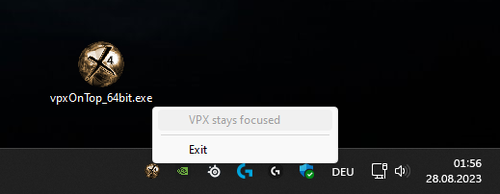
My small trayicon tool that gives "Visual Pinball Player" the focus.
Visual Pinball Player ist the player-instance window of VPX.
This useful tool ensures that the VPX player instance maintains focus. It checks every second to see if the focus is on the player and resets it to the window if necessary. This ensures that keyboard inputs always reach VPX. This is especially helpful when looking through the VR headset and can't see what the windows on the desktop are doing.
32bit & 64bit version included (i know, this makes no sense - but before someone is asking for 64bit version...)
180 downloads
-
New & Updated Visual Pinball
-
New & Updated Future Pinball
-
New & Updated Backglasses
-
New & Updated DMD Colorizations
-
New & Updated Virtual Reality Enabled Tables
-
VPU Remix & Mods
-
New & Updated Popper Media
-
Updated Files
-
Download Statistics
.thumb.png.557350d1c3d2c33f9858e4f7b4ca12ae.png)
.thumb.png.559ffeefc18faf238c9a03f881e135dd.png)
.thumb.png.cec808e8b058fde901e411dbcf2c7984.png)








BG.thumb.jpg.983e5c5881d8fac9cc37344b25ab45a8.jpg)















.thumb.png.9e2768ccc91095a59606f575abaab0fa.png)
JGBMod.thumb.jpg.31636f935b2d3cd9bb24d4b84a750c80.jpg)

FullDMD.thumb.png.5354ac01dd7326f018cb4b299e8b57b4.png)
PuPPackFullDMD.thumb.jpg.4156b2f0c6328fc077d11c85d1c493db.jpg)

FullDMD.thumb.jpg.74cdf5c1eca92292ce46ff2ea9b286b5.jpg)