
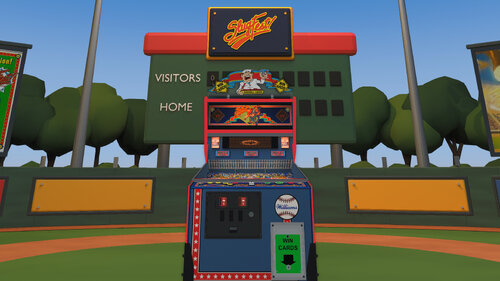
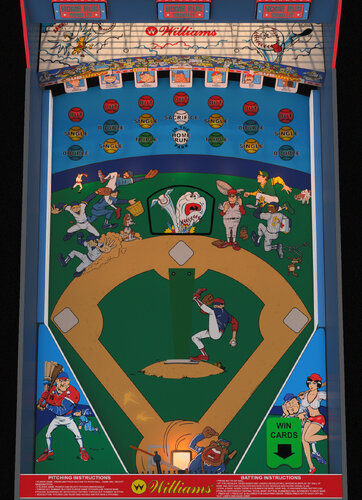
Welcome to SlugFest, a pitch-and-bat baseball game, play ball!
Lore:
SlugFest was Williams’ final pitch-and-bat baseball game, with only 1,559 machines produced. SlugFest introduced Williams’ first dot-matrix display (DMD). An animated heckler taunted players, who silenced him by launching a ball into the upper balcony. Cabinets could also dispense real baseball cards as prizes.
How to play:
- SlugFest plays like baseball.
- Press a pitch button to throw a pitch. Then, press the bat button as the pitch arrives to swing and hit the ball toward scoring targets, while avoiding targets marked OUT.
- Target hits move your runners around the bases, and each runner who reaches home scores one run.
- Your goal is to score as many runs as possible.
Requirements and Setup Steps:
- VPX - 10.8
- VPinMAME - 3.6 or newer
- ROM: sf_l1
- Card_images: Put the baseball card folder in the same folder as your table. (e.g. Tables folder).
-
Included are 2 camera _cabinet.ini and _desktop.ini view files.
- To use either one, rename the ini file to match the file name of the VPX table.
- In other words, remove _desktop or _cabinet from the ini file.
Features:
- Updated physics; animated bat, home-run ramp, and pitching cover.
- Baked lighting, GI, flashers, glowing inserts, and reflective metal.
- Updated images and graphics. Including hand-traced runners and playfield art.
- Positional mechanical and rolling sound.
- One and two-player, four pitch types, pinch hitting, stealing bases, and Throw Out Runner/Boo.
- Desktop and cabinet camera ini files.
- Baseball field environment can be enabled and activates automatically for VR.
- Included are 100 embedded baseball cards, randomly selected when card awards are dispensed and shown one at a time with smooth fades. (The on-table card display can be disabled.)
- DOF features now integrated.
Credits:
- SlugFest integration and tuning by DancingCan.
- Physics and mechanical-sound systems are adapted from VPW Example Table 1.7
- Roccodimarco, Tab, and Destruk — previous SlugFest work.
- VPin Workshop (VPW) — Example Rom and Table 1.7.
- nFozzy and Rothbauerw — physics foundations.
- iaakki, wrd1972, and apophis — Target Bouncer.
- Fleep — mechanical sounds.
- nFozzy — ramp-rolling sounds.
- Visual Pinball, VPinMAME, and VPX Lightmapper teams — development tools.
My Work:
- This is the first VPX table I’ve ever made, building on the work of earlier creators and tables.
- I had a blast putting everything together.
- Let me know what you think! I’m open to feedback.
- I hope you enjoy playing it as much as I enjoyed making it.
Controls:
Start:
- 1 = Start a one-player game.
- 2 = Start a two-player game.
Batter controls (both modes):
- Right flipper = Swing the bat.
- Left MagnaSave = Pinch Hit.
- Right MagnaSave = Steal Base.
- One-player pitching: Left flipper = Pitch; the game chooses the pitch type.
Two-player pitching:
- Left-flipper pitching is disabled.
- Up arrow = Fastball.
- Down arrow = Curveball.
- Left arrow = Changeup.
- Right arrow = Screwball.
- Pitcher: F = Throw Out Runner/Boo, depending on the game state.
- Flipper and MagnaSave buttons follow your VPX assignments.
Table Customization:
To customize the table, open the script, edit the lines below, save, and restart. These line numbers apply to the 1.0 production release.
Cabinet — line 190: Cabinet = 1
- 1 = Focused playfield.
- 2 = Full cabinet without the ballpark.
- 3 = Full cabinet with the ballpark.
Pitch Buttons and Controls — lines 317–339.
-
Const LeftFlipperPitchIn2P
- 1 = random pitch. Solo behavior stays unchanged.
- 0 = disabled
-
Customize 2nd Player pitch buttons by changing the lines below (default shown):
- Const PitchKeyFast = 200 ' Up arrow
- Const PitchKeyCurve = 208 ' Down arrow
- Const PitchKeyChangeup = 203 ' Left arrow
- Const PitchKeyScrew = 205 ' Right arrow
- For more examples refer to https://www.vpforums.org/Tutorials/KeyCodes.html
WinCardsOnTable — line 121: Const WinCardsOnTable = 1
- 1 = Show the WIN CARDS sign, awarded card images, and their shadows on the right plastic.
- 0 = Hide those visuals.
- Card awards, dispenser operation, card stock, and scoring remain active with either setting.
Apron — line 99: Const Apron = 1
- 1 = Show the apron artwork.
- 0 = Hide the apron artwork.
Fence — line 128: Const Fence = 1
- 1 = Show the front playfield fence.
- 0 = Hide it, with matching shadows and reflections adjusted automatically.
Lockdown bar — line 108: Const Lockbar = 1
- 1 = Show the lockdown bar.
- 0 = Hide the lockdown bar.
BatOnlyAtPitch — line 313: Const BatOnlyAtPitch = 1
- 1 = Allow swings only while a pitch is in flight.
- 0 = Allow free swings.
Selects the presentation outside VR.
- For VR, edit line 191: If RenderingMode = 2 Then Cabinet = 3
- Change the final 3 to 2 for the cabinet without the ballpark. Leave RenderingMode = 2 unchanged.
Baseball Card Customization
Want to put your own cards in the lineup? Use portrait PNG, JPG, or JPEG artwork with a 5:7 aspect ratio.
- Baseball-card source folder — line 322: Const WinCardRelativeFolder = "card_images"
- This identifies the source artwork folder used when building the embedded card set.
- Example 1 — line 325: WinCardFileNames(0) = "Albert Belle — 1992 Donruss.jpg" corresponds to WinCard_001.
- Example 2 — line 326: WinCardFileNames(1) = "Andy Benes — 1989 Topps USA Baseball.jpg" corresponds to WinCard_002.
- To swap artwork, replace the corresponding images in VPX’s Image Manager while keeping their existing names, such as WinCard_001 and WinCard_002, then save the table.
- Changing the folder or catalog filenames alone won’t replace the displayed cards.
---------------------------
Changelog:
1.0 - VPX Release - DancingCan
1.1 - Pitch button fixes
1.2 - DOF
Edited by DancingCan
Permission from ORIGINAL Author(s)?
written permission received.
Reached out to original author(s) but no response in 60 days or more.

User Feedback
You may only provide a review once you have downloaded the file.