
Jump to content

Big Buck Hunter Pro (Stern 2010) - MOD: Gameplay Fixes, Playfield clean-up

  • Get Support
  • Create an account or sign in to download this
download_no_perm
3158 Views
918 Downloads
5 From 8 reviews
53.93 MB File Size
bbh_170 ROM Name
32assassin, 85vett, TastyWasps, ThijsFTW Created by
Stern Manufacturer
2010 Year

3 Screenshots

Big Buck Hunter Pro (Stern 2010) - VPURemix patch

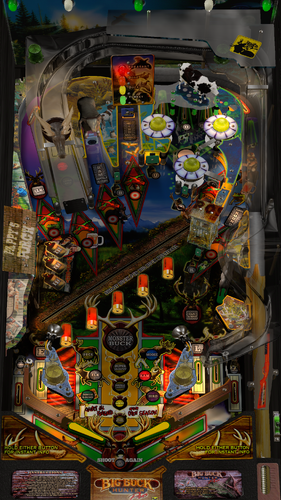
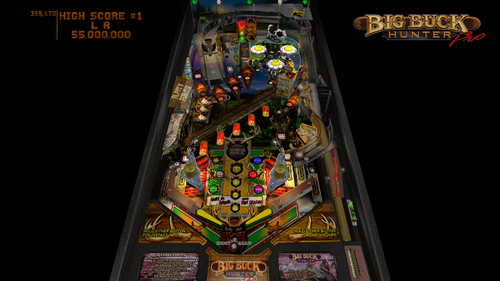
Modded version to fix gameplay bugs and enhance visuals.
 

This is a VPURemix patch, not a standalone table. You need the VPURemix tool to apply it to the base table. Without the tool it will not work.
 

Credits

All credit for the table itself goes to the people who built it:

  • Original table by 32assassin and 85vett (2019)
  • VR Room upgrade by Retro27 and Sixtoe (2021)
  • Modern Upgrade by TastyWasps (2023)


This patch is based on the @TastyWasps release: https://vpuniverse.com/files/file/18215-big-buck-hunter-pro-stern-2010/
 

I sent TastyWasps a message about this patch but have not had a reply. If there are any objections to it being here, let me know and I will take it down.
 

Thanks to everyone above for the work that made this possible. Everything below is only a set of fixes on top of their table.


What is fixed

  • The buck now moves the way the real machine does, and stays correct after Big Buck Multiball. It is also hittable exactly where you see it standing.
  • Elk Multiball works properly. The diverter no longer flaps around, and jackpots only score on a real shot into the elk.
  • The bumpers lit the wrong lamp on every hit. Fixed.
  • No more stray flipper sound when launching the ball with the plunger.
  • The up-posts now have proper solenoid sounds, both going up and coming back down.
  • The elk diverter had no sound at all. It now has one when it fires and one when it lets go.
  • Post and diverter sounds play positionally and follow the Mech Sound Volume slider.
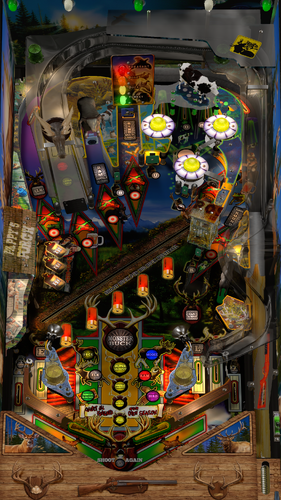
  • The apron artwork was stretched in places. It now sits evenly on the apron.
  • Instruction cards now work in every mode, not just VR.
  • Various small leftovers in the script cleaned up.


What is new

  • All table settings now live in the in-game Table Options menu (F12).
  • Cabinet side blades work in desktop mode too, not just VR. 9 to choose from, 8 of them new.
  • Apron art can be changed. 3 to choose from, 2 of them new. One leaves out the instruction cards and closes the card windows for the full artwork.
  • Flipper art can be changed. 5 to choose from, 4 of them new.
  • The plunger cover has an alternative design next to the Stern original.
  • Two side blades, one apron, the plunger cover and one flipper style are based on the real Wizard Mod machine.


Visual changes

  • All lamps changed to incandescent lights.
  • Inserts adjusted so they line up better.
  • New playfield upscale, so the text is properly readable.
  • New slingshot decals with fewer artifacts.


Requirements

  • VPURemix tool to apply the patch
  • VPX 10.8 or newer
  • ROM bbh_170

Edited by ThijsFTW
Consolidated changelogs

https://www.ipdb.org/machine.cgi?gid=5513
Yes
10.8 required
ThijsFTW
32assassin, 85vett, TastyWasps
1.10

What's New in Version 1.1   See changelog

Released

What is fixed

  • A stray flipper sound played when you launched the ball with the plunger. The two up-posts were still using the old stock VPX flipper coil sample, and the ROM fires a post the moment the ball leaves the shooter lane. Both posts now use proper Fleep solenoid samples that match the mechanism they belong to.
  • The posts now also make a sound when they drop back down, instead of only on the way up.
  • The elk diverter made no sound at all. It now has one when it fires and another when it lets go, matched to the flipper assembly with the heavier coil that drives it on the real machine.
  • Post and diverter sounds play positionally, so you hear them where the mechanism actually sits.
  • Post and diverter sounds now follow the F12 Mech Sound Volume slider like the rest of the mechanical sounds.
  • The apron artwork did not sit evenly on the apron mesh, which stretched parts of it. It is laid out again using the mesh, so the whole apron is now at one scale.


What is new

  • Cabinet side blades now work in desktop mode, not just in VR. There are 9 to choose from, 8 of them new.
  • Apron art can be changed from the options menu. There are 3 to choose from, 2 of them new. One of those leaves out the instruction cards and closes the two card windows, so you see the full artwork.
  • Flipper art can be changed from the options menu. There are 5 to choose from, 4 of them new. 
  • The plunger cover has an alternative design next to the Stern original.
  • Two of the side blades, one apron, the plunger cover and one flipper style are based on the Wizard Mod modifications for the real machine.
  • All of the above is set from the in-game Table Options menu (F12).

User Feedback

Create an account or sign in to leave a review

You need to be a member in order to leave a review

Create an account

Sign up for a new account in our community. It's easy!

Register a new account

Sign in

Already have an account? Sign in here.

Sign In Now

Nicolainuke

   1 of 1 member found this review helpful 1 / 1 member

Plays really well. F12 menu and lut options are excellent. Playfield looks great. Very clean upgrade that is much appreciated.

MikeBalls


Thanks for the table update Thijs! 😁👌


pcraenme


Excellent work! Thanks!

Joppnl


Thank you for this update!

For me it still is a 'rare' table (never seen it here IRL) so love to play it and see that it's getting some TLC from you 😆

Thanks!

andre420


excelent! tnx mate! 👌

onedevotee


really great, thank you 👍

coolball


Thanks for your great update Mod. Work fine now.


The table is after the patch diff 11 MB smaller, respect,

Rivermatty


Thanks for fine tuning this Table, so much work, don't know how you do it but it's much appreciated and I finally got a High Score!

×
  • Create New...
