-
SYSTEM SEARCH
System Scanners Online:
Username: Guest
>> System Scan?
>> The Universe >
Incoming Message:
Due to system limitations searching with words of 3 or less characters will not return results. For instance; Doctor Who. This will not return results as the system is trying to search for both Doctor AND Who in which Who will not be found as it's a 3 character word. To find Doctor Who; you'd search for either Doctor or "Doctor Who".
Search Tips:
For specific searches; enclose your search with quotes. Example: "Doctor Who" or "Addams Family".
Search the Community
Showing results for tags '1980'.
-
Version 1.0.0
1146 downloads
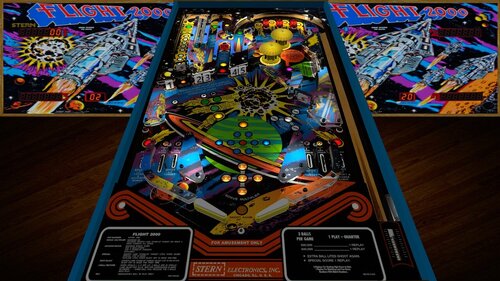
Thank you to @HSM and @jpsalasfor creating the VPX build of this table! And thanks @bigus1 for allowing us to mod your excellent mod Stern’s Flight 2000 pinball machine is a space-themed adventure for the true enthusiast. As the flyers put it, “Stern’s first talking pinball game is really taking off!”. One of the most interesting features of this game is the 3-ball multi ball. Each of the three balls has its own lift-off stages located on the upper left hand portion of the play field. Steppers, driven by solenoids, also move the balls in play along until kickers can kick the ball into the arch at the top. Changes in this version: I added nFozzy and Fleep @studly_do_rightimproved the look and sound, resolved issues, tested, and more @DGrimmReaper for the VR implementation @hauntfreaks for the new VR backglass/cabinet assets and link to new b2s! @Ext2k for the cabinet models @outhere for verifying DOF functionality following fleep conversion Enjoy! Note: This is a widebody table, so in my opinion it should not vertically fill the entire cabinet screen. If you want the robot voice: Press F6 Check/Enable talking sound Click OK Press F3 Desktop users can try the F12 option "Desktop VR Mode". Set that to on, then restart the table. Zoom out using Z offset (also in F12) to see the whole cabinet and backglass in the vr room on your desktop. You wont be able to look around but it's cool to see the whole cabinet with the table in it, imo -
.thumb.png.f53cb093f5d7fff494df50b776000fbc.png)
Version 1.0.0
115 downloads
Viking (Bally 1980) HI REZ ALT with Wheel Ok this is pushing the db2s editor to the max again to see what i can do with it .. if theres 1 backglass you want to dload this is the one looks killer on your cab... So I need comments and feedback on this backglass on what you guy think of it .... Enjoy, looks killer on my cab and thats all that really counts to me and oh yeah Happy 250th 4TH OF JULY -
.thumb.png.73956c3a34eaabf2262ac49024afcd51.png)
Version 1.2
125 downloads
Hi Rez ALT backglass -
.thumb.png.07ec1fb21613336aecbc4b13f0d5ef39.png)
Version 1.0.0
57 downloads
Star God (Zaccaria 1980) HI REZ ALT and Wheel -
-
.thumb.png.d4397dd298430e53d1ffc35e075acfaf.png)
Version 1.2
150 downloads
Hi Rez Alt version -
.thumb.png.723498ad961e13a8a6de4663e9837f9e.png)
Version 1.2
91 downloads
Star Race (Gottlieb 1980) -
.thumb.png.2674158a2052b16256726aae9896b6ae.png)
Version 1.2
84 downloads
Super Nova (Game Plan 1980) HI REZ ALT- 1 review
-
- 12
-

-
- super nova
- game plan
- (and 3 more)
-
.thumb.png.1f91aacb795f51099755ea897a6f4766.png)
Version 1.2
100 downloads
Star Gazer (Stern 1980) HI REZ ALT- 1 review
-
- 18
-
-
- star gazer
- stern
- (and 3 more)
-
.thumb.png.4c9ae1f107a5e536649432ebfda55959.png)
Version 1.2
121 downloads
Fathom (Bally 1980) HI REZ ALT -
.thumb.png.af73b952c009e9e147b0e8b3a4319469.png)
Version 1.2
99 downloads
Evil Fight ( Playmatic 1980) HI REZ ALT- 2 comments
- 2 reviews
-
- 9
-
-
- evil fight
- playmatic
- (and 3 more)
-
.thumb.png.2c9d6e1a631cc227f552eb5de1919ec0.png)
Version 1.2
106 downloads
Cheetah (Stern 1980) -
.thumb.png.912ce662ce51ba7b5d163ed1c542b783.png)
Version 1.2
122 downloads
FirePower (Williams 1980) HI REZ ALT -
.thumb.png.d8cc99bb9a5b89cbf721c9f788682d36.png)
Version 1.2
113 downloads
Galaxy (Stern 1980) HI REZ ALT -
.thumb.png.85033277c8e20968a765361789c8a6be.png)
Version 1.2
134 downloads
Pinball Lizard (Gameplan 1980) HI REZ ALT- 5 comments
- 2 reviews
-
- 14
-
-
- pinball lizard
- wildman
- (and 3 more)
-
.thumb.png.6a984b2e74a02ec10e3149be96bb7146.png)
Version 1.2
159 downloads
Seawitch (Stern 1980) HI REZ ALT -
.thumb.png.b0806cda01c295c032bd846d6d7178e9.png)
Version 1.5
1206 downloads
Nitro Ground Shaker (Bally 1980) HI REZ Thanks to HiRez00 for the new pic- 15 comments
- 1 review
-
- 99
-
-
- nitro ground shaker
- bally
- (and 3 more)
-
.thumb.png.ef8c3d84a42764180687cdffda1c53d9.png)
Version 1.0.0
814 downloads
Panthera (Gottlieb 1980) HI REZ 6&7 digit versions -
 View File Flight 2000 (Stern 1980) Physics Sound VR MOD Thank you to @HSM and @jpsalasfor creating the VPX build of this table! And thanks @bigus1 for allowing us to mod your excellent mod Stern’s Flight 2000 pinball machine is a space-themed adventure for the true enthusiast. As the flyers put it, “Stern’s first talking pinball game is really taking off!”. One of the most interesting features of this game is the 3-ball multi ball. Each of the three balls has its own lift-off stages located on the upper left hand portion of the play field. Steppers, driven by solenoids, also move the balls in play along until kickers can kick the ball into the arch at the top. Changes in this version: I added nFozzy and Fleep @studly_do_rightimproved the look and sound, resolved issues, tested, and more @DGrimmReaper for the VR implementation @hauntfreaks for the new VR backglass/cabinet assets and link to new b2s! @Ext2k for the cabinet models @outhere for verifying DOF functionality following fleep conversion Enjoy! Note: This is a widebody table, so in my opinion it should not vertically fill the entire cabinet screen. If you want the robot voice: Press F6 Check/Enable talking sound Click OK Press F3 Desktop users can try the F12 option "Desktop VR Mode". Set that to on, then restart the table. Zoom out using Z offset (also in F12) to see the whole cabinet and backglass in the vr room on your desktop. You wont be able to look around but it's cool to see the whole cabinet with the table in it, imo Submitter burger Submitted 04/07/26 Category Modified (MOD) Games Modified by burger, studly_do_rite, DGrimmreaper, hauntfreaks, Ext2k, outhere
 -
.thumb.png.c7dad0ec981a08e53f9d9b72bab1bee8.png)
Version 1.0.0
523 downloads
Galaxy (Stern 1980) HI REZ -
Version 2.0.0
3201 downloads
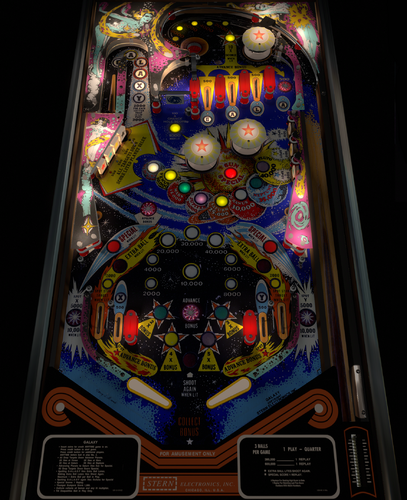
A classic Stern designed by Harry Williams. Purported to be the first game with a controlled general illumination circuit. I built this back in 2018 and was content to let it disappear post-vpinball.com but @nestorgian picked it up and gave it new life with nfozzy physics and fleep sounds and cleaned up playfield artwork. I did some small visual and physics tweaks and the VPW braintrust jumped in with additional help. Nestorgian - physics, sound, desktop view and script update Wylte - physics adjustment, field testing, troubleshooting Apophis - physics adjustments TastyWasps - VR Room leojreimroc - VR backglass, desktop scoring Hauntfreaks - desktop assets bord - physics meshes, various new visual meshes, general tinkering Sixtoe - absolutely nothing 😝 -
-
Wheel.thumb.png.f1b7102e40ba55231ea80320f4a868f6.png)
Version 1.0.0
15 downloads
Rockmakers (Bally 1968) Wheel Personal, non-commercial use only. Please contact me if you would like to use it in another way. All Logos, Copyrights and Trademarks are property of their respective owners. PROVIDED STRICTLY FOR PERSONAL / HOME USE AND NOT FOR COMMERCIAL SALE / RE-SALE OR DISTRIBUTION! -

Version 3.0
435 downloads
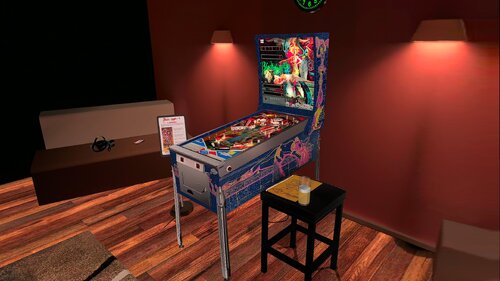
This file is based on JP Salas table version 6.0.0 https://www.vpforums.org/index.php?app=downloads&showfile=19044 This table works in DT-FS-VR-MR This file requires B2S Added Minimal/Basti Room/PoolBar and Mixed Reality VRRoom on menu Turn on/off music ambience on F12 Menu New feature on music: Download Media80.zip and extract to your Visual Pinball music folder Download Media80 here: https://mega.nz/file/ojVABI7Q#ah8A9gxcdyc4mUAkv0yWaKpIOS4sl3ogoh7OSXSyyJw The name of the songs are: Song1 Song2 Song3 Until Song40 You can replace these MP3 files with your favorite music files until song40. I will to use these feature in some of my future conversions To change to next song press Right Magnasave To change to previous song press Left Magnasave thanks to @Romknight for the script code. Virtual Desktop Settings Chromakey for Mixed Reality: Color RGB = 255,255,255 Similarity: 2 Smoothness: 2 JPSalas 6.0.0 Updated September 2025 - Moved LUT to User Options (F12) - Added some extra options to the User Options (F12) - Updated physics to my latest rev 4.3.1. mostly bouncier rubbers and harder flippers.