No files in this category yet.
Files From Subcategories
-
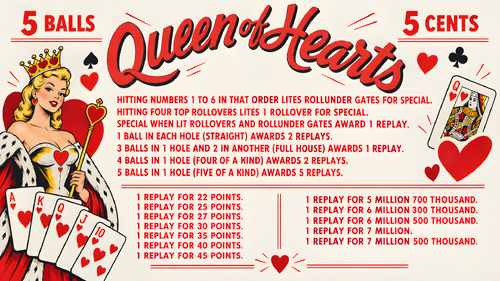
Tokyo Pinball (Rikiya Minami 2022) Media Files & Cabinet Instructions
By SixOfTwelve
Because the voices told me to... here's another episode of
Let's Put Things On Cabinets That Were Never Meant To Be On Cabinets!
Today’s game is Tokyo Pinball, released in 2022 by Rikiya Minami aka "Ricky". The game fully leans into a classic pixel-art aesthetic, complete with delightfully grating chiptune music and a range of visual options (CRT shaders, screen curvature, and more) to make it feel like you’re playing on some janky old cab in a dingy arcade basement somewhere.
As for gameplay, the physics are arcade-y but solid, and features like "bullet time" slow motion when the ball nears the drain make it very beginner-friendly. There’s also a good set of tutorials to help you get up to speed.
I really like this one - it’s clear the creator is a huge pinball fan and genuinely wants his game to act as a kind of “gateway drug” into the hobby. He even links to resources on his website showing where people can find places to play real pinball in Japan. And I have a ton of respect for those tiny teams - sometimes just one person (or two, in the case of LittleWing) - who manage to turn their own unique vision into a fully realized game.
Actually, today is a bit of a cheat day for Let's Put Things On Cabinets That Were Never Meant To Be On Cabinets! , because Tokyo Pinball already includes video options that are very much intended for cabinet play.
That said, it’s not completely cabinet-friendly. There are a few rough edges, but that's where the included AutoHotKey script comes in. It handles the usual behind-the-scenes magic: placing filler images on the backglass and DMD screens, launching the game, and mapping your cabinet buttons to the appropriate keys.
A quick word about controls:
This is where that “not completely cabinet-friendly” I mentioned above comes into play. The game requires separate keys for flippers, nudge, and kickback, meaning you’d ideally want three buttons on each side of your cabinet. Since most setups don’t go that far, I made a judgment call after some playtesting: in this case, kickback felt more useful than nudge, so the magnasave buttons are mapped to kickback.
If you’re running an analog controller in your cabinet, you can optionally use JoyToKey to handle nudging by physically abusing the cab. And of course, if you do have extra buttons available, the script can be adjusted to map those as well.
As usual, I’ve bundled in a generous pile of goodies to pretty up your frontend:
2 backglass images (one in 4:3 and one in 16:9) a company logo (since the creator doesn't have one, I built one out of his itch.io profile logo) 2 DMD images (one for the frontend, one as a filler image for the script) 2 flyer images (photos of the physical game CD and its inlay) 15 instruction cards (text from the PDF manual on Steam, images added by me) a promo video (trailer from the creator's YouTube channel) table audio (recorded from the game) a table image for your frontent a table video for your frontent a wheel image (from the creator's itch.io page)
As always, the script will need a bit of tweaking to fit your setup, but don’t worry - it’s heavily annotated. Give it a proper read-through before heading to the comments for help.
I’m happy to assist where I can, but do try to meet me halfway first 😉
Share and enjoy!
SOME MORE NOTES:
Where to get it:
While Tokyo Pinball is available on Steam, I highly recommend getting the version directly from Rikiya Minami's itch.io page. You might be paying a few cents more (and I do mean just a few, if any), but:
The creator gets a better cut of the profits on itch.io The itch.io version of the game doesn't need Steam running in the background and so is better suited for offline cabinets In my case, the Steam verison would constantly end up slipping behind my PinballX frontend window when launched - something that didn't happen with the itch.io version
How to run it:
Being only four years old at the time of this posting, the game should run without any fuss. Just make sure your video settings are configured correctly:
The 270° rotation is key Your window size may vary depending on your resolution. Note that you're setting the resolution for your landscape mode, even though the game screen is rotated Set the pixel scale as high as possible to fill the screen nicely
If the "bullet time" effect mentioned above is not your thing, you can turn it off in the options. I quite like it and it's part of the game's unique charm, but the fact that the music also slows down every time it's happening can make it irritating.
On that note, turning off lowpass filter and reverb effect in the audio settings also helps take the edge off the soundtrack. Don't expect miracles, but every little bit helps.
AI use disclaimer:
No AI was used in the creation of the artwork.
12 downloads
-
Halloween 1978-1981 (Original 2022) Instruction Card
By Autobott
Instruction card for Halloween 1978-1981 by HiRez00
41 downloads
(0 reviews)0 comments
Submitted
-
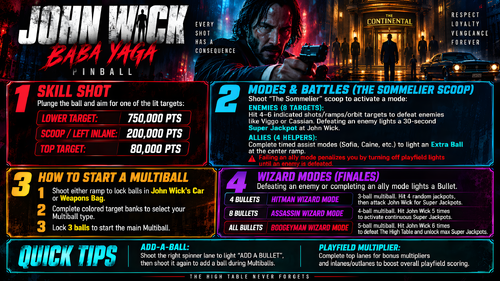
Rush LE (2025)- Loading Screen
By Skully63
Wanted a loading screen for the DrHotWing Table of Rush LE (2025) great table!! Enjoy! It's animated and has sound.
All Logos, Music, Copyrights and Trademarks are property of their respective owners.
PROVIDED STRICTLY FOR PERSONAL / HOME USE AND NOT FOR COMMERCIAL SALE / RE-SALE OR DISTRIBUTION!
See it in action before you download---------->https://rumble.com/v791gj4-rush-le-loading-2025.html
31 downloads
(0 reviews)0 comments
Updated
-
Masters of the Universe Collector's Edition (Original 2025) clear wheel logos 4k
Logo taken from backglass, upscaled and restored for high resolution and cleaned up, optimized for 2K/4K frontends
Download the regular version if you're using 1440p or less resolution, or the "_max" version if you're using 4K resolution or any other configuration like Desktop mode
Logos are optimized for cabinet mode using PinballX; since PinballX is using 70% of the respective screen width for the logo display, the 2k versions are set at 1008px width to avoid internal downscaling/upscaling of the frontend that might introduce unwanted artifacts, moiree or aliasing effects.
42 downloads
(0 reviews)0 comments
Updated
-
Mr Black (Taito do Brasil 1984) clear wheel logo 4K
Logo taken from backglass, upscaled and restored for high resolution and cleaned up, optimized for 4K/2K frontends
Download the 4K version if you use a frontend like PinballX or Pinup Popper on a 4K monitor, or the regular version if you have a 1440p resolution or less. Logos are optimized for each resolution since the internal downscaling/upscaling of the frontends might introduce unwanted artifacts, moiree or aliasing effects.
16 downloads
(0 reviews)0 comments
Updated
-
Mr. & Mrs. PecMen (LTD do Brasil 1983) clear wheel logo 4K
Logo taken from backglass, upscaled and restored for high resolution and cleaned up, optimized for 4K/2K frontends
Download the 4K version if you use a frontend like PinballX or Pinup Popper on a 4K monitor, or the regular version if you have a 1440p resolution or less. Logos are optimized for each resolution since the internal downscaling/upscaling of the frontends might introduce unwanted artifacts, moiree or aliasing effects.
21 downloads
(0 reviews)0 comments
Updated
-
Mr Doom (Recel 1979) clear wheel logo 4K
Logo taken from backglass, upscaled and restored for high resolution and cleaned up, optimized for 4K/2K frontends
Download the 4K version if you use a frontend like PinballX or Pinup Popper on a 4K monitor, or the regular version if you have a 1440p resolution or less. Logos are optimized for each resolution since the internal downscaling/upscaling of the frontends might introduce unwanted artifacts, moiree or aliasing effects.
17 downloads
(0 reviews)0 comments
Updated
-
Moon Shot (Chicago Coin 1969) clear wheel logo 4K
Logo taken from backglass, upscaled and restored for high resolution and cleaned up, optimized for 4K/2K frontends
Download the 4K version if you use a frontend like PinballX or Pinup Popper on a 4K monitor, or the regular version if you have a 1440p resolution or less. Logos are optimized for each resolution since the internal downscaling/upscaling of the frontends might introduce unwanted artifacts, moiree or aliasing effects.
25 downloads
(0 reviews)0 comments
Updated
-
Masters of the Universe (Original 2025) clear wheel logos 4K
Logo taken from backglass, upscaled and restored for high resolution and cleaned up, optimized for 2K/4K frontends
Providing files optimized for 1440p cabinet mode in PinballX and maximum available resolution.
PinballX is using 70% of the respective screen width for the logo display at a 1.66 aspect ratio, so the provided optimized version is set at 1008px max width / 605px max height to avoid internal downscaling/upscaling of the frontend that might introduce unwanted artifacts, moiree or aliasing effects.
DOWNLOAD ALL LOGOS (2000+) at this link: https://mega.nz/folder/22pRyY6K#t9cVLDbWaIlyDflG_QVTjw
10 downloads
(0 reviews)0 comments
Submitted
-
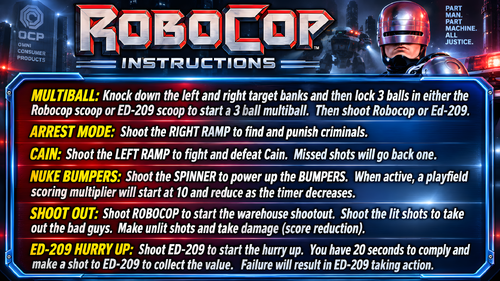
Monday Night Football (Data East 1989) clear wheel logos 4K
Logo taken from backglass, upscaled and restored for high resolution and cleaned up, optimized for 2K/4K frontends
Providing files optimized for 1440p cabinet mode in PinballX and maximum available resolution.
PinballX is using 70% of the respective screen width for the logo display at a 1.66 aspect ratio, so the provided optimized version is set at 1008px max width / 605px max height to avoid internal downscaling/upscaling of the frontend that might introduce unwanted artifacts, moiree or aliasing effects.
DOWNLOAD ALL LOGOS (2000+) at this link: https://mega.nz/folder/22pRyY6K#t9cVLDbWaIlyDflG_QVTjw
8 downloads
(0 reviews)0 comments
Submitted
-
Sonic the Hedgehog: Spinball (SEGA 1993) Media Files & Cabinet Instructions
By SixOfTwelve
And now for a very special edition of
Let's Put Things On Cabinets That Were Never Meant To Be On Cabinets!
Today it's time for a true classic: Ask any retro gamer to compile a list of influential pinball video games, and chances are that 1993's Sonic the Hedgehog: Spinball will pop up somewhere in their top ten. The game was developed in a relatively short amount of time by an American team after it became clear that the Japanese team working on Sonic the Hedgehog 3 wouldn't have the game ready in time to take advantage of the 1993 Christmas shopping season.
The ball physics are pretty bad, the control mechanism - a mixture of flipping, jumping and moving - is pretty clunky, but the Sonic factor still makes the game fun to play and it has a special place in many people's hearts.
The included AutoHotKey script launches the Megadrive/Genesis version of the game via RetroArch, covers the backglass and DMD screen with filler images and maps your cabinet's buttons to the game's keys.
A word about the controls:
Since most cabinets don't have a joystick on them, I needed to map the game's left/right movement to the Magnasave buttons in order to keep the Flipper buttons free to do the actual flipping. The game's Down button is mapped to the cab's Launch button. It's used in combination with the flippers for Sonic's dash maneuver. The game's Up button is only used for looking up and not really necessary in the game. I mapped it to the Buy-in button, but if your cab doesn't have one, it's no big loss. There is a maneuver that can be performed during bonus rounds originally by pressing all three controller buttons on the SEGA controller simultaneously. Since it's very impractical to push three buttons on a cab at the same time, I mapped the two Magnasave buttons to trigger all three controller buttons when pressed at the same time. The only time you'll notice this is when you enter the bonus rounds and use it to tilt Sonic's pinball table.
Another word about the controls:
If you look at the script, you'll notice that I used a sort of "double mapping": First I mapped keys to buttons in RetroArch, and then I used AutoHotKey to map other keys (the cabinet buttons) to those RetroArch keys.
The reason is that I use RetroArch to emulate other systems as well, and the key for "left flipper" in one game isn't always the same in another. Rather than work with half a dozen control schemes in RetroArch, I find it easier to stick to one and adapt the controls for each particular game in AutoHotKey.
Included media:
a backglass image (in 4:3 format) a company logo 2 DMD images, one for the frontend and a filler image used by the script 7 flyer images (courtesy of MobyGames) 15 instruction cards (taken from the game's PDF manual) table audio (recorded from the game) a wheel image (courtesy of the LaunchBox Games Database)
As usual, the script needs to be adapted to your system, but no fear - it's extensively annotated. Please take a good long look through it before asking for help in the comments section.
I'll gladly try to help, but please do make an effort first.
Share and enjoy!
SOME MORE NOTES:
Where to get it:
Oohh no. Nope. Uh-uh. Not touching that one with a thirty-nine-and-a-half-foot pole. You're on your own here.
How to run it:
As stated above, the game requires RetroArch to run.
Setting up RetroArch is a bit of a science in and of itself, and is frankly beyond the scope of this post. Make sure you have the game up and running to your satisfaction before attempting to use the AutoHotKey script.
Some pointers though:
My version uses the genesis_plus_gx_libretro core. Look at Settings -> Video -> Output -> Monitor Index to select the right monitor for your backglass screen (it was "2" in my case). Settings -> Input -> Port 1 Controls is where you map your keys. For my own setup, I had them set differently than the standard, because I re-use the same configuration files for RetroArch on some of my other (non-pinball) arcade cabinets and didn't want to revamp them completely for my pinball cabinet. You can map them to anything you like, just make sure you adjust the key mappings at the end of the script accordingly. My own mappings are listed in the script. It's also a good idea to set Settings -> On-Screen Display -> On-Screen Notifications to OFF (otherwise you'll get notifications like "ROM loaded" on screen) once you've set everything up the way you need it. Also make sure to set Settings -> Input -> Hotkeys -> Confirm Quit to OFF, or else RetroArch will make you press the Exit button twice before quitting. If you have extra cabinet buttons free, you can go to Settings -> Input -> Hotkeys and map them to "Load State" and "Save State" - very convenient and highly recommended.
AI use disclaimer:
No AI was used in the creation of the artwork. ChatGPT was helpful in figuring out the "fire three virtual buttons at the same time when pressing two actual buttons simultaneously" part. It got the actual code wrong, but put my brain on the right track 😉14 downloads
(0 reviews)0 comments
Submitted
-
Rush L.E. Instruction/Rules- DrHotWing
By Skully63
Rush is my favorite band of all time and I have been waiting forever for this VPX version to hit and DrHotWing nailed it. He provided a text file for the rules to be used in F12 features but I wanted something I could just push during the game and read
it right on my DMD Screen, so I made this Rules page based on his text post in the D/L. Hope you enjoy!!
52 downloads
(0 reviews)0 comments
Updated
-
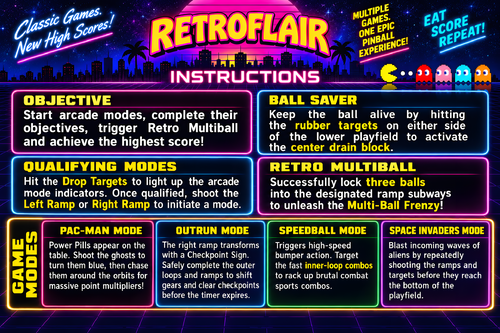
Mars Trek (Sonic 1977) clear wheel logos 4k
Logo taken from backglass, upscaled and restored for high resolution and cleaned up, optimized for 2K/4K frontends
Download the regular version if you're using 1440p or less resolution, or the "_max" version if you're using 4K resolution or any other configuration like Desktop mode
Logos are optimized for cabinet mode using PinballX; since PinballX is using 70% of the respective screen width for the logo display, the 2k versions are set at 1008px width to avoid internal downscaling/upscaling of the frontend that might introduce unwanted artifacts, moiree or aliasing effects.
48 downloads
(0 reviews)0 comments
Updated
-
Magic Castle (Zaccaria 1984) clear wheel logo 4K
Logo taken from backglass, upscaled and restored for high resolution and cleaned up, optimized for 4K/2K frontends
Download the 4K version if you use a frontend like PinballX or Pinup Popper on a 4K monitor, or the regular version if you have a 1440p resolution or less. Logos are optimized for each resolution since the internal downscaling/upscaling of the frontends might introduce unwanted artifacts, moiree or aliasing effects.
14 downloads
(0 reviews)0 comments
Updated
-

Adventure Pinball: Forgotten Island (Electronic Arts 2001) Media Files & Cabinet Instructions
By SixOfTwelve
Oh good, you're here. Have a seat, you almost missed the latest episode of
Let's Put Things On Cabinets That Were Never Meant To Be On Cabinets!
Today we open the door, get on the floor, and walk the dinosaur as we journey to Adventure Pinball: Forgotten Island, published in 2001 by Electronic Arts. Set on a remote prehistoric island, the game is famous for bending the Unreal engine, generally used for first-person shooters, to create a pinball simulation instead. The playfield layouts are varied (if a tad confusing sometimes) and make great use of the 3D environment. While the ball physics aren't all up to scratch, the game holds a certain early-2000s charm and flows very well.
The included AutoHotKey script rotates the playfield to portrait mode, covers the backglass and DMD screen with filler images, mounts the game's CD-ROM image (the game plays audio tracks from CD) and maps your cabinet's buttons to the game's keys.
There is also an option in the script to use JoyToKey for your cab's analog device, so if you prefer, you can nudge by hitting the cab instead of hitting buttons, and use the plunger to launch the ball.
Included media:
2 backglass images (one in 4:3 and one in 16:9 format) a company logo 2 DMD images, one for the frontend and a filler image used by the script (taken from the game's CD inlay) 2 flyer images (the game back and front cover, courtesy of MobyGames) 21 instruction cards (taken from the game's PDF manual) table audio (recorded from the game) a table video 2 wheel images (large and smaller)
As usual, the script needs to be adapted to your system, but no fear - it's extensively annotated. Please take a good long look through it before asking for help in the comments section.
I'll gladly try to help, but please do make an effort first.
Share and enjoy!
SOME MORE NOTES:
Where to get it:
Unfortunately, at the time of this posting, Adventure Pinball: Forgotten Island is not available on GOG or other sales platforms, so eBay may be your best legal option.
How to run it:
OK, this will require a bit of work.
Start the Setup.exe from the CD-ROM and install the game into a directory of your choice. Make sure to also install the DirectX files it offers. When you first start up the game, it will ask you which graphics mode to use: I found that for me, the "3dfx Glide for Windows" option worked best. Your mileage may vary. Make sure to set the graphics resolution to 800x600, which is the highest it will allow. Your game CD then needs to be converted into the .BIN/.CUE image format (since an .ISO image won't save the audio tracks). There are several tools available to do this for you, but that's beyond the scope of this post. To mount the CD image, I use the free version of Alcohol 52% on my cab. If you're using something else to mount .BIN/.CUE images, you need to change the command line at the appropriate place in the script. Even with all that, there is a possibility the game won't launch since it won't recognize the mounted CD image as a true CD-ROM. My advice is not to Abandon hope, but to look Ware you can find a patch. It should be noted that use of these kinds of patches can be a legally gray area. Check your local jurisdiction and make sure you own a legal copy of the game. I've read some comments where people said the PB.exe that starts the game needs to be run as administrator or in compatibility mode with Windows XP, but it actually ran without problems for me in normal mode. For a quicker game start, rename or delete the intro1.mpg file in the game's "System" folder.
AI use disclaimer:
The game's packaging cover image was upscaled and expanded in FreePik, and then further edited in Photoshop to create the backglasses.
The images for the wheel and DMD were also upscaled in FreePik, and then further edited in Photoshop.
10 downloads
-
Magic Pinball (Original 2025) clear wheel logos 4K
Logo taken from backglass, upscaled and restored for high resolution and cleaned up, optimized for 2K/4K frontends
Providing files optimized for 1440p cabinet mode in PinballX and maximum available resolution.
PinballX is using 70% of the respective screen width for the logo display at a 1.66 aspect ratio, so the provided optimized version is set at 1008px max width / 605px max height to avoid internal downscaling/upscaling of the frontend that might introduce unwanted artifacts, moiree or aliasing effects.
DOWNLOAD ALL LOGOS (2000+) at this link: https://mega.nz/folder/22pRyY6K#t9cVLDbWaIlyDflG_QVTjw
6 downloads
(0 reviews)0 comments
Submitted
-
Magic Circle (Bally 1965) clear wheel logo 4K
Logo taken from backglass, upscaled and restored for high resolution and cleaned up, optimized for 2K/4K frontends
Providing files optimized for 1440p cabinet mode in PinballX and maximum available resolution.
PinballX is using 70% of the respective screen width for the logo display at a 1.66 aspect ratio, so the provided optimized version is set at 1008px max width / 605px max height to avoid internal downscaling/upscaling of the frontend that might introduce unwanted artifacts, moiree or aliasing effects.
DOWNLOAD ALL LOGOS (2000+) at this link: https://mega.nz/folder/22pRyY6K#t9cVLDbWaIlyDflG_QVTjw
4 downloads
(0 reviews)0 comments
Submitted
-
Magic Clock (Williams 1960) clear wheel logos 4K
Logo taken from backglass, upscaled and restored for high resolution and cleaned up, optimized for 2K/4K frontends
Providing files optimized for 1440p cabinet mode in PinballX and maximum available resolution.
PinballX is using 70% of the respective screen width for the logo display at a 1.66 aspect ratio, so the provided optimized version is set at 1008px max width / 605px max height to avoid internal downscaling/upscaling of the frontend that might introduce unwanted artifacts, moiree or aliasing effects.
DOWNLOAD ALL LOGOS (2000+) at this link: https://mega.nz/folder/22pRyY6K#t9cVLDbWaIlyDflG_QVTjw
4 downloads
(0 reviews)0 comments
Submitted
-
(0 reviews)
0 comments
Submitted
-
Loony Labyrinth (LittleWing 1994) clear wheel logo 4k
Logo taken from backglass, upscaled and restored for high resolution and cleaned up, optimized for 2K/4K frontends
Download the regular version if you're using 1440p or less resolution, or the "_max" version if you're using 4K resolution or any other configuration like Desktop mode
Logos are optimized for cabinet mode using PinballX; since PinballX is using 70% of the respective screen width for the logo display, the 2k versions are set at 1008px width to avoid internal downscaling/upscaling of the frontend that might introduce unwanted artifacts, moiree or aliasing effects.
18 downloads
(0 reviews)0 comments
Updated
-
Little Joe (Bally 1972) clear wheel logos 4k
Logo taken from backglass, upscaled and restored for high resolution and cleaned up, optimized for 2K/4K frontends
Download the regular version if you're using 1440p or less resolution, or the "_max" version if you're using 4K resolution or any other configuration like Desktop mode
Logos are optimized for cabinet mode using PinballX; since PinballX is using 70% of the respective screen width for the logo display, the 2k versions are set at 1008px width to avoid internal downscaling/upscaling of the frontend that might introduce unwanted artifacts, moiree or aliasing effects.
27 downloads
(0 reviews)0 comments
Updated
-
Momonga Pinball Adventures (Paladin Studios 2016) Media Files & Cabinet Instructions
By SixOfTwelve
Just when you thought it was safe to go back into the mancave, here's yet another episode of
Let's Put Things On Cabinets That Were Never Meant To Be On Cabinets!
Today it's fun for all ages as we launch a small furry creature against hard objects in Momonga Pinball Adventures, released by Paladin Studios in 2016. As Momo the flying squirrel traverses the world in search of the evil owl soldiers who kidnapped his family, he meets a bunch of quirky characters and has to overcome many obstacles - mainly by curling up into a ball and smashing them to bits.
Momonga Pinball Adventures can't deny its origins as a casual game originally created for mobile devices. You will make many shots due more to luck than skill, but what the game lacks in accurate pinball physics, it more than makes up for in the charm department. The graphics are lush and colorful, the character designs are excellent, and the overall presentation is top-notch. Unfortunately, the game is rather short and ends on a cliffhanger that was never resolved, since the design studio closed its doors in 2024.
The included AutoHotKey script moves the game to the backglass, covers the playfield and DMD screen with filler images, and maps your cabinet's buttons to the game's keys.
I've included a ton of media:
4 frontend backglasses (two in 4:3 and two in 16:9 format) a company logo 2 DMD images, one for the frontend and a filler image used by the script 7 flyer images (collages of character concept art from Paladin Studio's production blog) 2 instruction cards a promo video (the launch trailer for the iOS version) table audio 2 table images, one for the frontend and a filler image used by the script a table video a wheel image
Image sources include Paladin Studio's website, the game's Steam page, MobyGames and the Launchbox Games Database
As usual, the launch script needs to be adapted to your system, but no fear - it's extensively annotated. Please take a good long look through it before asking for help in the comments section.
I'll gladly try to help, but please do make an effort first.
Share and enjoy!
SOME MORE NOTES:
Where to get it:
Momonga Pinball Adventures is available on Steam. At the time of this posting, it's on sale for less than a buck, but in my opinion the game is worth it even at the full Steam price (around $6).
How to run it:
The game should run "out of the box" on modern systems, but being a Steam game, the Steam client will launch along with it and hang around in the background. If you don't mind that, fine.
However, if you have an offline cabinet and want to run the game without the Steam client popping up:
Download the Goldberg Emulator and extract the steam_api.dll. Go to your game folder and rename or backup the original steam_api.dll and replace it with the one from step 1. Create a simple Notepad text file in the same folder, name it steam_appid.txt and paste the game's Steam ID into it. You can find the ID number in the URL of the game's Steam Store website. Running the game's EXE file should now work without Steam. It should be noted that use of a Steam emulator can be a legally gray area. Check your local jurisdiction and make sure you own a legal copy of the game.
The Phantom Input Menace:
If your cabinet has an analog device such as a VirtuaPin Controller that registers in Windows as a joystick, you may find that the game reads one of the joystick's axes as active, which can result in the "up" or "down" direction being pushed constantly - most visible during the main menu screen. This will either prevent you from quitting the game (if the "up-push" is active, since you can never move down to "Quit game") or from starting it (if the "down-push" is active, since you can never move up to "Start").
My solution for this was to install HIDHide, an insanely useful little tool which lets you create a white- or blacklist of software which is allowed (or not allowed) to "see" your gaming input devices.
Here is a quick rundown:
(Since I use my VirtuaPin Controller for many games on my cab in addition to Visual Pinball, a blacklist of "forbidden" games made more sense.)
1. In the "Devices" tab of HIDHide, select your gaming device and make sure to tick "Enable device hiding".
2. Then in the "Applications" tab, tick "Inverse application cloak" (which makes the selection a blacklist), and add the game's EXE file by clicking the plus button.
3. Unplug and replug your gaming device or (if, like me, you don't feel like opening up your cab and pulling out stuff) simply reboot your PC.
4. The next time you run Momonga Pinball Adventures, it won't see your device and the menus should work normally. You can use the flipper buttons (Shift) to move left and right and the magnasave buttons (Control) to move up and down.
Special thanks to:
@iwantpinball for testing the script on his cabinet and providing the alternate backglass images
5 downloads
(0 reviews)0 comments
Updated
-
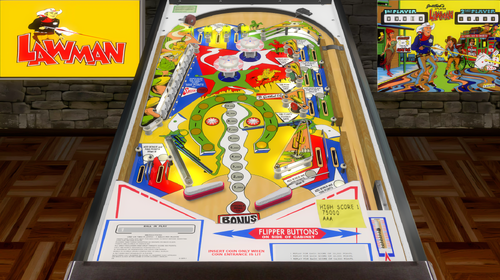
Lawman (Gottlieb 1971) clear wheel logo 4K
Logo taken from backglass, upscaled and restored for high resolution and cleaned up, optimized for 2K/4K frontends
Providing files optimized for 1440p cabinet mode in PinballX and maximum available resolution.
PinballX is using 70% of the respective screen width for the logo display at a 1.66 aspect ratio, so the provided optimized version is set at 1008px max width / 605px max height to avoid internal downscaling/upscaling of the frontend that might introduce unwanted artifacts, moiree or aliasing effects.
DOWNLOAD ALL LOGOS (2000+) at this link: https://mega.nz/folder/22pRyY6K#t9cVLDbWaIlyDflG_QVTjw
7 downloads
(0 reviews)0 comments
Submitted
-
Laser Ball (Williams 1979) clear wheel logos 4K
Logo taken from backglass/flyer, upscaled and restored for high resolution and cleaned up, optimized for 2K/4K frontends
Providing files optimized for 1440p cabinet mode in PinballX and maximum available resolution.
PinballX is using 70% of the respective screen width for the logo display at a 1.66 aspect ratio, so the provided optimized version is set at 1008px max width / 605px max height to avoid internal downscaling/upscaling of the frontend that might introduce unwanted artifacts, moiree or aliasing effects.
DOWNLOAD ALL LOGOS (2000+) at this link: https://mega.nz/folder/22pRyY6K#t9cVLDbWaIlyDflG_QVTjw
12 downloads
(0 reviews)0 comments
Submitted
-
VPU Staff's Top Picks
-
New & Updated Visual Pinball
-
New & Updated Future Pinball
-
New & Updated Backglasses
-
New & Updated DMD Colorizations
-
New & Updated Virtual Reality Enabled Tables
-
VPU Remix & Mods
-
New & Updated Popper Media
-
Updated Files
-
Download Statistics
28798
Files102495
Comments41856
Reviews