-
SYSTEM SEARCH
System Scanners Online:
Username: Guest
>> System Scan?
>> The Universe >
Incoming Message:
Due to system limitations searching with words of 3 or less characters will not return results. For instance; Doctor Who. This will not return results as the system is trying to search for both Doctor AND Who in which Who will not be found as it's a 3 character word. To find Doctor Who; you'd search for either Doctor or "Doctor Who".
Search Tips:
For specific searches; enclose your search with quotes. Example: "Doctor Who" or "Addams Family".
Search the Community
Showing results for tags 'joepicasso'.
Found 7 results
-
Version 10.7.2
694 downloads
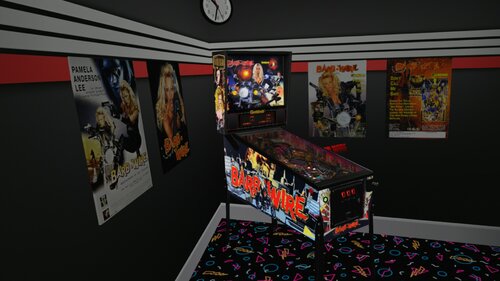
Here's another VR Conversion I want to share with you guys. This was created in collaboration with Rascal, who helped me a lot. If you don't know something yourself, Rascal knows it. 🤗 Why did I want to convert this particular table, simply because it's on my list and I really like it. I hope someone has as much fun with it and like it as I do, so I'm going to share it with you guys now. '********************* VR OPTIONS ************************************************** '*********************************************************************************** 'VR Logo - Set VRLogo = 0 to turn off VR Logo. VRLogo = 1 'VR Poster-Right - Set VRPosterR = 0 to turn off VR Poster-Right. VRPosterR = 1 'VR Poster-Left - Set VRPosterL = 0 to turn off VR Poster-Left. VRPosterL = 1 'VR table Glass - Set Glass = 0 to turn off VR playfield Glass. Glass = 1 'VR Playfield glass Scratches - Set to 0 if you want to turn them off. GlassScratch = 1 '*********************************************************************************** You don't need B2S but i want to give Credits to HiRez00 because i used his Backglass and his realy good Quality Speaker/DMD Grill Texture. And without my friend Rascal, we would only have a standard grill. This is the Link to the BS2 and Grill i used: A big thanks to Joe Picasso for creating such a beautyfull table and give me Permission to convert it to VR. I also want to thank Rawd for his VR toys and Sixtoe for his great templates and Rascal for helping me with the Mesh and everything else and of course Studlygoorite for beta testing . -
Version 1.0.3
7849 downloads
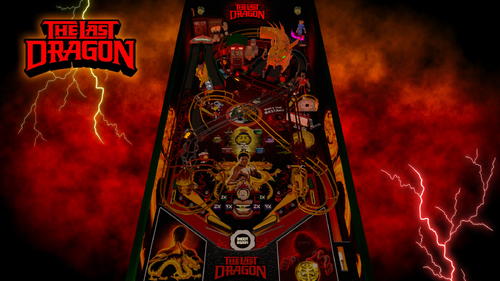
In a world where rhythm meets reflex… and honor meets high score — only one hero has The Glow! Step into “The Last Dragon” Pinball, an electrifying fusion of martial-arts mastery and pinball adrenaline. Join Bruce Leroy Green on his quest to reach the Sublime Glow — battling through six action-packed modes, unleashing Sho’nuff Multiball, and facing the ultimate showdown with the Shogun of Harlem himself! Light the Tower, crush the drop targets, and feel the rhythm of combos, spinners, and playfield multipliers as you climb toward the final Wizard Mode — where dragons awaken and The Glow ignites the entire table. Will you master strength, balance, and intuition… or fall before Sho’nuff’s fury? The Last Dragon Pinball — You got the Glow? Prove it. Updated Features: -Modes randomize when hitting spinners. -Jackpots progressively increase as you collect them. -Magnasaves to see rules on backglass FEATURED F12 MENU OPTIONS High Score Reset: -Toggle On/Off. When On, press “0” at any time to reset all high scores. VR Room: -Choose between Minimal, Mega, or Off for your preferred immersive setup. Mode Progress Saves: -off by default, turn on to save your progress in modes Staged Flippers: -Off -With Magnasaves -Actual Staged Flipper Switches Rule Cards on Backglass: -Display all 4 Rule Cards directly on the backglass using magnasaves for quick reference. -Rules on playfeild Free Play: -Toggle On/Off for home or arcade play. Game Difficulty: -Adjust the overall challenge -Easy mode = 5-balls, + easier to collect kickbacks, easier mode 6 -Normal mode = 5-balls, regular difficulty to replenish kickbacks -Tournament mode = 3-balls, modes are no longer randomized, regular difficulty to replenish kickbacks, slightly harder mode 6 Credits Image & Full Rules: -View the Credits image and the complete Rules & Info section directly in the F12 Menu. Reflections: -Set to 0 by default Special Thanks: -Huge thanks to DGrimmReaper and DaRdog for post-VR tweaks and refinements. -A special shout-out to Otto Bus for extensive testing and feedback. -Massive appreciation to Paladin and Mrs Paladin for their superb reveal stream on Twitch! 🎥 Watch it here: https://www.youtube.com/watch?v=yB89mSEKaw4&t=3754s Support the Project If you enjoy The Last Dragon Pinball, please click Like, comment, and leave a review! Sho’Nuff!- 62 comments
- 40 reviews
-
- 187
-

-
- dragon
- last dragon
- (and 17 more)
-

Version 1.0.2
20075 downloads
Requirements: 10.8 64-bit, Updated PinupPopper Features: •VR room full and minimal •Scorbit (enable or disable in table script) •Nfozzy Physics •Fleep Sounds •Full PupDMD •Full media pack •F12 Tweak Menu containing Many options: •Difficulty options, flipper size, outlane size and trust post on or off, etc •Number of balls per game •Rule cards you can turn on and off •VR Room Options •Many others -
 View File The Last Dragon In a world where rhythm meets reflex… and honor meets high score — only one hero has The Glow! Step into “The Last Dragon” Pinball, an electrifying fusion of martial-arts mastery and pinball adrenaline. Join Bruce Leroy Green on his quest to reach the Sublime Glow — battling through six action-packed modes, unleashing Sho’nuff Multiball, and facing the ultimate showdown with the Shogun of Harlem himself! Light the Tower, crush the drop targets, and feel the rhythm of combos, spinners, and playfield multipliers as you climb toward the final Wizard Mode — where dragons awaken and The Glow ignites the entire table. Will you master strength, balance, and intuition… or fall before Sho’nuff’s fury? The Last Dragon Pinball — You got the Glow? Prove it. FEATURED F12 MENU OPTIONS High Score Reset: -Toggle On/Off. When On, press “0” at any time to reset all high scores. VR Room: -Choose between Minimal, Mega, or Off for your preferred immersive setup. Staged Flippers: -Off -With Magnasaves -Actual Staged Flipper Switches Rule Cards on Backglass: -Display all 4 Rule Cards directly on the backglass for quick reference. Free Play: -Toggle On/Off for home or arcade play. Game Difficulty: -Adjust the overall challenge -Easy mode = 5-balls, + easier to collect kickbacks, easier mode 6 -Normal mode = 5-balls, regular difficulty to replenish kickbacks -Tournament mode = 3-balls, regular difficulty to replenish kickbacks, slightly harder mode 6 Credits Image & Full Rules: -View the Credits image and the complete Rules & Info section directly in the F12 Menu. Reflections: -Set to 0 by default Special Thanks: -Huge thanks to DGrimmReaper and DaRdog for post-VR tweaks and refinements. -A special shout-out to Otto for extensive testing and feedback. -Massive appreciation to Paladin and Mrs Paladin for their superb reveal stream on Twitch! 🎥 Watch it here: https://www.youtube.com/watch?v=yB89mSEKaw4&t=3754s Support the Project If you enjoy The Last Dragon Pinball, please click Like, comment, and leave a review! Sho’Nuff! Submitter Vpxpinballwizards Submitted 10/24/25 Category VPX - Pinball Tables VPX Standalone Yes
- 7 replies
-
- 1
-
-
- dragon
- last dragon
- (and 17 more)
-
View File Terrifier (original) Requirements: 10.8 64-bit, Updated PinupPopper Features: •VR room full and minimal •Scorbit (enable or disable in table script) •Nfozzy Physics •Fleep Sounds •Full PupDMD •Full media pack •F12 Tweak Menu containing Many options: •Difficulty options, flipper size, outlane size and trust post on or off, etc •Number of balls per game •Rule cards you can turn on and off •VR Room Options •Many others Submitter merlinrtp Submitted 10/13/24 Category VPX - Pinball Tables VPX Standalone No
-
Version 1.0.0
1857 downloads
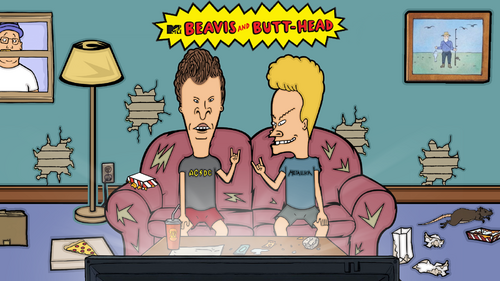
This beautiful B2S backglass was created by @JoePicasso for my Beavis and Butthead table. Thank you so much @JoePicasso! Enjoy! -
View File BarbWire(Gottlieb1996)JoePicassoModv1.2(VR ROOM ) Here's another VR Conversion I want to share with you guys. This was created in collaboration with Rascal, who helped me a lot. If you don't know something yourself, Rascal knows it. 🤗 Why did I want to convert this particular table, simply because it's on my list and I really like it. I hope someone has as much fun with it and like it as I do, so I'm going to share it with you guys now. '********************* VR OPTIONS ************************************************** '*********************************************************************************** 'VR Logo - Set VRLogo = 0 to turn off VR Logo. VRLogo = 1 'VR Poster-Right - Set VRPosterR = 0 to turn off VR Poster-Right. VRPosterR = 1 'VR Poster-Left - Set VRPosterL = 0 to turn off VR Poster-Left. VRPosterL = 1 'VR table Glass - Set Glass = 0 to turn off VR playfield Glass. Glass = 1 'VR Playfield glass Scratches - Set to 0 if you want to turn them off. GlassScratch = 1 '*********************************************************************************** You don't need B2S but i want to give Credits to HiRez00 because i used his Backglass and his realy good Quality Speaker/DMD Grill Texture. And without my friend Rascal, we would only have a standard grill. This is the Link to the BS2 and Grill i used: A big thanks to Joe Picasso for creating such a beautyfull table and give me Permission to convert it to VR. I also want to thank Rawd for his VR toys and Sixtoe for his great templates and Rascal for helping me with the Mesh and everything else and of course Studlygoorite for beta testing . Submitter Ahr1man Submitted 12/11/22 Category VR - Virtual Reality Pinball Modified by Ahr1man, Rascal