
-
SYSTEM SEARCH
System Scanners Online:
Username: Guest
>> System Scan?
>> The Universe >
Incoming Message:
Due to system limitations searching with words of 3 or less characters will not return results. For instance; Doctor Who. This will not return results as the system is trying to search for both Doctor AND Who in which Who will not be found as it's a 3 character word. To find Doctor Who; you'd search for either Doctor or "Doctor Who".
Search Tips:
For specific searches; enclose your search with quotes. Example: "Doctor Who" or "Addams Family".
Search the Community
Showing results for tags 'flupper'.
Found 5 results
-
Version 1.2.1
2637 downloads
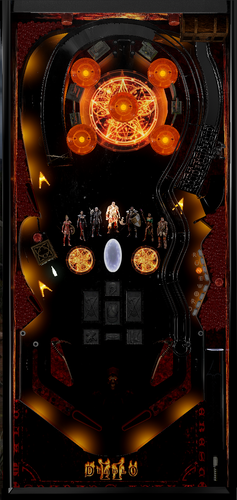
Welcome to my first VPX table! As an avid player of Diablo 2 for the last 26 years, I knew as soon as I got the inkling to create my very own table... It had to be Diablo 2. About 3 months of feverish work went into crafting this and I think both Diablo 2 and Pinball fans alike are going to get a real thrill out of it. There are very helpful FULLY VOICED live tutorials IN GAME. You must hold both flippers during attract mode to access the tutorials and then you can navigate them via the flippers. StartGame button exits tutorials whenever and returns to attract. Additionally, there is an extensive and detailed rulesheet PDF for your reading pleasure. The table itself will tell you a lot about what's happening as well between lights, callouts and a deep DMD system, but the rulesheet can really ground you in the details. All 5 iconic Acts of Diablo 2 are here to be enjoyed with each boss, music and enemies... Plus something special for the fans in the Wizard Mode/Act 6. Like Diablo 2, this game is cutthroat, but you will be rewarded for your skill. 3 VR rooms: Mixed Reality, Minimal and a custom Mega Room I put together. **Mixed Reality uses Magenta 255, 0, 255. If you want to change it to White or something else, all you need to do is, in the editor, search "Sphere" in the layers panel, double click it, go to its properties and scroll down to Modulate Color. Click the color box and set to whatever you want. Then save. The artistic intention for day/night setting is about 12-13%. Check F12 for options/feature toggles. The table has the features VPX fans have come to expect: Nfozzy, Fleep, Flupper bumpers/flashers and a quality FlexDMD. BIG THANKS to the VPW team for their Resource table and YouTube series. This is over 13000 lines of code and a lot of interwoven systems with basically RPG math underneath and I am just one guy with a Claude Max plan, so while the game is bug free as far as *I* know it, you may run into things as you play. I do plan to support this project going forward and possibly add more content. I have ideas. I am having my firstborn this August, and this table is in a great spot as is, so it was time to release... Oh, and DIABLO 2 RELEASED on the 28th of June in 2000... So that's fun. Celebrate that by downloading my table. Extra special thanks to my boys @MekelburgJ and @Krobs for playtesting this for months with me and giving their feedback. They have been in this thing with me from early on. Also special thanks to @Burger for his expertise, advice and creating a B2S for you VPin folks (im all VR, sorry). The B2S is one photo, but in VR you can select from 4 backglass photos - 2 classic and 2 new. I hope people have a blast with this and get sucked into it's systems and presentation the way my buddies and I have. Please let me know what you think in the comments/reviews. Long live Diablo 2. ~ ChuckRibbits -
 View File Diablo 2 (Original 2026) Welcome to my first VPX table! As an avid player of Diablo 2 for the last 26 years, I knew as soon as I got the inkling to create my very own table... It had to be Diablo 2. About 3 months of feverish work went into crafting this and I think both Diablo 2 and Pinball fans alike are going to get a real thrill out of it. There are very helpful FULLY VOICED live tutorials IN GAME. You must hold both flippers during attract mode to access the tutorials and then you can navigate them via the flippers. StartGame button exits tutorials whenever and returns to attract. Additionally, there is an extensive and detailed rulesheet PDF for your reading pleasure. The table itself will tell you a lot about what's happening as well between lights, callouts and a deep DMD system, but the rulesheet can really ground you in the details. All 5 iconic Acts of Diablo 2 are here to be enjoyed with each boss, music and enemies... Plus something special for the fans in the Wizard Mode/Act 6. Like Diablo 2, this game is cutthroat, but you will be rewarded for your skill. 3 VR rooms: Mixed Reality, Minimal and a custom Mega Room I put together. **Mixed Reality uses Magenta 255, 0, 255. If you want to change it to White or something else, all you need to do is, in the editor, search "Sphere" in the layers panel, double click it, go to its properties and scroll down to Modulate Color. Click the color box and set to whatever you want. Then save. The artistic intention for day/night setting is about 12-13%. Check F12 for options/feature toggles. The table has the features VPX fans have come to expect: Nfozzy, Fleep, Flupper bumpers/flashers and a quality FlexDMD. BIG THANKS to the VPW team for their Resource table and YouTube series. This is over 13000 lines of code and a lot of interwoven systems with basically RPG math underneath and I am just one guy with a Claude Max plan, so while the game is bug free as far as *I* know it, you may run into things as you play. I do plan to support this project going forward and possibly add more content. I have ideas. I am having my firstborn this August, and this table is in a great spot as is, so it was time to release... Oh, and DIABLO 2 RELEASED on the 28th of June in 2000... So that's fun. Celebrate that by downloading my table. Extra special thanks to my boys @MekelburgJ and @Krobs for playtesting this for months with me and giving their feedback. They have been in this thing with me from early on. Also special thanks to @Burger for his expertise, advice and creating a B2S for you VPin folks (im all VR, sorry). The B2S is one photo, but in VR you can select from 4 backglass photos - 2 classic and 2 new. I hope people have a blast with this and get sucked into it's systems and presentation the way my buddies and I have. Please let me know what you think in the comments/reviews. Long live Diablo 2. ~ ChuckRibbits Submitter ChuckRibbits Submitted 06/27/26 Category VPX - Pinball Tables VPX Standalone No
 -
untilHi pinballers! You are all welcome to come and play in my latest VPX tournament using William's Tales of the Arabian Nights' table by @Flupper. It started yesterday, Tuesday October 7th and finishes on Tuesday October 14th. See info card below for details! I use live tournament leaderboards on iScored, which also incorporates a live ranking leaderboard for an individual's top 16 scores posted on my live tables, covering not only live tournaments but all-time leaderboards too! Max Velocity
-
untilHi again pinballers! Feel the Power of the Wind! You are all welcome to come and play in my latest VPX tournament using William's 1990 table 'Whirlwind 'by @Flupper. It started yesterday and finishes on Friday September 5th. See info card below for details! I now use live tournament leaderboards on iScored, which also incorporates a live ranking leaderboard for an individual's top 10 scores posted on my live tables, covering not only live tournaments but all-time leaderboards too! Max Velocity
-

Version 1.0.0
141 downloads
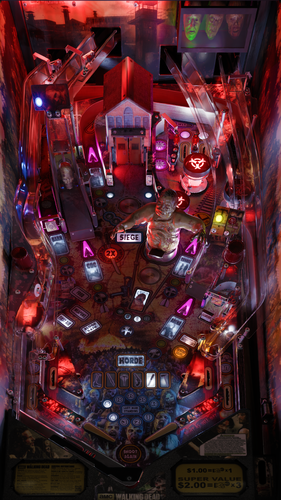
This POV is for 43" display in cabinet mode using VPX10.8. It is an alternate option to those offered by LoadedWeapon. The objective of this POV is to maximise the depth perception of the playfield utilising the "window" POV mode. The result is that, when viewed from directly from above, the image may look distorted - as shown in the attached screen shot - but when viewed from the front of the cabinet, the images regain their perspective (much like "STOP" painted on a road surface). Although specifically customised for this particular table, it should also be a close fit for the same table made by other creators. Installation procedure: 1. Make a backup copy of your *.ini file for this table. 2. Paste the downloaded file into your "Tables" folder 3. Rename the downloaded file to be exactly the same as your table file and B2S file. The most reliable way to do this is to select all files, right click with mouse, then select rename option on one of the files. All 3 files will then be renamed automatically Troubleshooting: a) If you start the table and it is not visible or not centred properly 1. press f12. 2. Make sure you are on "page 2/3" which is the POV setting screen. 3. Use the Magna button to highlight "Vertical Offset" 4. Use your flipper keys to adjust this value which will move playfield up or down. 5. If the playfield is "black colour" it means that it is "beyond" the location of your display screen. In such a case the "Vertical Offset" value is most likely a high negative value. In that case press the right Magna key. The value should reduce towards zero. As you get near to zero the playfield will become visible. Continue to adjust it until the apron is aligned with the bottom of your display screen.-
- 8
-

-
- walking dead
- pov
- (and 2 more)
.thumb.png.f1d5ddb3b218d4ddca5dbe967f50df0d.png)
