-
SYSTEM SEARCH
System Scanners Online:
Username: Guest
>> System Scan?
>> The Universe >
Incoming Message:
Due to system limitations searching with words of 3 or less characters will not return results. For instance; Doctor Who. This will not return results as the system is trying to search for both Doctor AND Who in which Who will not be found as it's a 3 character word. To find Doctor Who; you'd search for either Doctor or "Doctor Who".
Search Tips:
For specific searches; enclose your search with quotes. Example: "Doctor Who" or "Addams Family".
Search the Community
Showing results for tags 'Walking dead'.
Found 7 results
-

Version 1.0.0
69 downloads
Walking Dead, the Wheel- 1 comment
-
- 6
-

-
- wheel
- walking dead
- (and 1 more)
-

Version 1.0.0
141 downloads
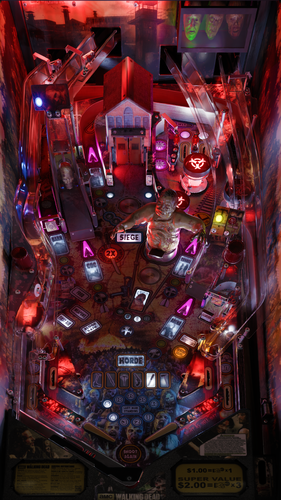
This POV is for 43" display in cabinet mode using VPX10.8. It is an alternate option to those offered by LoadedWeapon. The objective of this POV is to maximise the depth perception of the playfield utilising the "window" POV mode. The result is that, when viewed from directly from above, the image may look distorted - as shown in the attached screen shot - but when viewed from the front of the cabinet, the images regain their perspective (much like "STOP" painted on a road surface). Although specifically customised for this particular table, it should also be a close fit for the same table made by other creators. Installation procedure: 1. Make a backup copy of your *.ini file for this table. 2. Paste the downloaded file into your "Tables" folder 3. Rename the downloaded file to be exactly the same as your table file and B2S file. The most reliable way to do this is to select all files, right click with mouse, then select rename option on one of the files. All 3 files will then be renamed automatically Troubleshooting: a) If you start the table and it is not visible or not centred properly 1. press f12. 2. Make sure you are on "page 2/3" which is the POV setting screen. 3. Use the Magna button to highlight "Vertical Offset" 4. Use your flipper keys to adjust this value which will move playfield up or down. 5. If the playfield is "black colour" it means that it is "beyond" the location of your display screen. In such a case the "Vertical Offset" value is most likely a high negative value. In that case press the right Magna key. The value should reduce towards zero. As you get near to zero the playfield will become visible. Continue to adjust it until the apron is aligned with the bottom of your display screen.-
- 8
-
-
- walking dead
- pov
- (and 2 more)
-
.thumb.png.f1d5ddb3b218d4ddca5dbe967f50df0d.png) untilHi folks, I'm hosting another dedicated series of VPX tournaments starting tonight using solely ''The Walking Dead LE' table by Stern from 2014. It starts today, Wednesday April 23 through to Wednesday April 30 (7 days) and will repeat weekly on Wednesdays thereafter until further notice via the dedicated 'The Walking Dead' tournament channel on my Discord 'Max Velocity Gaming'. Interested and want to know more? Just let me know either on here, my own Discord as mentioned, the VPUniverse Discord or any of the other 'main' pinball ones. I'll then guide you in the right direction! Feel feel to join in the fun and see if you can top the leaderboard! Regards, Max Velocity
untilHi folks, I'm hosting another dedicated series of VPX tournaments starting tonight using solely ''The Walking Dead LE' table by Stern from 2014. It starts today, Wednesday April 23 through to Wednesday April 30 (7 days) and will repeat weekly on Wednesdays thereafter until further notice via the dedicated 'The Walking Dead' tournament channel on my Discord 'Max Velocity Gaming'. Interested and want to know more? Just let me know either on here, my own Discord as mentioned, the VPUniverse Discord or any of the other 'main' pinball ones. I'll then guide you in the right direction! Feel feel to join in the fun and see if you can top the leaderboard! Regards, Max Velocity -

Version 1.0.0
405 downloads
The Walking Dead Animated Wheel Also figured out transparency with GIF Previews, have to use alternate software to render it.- 3 comments
-
- 26
-
-
- walking dead
- stern
- (and 1 more)
-
Version 1.0
287 downloads
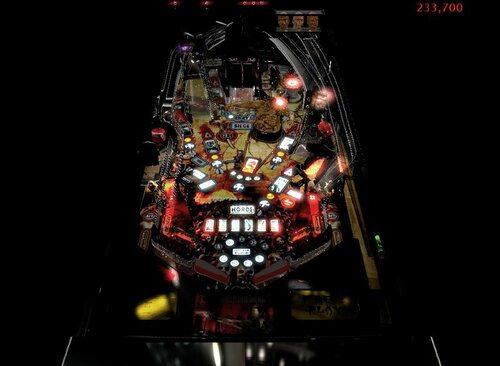
Ghost Mod of Walking Dead . Note: I did not make this table. Thanks to creators of table. Mod includes: NO ROMS. Just double click and play. VPX mod created EXCLUSIVE for VPUniverse. Includes new sounds, gameplay, scoring, background, scripts. Plays on VPX 1.0 includes new music, sounds, lighting. This is not a CAB game. This is moded for PC play. No Roms needed. Just VPX installed.-
- 3
-
-
- walking dead
- vpx
- (and 5 more)
-
- 1 review
-
- 4
-
-
- walking dead
- hyperpin
- (and 1 more)
-
- 2 reviews
-
- 1
-
-
- Walking Dead
- Stern
- (and 2 more)