Jump to content
  •  


    31d68d9f-35f1-43cb-8cda-ec967dd60421.jpg

Tarcisio Style Wheels

Tarcisio Style Wheel Images

  1. All
  2. A
  3. B
  4. C
  5. D
  6. E
  7. F
  8. G
  9. H
  10. I
  11. J
  12. K
  13. L
  14. M
  15. N
  16. O
  17. P
  18. Q
  19. R
  20. S
  21. T
  22. U
  23. V
  24. W
  25. X
  26. Y
  27. Z
  28. #

4984 files

  1. Doctor WHO Wheel (standard & PuP)

    Salut,
     
    Voici une wheel Doctor WHO.
    2 versions disponnibles :
    - Wheel non-PuP
    - Wheel PuP version

    41 downloads

       (0 reviews)

    0 comments

    Submitted

  2. Diner Wheel (standard & PuP)

    Salut,
     
    Voici une wheel Diner. (l'original n'est pas de moi)
    2 versions disponnibles :
    - Wheel non-PuP
    - Wheel PuP version

    41 downloads

       (0 reviews)

    0 comments

    Submitted

  3. Die Hard Trilogy Wheel (standard & PuP)

    Salut,
     
    Voici une wheel Die Hard Trilogy.
    2 versions disponnibles :
    - Wheel non-PuP
    - Wheel PuP version

    35 downloads

       (0 reviews)

    0 comments

    Submitted

  4. Diablo Wheel (standard & PuP)

    Salut,
     
    Voici une wheel Diablo.
    2 versions disponnibles :
    - Wheel non-PuP
    - Wheel PuP version

    27 downloads

       (0 reviews)

    0 comments

    Submitted

  5. City Hunter Wheel (standard & PuP)

    Salut,
     
    Voici une wheel City Hunter.
    2 versions disponnibles :
    - Wheel non-PuP
    - Wheel PuP version

    22 downloads

       (0 reviews)

    0 comments

    Submitted

  6. Breakshot Wheel (standard & PuP)

    Salut,
     
    Voici une wheel Breakshot.
    2 versions disponnibles :
    - Wheel non-PuP
    - Wheel PuP version

    33 downloads

       (0 reviews)

    0 comments

    Submitted

  7. Bram Stoker's Dracula Wheel (standard & PuP)

    Salut,
     
    Voici une wheel Bram Stoker's Dracula.
    2 versions disponnibles :
    - Wheel non-PuP
    - Wheel PuP version

    43 downloads

       (0 reviews)

    0 comments

    Submitted

  8. Black Rose Wheel (standard & PuP)

    Salut,
     
    Voici une wheel Black Rose.
    2 versions disponnibles :
    - Wheel non-PuP
    - Wheel PuP version

    54 downloads

       (0 reviews)

    1 comment

    Submitted

  9. Big Bang Bar Wheel (standard & PuP)

    Salut,
     
    Voici une wheel Big Bang Bar.
    2 versions disponnibles :
    - Wheel non-PuP
    - Wheel PuP version

    38 downloads

       (0 reviews)

    0 comments

    Submitted

  10. Beat the Clock Wheel (standard & PuP)

    Salut,
     
    Voici une wheel Beat the Clock.
    2 versions disponnibles :
    - Wheel non-PuP
    - Wheel PuP version

    31 downloads

       (0 reviews)

    0 comments

    Submitted

  11. Batman66 Wheel (standard & PuP)

    Salut,
     
    Voici une wheel Batman66.
    2 versions disponnibles :
    - Wheel non-PuP
    - Wheel PuP version

    47 downloads

       (0 reviews)

    0 comments

    Submitted

  12. Batman Wheel (standard & PuP)

    Salut,
     
    Voici une wheel Batman.
    2 versions disponnibles :
    - Wheel non-PuP
    - Wheel PuP version

    37 downloads

       (0 reviews)

    0 comments

    Submitted

  13. BarbWire Wheel (standard & PuP)

    Salut,
     
    Voici une wheel BarbWire.
    2 versions disponnibles :
    - Wheel non-PuP
    - Wheel PuP version

    31 downloads

       (0 reviews)

    0 comments

    Submitted

  14. Pain wheel

    Pain wheel

    15 downloads

       (0 reviews)

    0 comments

    Submitted

  15. Ali-Baba wheel

    Ali-Baba wheel

    19 downloads

       (0 reviews)

    0 comments

    Submitted

  16. Stereo 3D and BAM head-tracking wheels and scripts

    For all fellow stereo 3D and/or BAM head-tracking enthusiasts who would like to easily switch between these modes and normal "pancake" mode for VPX in PinUP Popper:
     
    Some wheel images and scripts that can be used for anaglyph 3D, polarized 3D and BAM head-tracking alternate run modes for VPX in PinUP Popper. For more information regarding alternate run modes in PinUP Popper, see: https://www.nailbuster.com/wikipinup/doku.php?id=alt_mode.
     
    (Note that for Future Pinball this procedure is not necessary, you can simply assign a key or button to toggle stereo 3D and BAM head-tracking in-game and at the same time. Unfortunately VPX currently does not allow switching between stereo 3D, BAM head-tracking or normal mode in game, nor run them simultaneously, hence the need for separate alternate run modes.)
     
    They can be used for VPX in PinUP Popper as follows:
    Add wheel images and Powershell scripts to your PinUP Popper setup, e.g. in C:\vPinball\PinUPSystem\POPMedia\Default\System Add useAltWheels=1 in PinUP Popper's GlobalConfig script: Open PinUP Popper Config, click on the Popper Setup tab, and click on the GlobalConfig button. On the Script tab, add "useAltWheels=1" (without quotes) in the window and click the Save button. Add the following code in the launch and close scripts for VPX in PinUP Popper: Open PinUP Popper Config, click on the Popper Setup tab, click on the Emulators button, and select Visual Pinball X in the list on the left. On the Launch Setup tab, there are two windows: Top window shows the VPX launch script, botton window shows the VPX close script. Add the following pieces of code in those window (don’t over-write the existing code), and save by clicking on the checkmark button. In the VPX launch script, copy-paste the following immediately after the "SET VPXEXE=vpinballx.exe" line: if "[ALTMODE]"=="A3D" ( SET VPXEXE=VPinballX_GL64.exe powershell -executionpolicy bypass "& '[STARTDIR]POPMedia\Default\System\VPX_enable_Anaglyph3D.ps1'" ) if "[ALTMODE]"=="P3D" ( SET VPXEXE=VPinballX_GL64.exe powershell -executionpolicy bypass "& '[STARTDIR]POPMedia\Default\System\VPX_enable_Polarized3D.ps1'" ) if "[ALTMODE]"=="BAM" ( START "" "C:\vPinball\FuturePinball\BAM\BAM-Tracker.exe" timeout /t 1 /nobreak > NUL powershell -executionpolicy bypass "& '[STARTDIR]POPMedia\Default\System\VPX_enable_BAM.ps1'" )  
    In the VPX close script, add the following at the bottom: if "[ALTMODE]"=="A3D" ( powershell -executionpolicy bypass "& '[STARTDIR]POPMedia\Default\System\VPX_disable_Stereo3D.ps1'" ) if "[ALTMODE]"=="P3D" ( powershell -executionpolicy bypass "& '[STARTDIR]POPMedia\Default\System\VPX_disable_Stereo3D.ps1'" ) if "[ALTMODE]"=="BAM" ( powershell -executionpolicy bypass "& '[STARTDIR]POPMedia\Default\System\VPX_disable_BAM.ps1'" taskkill /f /im "BAM-Tracker.exe" )  
    Open PinUP Popper Config, click on the Game Manager tab, and click on the Games Manager button. Add "BAM,A3D,P3D" (without quotes) in the Alternate Run Modes field of every VPX game in your collection (yes, this is tedious if you have 100+ tables, sorry 🙂). If you are upgrading from version 1.2 and have an extensive table collection, you can use the SQL command in the included UpdateDB.sql file to automate this process.  
    Change folder locations in the scripts according to your personal setup. Change the value of the Stereo3D parameter according to your preferred stereo 3D mode (e.g. 5 = red-cyan anaglyph, 3 = interlaced polarized). Note that once stereo 3D mode is enabled, you can toggle the specific mode in-game by pressing F10.
     
    Enjoy!
     
    --------------------
     
    Optional:
     
    For users that prefer different POV's for stereo 3D mode and normal mode, this can be accomplished by adding some copy commands of the table ini file in the VPX launch and close scripts, e.g. by replacing the "if [ALTMODE]== (...)" code blocks in step 3 above as follows:
    VPX launch script: if "[ALTMODE]"=="A3D" ( SET VPXEXE=VPinballX_GL64.exe copy "[DIRGAME]\[GAMENAME].ini" "[DIRGAME]\[GAMENAME].ini.normal" /Y copy "[DIRGAME]\[GAMENAME].ini.stereo3D" "[DIRGAME]\[GAMENAME].ini" /Y powershell -executionpolicy bypass "& '[STARTDIR]POPMedia\Default\System\VPX_enable_Anaglyph3D.ps1'" ) if "[ALTMODE]"=="P3D" ( SET VPXEXE=VPinballX_GL64.exe copy "[DIRGAME]\[GAMENAME].ini" "[DIRGAME]\[GAMENAME].ini.normal" /Y copy "[DIRGAME]\[GAMENAME].ini.stereo3D" "[DIRGAME]\[GAMENAME].ini" /Y powershell -executionpolicy bypass "& '[STARTDIR]POPMedia\Default\System\VPX_enable_Polarized3D.ps1'" )  
    VPX close script:  if "[ALTMODE]"=="A3D" ( copy "[DIRGAME]\[GAMENAME].ini" "[DIRGAME]\[GAMENAME].ini.stereo3D" /Y copy "[DIRGAME]\[GAMENAME].ini.normal" "[DIRGAME]\[GAMENAME].ini" /Y powershell -executionpolicy bypass "& '[STARTDIR]\POPMedia\Default\System\VPX_disable_Stereo3D.ps1'" ) if "[ALTMODE]"=="P3D" ( copy "[DIRGAME]\[GAMENAME].ini" "[DIRGAME]\[GAMENAME].ini.stereo3D" /Y copy "[DIRGAME]\[GAMENAME].ini.normal" "[DIRGAME]\[GAMENAME].ini" /Y powershell -executionpolicy bypass "& '[STARTDIR]\POPMedia\Default\System\VPX_disable_Stereo3D.ps1'" )  
     

    99 downloads

       (3 reviews)

    13 comments

    Updated

  17. Bugs Bunny's Birthday Ball Wheel (standard & PuP)

    Salut,
     
    Voici une wheel Bugs Bunny's Birthday Ball.
    2 versions disponnibles :
    - Wheel non-PuP
    - Wheel PuP version

    38 downloads

       (0 reviews)

    0 comments

    Submitted

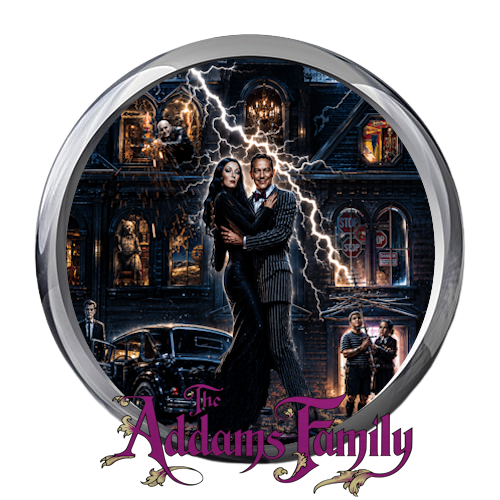
  18. Addams Family Wheel (standard & PuP)

    Salut,
     
    Voici une wheel The Addams Family.
    2 versions disponnibles :
    - Wheel non-PuP
    - Wheel PuP version

    42 downloads

       (0 reviews)

    0 comments

    Submitted

  19. Bad Cats Wheel (standard & PuP)

    Salut,
     
    Voici une wheel Bad Cats.
    2 versions disponnibles :
    - Wheel non-PuP
    - Wheel PuP version

    39 downloads

       (0 reviews)

    0 comments

    Submitted

  20. Aladdin Wheel (standard & PuP)

    Salut,
     
    Voici une wheel Aladdin.
    2 versions disponnibles :
    - Wheel non-PuP
    - Wheel PuP version

    71 downloads

       (0 reviews)

    0 comments

    Updated

  21. ACDC Wheel (standard & PuP)

    Salut,
     
    Voici une wheel ACDC.
    2 versions disponnibles :
    - Wheel non-PuP
    - Wheel PuP version

    31 downloads

       (0 reviews)

    0 comments

    Updated

  22. ACDC Luci Wheel (standard & PuP)

    Salut,
     
    Voici une wheel ACDC Luci.
    2 versions disponnibles :
    - Wheel non-PuP
    - Wheel PuP version

    52 downloads

       (0 reviews)

    0 comments

    Submitted

  23. Template Wheel PoLoMoD (standard & PuP)

    Salut,
     
    Voici le template pour créer vos wheels si vous souhaitez créer les votres.
    Fichier GIMP 1500x1500 (Calques Glass et PuP-Pack Optionnels)

    37 downloads

       (1 review)

    0 comments

    Submitted

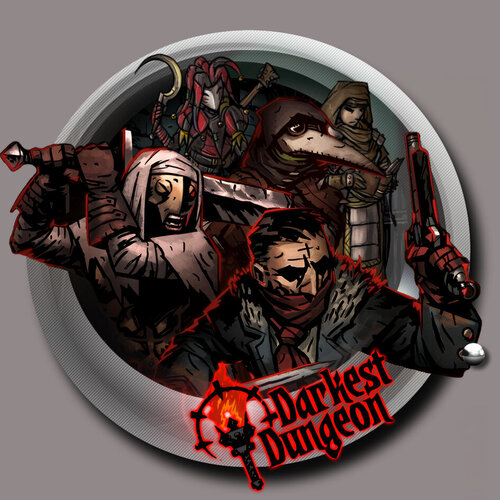
  24. Darkest Dungeon Wheel (standard & PuP)

    Salut,
     
    Voici une wheel Darkest Dungeon.
    2 versions disponnibles :
    - Wheel non-PuP
    - Wheel PuP version

    64 downloads

       (0 reviews)

    0 comments

    Submitted

  25. Austin Powers Wheel (standard & PuP)

    Salut,
     
    Voici une wheel Austin Powers.
    2 versions disponnibles :
    - Wheel non-PuP
    - Wheel PuP version

    42 downloads

       (1 review)

    0 comments

    Submitted

×
  • Create New...