
-
SYSTEM SEARCH
System Scanners Online:
Username: Guest
>> System Scan?
>> The Universe >
Incoming Message:
Due to system limitations searching with words of 3 or less characters will not return results. For instance; Doctor Who. This will not return results as the system is trying to search for both Doctor AND Who in which Who will not be found as it's a 3 character word. To find Doctor Who; you'd search for either Doctor or "Doctor Who".
Search Tips:
For specific searches; enclose your search with quotes. Example: "Doctor Who" or "Addams Family".
Search the Community
Showing results for tags 'vpupatch'.
Found 11 results
-
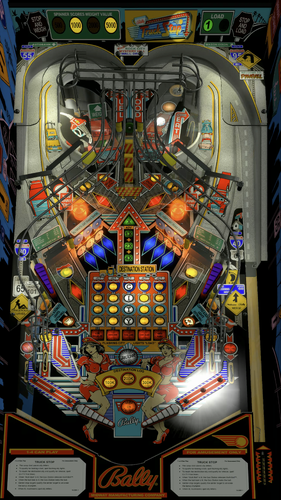
Version 1.0.0
237 downloads
Big Betty's Truck Stop (Bally 1988) Side Blade Mod. Big thanks to agentEighty6 for allowing me to add these to his table! Have fun!! Original Table Author: agentEighty6 Original Table Version: 2.1.0 Original Table Link:- 2 reviews
-
- 32
-

-
- sideblade mod
- truck stop
- (and 6 more)
-

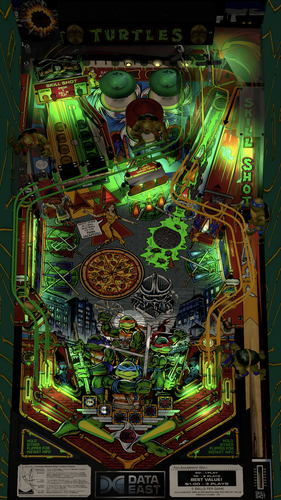
Version 1.0.0
254 downloads
Teenage Mutant Ninja Turtles (Data East 1991) Side blade Mod. Big thanks to Gedankekojote97 for creating this awesome table! Have fun!! Original Table Author: Gedankekojote97 Original Table Version: 1.0 Original Table Link: Please be sure to check out capnclaw's version of these side blades as well for a different option!- 1 review
-
- 19
-
-
- sideblade mod
- tmnt
- (and 9 more)
-
View File Teenage Mutant Ninja Turtles (Data East 1991) Sideblade Mod Teenage Mutant Ninja Turtles (Data East 1991) Side blade Mod. Big thanks to Gedankekojote97 for creating this awesome table! Have fun!! Original Table Author: Gedankekojote97 Original Table Version: 1.0 Original Table Link: Submitter baberim Submitted 03/03/25 Category VPURemix - VPX Table Patches Modified by Baberim Original Table Version 1.0
-
View File Truck Stop (Bally 1993) Sideblade Mod Big Betty's Truck Stop (Bally 1988) Side Blade Mod. Big thanks to agentEighty6 for allowing me to add these to his table! Have fun!! Original Table Author: agentEighty6 Original Table Version: 2.1.0 Original Table Link: Submitter baberim Submitted 03/01/25 Category VPURemix - VPX Table Patches Modified by Baberim Original Table Version 2.1.0
-
Version v1.4b_VP99_DT
626 downloads
Desktop Patch for Pirates Of the Caribbean.vpt by 85Vett (coolball for the Desktop-Patch) Changes i´ve done - added new Backdrop - change the values to create a desktop version - adjusts the flashers I'm not really happy with the Flipper settings, maybe someone can help with better settings. Need a better placed wall (for this desktop version at the plank to prevent ball from getting stuck behind bumper. Download and use the VPU Patching System - VPPatch - 32bit & 64bit 1.02 to create the Mod http://vpuniverse.com/forums/files/file/2581-vpu-patching-system-vppatch-32bit-64bit/ Download the original Table: "Pirates Of the Caribbean.vpt" /http://vpuniverse.com/forums/files/file/2458-pirates-of-the-caribbean-stern-2006-85vett-fs-12/ Use the Mod: "PotC_v1.4b_VP99_DT.dif" Have fun To Apply a patch: a. If you do not already have the table that the patch was created for; you will need to download that file. Read the "ReadMe.txt" file that comes with the patch download. The file should contain a link to the original file that the patch is based on. b. Make sure that you are on the "Apply Patch" tab located at the top of the window. c. Under "Original Table (Unmodified)". Click on "Choose" and then select the Original Unmodified Table that the patch was created for. d. Under "New Table Patch" click on "Choose" and select the patch file (.dif) that you want to apply to the table. e. Under "New Table File Name". Type in the name that you want to call your new table. Make sure that the file name ends in .vpt. f. Click "Apply Patch" - You will get a pop-up window indicating the location where your new file was created. This should be in the "mods" folder located in the same folder as the VPPatchXX.exe. If you have made any changes to the original table release then this patch will not work. -

Version 1.0.1
135 downloads
Thank you sliderpoint for the funtastic table and the permission to mod your table. Thank you freneticamnesic for fixing a transparency issue with the left rail image. Changes I have done. - added new Backdrop - changed the values to create a desktop version - adjusted rails and side walls Download and use the VPU Patching System - VPPatch - 32bit & 64bit 1.02 to create the Mod. http://vpuniverse.com/forums/files/file/2581-vpu-patching-system-vppatch-32bit-64bit/ Download the original Table: Road Kings (Williams 1986) SPv1 FS VP99x PM5 1 @ http://vpuniverse.com/forums/files/file/3054-road-kings-williams-1986-spv1-fs-vp99x-pm5/ This is the VP9.9x mod use this file as the Original Table Road Kings (Williams 1986) SPv1 FS VP99x.vpt To Apply a patch: a. If you do not already have the table that the patch was created for; you will need to download that file. Read the "ReadMe.txt" file that comes with the patch download. The file should contain a link to the original file that the patch is based on. b. Make sure that you are on the "Apply Patch" tab located at the top of the window. c. Under "Original Table (Unmodified)". Click on "Choose" and then select the Original Unmodified Table that the patch was created for. d. Under "New Table Patch" click on "Choose" and select the patch file (.dif) that you want to apply to the table. e. Under "New Table File Name". Type in the name that you want to call your new table. Make sure that the file name ends in .vpt. f. Click "Apply Patch" - You will get a pop-up window indicating the location where your new file was created. This should be in the "mods" folder located in the same folder as the VPPatchXX.exe. If you have made any changes to the original table release then this patch will not work. -

Version v1.0
216 downloads
Desktop Patch for Austin Powers (Stern 2001)_HR_FS_VP9.2.1 _1.3 by Javier15 (coolball for the Desktop-Patch) Thank you Javier15 for the fantastic table and the permission to mod your table. Changes i´ve done - added new Backdrop - change the values to create a desktop version - adjusts the flashers Download and use the VPU Patching System - VPPatch - 32bit & 64bit 1.02 to create the Mod http://vpuniverse.com/forums/files/file/2581-vpu-patching-system-vppatch-32bit-64bit/ Download the original Table: "Austin Powers (Stern 2001)_HR_FS_VP9.2.1 _1.3" / http://vpuniverse.com/forums/files/file/2705-austin-powers-stern-2001-hr-fs-vp921/ Use the Mod: "AustinPowersdesk1.dif" Have fun To Apply a patch: a. If you do not already have the table that the patch was created for; you will need to download that file. Read the "ReadMe.txt" file that comes with the patch download. The file should contain a link to the original file that the patch is based on. b. Make sure that you are on the "Apply Patch" tab located at the top of the window. c. Under "Original Table (Unmodified)". Click on "Choose" and then select the Original Unmodified Table that the patch was created for. d. Under "New Table Patch" click on "Choose" and select the patch file (.dif) that you want to apply to the table. e. Under "New Table File Name". Type in the name that you want to call your new table. Make sure that the file name ends in .vpt. f. Click "Apply Patch" - You will get a pop-up window indicating the location where your new file was created. This should be in the "mods" folder located in the same folder as the VPPatchXX.exe. If you have made any changes to the original table release then this patch will not work. -
Version v1.0b
369 downloads
Desktop Patch for Spiderman Stern 1-01.zip by 85Vett (coolball for the Desktop-Patch) Thank you 85vett for the fantastic table and the permission to mod your table. Changes i´ve done - added new Backdrop - change the values to create a desktop version - adjusts the flashers Download and use the VPU Patching System - VPPatch - 32bit & 64bit 1.02 to create the Mod http://vpuniverse.com/forums/files/file/2581-vpu-patching-system-vppatch-32bit-64bit/ Download the original Table: "Spiderman Stern 1-01.zip" / http://vpuniverse.com/forums/files/file/2743-spiderman-fs-stern-2007-85vett/ Use the Mod: "Spidermandesk2.dif" Have fun To Apply a patch: a. If you do not already have the table that the patch was created for; you will need to download that file. Read the "ReadMe.txt" file that comes with the patch download. The file should contain a link to the original file that the patch is based on. b. Make sure that you are on the "Apply Patch" tab located at the top of the window. c. Under "Original Table (Unmodified)". Click on "Choose" and then select the Original Unmodified Table that the patch was created for. d. Under "New Table Patch" click on "Choose" and select the patch file (.dif) that you want to apply to the table. e. Under "New Table File Name". Type in the name that you want to call your new table. Make sure that the file name ends in .vpt. f. Click "Apply Patch" - You will get a pop-up window indicating the location where your new file was created. This should be in the "mods" folder located in the same folder as the VPPatchXX.exe. If you have made any changes to the original table release then this patch will not work. -
Version v1.0
459 downloads
Desktop Patch for XMen FS 1-02.zip by 85Vett (coolball for the Desktop-Patch) Thank you 85vett for the fantastic table and the permission to mod your table. Changes i´ve done - added new Backdrop - change the values to create a desktop version - adjusts the flashers Download and use the VPU Patching System - VPPatch - 32bit & 64bit 1.02 to create the Mod http://vpuniverse.com/forums/files/file/2581-vpu-patching-system-vppatch-32bit-64bit/ Download the original Table: "XMen FS 1-02.zip" / http://vpuniverse.com/forums/files/file/2679-x-men-pro-stern-2012-85vett/ Use the Mod: "XMENdesk1.dif" Have fun To Apply a patch: a. If you do not already have the table that the patch was created for; you will need to download that file. Read the "ReadMe.txt" file that comes with the patch download. The file should contain a link to the original file that the patch is based on. b. Make sure that you are on the "Apply Patch" tab located at the top of the window. c. Under "Original Table (Unmodified)". Click on "Choose" and then select the Original Unmodified Table that the patch was created for. d. Under "New Table Patch" click on "Choose" and select the patch file (.dif) that you want to apply to the table. e. Under "New Table File Name". Type in the name that you want to call your new table. Make sure that the file name ends in .vpt. f. Click "Apply Patch" - You will get a pop-up window indicating the location where your new file was created. This should be in the "mods" folder located in the same folder as the VPPatchXX.exe. If you have made any changes to the original table release then this patch will not work. -
Version v1.0
472 downloads
Desktop Patch for Ironman FS 1.04.zip by 85Vett (coolball for the Desktop-Patch) Thank you 85vett for the fantastic table and the permission to mod your table. Changes i´ve done - added new Backdrop - change the values to create a desktop version - adjusts the flashers Download and use the VPU Patching System - VPPatch - 32bit & 64bit 1.02 to create the Mod http://vpuniverse.com/forums/files/file/2581-vpu-patching-system-vppatch-32bit-64bit/ Download the original Table: "Ironman FS 1.04.zip" / http://vpuniverse.com/forums/files/file/2470-iron-man-stern-2010-85vett/ Use the Mod: "Ironmandesk1.dif" Have fun To Apply a patch: a. If you do not already have the table that the patch was created for; you will need to download that file. Read the "ReadMe.txt" file that comes with the patch download. The file should contain a link to the original file that the patch is based on. b. Make sure that you are on the "Apply Patch" tab located at the top of the window. c. Under "Original Table (Unmodified)". Click on "Choose" and then select the Original Unmodified Table that the patch was created for. d. Under "New Table Patch" click on "Choose" and select the patch file (.dif) that you want to apply to the table. e. Under "New Table File Name". Type in the name that you want to call your new table. Make sure that the file name ends in .vpt. f. Click "Apply Patch" - You will get a pop-up window indicating the location where your new file was created. This should be in the "mods" folder located in the same folder as the VPPatchXX.exe. If you have made any changes to the original table release then this patch will not work. -
Version v1.0
426 downloads
Desktop Patch for Tron FS 1-4.vpt by 85Vett (coolball for the Desktop-Patch) Thank you 85vett for the fantastic table and the permission to mod your table. Changes i´ve done - added new Backdrop - change the values to create a desktop version - adjusts the flashers Download and use the VPU Patching System - VPPatch - 32bit & 64bit 1.02 to create the Mod http://vpuniverse.com/forums/files/file/2581-vpu-patching-system-vppatch-32bit-64bit/ Download the original Table: "Tron FS 1-4.vpt" / http://vpuniverse.com/forums/files/file/2624-tron-le-stern-201185vett/ Use the Mod: "Trondesk1.dif" Have fun To Apply a patch: a. If you do not already have the table that the patch was created for; you will need to download that file. Read the "ReadMe.txt" file that comes with the patch download. The file should contain a link to the original file that the patch is based on. b. Make sure that you are on the "Apply Patch" tab located at the top of the window. c. Under "Original Table (Unmodified)". Click on "Choose" and then select the Original Unmodified Table that the patch was created for. d. Under "New Table Patch" click on "Choose" and select the patch file (.dif) that you want to apply to the table. e. Under "New Table File Name". Type in the name that you want to call your new table. Make sure that the file name ends in .vpt. f. Click "Apply Patch" - You will get a pop-up window indicating the location where your new file was created. This should be in the "mods" folder located in the same folder as the VPPatchXX.exe. If you have made any changes to the original table release then this patch will not work.
