Jump to content

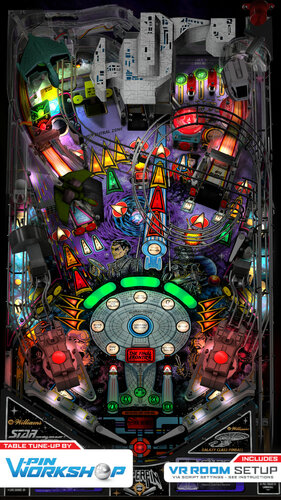
Star Trek The Next Generation (Williams 1993) VPW Mod

  • Get Support
  • Create an account or sign in to download this
download_no_perm
69691 Views
18302 Downloads
5 From 57 reviews
166.71 MB File Size
sttng_l7 ROM Name
Knorr, Clark Kent, VPW Created by
Knorr, Clark Kent, VPW Artwork by
Knorr, Clark Kent, VPW Scripting by
Williams Manufacturer
1993 Year

2 Screenshots

Engage!


VPW are proud to present a table tune up of Knorr and Clark Kent's version of Star Trek the Next Generation from Williams.


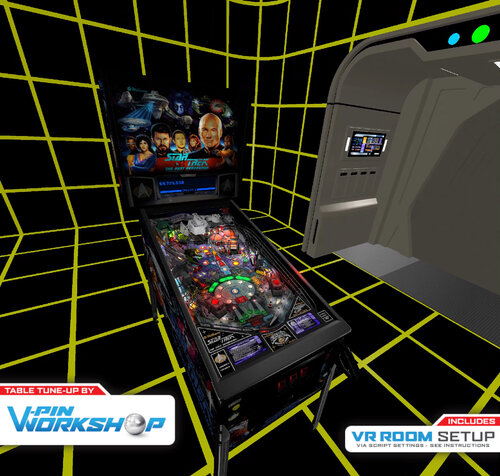
Although already great, we've added updated nfozzy physics, added some fleep sound whilst keeping the original recordings from the real machine, added the full VR room suite from Rawd and Steely, updated Sixtoes VR cabinet with Leojreimroc making a fully functional backbox in VR and lots of other tweaks and fixes along the way.


The table now plays even closer to the real thing and we hope you enjoy it!


VPW Mod v1.0
============
Project Lead - fluffhead35
VR Holodeck - Rawd/Steely
VR Work/Backglass - Sixtoe/Leojreimroc
Tweaks - ClarkKent, Apophis, Sixtoe

============


v01 - fluffhead35 - Added Flipper Triggers, Rubbers and Posts, Bumpers, slings, flipper, and table physics corrections.  Adding in fliper and physic damperner code.
                  - Adding in materials for all code
v02 - fluffhead35 - Added Fleep sound
v03 - fluffhead35 - finished Fleep sound and fixing upper flipper, changing flipper polarity to early 90's and later. Added Sling correction.  Increased plunger strength.
                  - Added logic to stop ball rolling sounds in subways.  Set FlipperCoilRampupMode to 2 
v05 - leojreimroc - Imported Rawd's Holodeck VR Room.  Adjusted Laser barriers for VR.
v06 - fluffhead35 - fixed flipper triggers.  Rubber thickness fixed on upper flipper.  Increased flipper hit sound level.  Updated sling rubbers to use bottom corner for post pass.
v07 - clarkkent   - deleted zCol_Rubber_Sleeve008, RubberPost4,  SubwayScoop_Prim
v08 - fluffhead35 - Made Posts for post pass collidable, adjusted flippers to be in line with guide.  Adjust playfield friction to .15.  Adjusted sling posts physics for post pass.
v09 - apophis     - Added new playfield mesh. Increased speed of slingshot animations. 
v10 - Rawd        - Added ClarkKent Cabinet artwork, some VR fixes and tweaks
v11 - leojreimroc - Implemented Iaaki's flasher code to all solenoid flashers.  Fixed a few flasher positions that were past the cabinet.  Implemented VR Backglass lighting.
v13 - fluffhead35 - Added new ball launch sound to help prevent high bass sounds.  Adjusted size of sleave and physic materials of start mission scoop.  Removed ball dampening triggers.
v14 - fluffhead35 - updated the sling posts for post pass based on clark kents suggestions.  Changed Table difficulty to 56. Added option to switch if ball launch should have bass lowered.
v15 - fluffhead35 - Set default wire Ramp sounds to be from clark kents samples.  Added option to use the other samples if user wants.  Changed ball out to brighter ball.  Turned off flipper corrections on upper right Flipper.
                  - Changed environment emission image to be shinyenvironment3blur4.  Adjusted gi around inlanes and inline insert lightings.
15d - set the falloff of gi lights to 5. Set the day night to 1, set environment lighting to black, adjusted warbird material, adjusted lighting around upper lanes.  Adjusted some random insert lighting.  Adjusted ramp friction based on clark kents suggestions.
15e - changed elasticity and scatter of sw57 to give ball more random bounces and goes down inlanes based on BountyBobs testing
16  - fluffhead35 - merged in nfozzy changed to init throughts at game start as well as using new flipper physics.  Removed target bouncer from sleeve in start mission scoop.  Lowered bumpercap3 from 25 to 20. Added TargetBouncer to Targets_hit
17  - Sixtoe       - Added VR logo back in, hooked up cannon light primitives to lighting system, cleaned up script

https://www.ipdb.org/machine.cgi?id=2357
https://vpuniverse.com/files/file/3084-star-trek-the-next-generation-williams-1993/
Contact Author First.
v10.7 required
Yes

What's New in Version 1.1   See changelog

Released

'v1.0.1 - Adjusted the neutral zone target, changed the vr wall heights to be correct
'v1.0.1a - disabled borgramp1a and set detarampendborg to collidable.
'v1.0.1b - adjusted the neutralzone sounds so that they will be heard. Moved sw48 on borgramp1 so that it see hit value, adjusted cannonlBall.z and cannonRBall.z to fix ball hitting habbit trail.
'v1.0.1c - added option to show cab rails in cabinet mode.  Added in staged flippers mod
'v1.0.1d - moved ramp3 to right a little to line up better with mission start scope.  Replaced the UpdateLamps subroutine with nFozzys versios to fix kickback light
'v1.0.1e - removed upper flipper from keyup and keydown as conflicted with solenoid calls.  
'v1.0.1f - Changed the Elasticity of neutral zone target to .2 and elasticity falloff to 0 for all targets
'v1.0.1g -  set T27P2 to be collidable so that ball hits target and gets into neutral zone
'v1.0.1h - scoopleft2 got moved to wrong position.  Fixed this issue.
'v1.0.1i - Added leftramp triger to start ramp sound.  Adjusting the ramp exit volumes some to make it better.  Added new logic for rampRoll to equalize sound and do a playsoundatvolumelevel call logic.
'        - Added left and right wire ramp gun ramp sounds.
'V1.0.1j - Replaced spinners that were used for gate animations with actual gates.
'v1.0.1k - fixed nuturalzone sound, changed sw27 to star and realigned, fixed issue with ramproll sound with default volume level not working right.  set some triggers to hidden.
'v1.0.1l - Added in code to try and help resolve vr dmd issue.
'v1.0.1m - nfozzy borg lamp fix, rawd vr reflection amount tweak, six klingon bird of prey tweak
'v1.0.1n - adjusted physics on lower sling posts.  Adjusted sounds lever for middle wire ramp. Put wirerampoff when entering borg ship.  Adjusted wireramp sound for vpw option.  
'v1.0.1o - Addeed Lockdown Firebutton. Removed unused sounds  Commented out Debug statements.  Made OriginalSounds the default.
'v1.0.1p - fixed missing variable and addede spacebackground.

User Feedback

Recommended Comments


MikeDASpike

Posted (edited)

table looks awesome in cabinettmode, but when I play this in VR, I have the 'Korpus1' primitive visible, instead of 'Korpus' (see the black side plan on the right side, its on the left as well, but transparant on 1 side))
1764728d1cb4a2d2530d9783764b6945.jpeg

Properly caused that my system is "seen" as cabinet mode 

Changing the "desktop init" sub slightly, shows it fine for me 

'**
'DesktopMode Init
'**

If table1.ShowDt = False and VRRoom = 0  then
    Korpus.visible = 0
    Korpus1.visible = 1
    LeftSideRail.visible = 0
    RightSideRail.visible = 0
Else
    Korpus.visible = 1
    Korpus1.visible = 0
    If VRRoom = 0 Then
        LeftSideRail.visible = 1
        RightSideRail.visible = 1
    Else
        LeftSideRail.visible = 0
        RightSideRail.visible = 0
    Korpus.visible = 1
    Korpus1.visible = 0
    End If
End if


Good job anyway

Edited by MikeDASpike
tomi5577

Posted

Very nice, very hard.

marie

Posted

Wow thanks VPW team. The table was already a showcase. curious how it looks, sounds and plays.

stefanaustria

Posted

It was/is perfect by Knorr and ClarkKent ... now witht some + ? Thanks all !

coolball

Posted

Thanks Team for this fantastic table.

  • Content Provider
RajoJoey

Posted

Great table from a great team. Thanks to all who were involved.

🤩

Gamblegamble89

Posted

I feel like the game or ball is lagging. The only other table Ive experienced this on was Cactus Canyon.  Any tips to make it run better?  all other games I run 4k on 3060 with 120HZ monitor no issues

toxie

Posted

Thanks! Note that PinMAME also supports the recently released, heavily bugfixed, LX-8 ROM.

eliory

Posted

2 hours ago, Gamblegamble89 said:

I feel like the game or ball is lagging. The only other table Ive experienced this on was Cactus Canyon.  Any tips to make it run better?  all other games I run 4k on 3060 with 120HZ monitor no issues

I have the same with cactus canyon, but this table run smooth, I got also 4k 120hz

plahta

Posted

Thank you again for your awesome work. I will go to my cab now ...:)

MrGrynch

Posted

What a treat!!! This is one of my all-time favorite tables, and now I can enjoy it even more!  Many thanks to the @VPinWorkshop team for creating these amazing tables.

castle11

Posted

love the VPW tables you guys are amazing.

thank you to all and the hard work

bigradders

Posted

I'm stoked to see this today, a big thank you to everyone involved and all the hard work that has been put into this


Matteo

Posted (edited)

Thank's :)

Edited by Matteo
Rod_72

Posted

amazing work by all, thanks

ronaldvg

Posted (edited)

First of all, again thanks for this beautiful update to an already great machine. VPW manages to make the best machines even better. Please everyone do not underestimate the amount of work that goes into this.


That being said, I read the remark of @toxie and I just managed to download and patch the LX-8 rom, but I am not seeing the VPINMAME release 3.6 that should support it. I do see that there was something added two days ago for this to work, but no release yet?

Edited by ronaldvg
GtecArcade

Posted

Just one question.... is this compatible with the Pup-pack?  I've had major problems with getting the pup-pack triggers to fire videos with all the TNG table versions out there.  I must bedoing something wrong but I don't know what.


Gameplay wise this is the best version of TNG I've played this is awesome, I love how they cut out the standard power up "test sequence" the table would do when initially starting it.

Tikimaster

Posted

PupPack runs nice here. No Problems.
 

DaRdog81

Posted

11 hours ago, MikeDASpike said:

table looks awesome in cabinettmode, but when I play this in VR, I have the 'Korpus1' primitive visible, instead of 'Korpus' (see the black side plan on the right side, its on the left as well, but transparant on 1 side))
1764728d1cb4a2d2530d9783764b6945.jpeg

Properly caused that my system is "seen" as cabinet mode 

Changing the "desktop init" sub slightly, shows it fine for me 

'**
'DesktopMode Init
'**

If table1.ShowDt = False and VRRoom = 0  then
    Korpus.visible = 0
    Korpus1.visible = 1
    LeftSideRail.visible = 0
    RightSideRail.visible = 0
Else
    Korpus.visible = 1
    Korpus1.visible = 0
    If VRRoom = 0 Then
        LeftSideRail.visible = 1
        RightSideRail.visible = 1
    Else
        LeftSideRail.visible = 0
        RightSideRail.visible = 0
    Korpus.visible = 1
    Korpus1.visible = 0
    End If
End if


Good job anyway

Thanks for this, fixed mine as well.

bombaj344

Posted

8 hours ago, Gamblegamble89 said:

I feel like the game or ball is lagging. The only other table Ive experienced this on was Cactus Canyon.  Any tips to make it run better?  all other games I run 4k on 3060 with 120HZ monitor no issues

Hey. Where did you download the LX-8 STTNG rom

bombaj344

Posted

1 hour ago, VpRod72 said:

amazing work by all, thanks


48 minutes ago, ronaldvg said:

First of all, again thanks for this beautiful update to an already great machine. VPW manages to make the best machines even better. Please everyone do not underestimate the amount of work that goes into this.


That being said, I read the remark of @toxie and I just managed to download and patch the LX-8 rom, but I am not seeing the VPINMAME release 3.6 that should support it. I do see that there was something added two days ago for this to work, but no release yet?

Hey. Where did you download the LX-8 STTNG rom

bladeof

Posted

Thank You VPW Team.

Cliffy

Posted

1 hour ago, ronaldvg said:

First of all, again thanks for this beautiful update to an already great machine. VPW manages to make the best machines even better. Please everyone do not underestimate the amount of work that goes into this.


That being said, I read the remark of @toxie and I just managed to download and patch the LX-8 rom, but I am not seeing the VPINMAME release 3.6 that should support it. I do see that there was something added two days ago for this to work, but no release yet?

https://github.com/vpinball/pinmame/suites/11062947045/artifacts/562559850


Once you've patched the rom zip it all back together and name it sttng_x8.zip and drop in your vpinmame\roms folder. 

Run setup.exe in the vpinmame folder and you should now see the lx-8 MOD rom, click check roms and if all don't show as good you didn't patch correctly or didn't zip all the roms back together.  If all show as good then click start rom and the dmd should pop up showing factory settings restored. Quit rom and the nvram will be created. Click start again and you should be good to go.

Now, go to vpinmame\altcolor folder and create new folder sttng_x8 and copy the color dmd files from the sttng_l7 folder into your new sttng_x8 folder. Run setup again and select the sttng_x8 rom, click game options, select use external dmd and check use 4 colors. save, now click start rom and you should see the dmd in color again.


Now edit the sttng vpx script and on line 97 change cgamename to sttng_x8 as below;

Const cGameName = "sttng_x8"

Save and run and bingo bango you're good.

If running the pup pack you will need to rename the pup folder to sttng_x8 and it should be solid.


MikeDASpike

Posted (edited)

1 hour ago, ronaldvg said:

That being said, I read the remark of @toxie and I just managed to download and patch the LX-8 rom, but I am not seeing the VPINMAME release 3.6 that should support it. I do see that there was something added two days ago for this to work, but no release yet?

You can download it from github https://github.com/vpinball/pinmame/actions/runs/4210807559


Edited by MikeDASpike
WrATH2000

Posted

Frigging amazing table, thanks again VPW team.


20230220-180330.jpg


Create an account or sign in to comment

You need to be a member in order to leave a comment

Create an account

Sign up for a new account in our community. It's easy!

Register a new account

Sign in

Already have an account? Sign in here.

Sign In Now
×
  • Create New...