-
SYSTEM SEARCH
System Scanners Online:
Username: Guest
>> System Scan?
>> The Universe >
Incoming Message:
Due to system limitations searching with words of 3 or less characters will not return results. For instance; Doctor Who. This will not return results as the system is trying to search for both Doctor AND Who in which Who will not be found as it's a 3 character word. To find Doctor Who; you'd search for either Doctor or "Doctor Who".
Search Tips:
For specific searches; enclose your search with quotes. Example: "Doctor Who" or "Addams Family".
Search the Community
Showing results for tags '3 monitor setup'.
Found 2 results
-
Version 1.02
1705 downloads
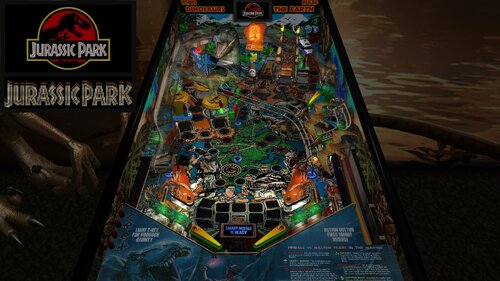
Note: In order to read the description for the new Version 1.02, you have to click on the "Permission to Mod" tab. For years, I have released Future Pinball tables with color DMD support for desktop PCs, but I always had to tell cabinet users that DMDExt did not support color. That has now changed—DMDExt version 2.5 adds color support! Click on the following link to learn more and download setup instructions for DMDExt 2.5: https://vpuniverse.com/files/file/30061-jurassic-park-revised-slamt1lt-edition-data-east-1993-color-dmd-ssf-pup-20-3-monitor-setup-fizx-33/page/3/?tab=comments#findComment-108589 This posting updates Slamt1lt’s Jurassic Park ULTIMATE Pro version 1.05. This table introduces three new features that have not been added to my previous table mods: 1. Faster game play on FizX – Several users asked me whether FizX could be made to play faster, and I suspected many others would appreciate the option as well. After working on this intermittently for about two months, I developed a solution that is included in this update. Four speed settings are available: Slow, Medium, Fast and Very Fast. The Slow setting matches the original FizX game speed. End users can boost the very fast game speed to make it even faster (or make other changes) with guidance provided in the instruction PDF file in the download. 2. Correct HUD DMD aspect ratio – A new version of BAM corrects the aspect ratio of the HUD DMD and it has the same shape as the backbox DMD. This feature requires some simple set up with guidance provided in the instruction PDF file included in the download. 3. Ball rolling sounds for ramps on cabinets - This table uses an updated FizX template with PUP 2.0 support. With PUP 2.0, you’ll hear ball rolling sounds on the plastic and wire ramps that are different from those on the playfield. Although I don't have a cabinet, DigitalArts successfully played this table on his cabinet verifying everything works correctly including the ramp sounds. In my Revised Slamt1lt Edition, my goal was to enhance and polish Slamt1lt's work while leaving the core design and gameplay untouched. I also incorporated a few select features from Rom’s version of the table; these are identified in the list of changes below. Slamt1lt's original features included changing playfield light insert colors during gameplay. He also added switchable original and modern audio modes. I personally prefer the modern mode, where Slamt1lt introduced new sounds and music. As expected, he included movie clips from Jurassic Park. Table Requirements BAM 1.5-397 or higher Required to display the HUD and overlays with the correct aspect ratio. BAM_v1.5-397 can be downloaded here: https://pinballnirvana.com/forums/threads/bam-update-v1-5-395.23944/#post-163376 PUP 2.0 This table was coded for PUP Surround Sound Feedback (SSF), which requires PUP 2.0 to function correctly. Follow the same installation method used for TerryRed’s Masters of the Universe Version 1.4. Note: The PUP pack for this table contains audio only (no video) and is used solely for SSF. Desktop users do not need to install PUP 2.0. Other Requirements If you wish to use SSF, the options for Backbox and Arcade Mode must be enabled on the FP Video / Rendering options. you need to change the "DOF_enabled" and "PUP_SSF_enabled" flags in the script to true. Video Overview of the Table and Game Play As with my recent table mods, I’ve added extensive in-game adjustments through a menu system that Gimli and I developed, called the “Tweaker.” Tweakers are available for game settings, lighting, and FizX. You can adjust parameters such as camera views, physics, ambient lighting, and sound levels. The first option in the FizX Tweaker allows you to select the game speeds (slow, medium, fast, very fast) mentioned earlier. The Tweakers include cabinet-friendly DMD displays and overlays. See the instruction manual included in the download for details on using the Tweaker and other table features. Another major upgrade is the complete overhaul of the table’s audio system. Every sound and piece of music is now categorized as music, game sound, sound effect, or voice quote, with independent volume controls for each category available in the game tweaker. Many other changes are identified in the "List of Changes" section which include adding Fleep’s recordings for all of the mechanical sounds. All of the large textures on the table were reworked with increased resolution and color correction. The textures were replaced on the backglass, speaker grill, side blades, apron, and exterior cabinet. Four lighting modes were added for Day, Dusk, Night and Dark Night and can be adjusted by the lighting tweaker. Colors were adjusted on lights used on the table to make them less harsh. See the list for more changes. Slamt1lt’s original Jurassic Park table was already a lot of fun to play, and I spent six months refining it. Based on videos of his recent tables, which feature faster gameplay, I believe he would appreciate the faster FizX options included here. After playing at faster speeds, it can be difficult to return to the slow setting. A big thank-you to Pop Bumper Pete for recording a new ball launcher sound to replace the previously used saucer sound. Thanks also to Fourbanks for general testing, and to DigitalArts for testing the three-monitor cabinet version—you can see a photo of his cabinet setup in the included image gallery. Please be sure to read the included PDF for setup instructions and additional tips. Thank you for downloading my table mod—and enjoy Jurassic Park, Revised Slamt1lt Edition! —George List of Changes 1. Replaced 1024x1024 backglass texture with 2048x2048 texture. 2. Added new custom speaker grill. 3. Replaced side blade textures on the inner cabinet wall. 4. Added a new custom apron texture and wire guides. Incorporated some of Slamt1lt’s original text using different colors. 5. Repositioned dinosaur models and adjusted the colors of the Parasaur and other dinosaurs. 6. Replaced the red bulbs at the top of the ramp entrance columns with animated flames that brighten during certain game modes. 7. Added music from the movie that alternates with Slamt1lt’s dinosaur soundtrack during attract mode. 8. Replaced the startup loading texture with 8 optional versions (4 for desktop, 4 for cabinets). Also changed the loading screen text from red to yellow. 9. Increased brightness of the topper and game room. 10. After reviewing Rom’s version, I implemented the flashing backglass bottom lights by copying the six lights, sequencer, and code. (Other unused lights in Rom’s version were not included.) 11. Added a new game room wall texture with an option to switch between it and the original. 12. Replaced the original exterior cabinet texture with two new custom textures. 13. Upscaled the playfield and all the plastics. Upscaled the texture for the "Shoot the T-Rex When Lit" box and edited it to clean it up. Upscaled the texture for the backwall and increased the contrast so it doesn't look washed out. Edited the top area of the backwall where to correct what looked like mistakes made on the graphic. Changed the text on the backwall so it reads from top to bottom on both sides and emphasized the correct words by making them larger. Filled in screw holes from the photos used to create the plastics. 14. Added the "Data East Presents Jurassic Park" to the DMD during the attract mode. Parts of Data East's DMD sequence were deleted and changed. Moved a "Game over" DMD animated sequence so it runs at the end of the game instead of during the attract mode. 15. Upscaled and edited the texture for the model of the amber mosquito. The area of the texture around the mosquito was made brighter to make the wings more obvious. Also added more bulbs so the mosquito is better lit. 16. Added code to eliminate the pop-up that asks for permission for the game to take control of the camera when the game starts. 17. Changed the brightness of the JP logo on the movie clip overlays so it is darker and matches the other frames of the video clips. 18. Added FizX physics and the most recent version of the menu system, called a tweaker. Adjusted the strength of several kickers to make them match FizX. Changed the start angle and swing of the flippers so it is now possible to hit the drop targets on the far left and right sides of the playfield. Adjusted the ramptor pit kicker so it points more to the left so it hits the center of the left flipper. 19, Fourbanks reported that the ball bounced out of the right inlane when dropped from the wire ramp. Invisible walls were added to both sides of the lane to prevent recurrence. Added the same walls to the left inlane. 20. Replaced the round boat kicker with a square kicker to prevent the ball from bouncing out of the kicker without triggering it. 21. Changed many of the colors of the playfield light inserts (and the corresponding colors defined in the script) and bulbs on the playfield and backbox to a less garish version. Reduced the glow radius of the bulbs under the slingshots and lane guides. 22. Found a dip in the ramp at the first bend on the uphill side of the custom ramp model. Added a short invisible FP ramp under the ramp model to fill in the dip and added an invisible wall to the right side of the ramp. Added an invisible approach ramp at the ramp entrance to make the transition between the playfield and ramp smoother. Changed the transition of the plastic ramp and diverter to the wire ramp so it is smoother. Changed the color of the end protector on the ramp exit from white to gray so it is the same color as the original table. 23. Slamt1lt's version changed the brightness of the plastics during game mode changes, but the apron remained dark throughout the game. Changed the apron on this version so it brightens and dims along with the rest of the plastics during gameplay. 24. Added a color DMD to the animated DMD sequences and background color with a border on the DMD text. Set up the DMD text so that the text with the brown background usually has game status info and the orange background usually has action required to identify a game mode (except during the attract mode). Added a section to the beginning of the script called "COLOR DMD STATUS," where cabinet users can turn off the color DMD because DMDExt cannot support it. In the process of making this change, I found some sequences where Slamt1lt missed duplicating some animated sequences on the backglass DMD that are on the HUD DMD. Revised Sub RampLightsOff() and Sub TRaptor1_Hit() to duplicate them. 25. Changed the captive ball configuration so it follows my guide at the following web address and makes it perform better: https://pinballnirvana.com/forums/threads/resolving-problems-with-captive-balls-on-future-pinball.23568/#post-160485 26. Changed the color of the 3 bumpers from greenish yellow caps with white base to yellow caps with dark gray base. 27. Added 6 unused dino sounds so they randomly play when the coin-in button is pressed. (from Rom's version of this table) Also fixed small bug where the voice quote "Hold onto your butts" was never played. 28. Added movement of the playfield texture during the earthquake sequence to make it appear more like an earthquake. Changed the sound played during the earthquake sequence from a mechanical sound to earthquake sound. (from Rom's version of this table) Slamt1lt added a "quick quake" sound that used a similar mechanical sound and was replaced with a short earthquake sound. 29. Duplicated the display of the movie clips onto the apron, mostly to improve visibility for cabinet users. 30. Added game and lighting tweakers. 31. Added lenses to 7 playfield light inserts that were missing. 32. The right side of the backwall was darker on all previous versions of the table. Fixed it by deleting a wall in front of the backwall on the playfield and adding the texture to an overlay at the bottom of the translite. 33. Reshaped the outer orbit lane wall to prevent the ball from getting stuck. 34. Added FizX presets for slow, medium, and fast gameplay. Added an option near the beginning of the script where end users can adjust the default settings. 35. Implemented BAM code allowing scores beyond 2 billion. Verified stability up to 922 trillion points 36. Added game tweaker option to choose video clip display location on the backwall or apron 37. Added option on the game tweaker to select whether the desktop camera view is changed during multiball or not. 38. Added option on the game tweaker to select between 2 audio options during the attract mode or alternate between the 2 during each startup. 39. Added game tweaker option to select between 2 cabinet textures or alternate between the 2 during each startup. 40. Added option on the game tweaker to select between 2 game room textures or alternate between the 2 during each startup. 41. Added 2 new options to the game tweaker. One adjusts how fast the earthquake sequence runs. The other turns the earthquake effect on and off that affects the ball. 42. Added an index to the beginning of the script to simplify finding the most used sections of the script. 43. Removed 14 MB of unused audio (overall file still ~10 MB larger than the original). 44. A rubber backstop was added to the end of the plastic ramp that exits to the left inlane to prevent the ball from bouncing around excessively. 45. Replaced all mechanical sounds with Fleep’s recordings and added ramp ball rolling sounds. 46. Pop Bumper Pete recorded a ball launcher sound that was added to replace the saucer sound previously used. 47. Added ball and flipper shadows. 48. Added an option in the script to disable DMD transition effects for cabinets that don't support it. 49. Updated to AIO template version 3.30.07 (PUP 2.0), enabling ramp ball rolling sounds on cabinets. 50. Categorized every sound and music file in the script. Added a way to adjust each of the 9 categories in the game tweaker. Found 2 misnamed sounds in the script that were corrected so that they will play. 51. Improved T-Rex lighting effect by replacing a dim flasher with a visible spotlight and adjusting brightness. The spotlight illuminates on each hit of the kicker in front of the T-Rex. 52. Created versions for 3 monitor cabinets and rotated display for desktops that are turned to portrait orientation. 53. Created an instruction manual for the table in PDF format, which includes more instructions on how to operate the tweakers than were available on earlier tables. Table Developers Polygame Puma Rom Slamt1lt GeorgeH Valued Contributors Gimli – Codeveloper of the Tweaker JLou5641 - Creator of FizX Fleep - Created recordings for mechanical sounds TerryRed – developed the FizX template Fourbanks –Tester of the desktop version Digitalarts – Tester of DOF and PUP SSF on this cabinet Pop Bumper Pete – recorded a new ball launcher sound -
View File Jurassic Park, Revised Slamt1lt Edition (Data East, 1993) (Color DMD, SSF-PUP 2.0, 3 Monitor Setup, FizX 3.3) Note: In order to read the description for the new Version 1.02, you have to click on the "Permission to Mod" tab. This posting updates Slamt1lt’s Jurassic Park ULTIMATE Pro version 1.05. This table introduces three new features that have not been added to my previous table mods: 1. Faster game play on FizX – Several users asked me whether FizX could be made to play faster, and I suspected many others would appreciate the option as well. After working on this intermittently for about two months, I developed a solution that is included in this update. Four speed settings are available: Slow, Medium, Fast and Very Fast. The Slow setting matches the original FizX game speed. End users can boost the very fast game speed to make it even faster (or make other changes) with guidance provided in the instruction PDF file in the download. 2. Correct HUD DMD aspect ratio – A new version of BAM corrects the aspect ratio of the HUD DMD and it has the same shape as the backbox DMD. This feature requires some simple set up with guidance provided in the instruction PDF file included in the download. 3. Ball rolling sounds for ramps on cabinets - This table uses an updated FizX template with PUP 2.0 support. With PUP 2.0, you’ll hear ball rolling sounds on the plastic and wire ramps that are different from those on the playfield. Although I don't have a cabinet, DigitalArts successfully played this table on his cabinet verifying everything works correctly including the ramp sounds. In my Revised Slamt1lt Edition, my goal was to enhance and polish Slamt1lt's work while leaving the core design and gameplay untouched. I also incorporated a few select features from Rom’s version of the table; these are identified in the list of changes below. Slamt1lt's original features included changing playfield light insert colors during gameplay. He also added switchable original and modern audio modes. I personally prefer the modern mode, where Slamt1lt introduced new sounds and music. As expected, he included movie clips from Jurassic Park. Table Requirements BAM 1.5-397 or higher Required to display the HUD and overlays with the correct aspect ratio. BAM_v1.5-397 can be downloaded here: https://pinballnirvana.com/forums/threads/bam-update-v1-5-395.23944/#post-163376 PUP 2.0 This table was coded for PUP Surround Sound Feedback (SSF), which requires PUP 2.0 to function correctly. Follow the same installation method used for TerryRed’s Masters of the Universe Version 1.4. Note: The PUP pack for this table contains audio only (no video) and is used solely for SSF. Desktop users do not need to install PUP 2.0. Other Requirements If you wish to use SSF, the options for Backbox and Arcade Mode must be enabled on the FP Video / Rendering options. you need to change the "DOF_enabled" and "PUP_SSF_enabled" flags in the script to true. Video Overview of the Table and Game Play As with my recent table mods, I’ve added extensive in-game adjustments through a menu system that Gimli and I developed, called the “Tweaker.” Tweakers are available for game settings, lighting, and FizX. You can adjust parameters such as camera views, physics, ambient lighting, and sound levels. The first option in the FizX Tweaker allows you to select the game speeds (slow, medium, fast, very fast) mentioned earlier. The Tweakers include cabinet-friendly DMD displays and overlays. See the instruction manual included in the download for details on using the Tweaker and other table features. Another major upgrade is the complete overhaul of the table’s audio system. Every sound and piece of music is now categorized as music, game sound, sound effect, or voice quote, with independent volume controls for each category available in the game tweaker. Many other changes are identified in the "List of Changes" section which include adding Fleep’s recordings for all of the mechanical sounds. All of the large textures on the table were reworked with increased resolution and color correction. The textures were replaced on the backglass, speaker grill, side blades, apron, and exterior cabinet. Four lighting modes were added for Day, Dusk, Night and Dark Night and can be adjusted by the lighting tweaker. Colors were adjusted on lights used on the table to make them less harsh. See the list for more changes. A popular addition for desktop and VR users is the color DMD, visible in the screenshots. Unfortunately, DMDExt (commonly used on cabinets) does not currently support the color DMD. I’ve requested a feature update at the link below to enable DMD color support, which would also expand color options for other tables. Feedback is encouraged; a login is required, but quick to set up. https://github.com/freezy/dmd-extensions/issues/520 Slamt1lt’s original Jurassic Park table was already a lot of fun to play, and I spent six months refining it. Based on videos of his recent tables, which feature faster gameplay, I believe he would appreciate the faster FizX options included here. After playing at faster speeds, it can be difficult to return to the slow setting. A big thank-you to Pop Bumper Pete for recording a new ball launcher sound to replace the previously used saucer sound. Thanks also to Fourbanks for general testing, and to DigitalArts for testing the three-monitor cabinet version—you can see a photo of his cabinet setup in the included image gallery. Please be sure to read the included PDF for setup instructions and additional tips. Thank you for downloading my table mod—and enjoy Jurassic Park, Revised Slamt1lt Edition! —George List of Changes 1. Replaced 1024x1024 backglass texture with 2048x2048 texture. 2. Added new custom speaker grill. 3. Replaced side blade textures on the inner cabinet wall. 4. Added a new custom apron texture and wire guides. Incorporated some of Slamt1lt’s original text using different colors. 5. Repositioned dinosaur models and adjusted the colors of the Parasaur and other dinosaurs. 6. Replaced the red bulbs at the top of the ramp entrance columns with animated flames that brighten during certain game modes. 7. Added music from the movie that alternates with Slamt1lt’s dinosaur soundtrack during attract mode. 8. Replaced the startup loading texture with 8 optional versions (4 for desktop, 4 for cabinets). Also changed the loading screen text from red to yellow. 9. Increased brightness of the topper and game room. 10. After reviewing Rom’s version, I implemented the flashing backglass bottom lights by copying the six lights, sequencer, and code. (Other unused lights in Rom’s version were not included.) 11. Added a new game room wall texture with an option to switch between it and the original. 12. Replaced the original exterior cabinet texture with two new custom textures. 13. Upscaled the playfield and all the plastics. Upscaled the texture for the "Shoot the T-Rex When Lit" box and edited it to clean it up. Upscaled the texture for the backwall and increased the contrast so it doesn't look washed out. Edited the top area of the backwall where to correct what looked like mistakes made on the graphic. Changed the text on the backwall so it reads from top to bottom on both sides and emphasized the correct words by making them larger. Filled in screw holes from the photos used to create the plastics. 14. Added the "Data East Presents Jurassic Park" to the DMD during the attract mode. Parts of Data East's DMD sequence were deleted and changed. Moved a "Game over" DMD animated sequence so it runs at the end of the game instead of during the attract mode. 15. Upscaled and edited the texture for the model of the amber mosquito. The area of the texture around the mosquito was made brighter to make the wings more obvious. Also added more bulbs so the mosquito is better lit. 16. Added code to eliminate the pop-up that asks for permission for the game to take control of the camera when the game starts. 17. Changed the brightness of the JP logo on the movie clip overlays so it is darker and matches the other frames of the video clips. 18. Added FizX physics and the most recent version of the menu system, called a tweaker. Adjusted the strength of several kickers to make them match FizX. Changed the start angle and swing of the flippers so it is now possible to hit the drop targets on the far left and right sides of the playfield. Adjusted the ramptor pit kicker so it points more to the left so it hits the center of the left flipper. 19, Fourbanks reported that the ball bounced out of the right inlane when dropped from the wire ramp. Invisible walls were added to both sides of the lane to prevent recurrence. Added the same walls to the left inlane. 20. Replaced the round boat kicker with a square kicker to prevent the ball from bouncing out of the kicker without triggering it. 21. Changed many of the colors of the playfield light inserts (and the corresponding colors defined in the script) and bulbs on the playfield and backbox to a less garish version. Reduced the glow radius of the bulbs under the slingshots and lane guides. 22. Found a dip in the ramp at the first bend on the uphill side of the custom ramp model. Added a short invisible FP ramp under the ramp model to fill in the dip and added an invisible wall to the right side of the ramp. Added an invisible approach ramp at the ramp entrance to make the transition between the playfield and ramp smoother. Changed the transition of the plastic ramp and diverter to the wire ramp so it is smoother. Changed the color of the end protector on the ramp exit from white to gray so it is the same color as the original table. 23. Slamt1lt's version changed the brightness of the plastics during game mode changes, but the apron remained dark throughout the game. Changed the apron on this version so it brightens and dims along with the rest of the plastics during gameplay. 24. Added a color DMD to the animated DMD sequences and background color with a border on the DMD text. Set up the DMD text so that the text with the brown background usually has game status info and the orange background usually has action required to identify a game mode (except during the attract mode). Added a section to the beginning of the script called "COLOR DMD STATUS," where cabinet users can turn off the color DMD because DMDExt cannot support it. In the process of making this change, I found some sequences where Slamt1lt missed duplicating some animated sequences on the backglass DMD that are on the HUD DMD. Revised Sub RampLightsOff() and Sub TRaptor1_Hit() to duplicate them. 25. Changed the captive ball configuration so it follows my guide at the following web address and makes it perform better: https://pinballnirvana.com/forums/threads/resolving-problems-with-captive-balls-on-future-pinball.23568/#post-160485 26. Changed the color of the 3 bumpers from greenish yellow caps with white base to yellow caps with dark gray base. 27. Added 6 unused dino sounds so they randomly play when the coin-in button is pressed. (from Rom's version of this table) Also fixed small bug where the voice quote "Hold onto your butts" was never played. 28. Added movement of the playfield texture during the earthquake sequence to make it appear more like an earthquake. Changed the sound played during the earthquake sequence from a mechanical sound to earthquake sound. (from Rom's version of this table) Slamt1lt added a "quick quake" sound that used a similar mechanical sound and was replaced with a short earthquake sound. 29. Duplicated the display of the movie clips onto the apron, mostly to improve visibility for cabinet users. 30. Added game and lighting tweakers. 31. Added lenses to 7 playfield light inserts that were missing. 32. The right side of the backwall was darker on all previous versions of the table. Fixed it by deleting a wall in front of the backwall on the playfield and adding the texture to an overlay at the bottom of the translite. 33. Reshaped the outer orbit lane wall to prevent the ball from getting stuck. 34. Added FizX presets for slow, medium, and fast gameplay. Added an option near the beginning of the script where end users can adjust the default settings. 35. Implemented BAM code allowing scores beyond 2 billion. Verified stability up to 922 trillion points 36. Added game tweaker option to choose video clip display location on the backwall or apron 37. Added option on the game tweaker to select whether the desktop camera view is changed during multiball or not. 38. Added option on the game tweaker to select between 2 audio options during the attract mode or alternate between the 2 during each startup. 39. Added game tweaker option to select between 2 cabinet textures or alternate between the 2 during each startup. 40. Added option on the game tweaker to select between 2 game room textures or alternate between the 2 during each startup. 41. Added 2 new options to the game tweaker. One adjusts how fast the earthquake sequence runs. The other turns the earthquake effect on and off that affects the ball. 42. Added an index to the beginning of the script to simplify finding the most used sections of the script. 43. Removed 14 MB of unused audio (overall file still ~10 MB larger than the original). 44. A rubber backstop was added to the end of the plastic ramp that exits to the left inlane to prevent the ball from bouncing around excessively. 45. Replaced all mechanical sounds with Fleep’s recordings and added ramp ball rolling sounds. 46. Pop Bumper Pete recorded a ball launcher sound that was added to replace the saucer sound previously used. 47. Added ball and flipper shadows. 48. Added an option in the script to disable DMD transition effects for cabinets that don't support it. 49. Updated to AIO template version 3.30.07 (PUP 2.0), enabling ramp ball rolling sounds on cabinets. 50. Categorized every sound and music file in the script. Added a way to adjust each of the 9 categories in the game tweaker. Found 2 misnamed sounds in the script that were corrected so that they will play. 51. Improved T-Rex lighting effect by replacing a dim flasher with a visible spotlight and adjusting brightness. The spotlight illuminates on each hit of the kicker in front of the T-Rex. 52. Created versions for 3 monitor cabinets and rotated display for desktops that are turned to portrait orientation. 53. Created an instruction manual for the table in PDF format, which includes more instructions on how to operate the tweakers than were available on earlier tables. Table Developers Polygame Puma Rom Slamt1lt GeorgeH Valued Contributors Gimli – Codeveloper of the Tweaker JLou5641 - Creator of FizX Fleep - Created recordings for mechanical sounds TerryRed – developed the FizX template Fourbanks –Tester of the desktop version Digitalarts – Tester of DOF and PUP SSF on this cabinet Pop Bumper Pete – recorded a new ball launcher sound Submitter GeorgeH Submitted 05/01/26 Category Future Pinball Tables

