
Jump to content

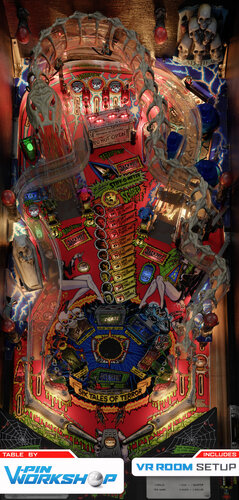
Scared Stiff (Bally 1996)

  • Get Support
  • Create an account or sign in to download this
download_no_perm
51614 Views
10931 Downloads
5 From 87 reviews
395.86 MB File Size
SS_15 ROM Name
VPW Created by
VPW Artwork by
VPW Scripting by
Bally Manufacturer
1996 Year

2 Screenshots

"Ride The Boney Beast!"


VPW proudly present a table that'll keep you up!

This started about a year ago when Sixtoe got hold of a playfield scan of Scared Stiff and decided to follow through on a long time promise he'd made to make a series of "how to vpx" videos showing how to build a table totally from scratch.

VPW How To VPX on Youtube

It's one mcarter78's favorite tables, so he started to build it in the toolkit and got hold of some of the toys to scan them, Tomate came in to finish the blender side of things, and Apophis came on board to sort out some script things and add the VR bells and whistles.

Cyberpez built a new 3D backglass and Tomate made a new 3D spider for it.

During building it Sixtoe found a bug in VPX and Niwak fixed it, so now all of the flashers work properly and fade nicely now PWM is implemented properly (you'll need a recent-ish vpinmame for this!), and we think you'll enjoy the lightshow :)

Check out all the options in the F12 menu, which includes the latest and greatest of everything VPW has to offer. Enjoy!


VPW STIFFS

Sixtoe - Project Lead, scratch table build and scripting.

Tomate - 3D modeling and rendering.

MCarter78 - 3D scanning, modeling and scripting.

Apophis - Scripting and VR support.
Cyberpez - Playfield Cutting, VR backglass.
DGrimmReaper - Custom VR ball shooter.
FrankEnstein - Custom instruction card.

Testers - Pinstratsdan, Rik, Studleygoorite, mecha_enron, dad-e-drums, bthlonewolf, bountybob, robbykingpin, nestorgian, guus_8005, wrd1972


Required Software (64-bit versions):
VPX 10.8.0 or later: https://github.com/vpinball/vpinball/releases/tag/v10.8.0-2051-28dd6c3

VPinMame 3.7.0.47 or later recommended: https://github.com/vpinball/pinmame/actions/runs/15769888098

B2S Server 2.1.3 or later (if B2S used): https://github.com/vpinball/b2s-backglass/releases/tag/v2.1.3


Version Log
001 - Sixtoe - "Just in case" Upload - Unplayable
002 - Sixtoe - Hit a script wall, please send help
003 - Sixtoe - IT'S ALIVE
004 - Sixtoe - Fully Playable
005 - tomate - First 2k batch added, most of the VPX objects set as not visible,VLM materials applied
006 - mcarter78 - Add room brightness, ball & plunger textures, make lights hidden, hide a few other trigger objects
007 - mcarter78 - Movables animation WIP (flippers, gates, crate, targets, bumpers, slings)
008 - tomate - dozens of fixes in Blender, not so many in VPX
009 - mcarter78 - Animate Leapers & diverter, fix GI string #s in update callback, Add rules card, cabinet mode & art blades to option menu
010 - mcarter78 - Reduce height of collidable targets under ramps causing stuck balls
011 - mcarter78 - Increase bumper ring speed
012 - mcarter78 - add collections/sfx for walls, metals & apron, add ramp rolling, crate hit, and autoplunger sounds
013 - mcarter78 - animate closed crate hit & ramp flap from spider VUK, hide ramp triggers
014 - tomate - some axis fixed in blender, open/close coffin prims added, fixed coffin position in VPX (thanks Apophis!), bumpers and gates elements re-named in blender and changed in the script, backgorund set to black for desktop mode
015 - apophis - Animated boogie arms. Updated desktop POV. Fixed GI rtx shadows. New ball image.
016 - tomate - crate and boogies textures fixed, set "hide parts behind" for PF object 
017 - apophis - Adjusted slingshot strength and threshold. Fixed flipper shadows. Added ball shadows. Animated coffin door and cadaver. Added options: desktop DMD visibility, outlane difficulty, ramp refractions
018 - apophis - Fixed coffin diverter logic.
019 - tomate - 4k batch added
020 - tomate - some fixes on blender side, new 4k batch added, VPX unused textures deleted
021 - apophis - Increased flipper strength to 2500. Increased upper gates elasticity to 0.85
022 - mcarter78 - Animate autoplunger & leaper rods, less bouncy gates
023 - cyberpez - backglass first draft
024 - tomate - new 4k batch added, previous issues fixed (cadaver, top lanes and insert), collidalbe low poly right ramp updated to match visual ramp
025 - mcarter78 - Fix autoplunger gate, open up the crate more when entering
026 - tomate - new 4k batch added, targets textures fixed, GIL on group0 issue fixed
027 - apophis - Backglass second draft. Made BG visible in desktop mode.
028 - apophis - Added VR Cab. Made desktop backglass optional. Light blocker below playfield. Adjusted visible crate opening angle.
029 - Sixtoe - Crate VUK rejigged and randomised, various rubber tweaks, redid wall and rubber layout in blocker format, made l53 visible temporarily.
030 - tomate - new 4k batch added, flippers and l53 fixed, vpx l53 back to hide, changed PF render probe to dynamic, add a hole on PF blocker to see the visual VUK
031 - tomate - added default LUT and saturation option menu
032 - apophis - Fixed tilt switch assignment. Changed default LUT is 1to1. Made insert lights reflect on ball. Changed default cab POV. Added info card to tweak menu (thanks FrankEnstein). 
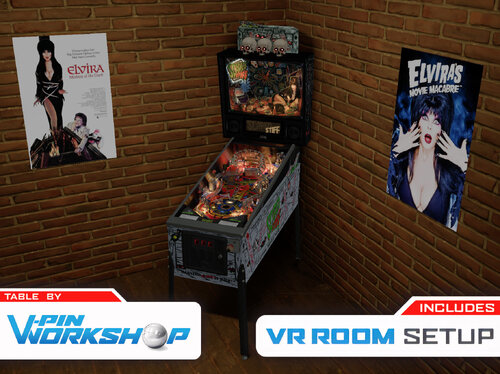
033 - apophis - Improved post passes. Added inlane slowdown code. Added custom shooter knob option (thanks DGrimmReaper). Added minimal VR room with movie poster options.
034 - apophis - Fixed spider b2s issues. Disabled reflections of some items. 
RC1 - apophis - Fixed boogie man analog nudging. Updated some backglass flashers (thanks cyberpez). Updated custom rules card in tweak menu (thanks FrankEnstein). Fixed knocker sfx. Updated frog target hit sfx and scoop entrance sfx. Fixed VR poster visible bug.
RC2 - mcarter78 - Only animate crate door on hit if not already currently animating
RC3 - apophis - Solved crate door issue? Added playfield reflection options. Lowered plunger speed.
RC4 - apophis - Accounted for frame rate in frog speed calcs. Adjusted down frog leap speed. Slowed down right vuk eject and ramps (slightly). Slingshots strength set to 4.2 from 4.5
RC5 - mcater78 - lowered ball height threshold for vuk trapdoor to  >= 109 from > 110 and added a Y value failsafe
RC6 - apophis - Updated (optimized) the reflection scope option. Improved spider wheel icon images (thanks HauntFreaks). Chnaged z lift on sw36 kicker from 100 to 105. 
RC7 - Sixtoe - Added metal hit to leaper targets, refactored entire cadaver coffin exit area, 


Permission from ORIGINAL Author(s)?

This is my own creation.

Allow file to be included on a VPUniverse downloader app?

Yes

VPX Standalone

Yes
https://www.ipdb.org/machine.cgi?id=3915
https://vpuniverse.com/files/file/12140-scared-stiff-bally-1996-b2s-full-dmd/
Contact Author First.
10.8 required
Yes

What's New in Version 1.1.1   See changelog

Released

'1.1.1 - apophis - Fixed cab POV issue (your INI file from v1.0 will work again). Added improved VR topper image and lights (thanks Retro27).

User Feedback

Recommended Comments


SlippyTpoad

Posted

what a couple of weeks - first CFTBL and now this. 


I already loved the Mikcab mod of this table but this takes it to another level.


Thanks VPW - another masterpiece 


Do VPW recommend using the AgX tone mapper with this table?  I see it's what was set as default  


niliang74

Posted

the table strains my hardware but, even if it worked well, it doesn't have much to offer in terms of gameplay rules, which are very basic, for a Bally/Williams from the golden age of pinball....2 stars and half for me

encryptedmind

Posted

On 6/23/2025 at 1:32 PM, benderle said:

Cool, but my Screen Settings Changes, "3Screen"

1. Release all was Perfect and OK, in the .ini

Now it´s all wrong.

Table Settings F12 set to new !? Why ??

Now i have a Mini Playfield  POV all are Reset ...

Greetings, some Suggestions are Hopefull

P.S Its like i have some same Probs with  VPinWorkshop Release


BUT YOU MAKE IT !! PERFECT 4 NOW !! Im curious 4 next release

@ll THX 4 TIME

What did you do to fix the mini playfield i have the same issues with this version. The 1.0 version worked fine but not 1.1


benderle

Posted (edited)

@encryptedmind

Sorry at the moment, i have  no SOLUTIONS at now.

Switch Back to 1.0.

I hope @VPinWorkshop has a response of the Prob, MABE ??!!


Has anyone a 1.0 LINK PLEASE


Edited by benderle
  • Content Provider
apophis

Posted

10 minutes ago, benderle said:

@encryptedmind

Sorry at the moment, i have  no SOLUTIONS at now.

Switch Back to 1.0.

I hope @VPinWorkshop has a response of the Prob, MABE ??!!


Has anyone a 1.0 LINK PLEASE


There will be an update in the next couple days that will fix the pov issue. 

benderle

Posted

@apophis


Hey , BIG THX 4 RESPONSE 👍

That´s a Solution, I'm happy 


Greeting´s @ll

solidrock68

Posted

On 6/21/2025 at 3:01 AM, hauntfreaks said:

@GHOSTfaceKILLr74  let me know your screen res, and I can make you a res file that my b2s and dmd will fit on your DT screen

I am also in desktop mode and sure would need some help running

b2s on my screen. Never used b2s server so some help would be great.

I am running in 1920x1080 res.

bombaj344

Posted

38 minutes ago, solidrock68 said:

I am also in desktop mode and sure would need some help running

b2s on my screen. Never used b2s server so some help would be great.

I am running in 1920x1080 res.

Do you have B2SServer installed?

solidrock68

Posted

1 hour ago, bombaj344 said:

Do you have B2SServer installed?

Yes, got it install, but do not know how to set it up in desktop mode.

S0L1DxSNAKE

Posted

Wow!  Absolutely incredible!  Thanks to the VPW team for another awesome release. 

Tikimaster

Posted

1 hour ago, solidrock68 said:

Yes, got it install, but do not know how to set it up in desktop mode.

Open screenrez-identifier to generate a screenres.txt with the default settings for your server.
If you are in1920/1080  HD, you can test my screenres.txt - put it into the same folder, where your server is.
If you registered the server, you should be able to open a backglass with doubleclick on the backglass file. 
You can find a lot of infos about the b2s-Server in this wiki:
https://github.com/vpinball/b2s-backglass/wiki

ScreenRes.txt

hauntfreaks

Posted

8 hours ago, solidrock68 said:

I am also in desktop mode and sure would need some help running

b2s on my screen. Never used b2s server so some help would be great.

I am running in 1920x1080 res.


it sounds like these guys have you on the right track... if you have any issues, you can contact me direct... and i'll get you all setup

benderle

Posted

Perfect Update, Screen POV are now same.


Hmm, Any Solution what was Wrong? 

Mabe to correct other Great VPinWorkshop Table´s ?


HOWEVER ,BIG THX

Digitalpinball

Posted (edited)

Thank you VPW team for this great table! 

It plays very well! 

Edited by Digitalpinball
shorstop33

Posted

This table looks awesome however it is very glitchy on my computer. This is probably a stupid question, but when when I press F11 my rendering and latency is in the red. I don’t get this on other tables and am assuming it’s my PC/Graphics card. Any insights would be greatly appreciated! Want to enjoy these awesome VPW tables!


Thanks! 
 

My System -

Graphics Card - Raedon RX 580 Seriee 

Processor - Intel(R) Core (TM) i7-7700K @ 4.2 GHz

Ram - 8.00 GB


I’ve got all the updated requirements for VPX in order to play the table.


Beardedman

Posted

I had hoped this would be done by the VPW team and wish granted, Fantastic update.

PinMan71

Posted

Thank you guys for this wonderfull work !!!!


PhartusMcBlumpkin

Posted (edited)

Dang, this is such a beautiful creation.  Thanks team for all the work.  I'm curious if anyone else is having issues with the music and vocal sounds being very low compared to table (flippers, bumpers, etc.) sounds.  I am using the up to date ROM here and am running the latest everything including 3.7.0.43 Vpinmame.  In the F12 menu stock mech/ball/ramp sound is 80% and music/sound both are 100% and I've moved those around a bit, but none seem to affect the voice vocals or background music.  Any ideas?  Nevermind, found some documentation on adjusting ROM sounds with End key and 8&9 keys.  Will give that a try.


Edited by PhartusMcBlumpkin
Offe

Posted

Another awesome table from the heroes at VPW!

elrobotjefe

Posted

Amazing table VPW Team!!!


If someone is having issues with the sound being too loud when the ball hits the crate, lower de volume pressing 8. If you get a "OPEN COIN DOOR TO USE BUTTONS" message, press END, then press 8 o 9 to adjust the volume. 27 is the max volume and sweet spot for me.


volume.jpg

ravjee

Posted

Another stunner from the VPW team. Your releases are on another level. Great work guys.


  • Content Provider
freneticamnesic

Posted

I think this should have 10k more downloads than it does. Scared stiff + vpw come on guys. Great work.

jcopps

Posted (edited)

Fantastic table as always VPW!

Edited by jcopps
tomi5577

Posted

weird sides but why?
 

fdfdfd.jpg

Lroy

Posted

Many thanks.


Create an account or sign in to comment

You need to be a member in order to leave a comment

Create an account

Sign up for a new account in our community. It's easy!

Register a new account

Sign in

Already have an account? Sign in here.

Sign In Now
×
  • Create New...