Jump to content

Fathom (Bally 1981) w VR Room

  • Get Support
  • Create an account or sign in to download this
download_no_perm
14792 Views
3245 Downloads
5 From 26 reviews
184.84 MB File Size
fathom.zip ROM Name
UnclePaulie Created by
Bally Manufacturer
1981 Year

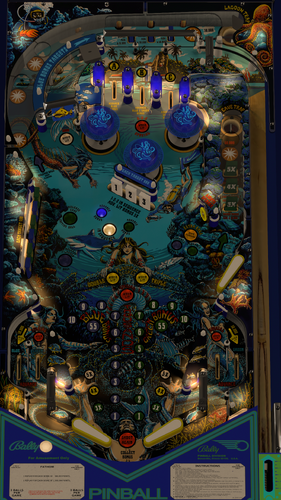
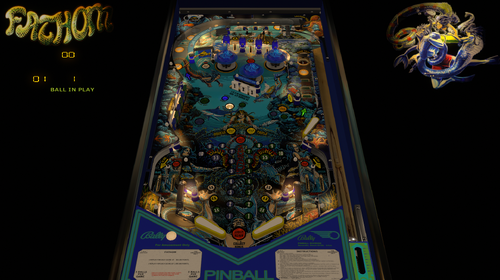
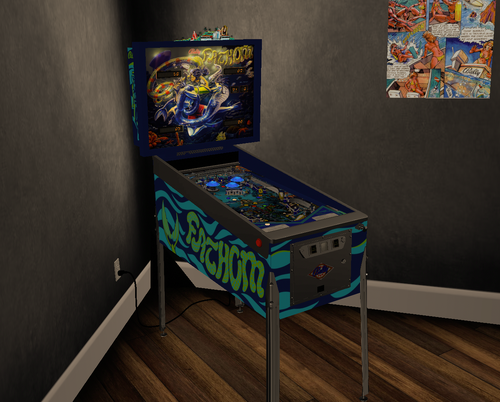
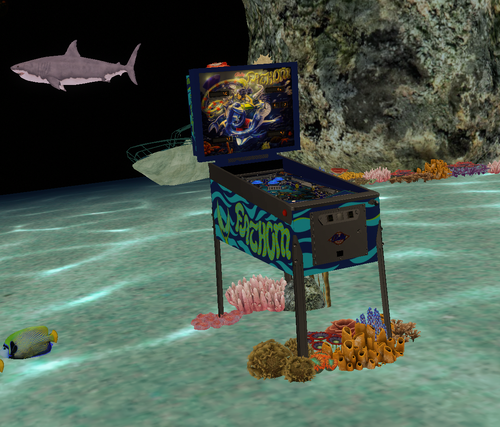
5 Screenshots

Version 2.0 by UnclePaulie 2023
  
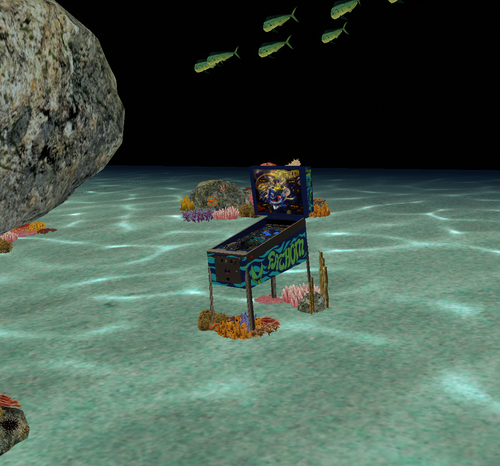
This version was done with my Medusa table and other recent Bally tables as a baseline to start, since they were Bally 1981.  Built everything ground up from there.  Used a few prims and images from Goldchicco's prior table, as well as some logic.  I used EBisLit's playfield as a baseline, and Redbone did lots graphics updates to that playfield, as well as the plastics, targets, apron, flippers, and many others.  The VPW team did lots of testing and recommended that I use Circus's VR room as an option, as it has you playing on the ocean floor with fish swimming around you, so his very cool environment is also included, and is the default environment for VR users.  Thanks to Circus for permission!


Included in this Version 2.0 is Hybrid VR/desktop/cabinet modes, new playfield, VPW physics, flipper tricks, dynamic shadows, Fleep sounds, Lampz, 3D inserts, new baked general illumination lighting and AO shadows, sling corrections, drop and stand-up targets, saucer, playfield meshes, various primitives, etc.  Significant time was spent on researching online videos, to ensure accuracy of shots, ball drops, kickouts, and overall playability.  I also created a desktop backglass with a lighting effect, as well as the VR backglass (image from Hauntfreaks) and other VR options. There are also some performance improvements and I added a playfield mesh for the playfield, so there's a realistic bevel in the saucer. 


Thank you to EBisLit for the playfield image, and Redbone for upscaling and cleaning up the all the images.  Thank you to Circus for the ocean VR environment.  And thank you to the VPW team for testing, especially redbone, apophis, bountybob, dgrimmreaper, studlygoorite, pinstratsdan, wylte, trytotilt, bietekwiet, astronasty, and hauntfreaks.


There are several options in the script.  Including VR rooms and environments, ball brightness, ocean environment sounds, and LUT lighting options.  The LUT changes are done by holding cntl (or left mangasave) and then while holding, scroll through the options with the right magnasave.  The Dip Switch settings are done in the script and are hardcoded.  IF... you want to change them, there's a setting in the script to manually override that, and then use F6 during gameplay to bring up the Dip Switch setting.  


This is a hybrid table done in VPX 10.74 (but will run fine in 10.8), and I have code in here to automatically choose between VR, desktop, and cabinet.   Additional VR options in the script include three VR environments, a VR clock, a topper, posters, and settings for dynamic shadows if you experience a performance hit.


Thanks again to the VPW team for all the testing, Circus for the Ocean VR environment, and Redbone for all the graphics enhancements!

https://www.ipdb.org/machine.cgi?id=829
https://vpuniverse.com/files/file/16041-fathom-bally-1981-b2s/
Yes
v10.7 required
Yes

What's New in Version 2.0.1   See changelog

Released

Testing in vpx 10.8 showed a weird glow around the balls.  Reloaded the images and the issue went away.  Some image likely got corrupted in the last version.

User Feedback

Recommended Comments

mikepmcs

Posted (edited)

Amazing. One of the greatest looking and playing games in the history of the world. Thank you for all your hard work bringing even more life into an already great game.


Edited by mikepmcs
tartzani

Posted

everyone need to get this :)

GordonJames

Posted (edited)

Ran across this yesterday. Kinda reminds me of TNA. I wonder If they sourced original parts for this or the whole thing is new? Pretty crazy stuff.

Edit: Nope, all new fabricated parts. They make a Centaur as well.


Edited by GordonJames
kyrexx

Posted

Superb, as always.


Thank you for all the time devoted to this work.

Drybonz

Posted

Another great Bally 81 update.  This one has always lost some of the details in darkness, but the new visuals really make the details pop.  I think the elements like the inserts and clear plastic over the lanes look really nice... realistic.  Also, great balanced lighting on this table.  Could be set up for dark or light environment and look great either way.  Thanks for another awesome update.

lminimart

Posted

3 hours ago, GordonJames said:

Ran across this yesterday. Kinda reminds me of TNA. I wonder If they sourced original parts for this or the whole thing is new? Pretty crazy stuff.

Edit: Nope, all new fabricated parts. They make a Centaur as well.


I've played the new Fathom! Beautiful game.

Cliffy

Posted

Beautiful, rich table @UnclePaulie, thanks! The ball handling physics feel SO good and just right for a Bally from the early 80's. 

On first startup the graphics were quite jaggy- fine pixelation but noticeable.  I opened in editor and in properties/user I see the 4xAA and Post Proc AA are OFF. I set these to default since I do have those on in vpx prefs. Restart the table and bingo- MUCH MUCH nicer. Shown here with @hauntfreaks fulldmd b2s. Super thanks again UnclePaulie!


fathom-201-haunt-paulie.jpg

marie

Posted

UnclePaulie, you are spoiling us with all your beautiful recreations. Thanks a lot again!

JasonDH

Posted

Another excellent rebuild! Plays and looks great! Thank you for sharing!

rudil24

Posted

awesome rendition! Really like the brighest =3 ball when playing in HDR.  also players: to load one of UnclePaulie's 13 wonderful flipper flavors at random on startup:

replace line 27 in the script:

const FlipperColor = 0 

with these 2 lines: 

dim FlipperColor 
FlipperColor = INT(RND*13)

thanks so much UnclePaulie, really enjoying the physics on this one!


  • Content Provider
UnclePaulie

Posted

11 minutes ago, rudil24 said:

awesome rendition! Really like the brighest =3 ball when playing in HDR.  also players: to load one of UnclePaulie's 13 wonderful flipper flavors at random on startup:

replace line 27 in the script:

const FlipperColor = 0 

with these 2 lines: 

dim FlipperColor 
FlipperColor = INT(RND*13)

thanks so much UnclePaulie, really enjoying the physics on this one!


Thanks,  good idea!  If I do an update, I can add another option of flipper randomness.  


Drybonz

Posted

7 hours ago, Cliffy said:

I opened in editor and in properties/user I see the 4xAA and Post Proc AA are OFF. I set these to default since I do have those on in vpx prefs.


Weird... they were both set to "default" by default for me.

BallStuck

Posted

awesome!

CainArg

Posted

Great job man dude!!!

Those great 80's tables are superb with your magic!


Thanks for sharing and THANKSS!!!!!!

Pinball5500

Posted

UnclePaulie = Highest Quality

Amazing guy

Thanks

ricotero29

Posted

Que preciosa tabla, y la jugabilidad un espectáculo. Gracias por el gran trabajo y por subirla en vpx 7.3 / 7.4! :)

yogevsho

Posted

beautiful table. sound and physics so good

thanks for your work 

  • Content Provider
rothbauerw

Posted

Another great release @UnclePaulie! Well done!


And the VR room is incredible. Thanks Circus!

Livin

Posted

Anyone know how to fix this... no matter the F1 B2S menu setting I always get the 'normal' DMD... if I turn off either checkbox, then I get no text, just B2S and the DMDext are blank20231001_141843.thumb.jpg.e96c60ad122ccc7a45c4beea71555f4b.jpg

S0L1DxSNAKE

Posted

Incredible work on this update.  Looks and plays great.  Thanks!!

Uncle_Morty

Posted (edited)

EDIT: Nevermind the text below, I've got it to work. Awesome work on that table! I'm coming from Pinball FX and holy shit, the sounds are incredible, the graphics amazing and the whole feel of the table is awesome! great work :D

can't wait to try out more of your tables!


hi there, I'm pretty new to VPX and Fathom would be my very first table! however, I can't figure out how to start the game...

I have installed it on my desktop PC via the PinMame baller installer, set up all the keys and the table does load. the plunger also seems to work and when I press the "start button" I hear a click, but I can't add credit (neither credit 1 nor 2) and so I'm stuck at having no ball ejected to the plunger. all sounds and animations seem to be running.

any help would be greatly appreciated!

Edited by Uncle_Morty
Lroy

Posted

Many thanks

Create an account or sign in to comment

You need to be a member in order to leave a comment

Create an account

Sign up for a new account in our community. It's easy!

Register a new account

Sign in

Already have an account? Sign in here.

Sign In Now
×
  • Create New...