3 files
-
v6.20Wheel.thumb.png.868462df7ed3a4b2217cf506a02c02b2.png) (2 reviews)
(2 reviews)0 comments
Updated
-
Wheel.thumb.png.16602695e444ed968b9491089c1de862.png)
Juke Box (Chicago Coin 1976) Media Pack
By PEandS1Ws
Front End Media Pack for the JP Salas table Juke Box (Chicago Coin 1976)
https://www.vpforums.org/index.php?app=downloads&showfile=19872
Includes:
Wheel
Logo
Table Audio
Flyer
Instruction Card
Full DMD or Topper videos (2 versions)
41 downloads
(0 reviews)0 comments
Submitted
-
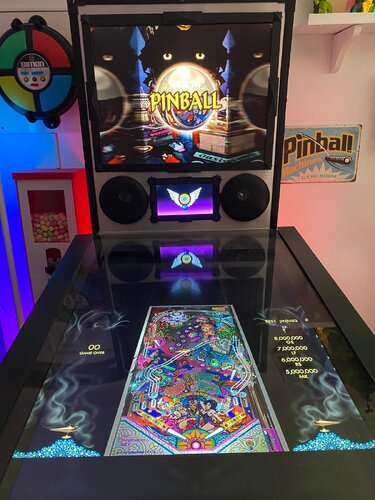
Jinni Zeala (LittleWing 2002) Media Files & Cabinet Instructions
By SixOfTwelve
This time on
Let's Put Things On Cabinets That Were Never Meant To Be On Cabinets!
we're dancing along with Jinni Zeala by Japanese studio LittleWing, released in 2002 for Windows and Macintosh. It's a fabulous Las Vegas glitter-filled fever dream of the Arabian Nights, and unlike some of LittleWing's earlier efforts, this game is still a lot of fun to play on modern systems. The ball physics have improved a lot, the music is bouncy, and it's got all the bells and whistles of a real late-1990s pinball table.
The included AutoHotKey script rotates the playfield to portrait mode, lowers the resolution to 1024x1080, fills the backglass and DMD screens with decorative images, launches the game and maps the keys to standard cabinet buttons.
I've included
the AutoHotKey launch script, fully annotated (please go through it and adapt the variables to your system before running it!) a DDrawCompat INI file for the resolution - see further below under "How to run it" a DMD filler image for in-game purposes a backglass image (also usable for your frontend of choice), in both 4:3 and 16:9 formats
Also, tons of frontend media:
2 flyer images (images of the Macintosh packaging - courtesy of MobyGames) 7 instruction cards (taken from the official website's player's guide - compared to their other manuals, this one is a bit light) table audio (recorded directly from the game) table image (an upscale of the playfield) company logo (taken from Crystal Caliburn's official PDF guide) a wheel logo
Share and enjoy!
SOME MORE NOTES:
Where to get it:
The company's website at www.littlewingpinball.com is still up as of 2026, and you can download the demo version of the game there. It needs to be be unlocked to full version with a code you could once buy at the website store, but that store has been "out of service due to a maintenance" since 2013. Never fear though, just browse any Archive that's reasonably well Organized, and hope nobody will take Revenge 😉
How to run it:
Jinni Zeala will run terribly choppy on most modern systems since it uses an obsolete DirectX version, and also cut parts of the image off when played in portrait mode. Go to https://github.com/narzoul/DDrawCompat/releases and download the latest version of DDrawCompat (expand the "Assets" tab under the latest post and get the ZIP file). Unzip and put the ddraw.dll file into your Jinni Zeala game directory. This Media Pack includes a file called DDrawCompatOverlay-j_zeala.ini that needs to be dropped into the same folder, as it will tell DDrawCompat what resolution to use.
The menu system in this game is a bit counter-intuitive, as you have to press Esc to start. I mapped the Start key to Esc, just because I'm used to pressing it whenever I start a game. The menu can be navigated with the flipper keys. Press the Launch button (Enter) to select.
The controls in the script will not work if you mapped different keys in-game. Go to "Options", "Controls" and "Reset to Default" and you should be fine.
Highscore workaround:
Unfortunately, when it comes to the highscore table, LittleWing moved away from the "select letters with flippers" method of their earlier games and opted for keyboard typing input. I solved this by mapping three letters plus Enter to the Coin button (5). They're set to "N-E-W" in the script - feel free to change them to your preference.
AI use disclaimer:
The backglass image is based on the cover image of the Macintosh version. I used Freepik to remove the logos, and then tweaked the image further in Photoshop. I composited the wheel logo in Photoshop from several screenshots of the game's start menu and then upscaled it with Freepik.42 downloads
-
VPU Staff's Top Picks
-
New & Updated Visual Pinball
-
New & Updated Future Pinball
-
New & Updated Backglasses
-
New & Updated DMD Colorizations
-
New & Updated Virtual Reality Enabled Tables
-
VPU Remix & Mods
-
New & Updated Popper Media
-
Updated Files
-
Download Statistics
30697
Files108159
Comments45177
Reviews

.thumb.png.c5639b74fdcf73cdfdd508e018ae07c7.png)
.thumb.jpg.29992146f7750d9ecbec6623b75ee49d.jpg)
.thumb.png.127f53a8a9f56a74beaf7ee19e8da95b.png)
PUPBW1.thumb.png.571efb2ca243a1e313685fa6b65e9af1.png)

PF.thumb.jpg.c7d3a89b0763c92a5f3da6a72e2be6a4.jpg)
GameRoom.thumb.png.b1f3f729b454c521a30399fa5092f6d5.png)
BG.thumb.jpg.ec4ce676cd27278c64ce26c75ea27474.jpg)
.thumb.png.0649db01d8274a14782a3f496fa7c08f.png)

Screenshot.thumb.jpg.cb33619d6066927d9bdb04f02fafdd73.jpg)


.thumb.png.430c4636bc2cc4d8102da5eac7a2efbd.png)
.thumb.png.8339c331bcb60c0096bfb93b66713bf3.png)
Dark.thumb.jpg.fdd3dfcfc887c1b85eeeb0b237836c19.jpg)

.thumb.png.f5db0c4911c85701cb5b3c0a6a477fe2.png)

AnimatedCylon.thumb.PNG.4d9b0c286992f86509090a41e4af3ba9.PNG)


Illuminated.thumb.PNG.626696de9f24bf3a63231910bff690f2.PNG)








.thumb.png.d976eb3304d497608590f035e0917838.png)
JGBMod.thumb.jpg.31636f935b2d3cd9bb24d4b84a750c80.jpg)
AltPlayfield.thumb.png.868677014248e937cbe5681c68927b46.png)
.thumb.png.f3c8ee56bb379022851b5d021a92280d.png)


FullDMD.thumb.png.5354ac01dd7326f018cb4b299e8b57b4.png)
PuPPackFullDMD.thumb.jpg.4156b2f0c6328fc077d11c85d1c493db.jpg)

FullDMD.thumb.jpg.74cdf5c1eca92292ce46ff2ea9b286b5.jpg)


.thumb.png.cf052ab83a81a970708492fd3d31ac4f.png)
.thumb.png.ecccb51649991318d278ea3c8b0e6ff4.png)

.thumb.png.536d6fff823243e3fa94adf7b301096a.png)

.thumb.jpg.1f18975f16b63b391c02d8bbab0f7b2a.jpg)