Modified (MOD) Games
28 files
-
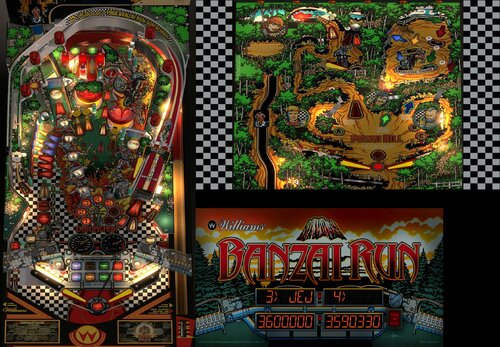
Banzai Run (Williams 1988) - PinCabViewVPX MOD (With Playable Backglass - 2/3 screens)
By Aubrel
Here a special release !!
I'm glad to share here a mod of JPSalas Banzai Run 1.0.2 table with working and playable backglass playfield in 2nd screen 🥳
To work, this mod needs to be launched using the "PinCabViewVPX_launcher.exe" included. Please read the bellow instructions.
In fact it needs more than just a launcher... It needs a Custom VPinballX build, ReShade and PinCabView/ArcCabView shader 2.6
How to install :
- Just extract this full archive in your VPinballX root folder (standard D3D9 build / v10.7 minimum as I didn't test with previous versions)
- Do not change anything and run directly "PinCabViewVPX_launcher.exe" (it should be next to your usual VPinballX.exe)
- That's all
- You have to use the launcher (PinCabviewVPX_Launcher.exe) to run the supported games (for now only Banzai Run)
PS: If needed, after the 1st launch, you can set some options :
If it's slow, not nice enough or if your screens are not displayed where they should (DMD and Backglass screens switched), just check options in "PinCabViewVPX.ini" (should be next to the launcher in Visual Pinball X root directory)
(Keep "DMDPositions", "DMDSizes" and "BGScreenNbr" at "0" if it's ok like that and never edit any "xxx_default.cfg" files)
Depending of your configuration, it will display the score leds in the backglass screen or in your 3rd screen.
"PauseMenu" option is available to get or not the VisualPinball pause menu before quit (with Esc key)
"ApronCrop" option is available in PinCabViewVPX.ini if you don't want to display the apron part of the table
"DMDScreenPercent" option is available in PinCabViewVPX.ini if you don't use the full DMD screen area
"FullDMDScreen" option is available to display the DMD in your full DMD screen area (can work with "DMDScreenPercent" too)
"SetPerfMode" option can help for low configs (also setting the table to use "Fast FXAA" and lower "details level" for example can help too)
"IntResLevel=1" should be ok for most people and matches 1080p screens, "IntResLevel=0" will bring a big boost ("2" and "3" will require more power but the game will look better on UHD screens)
...
Also some more options are available in in ReShade’s UI (access with “home” key ingame)
Important :
- Don't change the table's POV !!
- Don’t edit any “_default.cfg” files !
- You need at least 2 screens to be able to play in cabinet mode (backglass display is needed to play)
- This mod was made to runs only in "Cabinet mode" (but a “landscape desktop mode” is now available)
- Your playfield screen has to be your main screen and should be your "top-left" screen (negatives screen positions are not supported)
- All your screens have to use the very same DPI Scale
- FSS mode, Stereo3D and TrueFullScreen are disabled
- The internal resolution level can be set in PinCabViewVPX.ini (it can be very slow with high values)
- The included table won't be displayed as it should using the official Visual Pinball releases
- The backglass width can be adjusted ingame in ReShade UI with the “BackglassWidth Scale” slider
- The display size of the table can be set in ReShade UI with “Manual Main Screen Zoom” sliders.
Banzai Run table MOD (mostly a functionnal mod, still the JP table at 99%) :
- Backglass parts moved to the bottom of the table
- Script update to get the backglass elements always visible
- Script update to get the lifter moves in the table's backwall too
- Script update to fix the lifter moves (should be accurate now, the switches hack is removed)
- Added ball falling down from backglass and ramp collision sound
- Many art's colors adjusted with less saturation
- Lifter moves and backglass playfield arts improved
- Flipper shadows added
- Some small other changes...
Thanks to JP Salas for allowing me to share here this mod of his awesome table!
Thanks to Toxie to let me include my custom VPinballX build
Thanks to Smaug, Bietekwiet and BountyBob for their tests and feedbacks.
Side Note :
If you manage to understand how it works, you can add tables to this release
The tables should be named "TableName_PCV.vpx" and put in "PinCabViewVPX\Tables\" folder
To run you will have to send the "TableName" to the launcher (without or without path and "_PCV.vpx")
Example : "D:\MyVPinballDir\PinCabViewVPX_Launcher.exe” TableName
You can also put for this new table default “Preset” cgf files, a “Data” ini file and "Textures" images just like I did for "BanzaiRun" (and some special options in PinCabViewVPX.ini too!)
Enjoy !
***********************************************************************************
PinCabViewVPX by Aubrel
The pack contains :
- PinCabViewVPX Launcher by Aubrel
- PinCabView Custom VPX table "Banzai Run (Williams 1988)" (Original 1.0.2 table by JP Salas, PinCabView MOD and DirectB2S DMD Screen by Aubrel).
- PinCabView 2.6 ReShade's shader by Aubrel and Ducon2016 (ArcCabView 2.6 with Pinball options activated)
- ArcCabView Custom ReShade 4.9.1 build (ReShadeMod32.dll / ReShadeMod64.dll)
- PinCabView Custom VPinballX 10.7.3 build (VPinballX32_PCV.exe / VPinballX64_PCV.exe)
***********************************************************************************
PinCabView Info / Support :
https://vpuniverse.com/forums/topic/5494-pincabview-bigraceusa-fantasticjourney-timeshock-theweb-wormspinball-worldrallyfever-slamtilt-resurrection/
PinCabView2D Info / Support :
https://vpuniverse.com/forums/topic/5744-pincabview2d-most-old-dos-pinball-games-in-your-pincab/
PinCabViewWFS Info / Support :
https://vpuniverse.com/forums/topic/5903-pincabviewwfs-all-wildfire-studios-pinball-pc-games-in-your-pincab/
ArcCabView/PinCabView shader Info / Support :
https://www.emuline.org/topic/2598-arccabview-pincabview-display-your-arcade-games-just-as-you-want/
Thanks to Ducon2016 and Houb for the amazing "CRTGeomMOD" shader (and thanks to cgwg for the original CRTGeom shader)
http://www.emuline.org/topic/1420-shader-crt-multifonction-kick-ass-looking-games/
ReShade home : https://reshade.me
Visual Pinball repository : https://github.com/vpinball/vpinball
Original Banzai Run (Williams 1988) 1.0.2 by JP Salas :
https://www.vpforums.org/index.php?app=downloads&showfile=17036
3697 downloads
- banzairun
- banzai run
- (and 2 more)
-
.thumb.jpg.0144054f8fcc3e7a34490b48f4f8b68a.jpg)
BMX - RAD Edition (Bally 1983) MauiPunter MOD
By MauiPunter
BMX - RAD Edition (Bally 1983)
v1.0
By: MauiPunter
RAD was one of my favorite movies when I was growing up in the 80s and when I discovered there was a Bally BMX table by JPSalas, I just had to do a sound and theme mod for it. Also, thanks to hauntfreaks for creating an amazing backglass.
Please keep in mind this is my very first attempt at anything with VPX, so your patience is appreciated. While my mod is quite simple I hope to revisit it over time to learn more about creating and modding tables. A pup-pack for the movie to go with this table is coming in the future.
Notes:
The zip file contains everything you need for the table; the backglass, the media files, and the soundtrack to the movie.
1. Place the found files in your Music directory in a directory named bmx.
2. The media zip contains all the media files you will need for Pinup Popper.
3. Place the VPX and directB2s file in your Tables directory.
Music Control:
Music starts immediately when the table is loaded. Then randomly chooses songs from the playlist, which contains the whole RAD soundtrack except for one song.
All Artwork, Logos, Music, Copyrights, and Trademarks are the property of their respective owners.
PROVIDED STRICTLY FOR PERSONAL / HOME USE AND NOT FOR COMMERCIAL SALE / RE-SALE OR DISTRIBUTION!
285 downloads
-
.thumb.png.991c2d2ec6d1eba179cd90ae029646c1.png)
Bram Stoker's Dracula (B&W)
By dragon44
First and foremost I would like to say that it is just a Black and White modification of the original ICPJuggla table, which I thank for allowing me to do it and making it available to the entire community.
The goal of this table was to recreate a mod I saw on youtube: https://www.youtube.com/watch?v=smZbKsvyoP4&t=229s
This table originally comes from FP , from Francisco666 and Rom. He was made VP by ICPJuggla and had a few helpers at big names like Tom Tower, Zany, Ninuzzu, Bodydump and Ezepov.
I think that JP Salas is also working on this project.
I hope I haven't forgotten anyone.
I only ask one thing of you, keep having fun in this wonderful pastime.
878 downloads
.thumb.png.c3f10bf0d78baa072423129a9928ef9e.png)
.thumb.jpg.51c7531114e2f7aeb4ee57cf584aeb66.jpg)

.thumb.png.e8d923569c7ad8c0d8293085399d615a.png)
Illuminated.thumb.png.75d715670170e48968830f6d23115f86.png)
Illuminated.thumb.png.664aae020e341029e4b89a53e67488f4.png)



.thumb.jpg.fe2f8cd221a5724c6aa12be39443d71f.jpg)
3rdEdition-frameat0m8s.thumb.jpg.813701345a25077970e72723d2996ff9.jpg)



PuPPackFullDMD.thumb.png.cd96092648e5272870801cc27046def9.png)

FullDMD.thumb.jpg.f0020138340188d7cac9a4ec9df0a8ed.jpg)
FullDMD.thumb.jpg.ed8940604e1d6ba4c6c0b173666956a1.jpg)
FullDMD.thumb.jpg.81195cb5db4fbb2399ef210681fdac24.jpg)

Rules.thumb.png.0f3e74c15d74f754940e08fbebe44cdc.png)


Rules.thumb.png.7e30062954df731c52a7124de50d3a35.png)














Tombg-4K30FPSPlayfieldVideo.thumb.jpg.839b9c68b913bc2052ed5f07b2b486f2.jpg)