-
SYSTEM SEARCH
System Scanners Online:
Username: Guest
>> System Scan?
>> The Universe >
Incoming Message:
Due to system limitations searching with words of 3 or less characters will not return results. For instance; Doctor Who. This will not return results as the system is trying to search for both Doctor AND Who in which Who will not be found as it's a 3 character word. To find Doctor Who; you'd search for either Doctor or "Doctor Who".
Search Tips:
For specific searches; enclose your search with quotes. Example: "Doctor Who" or "Addams Family".
Search the Community
Showing results for tags 'vpinmame'.
Found 4 results
-
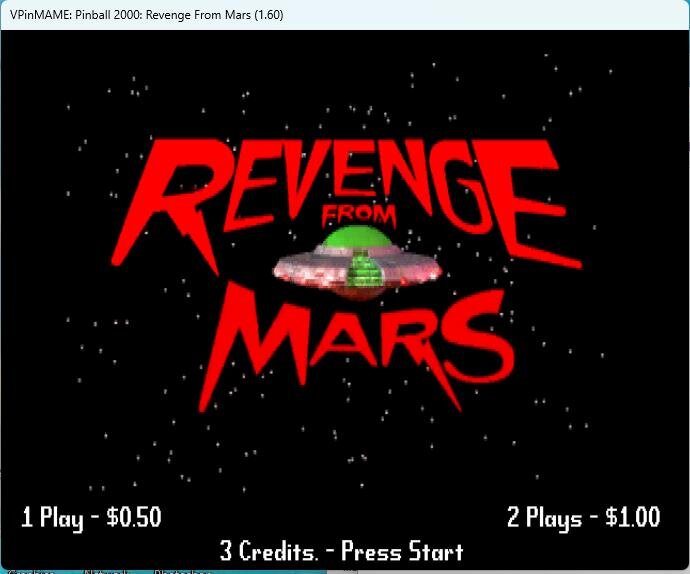
Well well well. What do we have here? P2K roms now running in the newest vpinmame!
-
Pincab Toolbox — a big batch of updates Since my last post, a lot has changed under the hood, and most of it is stuff you asked for. Scanner: New interface (green, cleaner tables, a collapsible detail panel, a Tutorial tab that explains what each check actually does) Now available in English, French and Spanish A dozen more checks: missing B2S global config file, missing .ttf fonts a table script needs, hard-coded absolute paths in a script, local copies of core.vbs/controller.vbs, and more Scans a whole drive or multiple drives now, not just one folder A "Check for updates" button that compares your version to the latest release PDF export of your report Repair (still closed beta): Way less noise, only real issues become items to fix, not every single scan result The repaired history now shows exactly what changed on each item, not just a filename A new Beginner / Expert toggle, pick how much technical detail you want to see No longer needs Administrator rights for the whole app, Windows only asks when one specific fix truly needs it A "recheck my score" button that reruns the same scan after a repair and shows you the before/after Two new automatic fixes: repositioning an off-screen DMD window, and registering a missing or mismatched COM component (VPinMAME, B2S, FlexDMD) Six fixes working today, always backed up first, always undoable in one click Already have it? Open the app, hit "Check for updates" in the Scanner tab, and grab the new build. Never tried it? Download it, scan your cab, and tell me what's broken. And tell me what you'd want next, what checks or fixes would actually save you time on your cab? Follow the page for the next updates https://pincab-toolbox.vercel.app/ Happy flipping!
-

Version 1.0.1
13379 downloads
Godzilla Pin2DMD Readme Colorization of Sega’s Godzilla.Feel free to alter my work however you want. I would prefer you release the source files for any changes but I can’t make you. Post any bugs in the pinside thread: https://pinside.com/pinball/forum/topic/pin2dmd-colorization-of-godzilla Release Change Log: 1.01 the "DMDMK66 Stole my work" edition. Rappel added and fixed some triggers. Alterted some palettes and color masks No source code update for this release until dmdmk66 either admit he stole my work or stops Missile Bonus recolored and remasked, Buildings remasked/color, bonus numbers redone New York Sonor scene redone, brown haired army guy is now a blonde haired navy guy triple helicopter missile scene recolored and remasked. Buildings are grey instead of blue to contrast with the sky better missile also had white area removed and turned red. 1.00 Initial Release Everything below plus some additional palette changes 0.90 Initial Beta Release Most(All?) Sequences color masked and keyframes linked Finaled color choices 0.50 Redid bridge animations Inital palette choices attract mode scenes colormasked and keyframed 0.10 Palette Jump Testing Thanks to Lucky1 for helping with keyframe triggers and thanks to Rappelbox for support ; and to both for the recordings.- 3 comments
- 10 reviews
-
- 137
-

-
Most are aware of Stern SAM soundtrack remixes that were done using Pinball Browser – links to some patches and/or patched game code here: http://vpuniverse.com/forums/forums/topic/2380-list-of-vpm-rom-remixes-and-mods But support for PinSound-based alternate soundtracks has been included in the last two releases and I very rarely see anyone mentioning it. It’s virtually untapped territory for updating/upgrading existing tables. There is currently support for Data East, Williams System 11C, WPC, and Whitestar. It’s very easy to add the feature. Download Windows version of PinSound Studio here: https://www.pinsound.org/pinsound-studio/ Like every other pinball-related program, this should be run as admin. There is online support to download alternate soundtracks directly through the program. Offline, you can go to the community website and download zip files for tables. The program allows you to import from zip. http://pinsound-community.org Wait for the program to extract and process the sound files from the zip. When the program is ready, select the Visual Pinball tab on the left hand side of the window. Type in the PinMAME rom set that you want to associate with the sound package that you imported. Now, in the VPinMAME game settings for the rom. Set the value of Sound Mode to 2. That’s it! Some that I really like: TAF – remastered music and voices http://pinsound-community.org/forum/index.php?/files/file/126-taf_remastered_original_voiceszip/ TZ – the lost Chris Granner DCS soundtrack http://pinsound-community.org/forum/index.php?/files/file/127-tz_dcs_chris_grannerzip/