-
SYSTEM SEARCH
System Scanners Online:
Username: Guest
>> System Scan?
>> The Universe >
Incoming Message:
Due to system limitations searching with words of 3 or less characters will not return results. For instance; Doctor Who. This will not return results as the system is trying to search for both Doctor AND Who in which Who will not be found as it's a 3 character word. To find Doctor Who; you'd search for either Doctor or "Doctor Who".
Search Tips:
For specific searches; enclose your search with quotes. Example: "Doctor Who" or "Addams Family".
Search the Community
Showing results for tags 'arcade'.
Found 4 results
-
Version 1.0.0
495 downloads
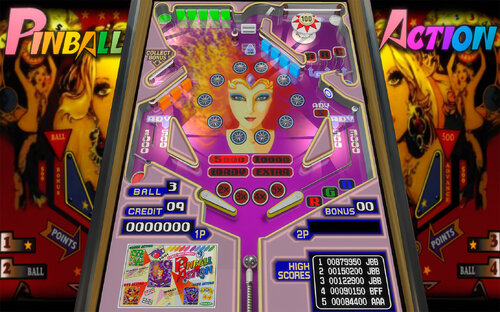
PINBALL ACTION (Tehkan 1985) Recreation of this beloved 80s multi-table arcade videogame, by JBBolcato. Includes regeneration of all artwork and audio, plus coding logic in VS script. Game is complete with all 4 tables (1 main and 3 warp Red Green Blue ones). This is half height pinball (4/3 vertical video game screen), so for full size cabinets, expect some space at the top! Also, all the scores and high scores are embedded in the bottom/apron part of the pinball, so the backglass is just for looking pretty - a simple one is included. Check the media folders for additional goodies like dmd video and topper/wheels. See rules for details on how to play. (pdf, or ingame/Press R or D) Enjoy! Tested only in desktop mode, and cabinet mode 3 screens. Feedback welcome! This is my very first table, so plenty to learn still. Many thanks to JPSalas for his advice and support, plus all the amazing Vpinball community for its endless supply of cool tables, programs and tutorials to welcome newbies like me. Version history: 1.0 - 24/12/2024 / initial release -
Desktop player here, my Altsound files sound muffled, grated, basically sounds like 8bit music when they are not supposed to (example: Twilight Zone Altsound 2.0) For some reason, my F1 does not call up the rom menu. Here are the attempts I have made to get the altsounds to work right: VPINMAME setup (and setup64) > turn Altsound Modes to 1 > set ducking value to 100 on altsounds in the Altsound csv files. > On VPINMAME rom test menu, turn Resampling Quality to 1 > On VPINMAME rom test menu, checked 'extend mono sound to stereo' > increase ingame volume via F12 or the coin door.
-
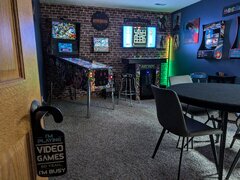 I designed and decorated this game room in my basement. The vpin cab and the MAME pedestal were both designed and built from the ground-up by me personally using 3/4" birch plywood. The vpin cab has authentic Williams rails, legs, buttons, and coin door. The glass came out of an old Twilight Zone pinball cabinet that was in an arcade in Sioux Falls, SD for a very long time. It has lots of scratches that can probably tell some great stories. It has a 27" LED for the backglass, a 15.6" for the full DMD, and a 42" C3 LG OLED for the playfield. The MAME arcade pedestal has a nice beer cooler inside, two-player controls with dual joysticks (right one rotates too), trackball, spinner, and the button layout for Defender Stargate in the middle.
 -
I have a 3 monitor pinball setup. When I launch Retroarch from outside of Pinip, it loads full screen on my backglass (monitor 3). However, When I launch Retroarch from with Pinup, it only launches on the playfield (monitor 2). In the Retroarch emulator, I did select the backglass option for Keep Displays On. Is there another place I should be trying to set it at? This is my Launch Script START "" "[STARTDIR]Launch\VPXSTARTER.exe" "Multiple Arcade Machine Emulator" 2 2 10 😄 cd "C:\Emulators\RetroArch-Win64\" START "" retroarch.exe -L "C:\Emulators\RetroArch-Win64\cores\quicknes_libretro.dll" -c "C:\Emulators\RetroArch-Win64\config\QuickNES\QuickNES.opt" "[GAMEFULLNAME]" -f