
Jump to content

The Goonies Never Say Die Pinball (VPW)

  • Get Support
  • Create an account or sign in to download this
download_no_perm
139661 Views
29566 Downloads
4.9 From 66 reviews
212.7 MB File Size
None ROM Name
VPW Created by
VPW Artwork by
VPW Scripting by
Original Manufacturer
2021 Year

2 Screenshots

"Don't you realize? The next time you see sky, it'll be over another town. The next time you take a test, it'll be in some other school. Our parents, they want the best of stuff for us. But right now, they got to do what's right for them. Because it's their time. Their time! Up there! Down here, it's our time. It's our time down here."


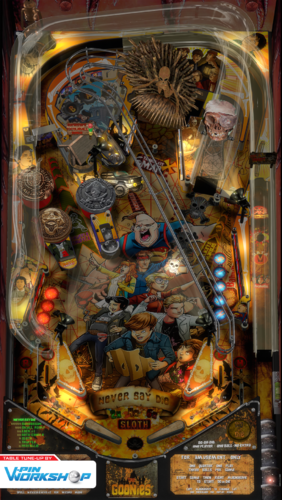
The VPin Workshop members present The Goonies: Never Say Die Pinball! This project started out by adding physics and fleep sound to Hawkeyez88 pup-pack release.  In doing so many scripting issues were found in the original table.  We decided to not only fix the current table, but have added support for FlexDMD, new modes, ramps, shadows, playfield, sounds, ect.

Pretty much every piece of this table has been touched, enhanced, and tested.


This table is setup to work with the FlexDMD out of the box.  You can disable the FlexDMD and enable the pupPack created by Hawkeyez88 by changing the options in the script.


* Main table overhaul: fluffhead35, oqqsan
* nfozzy and fleep: fluffhead35
* DOF: apophis
* New playfield design: HauntFreaks
* Playfield, image and lighting updates: HauntFreaks
* Backglass: HauntFreaks
* Droptarget Shadows: HauntFreaks
* Miscellaneous fixes and tweaks: Entire VPW team inc. Sixtoe, apophis, wylte, fluffhead35, oqqsan, Nailbuster
* 3d Inserts: oqqsan
* flupperdomes : oqqsan
* FlexDMD : oqqsan
* Apron Primitives: oqqsan and Tomate
* Ramp Primitives: tomate
* New Toy Primitives Chester,coins,key: oqqsan
* Scoring and game play enhancements: Rik, apophis, oqqsan
* Testing: Rik, apophis, VPW team
* Bone Organ Primitives: Tomate
* Bone Organ Animations: oqqsan
* wylte: Flasher shadows on ramp
* Original pupdmd code: Nailbuster
* Previous DMD animations: VPFiends
 
This release would not have been possible without the legacy of those who came before us including, in this case, Javiers VPX version.


Thank you to Rothbauerw and nFozzy for the physics. Thanks to Fleep for sounds.

Edited by VPinWorkshop
Updated per version 1.4

Included
Contact Author First.
10.8 required
Yes

What's New in Version 1.5   See changelog

Released

Update Summary

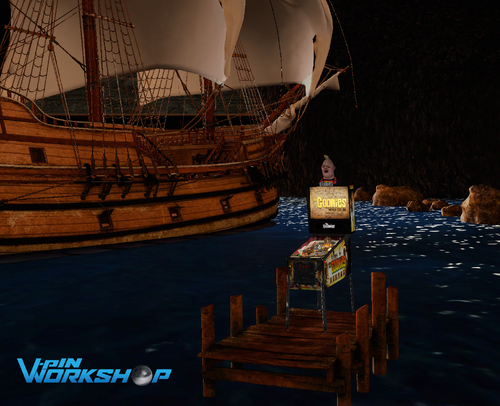
  • New MEGA VR room, back glass, and topper
  • New One-Eyed Willy skull on table
  • Some new sound effects
  • Mild score balancing
  • Most options are now in the tweak menu
  • Performance improvements and bug fixes
  • ... and more!


Details
'1.4.4 - Lumi - sound changes, mild rebalancing, new double scoring insert text
'1.4.5 - apophis - Fixed flipper trigger shapes. Opened up right outlane a little (to match left). Multiball fix.
'1.4.6 - DGrimmReaper - VR Backglass animations for non pup.
'1.4.7 - apophis - Fixed some ramp and wall sound effects (thanks Studlygoorite)
'1.4.8 - apophis - Adjusted height of backwall lights. Added visible rubber to trust post. Disabled unused timer.
'1.4.9 - DaRdog - Added MEGA VR room. Updated one-eyed-willy skull on table,
'1.4.10 - apophis - Moved table options to Tweak menu.
'1.4.11 - apophis - Fixed VR room option order. Lowered some reflection strengths, bloom, and SSR. Converted dynamic shadows to new RTX shadows. Added some missing visual rubbers. Moved some color options to tweak menu. Added visual blocker behind VR backglass.
'1.4.12 - DaRdog - Adjusted one-eyed-willy skull size.
'1.4.13 - apophis - Image manager cleanup. Added instruction and moved LUT selection to tweak menu.

User Feedback

Recommended Comments


derek642

Posted

this looks awesome!  is the "GooniesDMD" the pupPack folder?

outhere

Posted

1 hour ago, derek642 said:

this looks awesome!  is the "GooniesDMD" the pupPack folder?

In the tables folder  -- TheGooniesDMD

Dhitch83

Posted

sorry for a dumb question but this a first table for me.  does this need a rom as well? I couldn't find one in the roms section.  TIA

  • Content Provider
Wylte

Posted

3 hours ago, Dhitch83 said:

sorry for a dumb question but this a first table for me.  does this need a rom as well? I couldn't find one in the roms section.  TIA

Nope, no rom needed.  You will need FlexDMD installed and the included .b2s and TheGooniesDMD folder in the Tables folder alongside the table file.

Dhitch83

Posted

On 8/27/2022 at 2:23 PM, Wylte said:

Nope, no rom needed.  You will need FlexDMD installed and the included .b2s and TheGooniesDMD folder in the Tables folder alongside the table file.

Thanks!! What a great table!!


Cliffy

Posted

Just a heads up for anyone using Launchbox. I had to add Controller.Stop at the end of the Table1_Exit sub as the pup pack wouldn't close. It closes fine when launched from the editor, just not in Launchbox. Added at line 1501

1492    Sub Table1_Exit
1493             Savehs
1494             If B2SOn Then Controller.Stop

1495

1496             If enableFlexDmd Then
1497                  FlexDMD.Show = False
1498                  FlexDMD.Run = False
1499                  FlexDMD = NULL
1500             End If
1501              Controller.Stop
1502    End Sub


jforderer

Posted

amazing table thanx so much!

plays great for me - only problem i have is that when i try to play more than one player can only play 1 ball of first player then after that ball drains game is over.

outhere

Posted

16 minutes ago, jforderer said:

amazing table thanx so much!

plays great for me - only problem i have is that when i try to play more than one player can only play 1 ball of first player then after that ball drains game is over.

Is one player game

Chairman7w

Posted

This looks amazing, I can't wait to start playing this (I have to get it on my Cabinet, but having some PC issues at the moment).

Does anyone know if this is built original from scratch, or is it a reskin of another table?

  • Content Provider
Wylte

Posted

4 hours ago, Chairman7w said:

This looks amazing, I can't wait to start playing this (I have to get it on my Cabinet, but having some PC issues at the moment).

Does anyone know if this is built original from scratch, or is it a reskin of another table?

Based on Stern Indiana Jones, but with some modifications and fully custom code

themazingness

Posted

I can't get the DMD to show. Maybe it is related to this error in the log: 


Failed to load dmdscreen.dll in d:\Visual Pinball\VPinMAME\dmdscreen.dll 


Indeed, the dll doesn't exist. If this is the fix, how do I get it?

  • Content Provider
Wylte

Posted

45 minutes ago, themazingness said:

I can't get the DMD to show. Maybe it is related to this error in the log: 


Failed to load dmdscreen.dll in d:\Visual Pinball\VPinMAME\dmdscreen.dll 


Indeed, the dll doesn't exist. If this is the fix, how do I get it?

Not sure where that dll comes from; it's not in FlexDMD or DMDext, so it must be part of the vpinmame install?

FlexDMD 1.8 includes this line in the changelog: "Add support for dmdscreen.dll (if it exists, it will receive the same calls as dmddevice.dll)"


I'd say update all 3 just to be safe 🤷‍♂️

themazingness

Posted

21 minutes ago, Wylte said:

Not sure where that dll comes from; it's not in FlexDMD or DMDext, so it must be part of the vpinmame install?

FlexDMD 1.8 includes this line in the changelog: "Add support for dmdscreen.dll (if it exists, it will receive the same calls as dmddevice.dll)"


I'd say update all 3 just to be safe 🤷‍♂️

It turns out, the problem was the .ini file. Both of these were set to false:


; a DMD that renders with nice dots on a computer monitor
[virtualdmd]
enabled = True

; virtual dmd stays on top of all other windows
stayontop = true
 

It was the first one that got it working, but I enabled the second one before that and assume it is needed too.

Thurman8tr

Posted

Phenomenal game! VPW are masters at their craft!

Smileslikejoker

Posted (edited)

On 8/4/2022 at 2:28 PM, Cliffy said:

are you using the flexdmd or the pupdmd? I'm in desktop and use the pupdmd as shown below

Edit the vpx script and see lines 138-141 if they look like this for pupdmd

138 Const enablePupPack        = True
139 Const enablePupDMD      = True ' Enable PupPack must be true if this is set to true

140

141 Const enableFlexDmd        = False


and then line 170 set to 0 for LCD screen

dim PuPDMDDriverType: PuPDMDDriverType=0


goonies-actual.jpg

EDIT - I got the DMD showing.  I had put the pup files in the folder generated by PuPlayer.  The script had the wrong folder name listed so I changed it in the script.

The only issue left is the overlay.  I'll take it to the pup pack page.


Edited by Smileslikejoker
Cliffy

Posted

6 hours ago, Smileslikejoker said:

EDIT - I got the DMD showing.  I had put the pup files in the folder generated by PuPlayer.  The script had the wrong folder name listed so I changed it in the script.

The only issue left is the overlay.  I'll take it to the pup pack page.


If I remember right I had to use pup pack editor to change the overlay to always show or force on.

Smileslikejoker

Posted

It's something else.  I'm working on finding a fix lol.

Cliffy

Posted

On 5/7/2023 at 12:59 PM, Smileslikejoker said:

It's something else.  I'm working on finding a fix lol.

here's my screens pup if you wanna try it

screens.pup

Smileslikejoker

Posted

I found the fix.  I can't remember what it was now lol.  It was something with my setup at the time.  Probably something simple that I kept overlooking lol.

Still though, much appreciated Cliffy :)  SIDENOTE:  There was a table I wanted to ask you about as it needed some touch-ups for desktop users.  I figured if someone had tuned it up, it would be you lol.  Problem is... I can't remember which table it was LOL.

Cliffy

Posted

9 hours ago, Smileslikejoker said:

I found the fix.  I can't remember what it was now lol.  It was something with my setup at the time.  Probably something simple that I kept overlooking lol.

Still though, much appreciated Cliffy :)  SIDENOTE:  There was a table I wanted to ask you about as it needed some touch-ups for desktop users.  I figured if someone had tuned it up, it would be you lol.  Problem is... I can't remember which table it was LOL.

well when you figure out which one it was.. :)

  • Content Provider
Ext2k

Posted

Hi, amazing work!!! This table have a VR Room version?

Jayinvegas73

Posted

Does anyone know how to correct the error I am getting for the following:


Runtime error
-------------
Line: 9202
Object reference not set to an instance of an object.

davis

Posted

love it 💖

loonytu

Posted (edited)

works great dof not working this is my only table that it doesnt work  i updated everything

Edited by loonytu
loonytu

Posted

On 10/22/2023 at 1:32 AM, loonytu said:

works great dof not working this is my only table that it doesnt work  i updated everything

got it to work just cant remember how


Create an account or sign in to comment

You need to be a member in order to leave a comment

Create an account

Sign up for a new account in our community. It's easy!

Register a new account

Sign in

Already have an account? Sign in here.

Sign In Now
×
  • Create New...