
Jump to content

Star Trek The Next Generation (Williams 1993) VPW Mod

  • Get Support
  • Create an account or sign in to download this
download_no_perm
73888 Views
19336 Downloads
5 From 58 reviews
166.71 MB File Size
sttng_l7 ROM Name
Knorr, Clark Kent, VPW Created by
Knorr, Clark Kent, VPW Artwork by
Knorr, Clark Kent, VPW Scripting by
Williams Manufacturer
1993 Year

2 Screenshots

Engage!


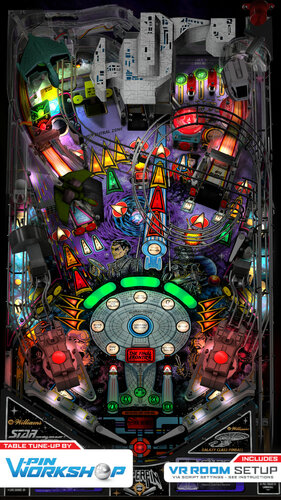
VPW are proud to present a table tune up of Knorr and Clark Kent's version of Star Trek the Next Generation from Williams.


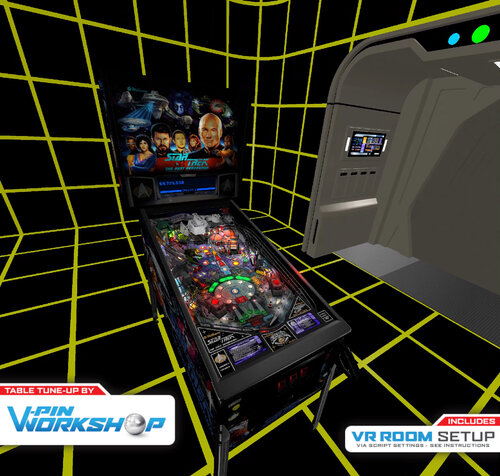
Although already great, we've added updated nfozzy physics, added some fleep sound whilst keeping the original recordings from the real machine, added the full VR room suite from Rawd and Steely, updated Sixtoes VR cabinet with Leojreimroc making a fully functional backbox in VR and lots of other tweaks and fixes along the way.


The table now plays even closer to the real thing and we hope you enjoy it!


VPW Mod v1.0
============
Project Lead - fluffhead35
VR Holodeck - Rawd/Steely
VR Work/Backglass - Sixtoe/Leojreimroc
Tweaks - ClarkKent, Apophis, Sixtoe

============


v01 - fluffhead35 - Added Flipper Triggers, Rubbers and Posts, Bumpers, slings, flipper, and table physics corrections.  Adding in fliper and physic damperner code.
                  - Adding in materials for all code
v02 - fluffhead35 - Added Fleep sound
v03 - fluffhead35 - finished Fleep sound and fixing upper flipper, changing flipper polarity to early 90's and later. Added Sling correction.  Increased plunger strength.
                  - Added logic to stop ball rolling sounds in subways.  Set FlipperCoilRampupMode to 2 
v05 - leojreimroc - Imported Rawd's Holodeck VR Room.  Adjusted Laser barriers for VR.
v06 - fluffhead35 - fixed flipper triggers.  Rubber thickness fixed on upper flipper.  Increased flipper hit sound level.  Updated sling rubbers to use bottom corner for post pass.
v07 - clarkkent   - deleted zCol_Rubber_Sleeve008, RubberPost4,  SubwayScoop_Prim
v08 - fluffhead35 - Made Posts for post pass collidable, adjusted flippers to be in line with guide.  Adjust playfield friction to .15.  Adjusted sling posts physics for post pass.
v09 - apophis     - Added new playfield mesh. Increased speed of slingshot animations. 
v10 - Rawd        - Added ClarkKent Cabinet artwork, some VR fixes and tweaks
v11 - leojreimroc - Implemented Iaaki's flasher code to all solenoid flashers.  Fixed a few flasher positions that were past the cabinet.  Implemented VR Backglass lighting.
v13 - fluffhead35 - Added new ball launch sound to help prevent high bass sounds.  Adjusted size of sleave and physic materials of start mission scoop.  Removed ball dampening triggers.
v14 - fluffhead35 - updated the sling posts for post pass based on clark kents suggestions.  Changed Table difficulty to 56. Added option to switch if ball launch should have bass lowered.
v15 - fluffhead35 - Set default wire Ramp sounds to be from clark kents samples.  Added option to use the other samples if user wants.  Changed ball out to brighter ball.  Turned off flipper corrections on upper right Flipper.
                  - Changed environment emission image to be shinyenvironment3blur4.  Adjusted gi around inlanes and inline insert lightings.
15d - set the falloff of gi lights to 5. Set the day night to 1, set environment lighting to black, adjusted warbird material, adjusted lighting around upper lanes.  Adjusted some random insert lighting.  Adjusted ramp friction based on clark kents suggestions.
15e - changed elasticity and scatter of sw57 to give ball more random bounces and goes down inlanes based on BountyBobs testing
16  - fluffhead35 - merged in nfozzy changed to init throughts at game start as well as using new flipper physics.  Removed target bouncer from sleeve in start mission scoop.  Lowered bumpercap3 from 25 to 20. Added TargetBouncer to Targets_hit
17  - Sixtoe       - Added VR logo back in, hooked up cannon light primitives to lighting system, cleaned up script

https://www.ipdb.org/machine.cgi?id=2357
https://vpuniverse.com/files/file/3084-star-trek-the-next-generation-williams-1993/
Contact Author First.
v10.7 required
Yes

What's New in Version 1.1   See changelog

Released

'v1.0.1 - Adjusted the neutral zone target, changed the vr wall heights to be correct
'v1.0.1a - disabled borgramp1a and set detarampendborg to collidable.
'v1.0.1b - adjusted the neutralzone sounds so that they will be heard. Moved sw48 on borgramp1 so that it see hit value, adjusted cannonlBall.z and cannonRBall.z to fix ball hitting habbit trail.
'v1.0.1c - added option to show cab rails in cabinet mode.  Added in staged flippers mod
'v1.0.1d - moved ramp3 to right a little to line up better with mission start scope.  Replaced the UpdateLamps subroutine with nFozzys versios to fix kickback light
'v1.0.1e - removed upper flipper from keyup and keydown as conflicted with solenoid calls.  
'v1.0.1f - Changed the Elasticity of neutral zone target to .2 and elasticity falloff to 0 for all targets
'v1.0.1g -  set T27P2 to be collidable so that ball hits target and gets into neutral zone
'v1.0.1h - scoopleft2 got moved to wrong position.  Fixed this issue.
'v1.0.1i - Added leftramp triger to start ramp sound.  Adjusting the ramp exit volumes some to make it better.  Added new logic for rampRoll to equalize sound and do a playsoundatvolumelevel call logic.
'        - Added left and right wire ramp gun ramp sounds.
'V1.0.1j - Replaced spinners that were used for gate animations with actual gates.
'v1.0.1k - fixed nuturalzone sound, changed sw27 to star and realigned, fixed issue with ramproll sound with default volume level not working right.  set some triggers to hidden.
'v1.0.1l - Added in code to try and help resolve vr dmd issue.
'v1.0.1m - nfozzy borg lamp fix, rawd vr reflection amount tweak, six klingon bird of prey tweak
'v1.0.1n - adjusted physics on lower sling posts.  Adjusted sounds lever for middle wire ramp. Put wirerampoff when entering borg ship.  Adjusted wireramp sound for vpw option.  
'v1.0.1o - Addeed Lockdown Firebutton. Removed unused sounds  Commented out Debug statements.  Made OriginalSounds the default.
'v1.0.1p - fixed missing variable and addede spacebackground.

User Feedback

Recommended Comments


  • Content Provider
Wylte

Posted

3 hours ago, Drybonz said:

I would love to see more older tables (even older era than this) done to this level of perfection.

Check out work by Bord, UnclePaulie, and Shlabber34 - they might have what you're looking for!

  • Content Provider
RobbyKingPin

Posted

I can only have one word for this. WOW! I got good memories on this table in real life and after playing this new version I must say this one feels exactly like the real one. What a masterpiece!

Drybonz

Posted

1 hour ago, Wylte said:

Check out work by Bord, UnclePaulie, and Shlabber34 - they might have what you're looking for!


Thanks... I've got 'em.  They are all making great tables!

Vendrakio

Posted

So...I downloaded version 1.1 (No idea how to download previous versions) and I am getting the following script errors...


Line: 57

Variable is undefined:  'RenderingMode'


Line: 192

Variable is Undefined:  'vpInit'


Line: 1126

Object required:  'Controller'


Can anyone help out or tell me what to have in those specific lines of script.


I am running VPX version 10.7 but have loaded many VPW table saved with version 10.72 and all I do is save it after loading it and everything runs fine.


Thanks in advance.

  • Content Provider
Wylte

Posted

47 minutes ago, Vendrakio said:

I am running VPX version 10.7 but have loaded many VPW table saved with version 10.72 and all I do is save it after loading it and everything runs fine.

This (and other new tables) use methods that require an updated VPX.  The latest stable release is 10.7.3:

https://github.com/vpinball/vpinball

  • Content Provider
Wylte

Posted

3 hours ago, GordonJames said:

Thanks for posting that. Evidently I'm not allowed to see the first link and there's no listing for Star Trek The Next Generation color DMD file.

There are some colorization creators who are hiding their files after the PAC drama.  You'll just have to hope they come back to the vpin world

GordonJames

Posted

8 hours ago, Wylte said:

There are some colorization creators who are hiding their files after the PAC drama.  You'll just have to hope they come back to the vpin world

PAC drama? Weird, ok. Thanks for the reply.

PinballEnthusiast2023

Posted

Thank you for the awesome table.  Really appreciate all of the hard work you put into it.  Happy Holidays.

jayhawk72

Posted

Hello I am new to this.  I couldn’t get this to load I received a rom error.  I downloaded the zips from the site provided and placed in my tables folder.  Did I miss something can someone help


jayhawk72

Posted

Hello I am new to this.  I couldn’t get this to load I received a rom error.  I downloaded the zips from the site provided and placed in my tables folder.  Did I miss something can someone help


Cygnusxr1

Posted (edited)

I've never been able to get the color dmd working, nor find the "non pup pak" alt sound files. The Pup Pak alt sound mutes music for calls in the PUP. Maybe my .pal and .vin files (there is a blue Borg cube vs green .pal as well) are bad? They are supposed to work with sting_l7 according to the readme.txt that came with them. I'm also updated to VPinMAME 3.6, and VPX 10.80 (thanks nail buster). I'm at my wits end, and I'm normally pretty sharp about this stuff.


Also, I don't know if anyone noticed or experienced this, but once you upgrade to VPX 10.80 and vPinMAME 3.6 if you attempt to save this board it forever breaks the rom lookup  (i.e., cGameName = "NAME"). At first I thought it was my rom file, but I tested them in vPinMAME 3.6, and they worked just fine. I had to restore from a backup copy. I noticed this when I was updating the script to point to sttng_x8 or sttng_l8. After that, no rom would work no matter what. @jayhawk72 maybe this what happened to you (i.e., saved the board)? If so, re-download a fresh copy of the table.


If someone has the files, or setup doc I can follow to get the colorDMD going, or the non-pup altsound files, I would be grateful. 


Also, just an FYI: I used my VPMalias.txt file in vPinMAME to test using alternate rom files without need to commit the save to the table, so it didn't break the board as I keep fiddling with alternate ROMs. Again, keep a backup of your table BEFORE you save anything. 

Edited by Cygnusxr1
jw15851

Posted

On 2/21/2023 at 9:55 AM, SixOfTwelve said:


Not at the table right now, but from memory (since I did the very same thing last night):

Look for all occurences of the term "If keycode = PlungerKey" (there should be two) and add

"or If keycode = LockBarKey" to each line

I had an issue where the lock bar launch button seemed to only really work once per ball, and the button was ignored after that.  Couldn't launch cannons, probes, etc.  Your suggestion got me to a solution, when I added exactly what you typed, that extra "If" gave me a syntax error, but changing it so the two occurrences of:

If keycode = PlungerKey Then

to now read:

If keycode = PlungerKey or keycode = LockBarKey Then

That suddenly fixed the issue, and the lock bar fire button would reliably always launch the ball.


This is one of my favorite tables of all time, and it was really frustrating it wouldn't play right until now.  Thanks!

Scripper

Posted

Is there a way to adjust the size of the DMD in desktop mode?

NelsonPJ

Posted

On 7/10/2024 at 5:29 PM, jw15851 said:

I had an issue where the lock bar launch button seemed to only really work once per ball, and the button was ignored after that.  Couldn't launch cannons, probes, etc.  Your suggestion got me to a solution, when I added exactly what you typed, that extra "If" gave me a syntax error, but changing it so the two occurrences of:

If keycode = PlungerKey Then

to now read:

If keycode = PlungerKey or keycode = LockBarKey Then

That suddenly fixed the issue, and the lock bar fire button would reliably always launch the ball.


This is one of my favorite tables of all time, and it was really frustrating it wouldn't play right until now.  Thanks!

Thanks for this - I was having the same issue with my lockdown bar only working the first time - this fixed it!

lafester

Posted

On 2/20/2023 at 2:17 AM, Gamblegamble89 said:

I feel like the game or ball is lagging. The only other table Ive experienced this on was Cactus Canyon.  Any tips to make it run better?  all other games I run 4k on 3060 with 120HZ monitor no issues

Did you figure this out? When the lights flash I see stuttering all over the place

Brucey

Posted (edited)

@VPinWorkshop unbelievable table. Thank you guys so much, I can't get enough of this. Learnt about the Picard Manoeuvre etc! 


Thanks again, 10 out of 10 as always!! 

Edited by Brucey
theblinky

Posted

A fantastic table and another amazing job by VPW - thank you!

When the lights start flashing during the start of multiball I get black lines on the screen and its almost like a sort of screen tearing type of thing, it's hard to describe. Only seems to happen on this table, wondering if this happens for anyone else?

Lroy

Posted

Many thanks

FRAQATTAQ

Posted

I love this table. Used to play it in a bar with my friend for countless hours. 


One question. How do I change the DMD colour from blue to yellow?

mystereo

Posted

How to hide the built-in DMD? I unchecked to ShowDMD to hide it to no avail. Thx.

Cliffy

Posted

10 minutes ago, mystereo said:

How to hide the built-in DMD? I unchecked to ShowDMD to hide it to no avail. Thx.

Open in edit mode, click the toggle to backglass view. If you see it there just grab with your mouse and slide it out of the bounding box. If it won't move it's gray, meaning locked. click edit/lock.

If you dont see it there then make sure all layers are checked in properties

dmd-offscreen.jpg

mystereo

Posted (edited)

Thanks Cliffy! I enabled all of the layers to finally see it and moved it out of the way. Thanks for the quick response! Plus, now I can apply this technique to other tables I'm having this issue with.

Edited by mystereo
khangames

Posted

Read through everything I can find and I can't quite figure out why I'm seemingly the only person having issues with this table. It essentially seems like it struggles to find the balls. Especially if it's time to launch a probe. The game just kind of stops and the game eventually starts spazzing out trying to kick balls out of everywhere it can think to find one but most of the time it isn't able to. Sometimes there will be a ball sitting in the right probe but when it tries to kick it out it doesn't have enough power to fire it out of there.

I've tried both the sttng_l7 rom as well as the sttng_x8 with the patch. I've confirmed my ROMs are valid with vPinMAME.

I've tried deleting the cfg and nv files and starting fresh.

If anyone has any suggestions I'd truly appreciate it because I want so badly to be able to enjoy this table the way its meant to be played.

Thanks in advance!

Tesla1856

Posted

4 hours ago, khangames said:

It essentially seems like it struggles to find the balls. 
I've tried both the sttng_l7 rom 


Weird. Yeah, never seen that. I've always used STTNG_L7.zip rom ... with this VPW version and also ran Bigus MOD of Knorr's for many years. If you want help, click Get-Support button above or drop by VPF.


Create an account or sign in to comment

You need to be a member in order to leave a comment

Create an account

Sign up for a new account in our community. It's easy!

Register a new account

Sign in

Already have an account? Sign in here.

Sign In Now
×
  • Create New...