Jump to content

Iron Maiden Legacy of the Beast (Original 2022) VPW

  • Get Support
  • Create an account or sign in to download this
download_no_perm
180585 Views
26699 Downloads
4.9 From 134 reviews
366.18 MB File Size
None ROM Name
VPW Created by
Original Manufacturer
2022 Year

2 Screenshots

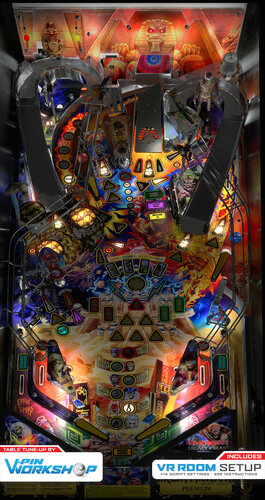
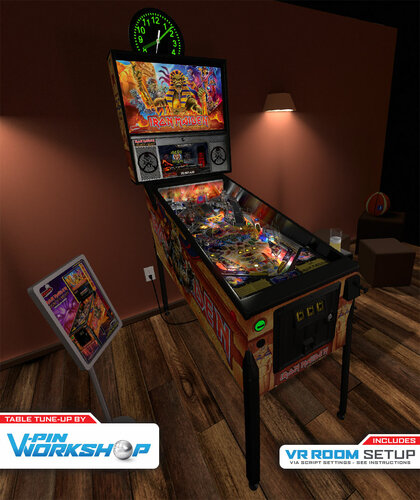
Iron Maiden Legacy of the Beast

By: VPW


**************************************

Version 1.0.12 Additional instruction:


Download and update the new PUP pack. 
** Backup your music files first if you purchased them. They are in the Music directory inside the PUP pack. **
1.0.11 PUP Pack location

https://mega.nz/file/KFpxTAhC#gqsHVYJLRxtGYU0erF3SvoBQi7q7LBnT9YNUkcBG5iE


If you have a cab with MX LEDs and you want to see a custom fire animation on your back panel, download the following animated GIF and place it in your \DirectOuput\Config directory.
https://drive.google.com/file/d/1JdxWgsUjNwwpt6Mx8UcBuF5IiLmO6YHE/view?usp=share_link


**************************************


So many hours from so many users were put into this tribute table to show how far things have really come with the possibilities of VPX. We wanted to get this out there for all to enjoy and expand the user base since we have exhausted our testing. This is one of the most complex tables so far and we have pounded on it for months, but I am sure there are still issues that are lurking. If you find an issues, please post to the forums so we can work through them.


Without the following people this could never happen.  Special thanks to:

RetroG33K, Soundscape, Iaakki, Daphishbowl, Apophis, Benji, Hawkeye, Sixtoe, MrH, Rik, Nailbuster, Tomate, AstroNasty, TerryRed, DarkStar, HiRez00, Seirif, Rothbauerw, PinStratsDan, leojreimroc, BountyBob, and many more.


NOTES:
**Don't change the variable PuPDMDDriverType=2. There was an oversight on bat file directions shown and no pup variables need to be changed for this table**

- Make sure your PINUP is up to date: https://www.nailbuster.com/wikipinup/doku.php?id=release_notes

- VPX Version: 10.7.2


INSTALL:

1) Copy VPX to your VPX Tables directory

2) Download the pup pack (link below)

3) Copy IM_LOTB directory inside the pup zip to <drive>:\PinUPSystem\PUPVideos 

4) Run the batch file in the pup pack that matches your config. It should make all necessary script changes for you.

5) To get the full music, view the readme in the Pup Music directory <drive>:\PinUPSystem\PUPVideos\IM_LOTB\Music

6) Update your DOF config files


1.0.0 PUP Pack location

https://mega.nz/file/jQoUiZ5Z#BhKnoLmeTdD2UbIcZ9yxeTpyxVtoz3jh2y-u43ZTOAQ


MPT3K Scorbit Setup and Tutorial

Manu made a great step by step on how to setup and use Scorbit

https://youtu.be/Sb6GF_3wDtc

Edited by VPinWorkshop
Updated to version 1.0.12 to fix visual issue with flippers

No
v10.7 required
Yes

What's New in Version 1.0.12   See changelog

Released

Version 1.0.12


Full change list since version 1.0.2

  • If MummyMB Ended while a ball was being processed to drop in the lock it fell through the mechanism 
  • Fixed Scorbit bug when starting a game when machine is not paired
  • Tomb Treasure could get enabled during MummyMB instead of waiting until the mode is over 
  • Trooper wasn't disabled when cyborg was enabled so it looked like the lock shots were not registering when in fact it was waiting for the player to hit start Cyborg 
  • TombTreasure needed to make sure no modes were active instead of just the base modes.  Caused Tomb Treasure to award during Cyborg 
  • Draining a ball while the lock was clearing during MummyMB could cause the ball not to finish clearing 
  • Draining while a ball was in the lock could cause mummy to think it never started and leave the mode running 
  • Optimized Logging 
  • Fixed Scorbit overflow in MAC address that prevented some machines from pairing 
  • Forced Left ramp red insert to only align with gate opening/closing 
  • Dropped small wall to prevent ball from sticking in lock mech 
  • Added KeepLogs variable to save the logfile 
  • Added debounce to drop targets to prevent possible sweep causing lots of bonus-X 
  • If left ramp was flashing red when MummyMB ended it incorrectly stayed flashing 
  • If you have TombTreasure Lit when Collecting Mummy things got confused and mummy would try to lock a second ball 
  • If TombTreasure and mummy were lit when you started a non-Multiball mode it closed the ramp and messed up mummy 
  • Flipper sizes were not exact
  • Optimized score updates to minimize messages sent to pup 
  • Match Sequence sound was set to table instead of backglass  
  • Some table sounds didn’t use cTableVolume for volume level 
  • Optimized Pup Messages for better performance 
  • Starting TombTreasure while Mummy was ready to be started caused the ball to get stuck 
  • Add-a-ball miscalculated ball save time so it was massive  
  • Extra Ball immediately lit BallSave solid instead of after ball saver ran out (if it was running) 
  • On TrooperMB could get stuck with left spinner always lit inflating scores/JP 
  • Flight of Icarus music link was incorrect  
  • Fixed potential bug in scorbit code that could cause session to not end 
  • Add-A-Ball Mystery during ball-save incorrectly cleared your remaining ball save 
  • MummyMB stopped Add-A-Ball (yellow shots) progress when left ramp was lit red 
  • Fixed Error on "Make a Note" Popup so it tries to continue and just plays an error sound 
  • Slight Tweak to better align match sound  
  • Popup Error when Cyborg was ready and you hit the underworld
  • DOF updates
  • Fixed misaligned flipper primitives (ver 1.0.12)

User Feedback

Recommended Comments


CydonianKnight42

Posted

Beautiful Table! Awesome work as always guys! However I can’t get any DOF features to work. I’ve updated my config file but still no luck. Any ideas?

outhere

Posted

On 1/23/2023 at 3:59 PM, CydonianKnight42 said:

Beautiful Table! Awesome work as always guys! However I can’t get any DOF features to work. I’ve updated my config file but still no luck. Any ideas?

I just installed version 10.2 of the game and the DOF works just fine
Post more information about your software / hardware setup
Maybe that will help somebody figure out what's going on

Kryne

Posted

Huge thank you to all that worked on this table, i am not an IM fan but just had to check out this table. Its amazing and was so easy to setup even on a laptop.

FinaIstar

Posted

Hi Guy first this table is unbelievable and its runs so perfect and I have play 40 or 50 hours on this and big thanks to the VPW team I most play only tables from you there a feal so real.


but I have 2 problems the full dmd doesn't show anytime anything after the ball lost de dmd freeze sometimes und don't show you score directly than it goes on when the second ball starts. 


i have all updated vex freeze dmd and pinmame.


and my second problem is yesterday the first time I have all songs played and 2 minutes to midnight where the last to start an then vpx get an error  like this in the pic below.

can anyone help please?


and sorry my English is not the best im from Germany


grettings 

IMG_0729.HEIC

gunner

Posted

Awesome table, many thanks to all involved!


Just wondering if there is a FlexDMD that can be added?

I'm running the 2 screen option so my 4:1 DMD screen is unused.


See it in the script but there was nothing FlexDMD related in the download.


Thanks

tmagni78

Posted

Need some help!  I'm on Desktop, rank the desktop bat option in the pup-pack, no dice.  No pup loads.  Do I need to change something in the table script as well.  PINUP is up to date.

Cliffy

Posted

On 1/27/2023 at 3:04 PM, tmagni78 said:

Need some help!  I'm on Desktop, rank the desktop bat option in the pup-pack, no dice.  No pup loads.  Do I need to change something in the table script as well.  PINUP is up to date.

Is the plugin enabled in the b2stablesettings.xml?

<B2STableSettings>
  <ArePluginsOn>1</ArePluginsOn>


Is pinup enabled in your dmddevice.ini global section?

[pinup]

; if enabled, send frames to PinUP.
enabled = true


Do you have nailbusters PuPDesktopPunch.exe and pupinit.bat in the table folder?


fudgeycaca

Posted

I'm trying to get the real music set up.  After checking the first few URLs in the README, they lead to a page for the album, but the individual song can't be purchased.  Seems Amazon is strong-arming the purchase of the complete album and is no longer offering the individual MP3s???  


Do we really need to buy several albums to get specific versions of the songs? 

RichTX

Posted

Has anyone gotten the DOF shaker motor integrated into DOF yet?


Thanks  in advance if you’re working on it already.

SixOfTwelve

Posted

On 2/4/2023 at 6:08 PM, fudgeycaca said:

I'm trying to get the real music set up.  After checking the first few URLs in the README, they lead to a page for the album, but the individual song can't be purchased.  Seems Amazon is strong-arming the purchase of the complete album and is no longer offering the individual MP3s???  


Do we really need to buy several albums to get specific versions of the songs? 


What country do you live in? I had to retool the links to work with my German Amazon page, but I could buy the individual songs without any trouble.

jarr3

Posted

On 2/4/2023 at 6:08 PM, fudgeycaca said:

I'm trying to get the real music set up.  After checking the first few URLs in the README, they lead to a page for the album, but the individual song can't be purchased.  Seems Amazon is strong-arming the purchase of the complete album and is no longer offering the individual MP3s???  


Do we really need to buy several albums to get specific versions of the songs? 

Actually most of the songs come from one album, so if you get that one first you are good to go. At least in Germany that is much cheaper than getting the individual songs.

fudgeycaca

Posted

22 hours ago, SixOfTwelve said:


What country do you live in? 

I'm in the USA, making it that much more confusing. Should work no issue...

outhere

Posted

On 2/5/2023 at 10:17 AM, RichTX said:

Has anyone gotten the DOF shaker motor integrated into DOF yet?


Thanks  in advance if you’re working on it already.

To find out take a look at the game on the DOF website

If the DOF is not working Try this for the time being until things are updated

On the DOF website on the right side Delete this Line -- PF Back Effects MX --

At the Bottom Save and Download new files
    In case you're not aware of This.. once you make changes on the right side of the DOF website any new changes for that Game will not show up... So after they do the all the updating all you have to do is go back and set it back to default

Mooserules

Posted

Read through the comments but didn't see a fix.  Runs great but only plays the MOD songs. I have put the ffmpeg.exe file into the music directory along with the correctly named mp3's of each song. Run the bat mode song file it recogonizes the 9. I have changed the const music to false and it still only plays the mode song versions. What am I missing? 

unnamed.jpg

unnamed (2).jpg

unnamed (1).jpg

Cliffy

Posted

1 hour ago, Mooserules said:

Read through the comments but didn't see a fix.  Runs great but only plays the MOD songs. I have put the ffmpeg.exe file into the music directory along with the correctly named mp3's of each song. Run the bat mode song file it recogonizes the 9. I have changed the const music to false and it still only plays the mode song versions. What am I missing? 

unnamed.jpg

unnamed (2).jpg

unnamed (1).jpg

line 57 

Const Music8Bit                    = False  ' Use 8Bit version of Music

Mooserules

Posted

8 hours ago, Cliffy said:

line 57 

Const Music8Bit                    = False  ' Use 8Bit version of Music

Yes as posted and pictured I changed that to false and still its playing the mode music.


Cliffy

Posted

39 minutes ago, Mooserules said:

Yes as posted and pictured I changed that to false and still its playing the mode music.


sorry but honestly those little crooked pics are unreadable :)

When I unzipped the ffmpeg it also put ffplay.exe and ffprobe.exe in the music folder too. I'm not sure if thats whats needed because they aren't called for in the readme but can't hurt to try

Mooserules

Posted

1 hour ago, Cliffy said:

thanks for replying it was a good idea. I tried adding those other files but the same issue. I also tried to edit the songs in song manager and that didn't work. I'll message the table creator maybe he can help. That mode music makes the table unplayable :)


fester1979

Posted

Hi,


Struggling with the DOF...updated the files, all my other tables work fine...only getting red flashers on the slingshots....any ideas?


Thanks,

Sean

marccy1138

Posted

Does anyone have a nice POV they would be willing to share? I cant seem to get it right. Feels like the previous version had a better pov.


Thanks in advance!

  • Content Provider
ARMYAVIATION

Posted

On 2/6/2023 at 12:27 PM, fudgeycaca said:

I'm in the USA, making it that much more confusing. Should work no issue...

I am getting the same DOF issue thing, only right side addressable when sling hit.  I had the default for that table.  did someone mess it up on update


Mooserules

Posted

On 2/7/2023 at 9:19 PM, Mooserules said:

It required the purchased music, that was the fix.


criptonite

Posted

Great table love it but how come i can not allow to save a POV

diablode

Posted

How do I change LUT on this?


Great table.

forte

Posted

can i play this table without the pup pack? i dont use pup packs


Create an account or sign in to comment

You need to be a member in order to leave a comment

Create an account

Sign up for a new account in our community. It's easy!

Register a new account

Sign in

Already have an account? Sign in here.

Sign In Now
×
  • Create New...