Serum DMD colorizations
3 files
-
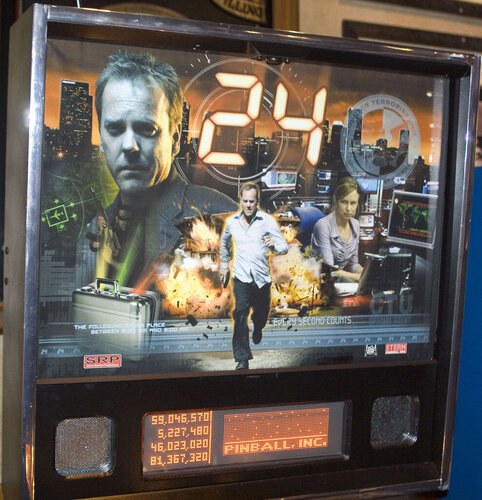
"24" (Stern 2009) Serum Colorization V1.0.1
By OdinBolt
Serum Colorization for the "24™" Pinball DMD.
All known scenes have been completed and is missing some of the score transitions and sequences.
Make sure to use a newer DMDEXT (v2.2.2 or higher to avoid VPX crashing issues.
Install the CRZ file into the standard location for SERUM files.
V1.0.1
Updated to Serum V2
4558 downloads
-
![More information about "[ZEN] BioLab Colorization - Serum v2"](https://vpuniverse.com/screenshots/monthly_2025_03/biolab.thumb.gif.fa5b38df28b153a7653705f666d6033a.gif)
[ZEN] BioLab Colorization - Serum v2
By Boroka
BioLab for Pinball FX.
I'm a huge fan of Zen studios and their original tables and have decided to give some color love to some of them.. Now I present BioLab.
To use:
Set Pinball FX to cabinet mode and set use external DMD device. Language English.
Colorization Installation location:
BioLab "27.CRZ" goes in "vpinmame\altcolor\27" folder
Requires: DMDextensions v2.3.0 + and setting system environment variable if Visual PinMAME not installed: see https://github.com/freezy/dmd-extensions?tab=readme-ov-file#pinball-fx for detailed instructions getting dmdext to work with PinballFX
** While I used frame dumps from both FX and FX3 to create the crz and have created unique sprites to handle both game engines..
It currently appears that dmdext command line (used for FX3 mirroring/memory grabbing to display) DOES NOT support Serum2 colorizations yet (Serum2 crz's just result in a black screen in FX3, but Serum1 and other color formats do appear to work in FX3/2.3.0)..
Hopefully we can get a fix/patch for dmdext command line / Serum2 use in FX3 in the future **
IF/When dmdext supports Serum2/FX3 - the file can be copied/renamed "biolab.crz" and placed in a "vpinmame\altcolor\biolab" folder
Once running, you should be able to drag the virtual DMDext window to your desired location, right click save position for 27 ( or manually add/edit an entry [27] to your table list in the dmddevice.ini
You can then set scaletohd=true to enable the HD version for the virtual
Example: (use your own values)
[27]
;biolab
virtualdmd left = 0
virtualdmd top = 0
virtualdmd width = 1024
virtualdmd height = 256
scaletohd = true
If you have a zedmdHD configured, it should detect/use the HD frames..
*** It likely will need an S3 (esp32) version of zedmdHD ***
the non-S3 zedmdHD while it works ( I do need to update my test non-S3 zedmdHD version so it may be better now), but what i tested could not handle the animated fullscreen backgrounds very well.
That said, If non-S3 zedmdHD, I recommend setting the scaletohd value to false under [27] in the dmddevice.ini
Donation/Beer me: (if you feel like it) https://www.paypal.com/paypalme/Boroka1
BioLab Test.mp4371 downloads
-
![More information about "[ZEN] Sorcerer's Lair Colorization - Serum v2"](https://vpuniverse.com/screenshots/monthly_2024_12/sorc.thumb.jpg.d2ef9e80d43523c642d44b6b3837eb30.jpg)
[ZEN] Sorcerer's Lair Colorization - Serum v2
By Boroka
Sorcerer's Lair colorization for Pinball FX.
I'm a huge fan of Zen studios and their original tables and wanted to attempt to give some color love to some of them.. I present Sorcerer's Lair..
To use:
Set Pinball FX to cabinet mode and set use external DMD device. Language English.
Colorization Installation location:
Sorcerer's Lair "33.CRZ" goes in "vpinmame\altcolor\33" folder
Requires: DMDextensions v2.3.0 + and setting system environment variable if Visual PinMAME not installed: see https://github.com/freezy/dmd-extensions?tab=readme-ov-file#pinball-fx for detailed instructions getting dmdext to work with PinballFX
** While I used frame dumps from both FX and FX3 to create the crz and have created unique sprites to handle both game engines..
It currently appears that dmdext command line (used for FX3 mirroring/memory grabbing to display) DOES NOT support Serum2 colorizations yet (Serum2 crz's just result in a black screen in FX3, but Serum1 and other color formats do appear to work in FX3/2.3.0)..
Hopefully we can get a fix/patch for dmdext command line / Serum2 use in FX3 in the future **
IF/When dmdext supports Serum2/FX3 - the file can be copied/renamed "citadel.crz" and placed in a "vpinmame\altcolor\citadel" folder
Once running, you should be able to drag the virtual DMDext window to your desired location, right click save position for 33 ( or manually add/edit an entry [33] to your table list in the dmddevice.ini
You can then set scaletohd=true to enable the HD version for the virtual
Example: (use your own values)
[33]
;citadel
virtualdmd left = 0
virtualdmd top = 0
virtualdmd width = 1024
virtualdmd height = 256
scaletohd = true
If you have a zedmdHD configured, it should detect/use the HD frames..
*** It likely will need an S3 (esp32) version of zedmdHD ***
the non-S3 zedmdHD while it works ( I do need to update my test non-S3 zedmdHD version so it may be better now), but what i tested could not handle the animated fullscreen backgrounds very well.
That said, If non-S3 zedmdHD, I recommend setting the scaletohd value to false under [33] in the dmddevice.ini
Donation/Beer me: (if you feel like it) https://www.paypal.com/paypalme/Boroka1
607 downloads




RHP.thumb.png.1c165452af06acdc89a6b1e659e677e2.png)
RHP.thumb.png.5ba393177b717a4843c23ced731c33ae.png)

.thumb.png.26c1082d14c18fdb0cfb39a00af28027.png)
.thumb.PNG.f0d05ccb1e2f9c32e50315734179c602.PNG)
.thumb.png.1c0f10c46ab70f2f5377fb208a7e69c1.png)
RHP.thumb.png.53213b1ab3a70b6ce76fb280afc407fd.png)
RHP.thumb.png.8da7cbfa65f132ede1e03ec756fccf56.png)


FullDMD.thumb.jpg.1545394d848375985fbc0bf254b393c4.jpg)




1.thumb.png.af8ba175dc22df0d6be122a668a5a749.png)

1.0.0.thumb.png.74731c60a10f932288b30278f2b4e639.png)
ComfyUI.thumb.jpg.ec11a7bd7e54eca7bc77f3182057b969.jpg)
.thumb.jpg.8308735f4b0478336ffafc3db9325e9d.jpg)




_4k.thumb.jpg.6cf79e30e37584aa9495f6e1081d0f9d.jpg)
_4k.thumb.jpg.d6c3d9c6674a209ca5caa3972222b417.jpg)
-1.2_4k_4k.thumb.jpg.083b3aff5db673de92d0d1642359c230.jpg)

(2).thumb.png.c424668e5a5b53c0ec46a52d3853a4b1.png)
(1).thumb.png.69f356ad982093321d60471e04bd8ddb.png)

.thumb.png.5436f34b31da395c472f89defbbf23f3.png)