
Jump to content

Judge Dredd (Bally 1993) VPW

  • Get Support
  • Create an account or sign in to download this
download_no_perm
64320 Views
15011 Downloads
5 From 37 reviews
276.58 MB File Size
jd_l1 ROM Name
VPW Created by
VPW Artwork by
VPW Scripting by
Bally Manufacturer
1993 Year

2 Screenshots

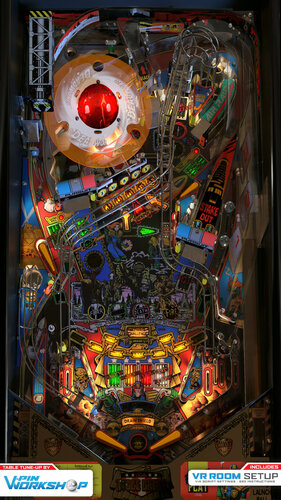
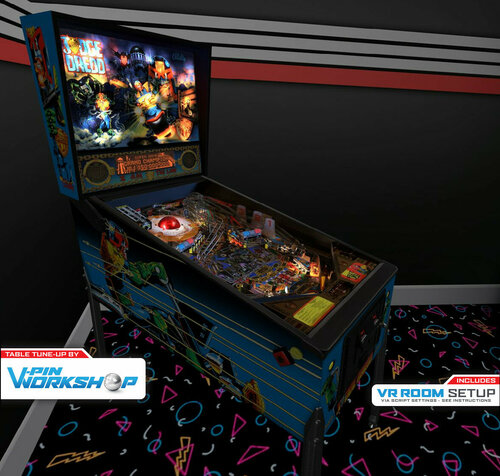
I AM THE LAW! - V-Pin Workshop proudly presents Judge Dredd from Bally.


This table has been a long time coming! It was started in December 2020 when Sixtoe decided to bring one of his favorite tables up to date (after having converting Dozer's version earlier in the year to VR and discovering it was still an old, albeit well made, vp9 table at heart).
It was decided that due to the complexity of the table, rather than modify an existing table we'd start from scratch using all new assets and rendering the table out, so here were are 11 months later (there were coffee breaks) and we're really happy with the way it turned out and hope you enjoy it!


 V-Pin Workshop Judge Dredd Team

  • Sixtoe - Project Lead, VPX Monkey, lives on gin, jack of all trades, master of none.
  • Tomate - Primitives, Baron of Blender, helping Sixtoe to not suck (as much) at 3D stuff.
  • iaakki - Scripting, Physics, Insert lighting, Complicated Stuff.
  • Benji - Physics, Deadworld & Banana insert primitives.
  • Daphishbowl & iaakki - Deadworld & Crane code (here be dragons).
  • Flupper - Flipper & Insert primitives, ramp tutorial, general rendering assistance.
  • Cyberpez - Opto's and VUK prims, aftermarket crane models, general assistance.
  • RothebauerW - Physics tutorial, drop and standup target bug fixing, general assistance.
  • Fluffhead, Apophis and Wylte - RTX Ball Shadows, general assistance.
  • gtxjoe - Ball trough tweaking assistance.
  • 3rdaxis - VR cabinet improvements, Working coin door and manual.
  • Embee & Kingdids - Original crane primitive and texture redraw.
  • EBisLit - Playfield photos.
  • DJRobX - Still answering Sixtoes coding questions...
  • Rik & VPW Team - Testing
  • Everyone in VPW for their support and encouragement!


Notes

  • Only use JD-L1 Rom!
  • Lots of options in the script, including VR and Cabinet modes.
  • Table designed on and for VPX 10.6.2 (Rev 8678), tested OK on VPX 10.7.0 Final (Rev 310)
    Do not use 10.7 328 as it's broken and breaks this and other tables


How To Play

  • Start Button  -  Start normal Game
  • Plunger  -  Launch Ball (note: real machine does not have a plunger, right firebutton launches balls)
  • Right Magnasave  -  Start "Super Game" (instant multiball - needs 2 credits)
  • Left Magnasave  -  Change LUT until game starts, then launches ball from left plunger lane in Air Raid / Missile mode.
  • How to activate DeadWorld  -  Hit J-U-D-G-E drop targets in order (ball in judge subway lights a letter)
  • How to start DW multiball  -  Get 3 balls into deadworld using left pursuit ramp after lighting J-U-D-G-E.
  • How to get Ultimate Challenge  -  Defeat all 4 dark judges or light all chain missions.
     
https://www.ipdb.org/machine.cgi?id=1322
https://vpuniverse.com/files/file/2223-judge-dreddbally-1993/
Contact Author First.
v10.6 optional
No

What's New in Version 1.1

Released

V1.1

Rebuilt entire subway entrance and fixed wall partially blocking subway (after it was added at last minute to fix a ball trap).

Fixed missing flipper rubber sounds.

Adjusted crane ramp exit hole area.

Changed cabinet POV with 1:1 one from Hauntfreaks.

Fixed DMD surround in VR.
 

V1.0
Initial Release

User Feedback

Recommended Comments


  • Content Provider
Wylte

Posted

17 minutes ago, outhere said:

Using - JD_L1
This game should run like a champ on my system so this makes no sense

Try running it in 10.7?  I haven't seen any new bugs playing on 310, and even if there are it's better than guaranteed crashing...

mrwilt

Posted

wow, wow, wow! amazing. thank you for all of your hard work!

outhere

Posted

8 hours ago, VPinWorkshop said:


You *should* have no issues running it, it doesn't use anything special as such so it should just work, we use 10.6.2 as well so I'm not sure what to suggest. Make sure you're running JD_L1, apart from that I'm not sure, sorry 😕 

@VPinWorkshopUpdate
Now that I had a chance to play the game WOW what a nice job
I use a real pin2DMD and it would appear JD-L1 Rom does not like @lucky1 dll file but everything works when I use freezy
If I use JD-L7 Rom then Lucky1 dll file works fine
Why does this Game only work right with Rom JD-L1

  • Content Provider
Wylte

Posted

13 minutes ago, outhere said:

@VPinWorkshopUpdate
Now that I had a chance to play the game WOW what a nice job
I use a real pin2DMD and it would appear JD-L1 Rom does not like @lucky1 dll file but everything works when I use freezy
If I use JD-L7 Rom then Lucky1 dll file works fine
Why does this Game only work right with Rom JD-L1

For the Deadworld locked balls - it was changed to a virtual lock after L1 at the insistence of a distributor.

DozerAUS

Posted

What a beauty.  You guys are making some beautiful recreations and it's a pleasure to just install them on my cab and not have to tweak anything.  Nice to see you handled the deadworld mech far nicer than I had it scripted it way back when as well.

Judge Dredd was done back in the day when VPX was still reasonably new and converting tables from VP9 was a good base to learn the new editor.  It's fantastic to see it being used now to create releases of this quality.

Keep up the great work guys, I'm a massive fan.

Dozer.

Lom87

Posted

this is sooo great! thank you guys!! 


is there a way to disable the klick sound from the 'flipperfingers' in the script? (only want dof)

  • Content Provider
RajoJoey

Posted

Thanks for the fast update. 👍

VPinWorkshop

Posted

3 hours ago, DozerAUS said:

What a beauty.  You guys are making some beautiful recreations and it's a pleasure to just install them on my cab and not have to tweak anything.  Nice to see you handled the deadworld mech far nicer than I had it scripted it way back when as well.

Judge Dredd was done back in the day when VPX was still reasonably new and converting tables from VP9 was a good base to learn the new editor.  It's fantastic to see it being used now to create releases of this quality.

Keep up the great work guys, I'm a massive fan.

Dozer.


Wow, thanks Dozer and great to hear from you!


You've definitely been an inspiration and your work on the original was great, it had some really interesting workarounds to get things to work (those hand crafted wire ramps! lol) :)


Really glad to hear you like it, and yeah the deadworld and crane was "interesting" to get going, what a fickle beast that is!


Six.

VPinWorkshop

Posted

8 hours ago, outhere said:

@VPinWorkshopUpdate
Now that I had a chance to play the game WOW what a nice job
I use a real pin2DMD and it would appear JD-L1 Rom does not like @lucky1 dll file but everything works when I use freezy
If I use JD-L7 Rom then Lucky1 dll file works fine
Why does this Game only work right with Rom JD-L1


Good to know you got it fixed, like Wytle said JD_L1 is the only romset that has the full functionality of the deadworld and it took us ages to get that working ;)


It also has a different switch setup for sensors for the left pursuit ramp, if there really is a call for using JD_L7 (or whatever the latest is for pin2DMD users) for if you prefer to use your DMD over the full functioning of the deadworld, I can retrofit it and make it work for both, although personally I think the fully working deadworld is one of pinballs best toys ever made!


If you want to use a newer rom then you need to change line 2940 from;

Sub sw67_Hit:vpmTimer.PulseSw 32:End Sub

to

Sub sw67_Hit:vpmTimer.PulseSw 67:End Sub

And it should just work.


Let me know.

Cordsl

Posted

Hi guys, this table is superb! Thank you all for all your efforts. While playing the ball got stuck under the "dead world wheel". I could not nudge it out and had to restart. The ball came there through the subway entrance. I hope this is of any help.


20211025_110921.jpg

jrockrat

Posted

Thank You!! Another great table!

outhere

Posted

3 hours ago, VPinWorkshop said:


Good to know you got it fixed, like Wytle said JD_L1 is the only romset that has the full functionality of the deadworld and it took us ages to get that working ;)


It also has a different switch setup for sensors for the left pursuit ramp, if there really is a call for using JD_L7 (or whatever the latest is for pin2DMD users) for if you prefer to use your DMD over the full functioning of the deadworld, I can retrofit it and make it work for both, although personally I think the fully working deadworld is one of pinballs best toys ever made!


If you want to use a newer rom then you need to change line 2940 from;

Sub sw67_Hit:vpmTimer.PulseSw 32:End Sub

to

Sub sw67_Hit:vpmTimer.PulseSw 67:End Sub

And it should just work.


Let me know.

I'll just have the front end switch out the Dll file which I do for a few other games
But maybe @lucky1 will have a time to take a look at it and see if I am correct or not

PastorLUL

Posted

Looks excellent! However, im running this table on my 2560x1440 120hz cab (1660 super as gpu) and i cant get it to a stable 120fps. Especially when the flashers kick in i get insane ball stutter, all of your other tables run perfectly fine at that framerate though. Hopefully a fix available or a way to at least disable the flashers? :(.

Allan1130

Posted

Hey everyone.  Quick question.  I am getting an error window, saying game name not found (line 40), and table won't load.  Is there a VPMalias I need to add to my folder?  Can anyone tell me what it is?  Thanks for your time and help.

DGPG35

Posted

Running good here at 4K (120 fps) with 4790k/RTX 2060 combo. 


Q: Does anyone have a link/suggestion for the best BG to use with this table, my current BG (b2s) has no light interaction with the table?


Thank you Team VPW for another stunning table, very much appreciated!

forte

Posted

table is awesome but i find the apron to intrusive and big, i would love to have a more zoomed angle, can i disable said apron?

  • Content Provider
Wylte

Posted

6 hours ago, forte said:

table is awesome but i find the apron to intrusive and big, i would love to have a more zoomed angle, can i disable said apron?

What you want is the PoV, specifically the Offsets.  X and Y position the table in the screen, Z zooms.

Open the table in the editor then press F6.  Cycle through the options with the magnasave keys (default L&R ctrl) and adjust them with your flippers.  You can press your start key (default 1) to undo all changes in that session.

I recommend leaving the light values alone (use the LUTs first, then the Day/Night slider in the User options of the editor) and keeping the xy scale 1:1 **and Never touch z-scale as it affects physics**, but everything else you can adjust to fit your screen.

naeromagus

Posted

So I fired this up tonight. Am blown away @ what is being done currently with vpx. For this table, the physics, the lighting, sound, the whole package is A++. Such attention to detail and care has been put into this release. 

I needed to leave a second comment to

let you know it is very appreciated  🙏 

tagi3d

Posted

Table is awesome, looks and feels like my brother's who has the real thing. Only a quick question, the table loads about 2x as long as any other table and frame rate significantly lower. All other VPW tables run perfect. Any clues?

  • Content Provider
iaakki

Posted

13 hours ago, tagi3d said:

Table is awesome, looks and feels like my brother's who has the real thing. Only a quick question, the table loads about 2x as long as any other table and frame rate significantly lower. All other VPW tables run perfect. Any clues?

What GPU you are having? One shouldn't really use screen space reflections on this as the whole table is baked outside VPX. So the textures are rather large and it takes some time they are loaded to GPU mem I guess. I have gtx 1060 3gb in one of my vpin cabs and table plays solid at 4k@60hz. Load time is a bit longer indeed. 

Ice

Posted

Thank you team. Great update !

zeek11

Posted

Simply....awesome and thank you! I'm running with no issues on 10.7. I am using the PUPpack as well, but still trying to find the right option as I've tried them all and the DMD doesn't look right...I'll sort it. This table is a beauty! Thank you for all your time and effort.....not unappreciated!

mcdowelld17

Posted

Thank you for another great table. 


forte

Posted

On 10/26/2021 at 7:32 PM, Wylte said:

What you want is the PoV, specifically the Offsets.  X and Y position the table in the screen, Z zooms.

Open the table in the editor then press F6.  Cycle through the options with the magnasave keys (default L&R ctrl) and adjust them with your flippers.  You can press your start key (default 1) to undo all changes in that session.

I recommend leaving the light values alone (use the LUTs first, then the Day/Night slider in the User options of the editor) and keeping the xy scale 1:1 **and Never touch z-scale as it affects physics**, but everything else you can adjust to fit your screen.

yeah i know how to edit said settings, but i dont like having the apron art cut out of the screen to achieve said zoomed angle, thank you for taking the time to help me anyway!

tagi3d

Posted

On 10/28/2021 at 3:07 AM, iaakki said:

What GPU you are having? One shouldn't really use screen space reflections on this as the whole table is baked outside VPX. So the textures are rather large and it takes some time they are loaded to GPU mem I guess. I have gtx 1060 3gb in one of my vpin cabs and table plays solid at 4k@60hz. Load time is a bit longer indeed. 

GTX 970, 1.1 update seems to have improved it a lot for me.


Create an account or sign in to comment

You need to be a member in order to leave a comment

Create an account

Sign up for a new account in our community. It's easy!

Register a new account

Sign in

Already have an account? Sign in here.

Sign In Now
×
  • Create New...