New
- "Scroll big logo " - a new block under the preview for dense, tall or
multi-line logos that turn to mush when squeezed onto 96x16. Instead of
shrinking the logo to 16 px, it keeps the logo full-size and slides a
96x16 window across it, so every line stays big and readable as it
passes. Pick a direction with the round buttons (Off, Up, Down, Left,
Right). Every logo scrolls in every direction - tall, wide or square -
and the logo runs the whole way through, from fully off-screen on one
side to fully off-screen on the other. The preset effect you have chosen
(background, shader, overlay) scrolls along with it, and every Size and
Readability slider applies too, so a scrolling logo tunes exactly like a
static one. A speed slider sets how many frames the pass takes.
- 250 new presets that always keep your logo's own colours (the nl and nl2
families). Every one uses brightness-only effects - waves, scans,
ripples, breathe, strobe, twinkle, chase, layered shaders, plus moving
backgrounds and overlays - so the cyan, red or gold of your logo stays
exactly as it is; the effect only changes how bright each pixel is, never
its colour. All are visually distinct from each other and from the older
presets, bringing the collection to around 415.
- The presets that recoloured the whole logo were removed - both the ones
that forced it to a single colour (all white, all gold...) and the ones
that replaced its colours with a rainbow, fire or plasma. Everything that
remains keeps your logo's real colours.
Changed
- The Size "fit" dropdown now has five options that each do something
visibly different: 'fit' shows the whole logo in proportion, 'height'
fills the height, 'width' fills the width (and may run off the top and
bottom), 'stretch' fills the whole panel, 'original' leaves it 1:1.
Before, three of the choices did the same thing.
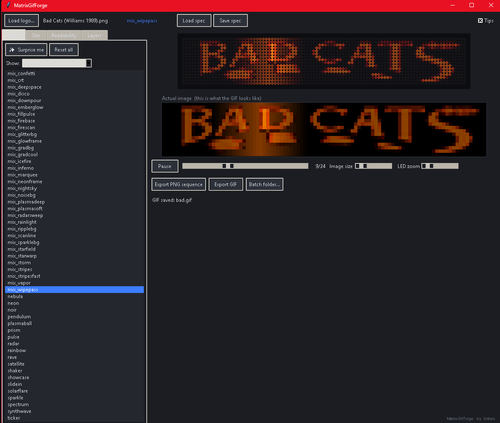
- "Surprise me" now draws evenly across the whole collection and remembers
the last 40 picks, so it reliably shows something different every time
and you can see the full range instead of the same handful.





User Feedback
Create an account or sign in to leave a review
You need to be a member in order to leave a review
Create an account
Sign up for a new account in our community. It's easy!
Register a new accountSign in
Already have an account? Sign in here.
Sign In NowThere are no reviews to display.