
Jump to content

Fireball II (Bally 1981)

  • Get Support
  • Create an account or sign in to download this
download_no_perm
5541 Views
1672 Downloads
5 From 12 reviews
137.22 MB File Size
fball_ii ROM Name
mistermixer bord jpsalas RusstyT Created by
mistermixer RusstyT Artwork by
mistermixer jpsalas Scripting by
Bally Manufacturer
1981 Year

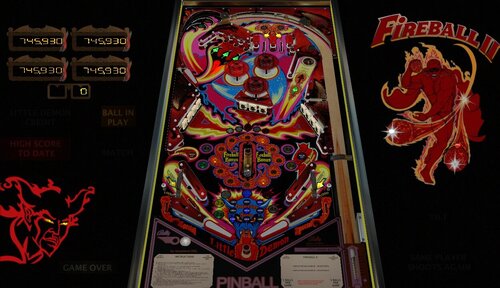
3 Screenshots

Use the right Magna-Save to raise the center post and make the game even more exciting!


Built from scratch by @mistermixer, with previous versions by @destruk and @Javier used as reference. Authors: @mistermixer, @bord, and @jpsalas.


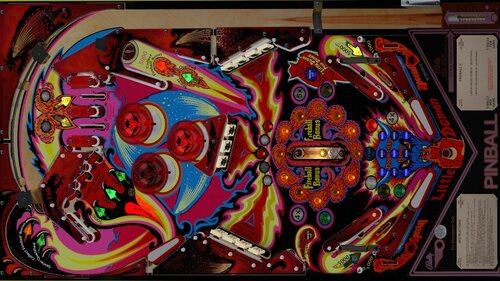
Released by Fireball II in June 1981, Fireball II is a solid-state Bally pinball machine designed by Gary Gayton and known for its three-ball multiball gameplay. It features three flippers, a captive ball, and the unique "Little Demon" post between the flippers that can be raised by the player to help save the ball. 


Credits for this release:

  • @RusstyT – Added GI lighting, dramatically enhanced the playfield image and insert lights, and painstakingly replaced nearly every object on the table with higher-quality models and assets. His extensive visual overhaul completely transformed the look of the table, giving it a far more polished and modern appearance.
  • @DGrimmReaper – Cabinet textures, animated VR backglass, center post animation fixes, various VR cabinet fixes, and desktop score displays.
  • @studly_do_right – For helping improve the visuals and sound.
  • @hauntfreaks – B2S backglass assets.
  • @Gravy – worked with RusstyT to provide feedback and help improve visual aspects
  • @burger – nFozzy and Fleep integration, desktop backdrop enhancements.


Info:

  • use Right Magna-Save to activate the flipper post (the  "Little Demon")
  • LUT options available in F12
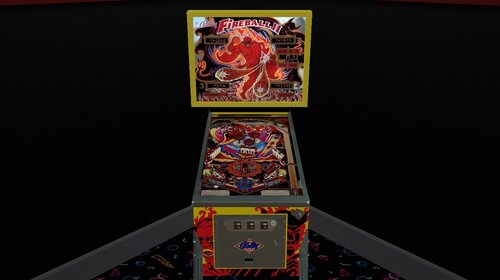
  • Desktop users can see VR Cabinet and room by changing to vrtest=1 in the script

Edited by burger


Permission from ORIGINAL Author(s)?

Yes
written permission received.

Allow file to be included on a VPUniverse downloader app?

Yes

VPX Standalone

No
https://www.ipdb.org/machine.cgi?id=854
https://vpuniverse.com/files/file/12744-fireball-ii-bally-1981-b2s/
Contact Author First.
10.8 required
Yes

What's New in Version 1.0.2   See changelog

Released

Fixed issue where playfield lights weren't working properly. You can download the update OR just change line 58 to be "Const UseLamps = 0" (instead of 1). Thanks @DGrimmReaper and @RusstyT for the fix!

User Feedback

Recommended Comments


RusstyT

Posted

2 minutes ago, neil81992 said:

Thanks RusstyT! Appreciate you sorting this promptly

Mate. I thought I did. It's still misbehaving. Works the  first tgame and I went beauty. Second game no bingo must be something else.


neil81992

Posted

40 minutes ago, RusstyT said:

Mate. I thought I did. It's still misbehaving. Works the  first tgame and I went beauty. Second game no bingo must be something else.


I retract my thanks 😂.

I'm sure the first time I loaded it up, all was well, but from then on, the lights bore no correlation to what was happening during gameplay. 

RusstyT

Posted

1 minute ago, neil81992 said:

I retract my thanks 😂.

I'm sure the first time I loaded it up, all was well, but from then on, the lights bore no correlation to what was happening during gameplay. 

LOL. Yeh same. 

goodtwist

Posted

Thanks for all the work! Cool table!

DGrimmReaper

Posted (edited)

@neil81992 @RusstyT Try changing to this near the top of the script:

Const UseLamps = 0


I think this will resolve the light issues.

Edited by DGrimmReaper
strangeleo7

Posted

1 hour ago, DGrimmReaper said:

@neil81992 @RusstyT Try changing to this near the top of the script:

Const UseLamps = 0


I think this will resolve the light issues.

PERFECT!!! line  56 to 61
' using table width and height in script slows down the performance
Const UseSolenoids = 2
Const UseLamps = 0  (change 1 to 0)
Const UseGI = 1
Const UseSync = 0
Const HandleMech = 0

RusstyT

Posted

3 hours ago, strangeleo7 said:

PERFECT!!! line  56 to 61
 

legend eh. Can enjoy the game now

RusstyT

Posted

4 hours ago, DGrimmReaper said:

@neil81992 @RusstyT Try changing to this near the top of the script:

Const UseLamps = 0


I think this will resolve the light issues.

@DGrimmReaper @burgerYep that fixed the lights following ROM issue. Awesome man. This is a fun game.

htamas

Posted

Great table, plays very well. Thank you very much.

Could you please add an option in the F12 menu to disable the side rails in cabinet mode? I managed to do it in the first version with some script change, but I forgot what exactly I did 🙂

I wish this was an F12 option for EVERY table...

RusstyT

Posted

41 minutes ago, htamas said:

Great table, plays very well. Thank you very much.

Could you please add an option in the F12 menu to disable the side rails in cabinet mode? I managed to do it in the first version with some script change, but I forgot what exactly I did 🙂

I wish this was an F12 option for EVERY table...

You'll have to learn how to implement it htamas then all your wishes will come true.

in a table that has the F12 option to make rails disappear search the script for Table1_OptionEvent. Place the Dim ShowRails before the Sub Table1_OptionEvent and copy the script from the example Sub to turn rails on and off. Open the game in edit mode and open the example table from the first file opened.  If you are having trouble PM me and I can guide you through it. 


prayformojo2

Posted

Thank you for the fix. Works like a dream now. Truly a great table with a fun and simple rule set. 

naeromagus

Posted

Awesome Thank you for all of your work and this released Tables much enjoyed. Maybe one day you can work your magic Pinball Magic :) That would be great 

Eduardo

Posted

my DOF setup is triggering the knocker during the FIREBALL BONUS, which makes a deafening racket, haha. I tried remapping it (in the DOF Config Tools) to a different port (like the slingshot), but that just made the sling and the knocker fire together during the bonus, lol. For now, I've only managed to disable it. Has anyone else wanted to change this or knows how to do it?


Create an account or sign in to comment

You need to be a member in order to leave a comment

Create an account

Sign up for a new account in our community. It's easy!

Register a new account

Sign in

Already have an account? Sign in here.

Sign In Now
×
  • Create New...