
About This File
PNG / APNG / Cube / Wheel / Cube- Wheelbar Creator
A free, browser-based tool to create wheel art, animated wheels, 3D cube animations and wheelbars for Pinup Popper / virtual pinball frontends. Runs entirely offline in your browser — nothing is uploaded, no install needed. Just open the HTML file.
Four tools in one:
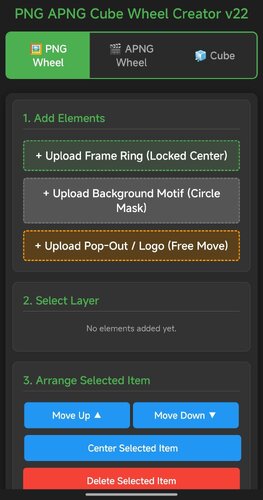
🖼️ PNG Tab — Design static wheel images with frame rings, motifs, pop-out effects, curved/straight text overlays, glow, scaling and masking. The background motif is freely positionable — drag and
scale it under the fixed circular window to frame the image exactly how you want. Shows the exact file size before you save.
🎞️ APNG Tab — Build animated wheels. Add animated layers (GIF/MP4), per-layer speed and boomerang, plus ready-made animation presets (spin, pulse, glitch, hue-shift and more). Animated layers can be masked to the wheel circle, so portrait clips stay neatly inside the wheel instead of poking out.
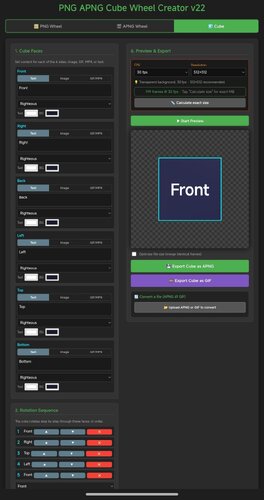
🧊 Cube Tab — Create a rotating 3D cube. Put text, images, GIFs or MP4s on each of the 6 faces with Fill / Fit / Stretch options, set a custom rotation sequence, adjust speed/hold/easing, choose edge color & thickness, metallic/gloss finish, and pick from multiple presets.
🟦 Cubebar Tab and Wheelbar Tab — Design Pinup Popper cubebars. Choose a T-Bar (straight) or T-Arc (curved) shape, set the fill color, and add an upper and a lower image — each freely positionable with scale, opacity and rotation. Add straight or curved text labels (curved text bends along the arc) with engrave / emboss / glow effects. Exports a transparent 32-bit PNG at 1080×2160 — exactly what Popper's wheelbar accepts.
Export & convert:
Save wheels & cubes as APNG (full quality) or GIF (with dithering for smooth gradients)
All exports are transparent at original dimensions
Tap "Calculate exact size" to see the real file size for both formats before exporting
Built-in converter: load any existing APNG or GIF and turn it into the other format — shows both output sizes first

User Feedback
Create an account or sign in to leave a review
You need to be a member in order to leave a review
Create an account
Sign up for a new account in our community. It's easy!
Register a new accountSign in
Already have an account? Sign in here.
Sign In Now