
.thumb.gif.29388ed0f9dc7f4250a7e2a1130959b6.gif)
About This File
# Pinup Popper Media Creator
A free, browser-based tool to create wheel art, animated wheels, 3D cube animations, wheelbars, spinning wheel animations and animated full-screen media (loading / attract screens) for Pinup Popper / virtual pinball frontends. Runs entirely offline in your browser — nothing is uploaded, no install needed. Just open the HTML file.
**Seven tools in one:**
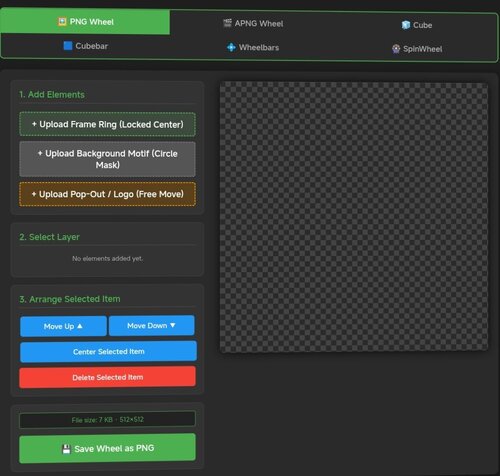
🖼️ **PNG Tab** — Design static wheel images with frame rings, motifs, pop-out effects, curved/straight text overlays, glow, scaling and masking. The background motif is freely positionable — drag and scale it under the fixed circular window to frame the image exactly how you want. Shows the exact file size before you save.
🎞️ **APNG Tab** — Build animated wheels. Add animated layers (GIF/MP4), per-layer speed and boomerang, plus ready-made animation presets (spin, pulse, glitch, hue-shift and more). Animated layers can be masked to the wheel circle, so portrait clips stay neatly inside the wheel instead of poking out.
🧊 **Cube Tab** — Create a rotating 3D cube. Put text, images, GIFs or MP4s on each of the 6 faces with Fill / Fit / Stretch options, set a custom rotation sequence, adjust speed/hold/easing, choose edge color & thickness, metallic/gloss finish, and pick from multiple presets.
🟦 **Cubebar Tab and Wheelbar Tab** — Design Pinup Popper cubebars. Choose a T-Bar (straight) or T-Arc (curved) shape, set the fill color, and add an upper and a lower image — each freely positionable with scale, opacity and rotation. Add straight or curved text labels (curved text bends along the arc) with engrave / emboss / glow effects. Exports a transparent 32-bit PNG at 1080×2160 — exactly what Popper's wheelbar accepts.
🎡 **SpinWheel Tab** — Animate the base wheel as a spinning coin or medal. Compose each side (front/back) from multiple image layers (GIF/MP4 supported, with per-layer opacity, frame range and boomerang ping-pong) and multiple text layers (curved or straight, engrave/emboss effects). Layers can sit inside the chrome ring or on top of it. Adjust spin tempo, hold time per side, axis and direction. Export as animated APNG or GIF — transparency preserved in both.
✂️ **Cutout Tab** — Cut a subject out of an image and remove its background to a transparent PNG — handy for prepping motifs, logos or character art for the other tabs. Erase areas by clicking with the Magic Wand or Chroma Key (adjustable tolerance), or draw a selection with Lasso / Polygon / Rectangle / Ellipse and choose to keep or remove what's inside. Fine-tune with an eraser brush, feathered/soft edges and edge smoothing; restore, pan and zoom as you work. Optionally trims empty borders on export. Saves a transparent PNG.
🖥️ **Screen Creator Tab** — Build animated full-screen media for any Pinup Popper display — loading screens, attract videos, backglass / DMD / topper graphics. Layer a background freely: a base color or gradient, a still image, an MP4 video and one of several animated presets (starfield, aurora, synthwave grid, rain, bokeh, rings, glitch and more) — all combinable. On top, add text, image and video layers, each freely positioned, scaled, rotated and individually animated (fade, slide, zoom, pulse, float, spin…). Edit straight on the canvas — drag to move, corner handles to scale, top handle to rotate, tap to select. Add a progress bar and a spinner (each positionable in X/Y and rotatable in 90° steps), plus scanline / vignette / glow / grain overlays and an audio track. Pick any output resolution (HD / 2K / 4K or custom), rotate the whole output 90° for portrait/rotated displays, key out a green screen on image/video layers (chroma key), and save / load your setups with full undo / redo. Exports an MP4 with audio.
**Export & convert:**
- Save wheels, cubes and SpinWheels as APNG (full quality) or GIF (with dithering for smooth gradients)
- All exports are transparent at original dimensions
- Tap "Calculate exact size" to see the real file size for both formats before exporting
- Built-in converter: load any existing APNG or GIF and turn it into the other format — shows both output sizes first
- Screen Creator exports an MP4 (with audio) at your chosen resolution
 With version 24:
User Feedback
Create an account or sign in to leave a review
You need to be a member in order to leave a review
Create an account
Sign up for a new account in our community. It's easy!
Register a new accountSign in
Already have an account? Sign in here.
Sign In Now