

About This File
🎯 VPX Achievement Watcher
A companion app for Visual Pinball X (VPX) that adds modern achievements, live overlays, and challenges by reading VPinMAME NVRAM data.
━━━━━━━━━━━━━━━━━━━━━━━━━━━━━━
Features
━━━━━━━━━━━━━━━━━━━━━━━━━━━━━━
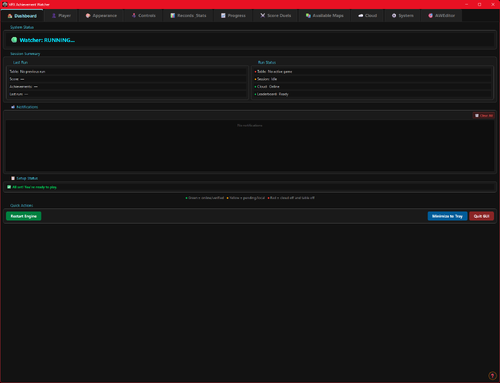
🏠 Dashboard
Your control center at a glance:
• System Status: Is the watcher running? Is VPX active?
• Session Summary: Two cards side by side:
◦ Last Run: Last table played, score, achievements unlocked, and date
◦ Run Status: Live status indicators (green/yellow/red) for Table, Session, Cloud, and Leaderboard connection
• 📬 Notifications: Clickable feed with alerts for leaderboard ranks, beaten achievement records, missing VPS-IDs, and available updates. Unread count shown on tab badge. Clear All button to dismiss
• 📋 Setup Status: Checklist that verifies your setup is complete — Player Name set, Cloud Sync enabled, VPS-IDs assigned, Maps loaded, Overlays configured, and Widget Controls bound. Red/yellow/green indicators with direct links to fix missing items. Shows "✅ All set!" when everything passes
• Quick Actions: Restart Engine, Minimize to Tray, Quit
━━━━━━━━━━━━━━━━━━━━━━━━━━━━━━
👤 Player
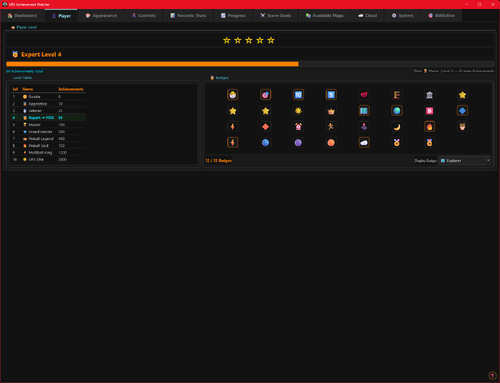
Your personal player profile and summary:
• Player Level: Current level and XP progress bar based on unlocked achievements
• Prestige System: Reach Prestige 1–5 by unlocking 2000 achievements per star (☆ → ★)
• Level Table: All levels from Rookie to VPX Elite with their achievement thresholds
• 🏅 Badges: 37 collectible badges earned through gameplay milestones — unlock achievements, complete challenges, reach levels, accumulate playtime, and more
• Display Badge: Choose which badge icon appears next to your name on cloud leaderboards
━━━━━━━━━━━━━━━━━━━━━━━━━━━━━━
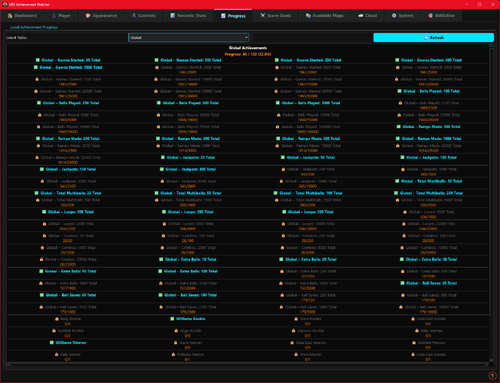
📈 Progress
Track your achievement progress per table:
• Select Table: Dropdown with all played tables (ROM-based and custom/non-ROM tables)
• Global Achievements: Cross-table achievements like total playtime, tables played, manufacturer milestones — with progress bars (e.g. 12/25)
• Per-Table Achievements: Each achievement listed with status (✅ unlocked / 🔒 locked)
• ℹ️ Info Links: Click the info icon on any achievement to see its unlock condition, VPS table info, and unlock timestamp
• Rarity Tiers: Common, Uncommon, Rare, Epic, Legendary — color-coded based on how many cloud players have unlocked each one. Rarity legend shown below progress bar
• Custom Table Progress: AWEditor-created achievements are tracked separately with their own progress view
━━━━━━━━━━━━━━━━━━━━━━━━━━━━━━
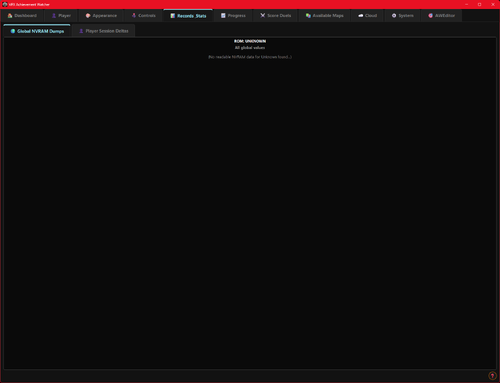
📊 Records & Stats
Records every round played, session duration, and scores in the background:
• 🌍 Global NVRAM Dumps: Full raw NVRAM data overview per table — all fields and values in a multi-column table
• 👤 Player Session Deltas: What changed during your session — actions, score differences, playtime, and field-by-field changes
━━━━━━━━━━━━━━━━━━━━━━━━━━━━━━
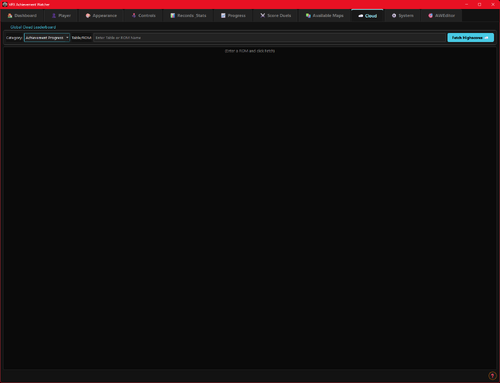
☁️ Cloud
Global cloud leaderboard for achievement progress:
• Category: Achievement Progress leaderboard per table
• Search: Enter a table or ROM name with autocomplete (resolves table titles to ROM keys)
• Fetch: Load the leaderboard — ranked list with progress bars, medals (🏆🥈🥉), player badges, date, and ℹ️ VPS info links
• VPS Info Dialog: Click ℹ️ on any leaderboard entry to see linked VPS table details and achievement breakdown
💡 Tip: You can find your personal 4-digit player ID in the "System" tab. Make a note of it! If you ever install Watcher on a new PC, you can use it to restore your cloud progress.
━━━━━━━━━━━━━━━━━━━━━━━━━━━━━━
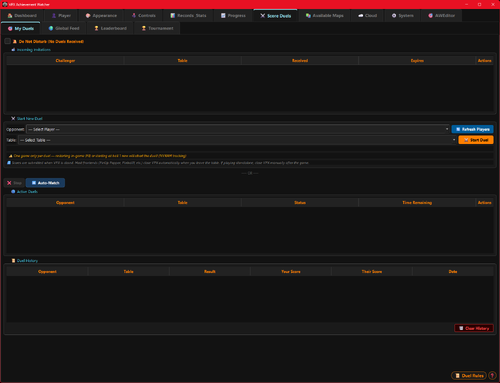
⚔️ Score Duels
Challenge other players to direct score duels on the same table!
The Score Duels tab is organized into 4 sub-tabs:
🎯 My Duels
• 📬 Incoming Invitations: Inbox for duel challenges from other players — accept or decline with one click
• 🔕 Do Not Disturb: Toggle to stop receiving new duel invitations
• ⚔️ Start New Duel: Pick an opponent and table, then send a challenge
• 🔀 Auto-Match: Join the matchmaking queue — automatically matched with a player who shares at least one table (by VPS-ID). Search times out after 5 minutes
• 🟢 Active Duels: Overview of all running duels with status, time remaining, and cancel option
• 📜 Duel History: Past duel results with opponent, table, scores, and date
🌍 Global Feed
Live feed of all active and recently completed duels across all players.
🏆 Leaderboard
Top 50 players ranked by duel wins. Shows Rank, Player Name, Wins, Losses, and Win Rate (%). Players need at least 3 completed duels to qualify. Your own row is highlighted with a ★. Medals for top 3: 🥇🥈🥉.
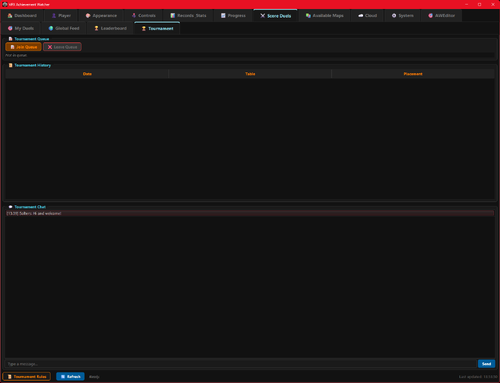
🏆 Tournament
4-player single-elimination knockout tournaments:
• Join Queue: Enter the tournament matchmaking queue (30 min timeout)
• Auto-Matching: When 4 players sharing at least one table are queued, a tournament is automatically created
• Bracket: 2 Semifinals → 1 Final, all played on the same randomly selected table
• 2 hours per match — each duel has a 2-hour time limit
• Notifications: In-app alerts for tournament start, elimination, final reached, and final result
• History: Completed tournaments are saved locally with your placement (🏆 Winner, #2, #3-4)
💬 Tournament Chat: Live chat for tournament participants — real-time messages
━━━━━━━━━━━━━━━━━━━━━━━━━━━━━━
🎨 Appearance
Customize the look and feel of the entire application, organized into 5 sub-tabs:
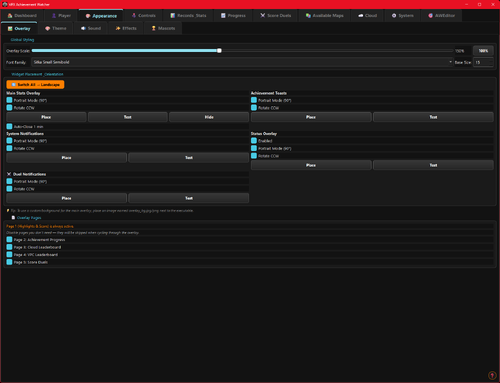
🖼 Overlay
• Global Styling: Font family, base font size, and overlay scale slider (30–300%)
• Widget Placement & Orientation: Place and save screen positions for each overlay independently. Each widget has Portrait Mode (90°), Rotate CCW, Place, and Test buttons:
◦ Main Stats Overlay (with auto-close option)
◦ Achievement Toasts
◦ System Notifications
◦ Status Overlay (cloud/leaderboard feedback, can be disabled)
◦ ⚔️ Duel Notifications
• 🔄 Switch All → Portrait/Landscape: Toggle all overlay orientations at once
• 📄 Overlay Pages: Enable/disable individual overlay pages — Page 1 (Highlights & Score) is always active; Page 2 (Achievement Progress), Page 3 (Cloud Leaderboard), Page 4 (VPC Leaderboard), Page 5 (Score Duels) can be toggled
• Custom Background: Place an overlay_bg.jpg/png next to the executable for a custom overlay background
🎨 Theme
• Active Theme: Select and apply a color theme from the dropdown
• Color Preview: Live preview of Primary, Accent, Border, and BG colors
• Overlay Preview / Test: Test Main Stats Overlay and Achievement Toast with the current theme
• Available Themes: Full list of all themes with icon, name, and description
🔊 Sound
• Enable/Disable: Master toggle for sound effects
• Volume: Slider (0–100%)
• Sound Pack: Choose from multiple packs (Zaptron, Vex Machina, Retro, etc.)
• Events Table: Per-event enable/disable toggle and preview button for each sound event
✨ Effects
• GPU-accelerated visual effects with automatic CPU fallback
🐾 Mascots
• 🏆 Trophie (GUI Mascot): Lives in the bottom-left corner of the main window
• 🎱 Steely (Desktop Overlay Mascot): A metallic chrome pinball that lives on your desktop as an always-on-top overlay. Reacts to game events
• Skins: Multiple visual skins for both mascots
• Personality: Unique speech bubbles, reactions, memory, and a "bickering" system between them
• Portrait Mode: Steely supports 90° rotation for cabinet screens
━━━━━━━━━━━━━━━━━━━━━━━━━━━━━━
📺 VPC Weekly Challenge
View Discord's Weekly Challenge directly on the overlay (view only).
━━━━━━━━━━━━━━━━━━━━━━━━━━━━━━
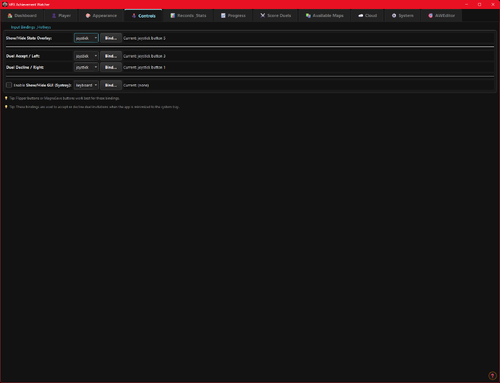
🕹️ Controls
Configure hotkeys and input bindings for the overlay and challenges:
• Supports keyboard keys and joystick buttons
• Bindings for overlay toggle, duel accept (left), duel decline (right), and system tray show/hide
• 💡 Flipper buttons or MagnaSave buttons work best
━━━━━━━━━━━━━━━━━━━━━━━━━━━━━━
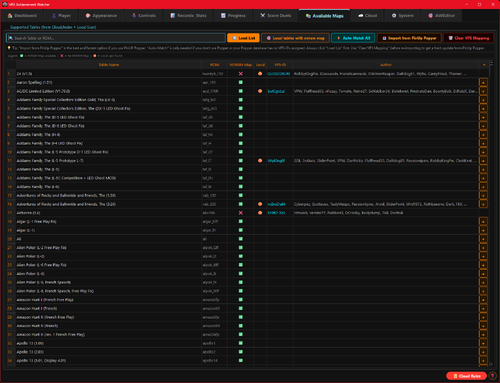
🗺️ Available Maps
Browse all supported tables and their NVRAM map status:
• ✅ NVRAM Map = achievement tracking supported
• ❌ No NVRAM Map = not supported yet
• 🟠 Local = .vpx file found in your tables folder
• Filter by local tables with NVRAM maps, search by name or ROM
• Assign VPS-IDs to link tables to the Virtual Pinball Spreadsheet database
• View table author extracted from .vpx file metadata
━━━━━━━━━━━━━━━━━━━━━━━━━━━━━━
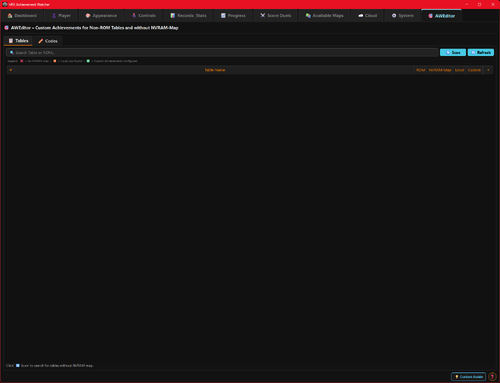
🎯 AWEditor — Custom Achievement Editor
Create custom achievements for tables that don't use VPinMAME ROMs (Non-ROM / Original tables):
• 📋 Tables: Scan your tables directory for tables without NVRAM maps
• ✏️ Codes: Analyze table scripts, detect events, and create custom achievement rules
• Export: Generates VBScript + JSON files — the table writes trigger files that the watcher detects instantly
• Full Script Export: Zero manual work — AWEditor inserts all FireAchievement calls automatically
━━━━━━━━━━━━━━━━━━━━━━━━━━━━━━
⚙️ System
The System tab has 2 sub-tabs:
⚙️ General
• 👤 Player Profile: Set your display name and 4-character player ID. Identity fields are locked while Cloud Sync is active
• ☁️ Cloud Sync & Backup:
Enable/disable Cloud Sync (validates player name and ID against cloud for uniqueness). Auto-Backup toggle, manual Backup to Cloud, and Restore from Cloud (restores achievements, VPS mapping, and CAT progress)
• 🐛 Feedback & Bug Reports: Report bugs or suggestions directly from the app
• 🔑 Admin Login: Log in as chat moderator for Tournament Chat moderation (admin only)
🔧 Maintenance
• 📁 Directory Setup: Configure BASE, NVRAM, and Tables directories
• Repair Data Folders: Fix broken or missing data directories
• Force Cache NVRAM Maps: Re-download and cache all NVRAM map files
• 🔄 Update Databases: Force re-download of index.json, romnames.json, vpsdb.json, and VPXTool
• ⬆️ Watcher Update: Check GitHub for newer releases — downloads and installs the Setup automatically with release notes preview
━━━━━━━━━━━━━━━━━━━━━━━━━━━━━━
🛡️ Fair Play & Anti-Cheat
To keep the leaderboards fair, local saves and scores are protected by hash signatures.
Matches and tournaments use a feature called NVRAM tracking. Restarting from Ball 1, pressing F3, or restarting the VPX Player will result in disqualification.
━━━━━━━━━━━━━━━━━━━━━━━━━━━━━━
Data Sources
The Achievement Watcher uses the following open-source projects and data sources:
Thanks to this people:
• NVRAM Maps by tomlogic — https://github.com/tomlogic/pinmame-nvram-maps
• vpxtool by francisdb — https://github.com/francisdb/vpxtool
• VPC Data by emb417 — https://github.com/emb417/vpc-data
• VPS Database by VPS Team — https://github.com/VirtualPinballSpreadsheet/vps-db
• Visual Pinball & PinMAME — https://github.com/vpinball
 With version 2.1:
User Feedback
Create an account or sign in to leave a review
You need to be a member in order to leave a review
Create an account
Sign up for a new account in our community. It's easy!
Register a new accountSign in
Already have an account? Sign in here.
Sign In Now