2 files
-
Fathom (Bally 1981) tutorial HD
By Rumbaabaa
This video is an in-depth tutorial for Fathom (Bally 1981), breaking down the table elements, scoring and key shots. It’s designed to fit a cabinet backglass or widescreen monitor.
The video can be found on YouTube at: www.youtube.com/@RumbaabaaPinVids.
Massive thanks to the incredible creators who make the virtual tables. This is a small thank-you, and hopefully a help to players.
16 downloads
(0 reviews)0 comments
Submitted
-
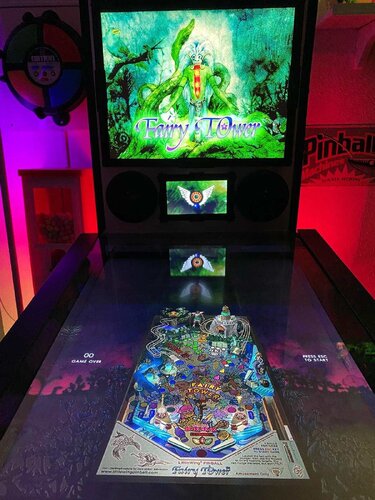
Fairy Tower (LittleWing 2007) Media Files & Cabinet Instructions
By SixOfTwelve
Up the airy mountain, down the rushy glen
We daren't go a-hunting, for fear of
Let's Put Things On Cabinets That Were Never Meant To Be On Cabinets!
this time we're off into the woods with Fairy Tower, the penultimate game by Japanese studio LittleWing, released in 2007 for Windows and Macintosh. The game features a treasure hunt to return missing enchanted items to a magical tower while harnessing the power of the elements. And of course there's aliens and a spaceship involved in the backstory, because LittleWing.
The tone in this one is a bit incongruous: One the one hand you have gorgeous evocative watercolor title art, the backstory is beautifully illustrated, dealing with themes of gentle giants, magic, loss and regret. On the other hand you have the game blasting wacky banjo polka music at you at all times. Oh well.
The included AutoHotKey script rotates the playfield to portrait mode, fills the backglass and DMD screens with decorative images, launches the game and maps the keys to standard cabinet buttons.
I've included
the AutoHotKey launch script, fully annotated (please go through it and adapt the variables to your system before running it!) a DMD filler image for in-game purposes (two variations) a backglass image (also usable for your frontend of choice), in both 4:3 and 16:9 formats
Also, tons of frontend media:
19 instruction cards (taken from the official website's player's guide, and supplemented by me with a few quick and dirty "what's what on the playfield" images) table audio (recorded directly from the game) table image (an upscale of the playfield) company logo (taken from Crystal Caliburn's official PDF guide) a wheel logo (in two sizes) Sadly, again no flyer images this time, since from 2004's Monster Fair onward, LittleWing sold their games exclusively as downloads, so there are no box covers or any other large-scale artwork I could find.
Share and enjoy!
SOME MORE NOTES:
Where to get it:
The company's website at www.littlewingpinball.com is still up as of 2026, and you can download the demo version of the game there. It needs to be be unlocked to full version with a code you could once buy at the website store, but that store has been "out of service due to a maintenance" since 2013. Sadly, even the trusty Archive that's reasonably well Organized failed me this time. But My advice is not to Abandon hope, you never know Ware it'll turn up 😉
How to run it:
Fairy Tower runs pretty much out of the box on a modern system - no extra DLLs required this time.
The menu system in this game is a bit counter-intuitive, as you have to press Esc to start. I mapped the Start button to Esc, just because I'm used to pressing it whenever I start a game. The script also remaps the flipper keys so they can be used to navigate the menu. Press the Launch button (Enter) to select.
The controls in the script will not work if you mapped different keys in-game. Go to "Options", "Controls" and "Reset to Default" and you should be fine.
What didn't work:
I've been informed that mapping a key to send Esc might kill Pinup Popper. Since I don't use it, I didn't run into that problem, but I'm workin on figuring it out. Please let me know if you find a workaround!
Highscore workaround:
Unfortunately, when it comes to the highscore table, LittleWing moved away from the "select letters with flippers" method of their earlier games and opted for keyboard typing input. I solved this by mapping three letters plus Enter to the Coin button (5). They're set to "N-E-W" in the script - feel free to change them to your preference.
AI use disclaimer:
As I already mentioned, there is no high-resolution artwork available for Fairy Tower. The game intro does feature gorgeous watercolor art by LittleWing co-founder Reiko F. Nojima though, so I decided to use that as the backglass.
The backglass image was upscaled (and expanded for the 16:9 version) with Freepik and tweaked further in Photoshop. For the DMD image, I took the image included in the pack as run_FairyTower_DMD2 and used Freepik to give it a wet watercolor look to match the backglass. Again, I then edited it further in Photoshop. No AI was used for the wheel image - I just picked a font that came as close as possible to the original and tried to recreate the gradient and glow as best I could in Photoshop. (I had to add a stroke around the letters to improve readability against the backglass background.)46 downloads
(0 reviews)0 comments
Updated
.thumb.png.557350d1c3d2c33f9858e4f7b4ca12ae.png)
JGBMod.thumb.jpg.31636f935b2d3cd9bb24d4b84a750c80.jpg)
AltPlayfield.thumb.png.868677014248e937cbe5681c68927b46.png)
.thumb.png.54c04f825f3400b6f5aa83ff0953c815.png)
.thumb.png.f3c8ee56bb379022851b5d021a92280d.png)

BG.thumb.jpg.2f799d2323b6dde4b810e174293506c9.jpg)
Illuminated.thumb.png.0b0bb13f233a07cacca0ba9aec403a17.png)
.thumb.png.40d0f757d637cc4a52652658929a6be8.png)
.thumb.png.0bdf1ecce8b944b982f2fd216c2d50fa.png)
.thumb.png.707efbb3abf02461f55186adf5c5ed88.png)
.thumb.png.940ed8fdb9c0707699d49d9ca756e9b1.png)
1.0.0.thumb.png.717e88213369d1d24148c3e4c1918e7a.png)
.thumb.png.aaecec14ace9ec0ad048543828adffb0.png)



Illuminated.thumb.png.c2b521c6773e735a460c69131b02d0e5.png)









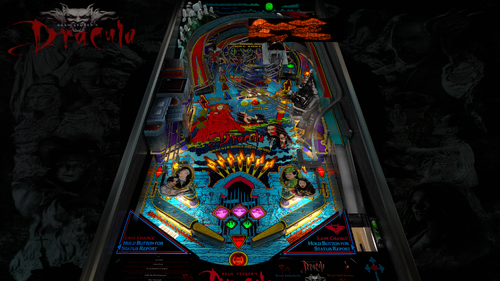
![More information about "Bram Stoker's Dracula (Williams 1993) [CSILK Mod] 1.6I VR"](https://vpuniverse.com/screenshots/monthly_2024_03/Me-TeamViewer_2024-03-15_15-45-42.thumb.png.df9b3821ddcf7bb666c1767c72bda0fd.png)

FullDMD.thumb.jpg.1f77d9cee79b659368504e762548ead6.jpg)

.thumb.jpg.0690ad56e857dd3f59e890312fedaf7c.jpg)
.thumb.jpg.2ee1c7a4ee5b909156683151cac109d5.jpg)
.thumb.jpg.1e6543d61ddd6c62539cfa58910d4cdf.jpg)



Rules.thumb.png.31dd7e5b65fcbd674e522a241f7e417a.png)

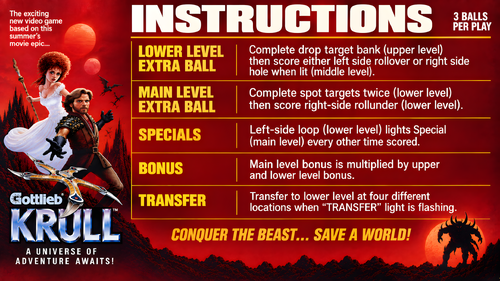
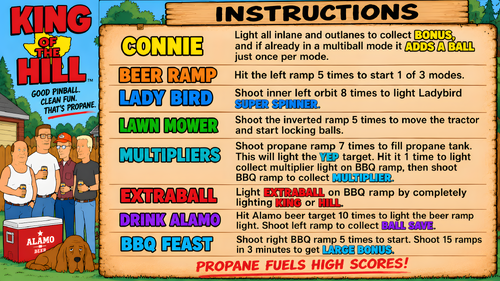
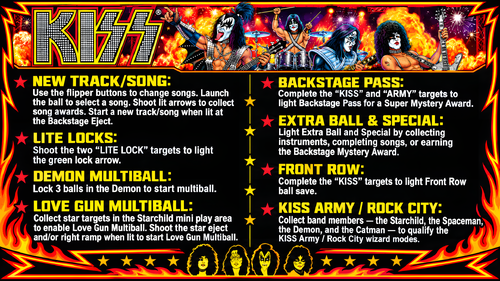
.thumb.jpg.62c14b4bb0d7fa2de0248bca3d1f941f.jpg)
.thumb.png.dad8ef13b0710313d84cf62e9dd525df.png)



-Prototype.thumb.png.a2418daeb76abc33fd2c09184d0b542c.png)

VERSION2.thumb.png.312bc36093772f4620e4b8ed96d4e5e5.png)
(new).thumb.png.c68df13f8d6dfcb1d2206c7815701c9c.png)
o.thumb.png.54ac21d4f5d510495597150270341d2d.png)


K-POPDemonHunters1.0.1(Original2026)-1.thumb.jpg.c0471b07504850fb252a00703c905114.jpg)
Rules.thumb.jpeg.21cdc1b3bd5e9d04e1dc99bbc07956d9.jpeg)