
VPX - POV (Point of View) & Physics Sets
Physics Set Exports
2 files
-
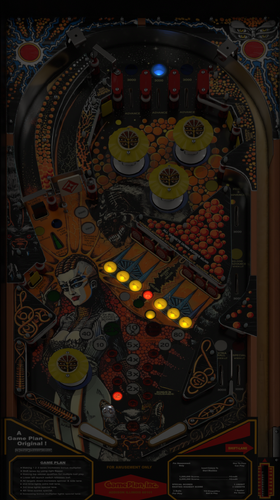
Andromeda (Game Plan 1985) VPW - Forced Perspective for Cabinet
This is a Cabinet POV for 43" display, using VPX10.8. It is an alternate option to those offered by LoadedWeapon.
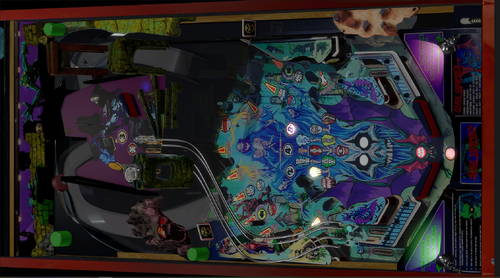
The objective of this POV is to maximise the depth perception of the playfield utilising the "Window" option in "View Layout Mode". The result is, when viewed directly from above, the image may look distorted - as shown in the attached screen shot - but when viewed from the front of the cabinet, the images regain their perspective (much like "STOP" painted on a road surface). Although specifically customised for this particular table, it should also be a close fit for the same table made by other creators. Link to Table:
Installation procedure:
1. Make a backup copy of your *.ini file for this table which will be located in your "Tables" folder.
2. Paste the downloaded *.ini file into your "Tables" folder
3. Rename the downloaded file to be exactly the same as your table file and B2S file. The most reliable way to do this is to select all files Table file,B2S and ini file. Right click with mouse. Select rename option. Rename the file. All 3 files will then be renamed automatically
Troubleshooting:
a) If you start the table and it is not visible or not centred properly
1. press f12.
2. Make sure you are on the page with heading "Point of View" which is the POV setting screen.
3. Use the Magna button to scroll and highlight "Vertical Offset"
4. Use your flipper keys to adjust this value which will move playfield up or down.
5. If the playfield is "black colour" it means that it is "beyond" the location of your display screen. In such a case the "Vertical Offset" value is most likely a high negative value. In that case press the right Magna key. The value should reduce towards zero. As you get near to zero the playfield will become visible. Continue to adjust it until the apron is aligned with the bottom of your display screen.
b) In the unlikely event that you cannot get the screen to size to your playfield, simply delete the ini file and replace it with your backup copy.
38 downloads
(0 reviews)0 comments
Submitted
-
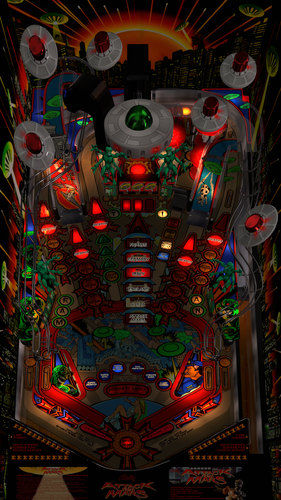
Attack from Mars (Bally 1995) JP Salas version - Forced Perspective for Cabinet
This POV is for 43" display in cabinet , using VPX10.8. It is an alternate option to those offered by LoadedWeapon.
The objective of this POV is to maximise the depth perception of the playfield utilising the "Window" option in "View Layout Mode". The result is, when viewed directly from above, the image may look distorted - as shown in the attached screen shot - but when viewed from the front of the cabinet, the images regain their perspective (much like "STOP" painted on a road surface). Although specifically customised for this particular table, it should also be a close fit for the same table made by other creators.
https://www.vpforums.org/index.php?app=downloads&showfile=11603
Installation procedure:
1. Make a backup copy of your *.ini file for this table.
2. Paste the downloaded file into your "Tables" folder
3. Rename the downloaded file to be exactly the same as your table file and B2S file. The most reliable way to do this is to select all files, right click with mouse, then select rename option on one of the files. All 3 files will then be renamed automatically
Troubleshooting:
a) If you start the table and it is not visible or not centred properly
1. press f12.
2. Make sure you are on the page with heading "Point of View" which is the POV setting screen.
3. Use the Magna button to scroll and highlight "Vertical Offset"
4. Use your flipper keys to adjust this value which will move playfield up or down.
5. If the playfield is "black colour" it means that it is "beyond" the location of your display screen. In such a case the "Vertical Offset" value is most likely a high negative value. In that case press the right Magna key. The value should reduce towards zero. As you get near to zero the playfield will become visible. Continue to adjust it until the apron is aligned with the bottom of your display screen.
301 downloads
- pov
- attack from mars
- (and 1 more)
(1 review)0 comments
Submitted
-
VPU Staff's Top Picks
-
New & Updated Visual Pinball
-
New & Updated Future Pinball
-
New & Updated Backglasses
-
New & Updated DMD Colorizations
-
New & Updated Virtual Reality Enabled Tables
-
VPU Remix & Mods
-
New & Updated Popper Media
-
Updated Files
-
Download Statistics
30723
Files108274
Comments45209
Reviews

1.thumb.jpg.54902e18dd1f7dbac68b5c1d0130a3c9.jpg)



(Custom).thumb.png.fdc01bc14fd91bd66f346f469b9e3b12.png)
(Custom).thumb.png.2ee3235d6effa14cccc028a70fb279ac.png)







.thumb.jpeg.e47615603d7ef896f4a724574c81e815.jpeg)
4k1.1.thumb.png.acc720d2407dfd8790ef5b8d001b5719.png)
-frameat0m5s.thumb.jpg.37a04a829f0640b70d02d1d721496fc4.jpg)
FullDMD.thumb.jpg.43072decb46a3e0f974195bdbb3ef98b.jpg)
FullDMD.thumb.jpg.711ea33336b6ada7eb61056ac0acb1bb.jpg)
FullDMD.thumb.jpg.5ed54dbedaf801372cd779d9bc689df4.jpg)
FullDMD.thumb.jpg.1c7f0ec590b81b8b884d30fc9ce9f590.jpg)
FullDMD.thumb.jpg.315b079ffa18909913badbf37a68c34b.jpg)
.thumb.png.ab6b19bf2db454c177015223ab85a4c1.png)
.thumb.png.79a218329a89fd26c8f567176614fcce.png)
.thumb.png.064bdd2b072b016561e1873c067dd0cb.png)












.thumb.png.97a6e70b307e8ce8d1c2f9616dd0bed5.png)



InstructionCard2.thumb.png.35487dbc647c5650e4db5e30b7165d07.png)

