B2S Install & Support Files
5 files
-
.thumb.png.7a19129b9bf8435b61d2864f5f7a3c92.png)
B2S Designer
By jarr3
B2S Designer
A WYSIWYG application to create 'directB2S' backglasses.
What Stefan Wuehr ('Herweh') started in 2012 continues here.
Documentation is included in the download zip file as a htmldoc file, but can also be found online here
The B2S.Server wiki can be found here.
For general installation and version info please click here.
When you've made your first steps in the designer here are some maybe very helpful tips.
Have fun and please do not forget to like and review..., what is important for content creators (tables, backglasses, DMD colorization?)...
... is as important for us writing the tool-set
4157 downloads
-

B2S Backglass Server
By jarr3
System files to run 'directB2S' backglasses, usually in combination with Visual Pinball tables.
What Stefan Wuehr ('Herweh') started in 2012 continues here.
Full documentation is available in the Wiki at https://github.com/vpinball/b2s-backglass/wiki
Please do not forget to like and review..., what is important for content creators (tables, backglasses, DMD colorization?)...
... is as important for us writing the tool-set
Thanks to all testers!
Retsamikit & Cliffy on 1 screen setup
Kalman & Mike DA Spike on 3 screen setup
Rajo Joey for testing the B2SScreenresIdentifier
wiesshund for general support on every setup
And especially to @toxie and @jsm174 , without them the B2S Backglass Server move to github would not have happened!
5297 downloads
- b2s
- backglass server
- (and 1 more)
-
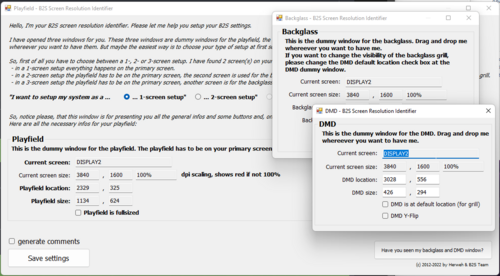
B2S ScreenResIdentifier
By jarr3
B2S ScreenResIdentifier can be used to help setup your B2S Screen Resolutions and screen setup.
What Stefan Wuehr ('Herweh') started in 2012 continues here.
Full documentation is available in the Wiki at https://github.com/vpinball/b2s-backglass/wiki
This is a separate download, but is also part of the B2S Server, if you have already you can ignore downloading this.
Usage:
Simple to use. Double click the B2S_ScreenResIdentifier.exe to edit ScreenRes.txt or "drop" any TableName.res file on the B2S_ScreenResIdentifier.exe to edit it.
Move screens around as indicated on each window and once happy click save and a ScreenRes.txt for TableName.res file is created/updated in the same location.
B2S ScreenResIdentifier reads out the current resolution and scaling of your screen and in case your scaling isn't set to 100% it will turn red. (see screenshot)
The newer versions of B2S Server supports comment lines in the ScreenRes files. Lines starting with "#" is ignored when reading the ScreenRes.txt or TableName.res files.
Now possible to do like this:
# Playfield Screen resolution width/height
800
600
# Backglass Screen resolution width/height
800
600
...
If any of your tools do not support them you can ask friendly if someone can update them (PinballX is already updated) or use B2S_ScreenResIdentifier.exe to save without comments (using the checkbox).
2114 downloads
- b2s backglass
- screenres
- (and 1 more)
-
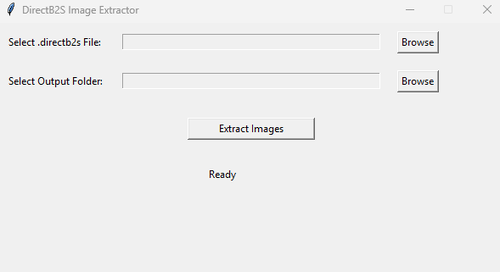
B2S Extractor
By supafraud
This is a tool for extracting images like score reel image sets embedded in directb2s files that might otherwise be inaccessible. It's a simple tool written in python. I made it because I had issues adding DMD images to EM b2s files that used custom score reels. This allows you to extract the non-standard score reel image sets, then reimport them so it doesn't mess up the directb2s file.
216 downloads
-
B2S Debug
By Dazz
If experiencing issues with B2S displaying on incorrect display, this will show you what screen you should use as your display.
1. Place B2S_Debug in your Tables folder
2. Run B2S_Debug.exe
3. Upon hitting ESC a log file called B2SLOG.txt will be created in your Tables folder. The output of this fill will show which screen numbers you should enter into your ScreenRes.txt file for your Backglass screen.
Example output:
"------------------------------------------------"
"\\.\DISPLAY1"," First screen"
"\\.\DISPLAY5"," Second screen"
"\\.\DISPLAY6"," Third screen"
"------------------------------------------------"
804 downloads
(0 reviews)0 comments
Updated


RHP.thumb.png.1c165452af06acdc89a6b1e659e677e2.png)
RHP.thumb.png.5ba393177b717a4843c23ced731c33ae.png)
BG.thumb.jpg.995fda378a6992a25dde673780d8ffbf.jpg)
BG.thumb.jpg.9ae774d9dd3c89bcf3a7127b7b6e2bf4.jpg)

Screenshot.thumb.jpg.37e9d9318702d5be4bbcef1f48c3ef2b.jpg)
backglassipdbphoto.thumb.jpg.686fb4e0c5d8440ded220a6fa42f7b81.jpg)


.thumb.png.d8cc99bb9a5b89cbf721c9f788682d36.png)
.thumb.png.08e7e8beebe6f66ccf2a748c7496a268.png)
.thumb.png.ea87133bf01ad97336c3abb66b9a052e.png)







.thumb.png.7f644d5a7b553abe19b20ff29c3722b1.png)











.thumb.jpg.6cbec5e31b40eb04e540030e38075882.jpg)
FullDMD.thumb.jpg.af8f65120cc711a9bfb553095f5b44ac.jpg)


.thumb.gif.5c8a601819e4556501dd57f82df53074.gif)










.thumb.jpg.3530e4850fded8859d326dd9144b0840.jpg)
.thumb.jpg.78d793e62ed621ddb70fa0fbd2746a50.jpg)

_4k.thumb.jpg.c3d5bcdee209b697de0a756332e20013.jpg)
-v55_VPX8_4k_4k.thumb.jpg.e6a66d72d5484dacd0046a640f1ae939.jpg)
_4k.thumb.jpg.5d69a6c61ced5cd5ab79d87f46d3af7c.jpg)