Jump to content
  • SYSTEM SEARCH

    System Scanners Online:

    Username: Guest

    >> System Scan?
    >> The Universe >


    Incoming Message:
    Due to system limitations searching with words of 3 or less characters will not return results. For instance; Doctor Who.  This will not return results as the system is trying to search for both Doctor AND Who in which Who will not be found as it's a 3 character word.  To find Doctor Who; you'd search for either Doctor or "Doctor Who". 

    Search Tips:
    For specific searches; enclose your search with quotes. Example: "Doctor Who" or "Addams Family".
     

Search the Community

Showing results for tags 'screenres'.

  • Search By Tags

    Type tags separated by commas.
  • Search By Author

Content Type


Forums

  • Welcome to the VPUniverse
    • VPU General Discussion
    • Holiday Image Search Discussion
    • Community Development & Site Problem Reporting
    • Site News & Announcements
    • VPU Polls
    • The Big Bang
    • VPU Classifieds - Buy / Sell / Trade
    • Pinball Festivals, Groups & Gatherings
  • New Releases
    • B2S New Releases
    • Visual Pinball New Releases
    • Future Pinball New Releases
    • Front End & Support Files New Releases
    • Pinup-Popper & PuP-Pack Releases
  • DMD Development Discussions
    • DMD Extensions
    • Pin2DMD Forums
    • Serum and ZeDMD Discussion
  • VPUniverse.com Online Virtual Pinball League
    • General Tournament & League Discussion
    • Tournament & League Rules Discussion
    • Tournament & League Game Discussion - Game Suggestions
  • Digital Pinball Cabinets
    • Cabinet Builds
    • Cabinet Discussion
    • PinCab/Pinball Hardware Development
    • Arcade 1UP & AtGames Legends Modding
  • Planet Visual Pinball Engine
    • Visual Pinball Engine General Discussion
  • Planet Visual Pinball
    • Visual Pinball Support
    • Visual Pinball General Discussion
    • Visual Pinball Development
    • Table Development / MODding
  • Planet Future Pinball
    • Future Pinball General Discussion
    • Table Development and Releases
    • Future Pinball Support
  • Planet Virtual Reality
    • VPVR - Virtual Pinball in Virtual Reality
    • Pinball FX in VIrtual Reality
    • General Virtual Reality
  • Scorbit Discussion Forum
    • Scorbit General Discussion
    • Scorbit User Exchange
    • Scorbit for Digital Pinball Development
  • Artwork
    • Backglass Artwork
    • Feature Requests
    • Playfield Artwork
  • Pinup Popper
    • Installation Support
    • Pinup Popper Support
    • Pinup Popper VR
    • Pup-Pack Support
  • Pinball Front-Ends
    • HyperPin Support
    • Pinball X Support
    • Pinball Y Support
  • PinMAME
    • PinMAME Support
    • PinMAME Development
  • Real Pinball & Arcade Gaming Discussion
    • Real Pinball Discussion
    • Arcade Gaming Discussion
  • Direct Output Framework
    • Direct Output Announcements
    • Direct Output General Discussion
    • Direct Output Support
  • B2S Development
    • B2S Development Support
  • Console & PC Virtual Pinball
    • Pinball Arcade
    • ProPinball
    • Console & PC Gaming Discussion
    • Other Virtual Pinball & Gaming Discussion
  • DMD Colorization's Topics
  • VPU Online Virtual Pinball Tournament & League's League Discussion

Categories

  • Audio Files
    • ALTSound
    • PinJuke - Jukebox for your pincab
  • B2S Install & Support Files
  • B2S Backglass Downloads
    • B2S Alternate / Original
    • Video Backglasses
    • B2S Cabinet / Stencil Art
    • Backglass Resources
  • Direct Output Framework
  • Future Pinball
    • Future Pinball Files
    • Future Pinball Tables
  • VPURemix - Patching System
    • VPURemix - VPX Table Patches
  • Visual Pinball
    • Visual Pinball 10 - Install & Support Files
    • VPX - Pinball Tables
    • VPX - Game Resources
    • VPX - POV (Point of View) & Physics Sets
    • Visual Pinball - 9.x.x
  • VR - Virtual Reality Pinball
    • VR Pinball Install Required Files
    • VR - Room Resources
  • Other Digital Pinball
  • ROM Colorizations
    • ROM Frame Dumps
    • Pin2DMD Colorizations - Virtual Pinball
    • Pin2DMD Colorizations - Real Pinball
    • Serum DMD colorizations
    • SAM - Color ROM Patches
  • PinMAME
    • PinMAME Source
    • PinMAME Roms
  • DMD Extensions
  • Pin2DMD Files
    • Pin2DMD Documentation
    • Pin2DMD Firmware
    • Table Support Files
    • Pin2DMD Tools
    • Pin2DMD Color Palettes
    • PCB Files
  • Cabinet Resources
    • Cabinet Plans
    • Wiring Schematics
    • Cabinet Artwork
    • Support Files
    • 3D Printed Parts
  • Pinup Popper Files
    • PuP Packs
    • Pinup Popper Themes
    • FullDMD Videos
    • PuP - Underlays
    • T-Arc Loading Videos
    • T-Bar Themes
    • T-Arc Themes
  • Pinball Frontend Downloads
    • HyperPin Support Files
    • Frontend Media Files
    • Plugins
    • Media Managers
  • Development Resources
    • Table Resources
    • Table Creation Resources
  • Mature Content - Adult - 18+
  • VPinWorkshop - Desktop - Blood Machines
  • VPU Online Virtual Pinball Tournament & League's Files

Calendars

  • In-Person Events
  • Live Streaming Events
  • Online Tournaments

Categories

  • News Articles
    • Archived Articles

Categories

  • Cabinet Building & Configurations
  • DMD Colorization Tutorials
  • VpinMAME
  • Game Specific Tips & Tricks
  • Future Pinball
  • B2S Tutorials
  • Visual Pinball - How Tos & Wikis
  • VR Tutorials

Find results in...

Find results that contain...


Date Created

  • Start

    End


Last Updated

  • Start

    End


Filter by number of...

Joined

  • Start

    End


Group


AIM


MSN


Website URL


ICQ


Yahoo


Jabber


Skype


Interests

Found 1 result

  1. Version 2.1.0

    2103 downloads

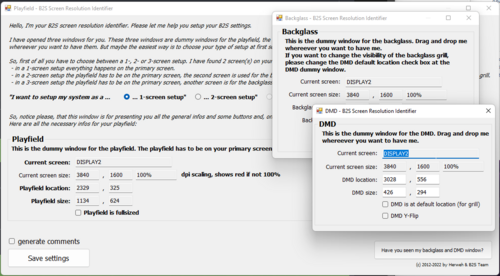
    B2S ScreenResIdentifier can be used to help setup your B2S Screen Resolutions and screen setup. What Stefan Wuehr ('Herweh') started in 2012 continues here. Full documentation is available in the Wiki at https://github.com/vpinball/b2s-backglass/wiki This is a separate download, but is also part of the B2S Server, if you have already you can ignore downloading this. Usage: Simple to use. Double click the B2S_ScreenResIdentifier.exe to edit ScreenRes.txt or "drop" any TableName.res file on the B2S_ScreenResIdentifier.exe to edit it. Move screens around as indicated on each window and once happy click save and a ScreenRes.txt for TableName.res file is created/updated in the same location. B2S ScreenResIdentifier reads out the current resolution and scaling of your screen and in case your scaling isn't set to 100% it will turn red. (see screenshot) The newer versions of B2S Server supports comment lines in the ScreenRes files. Lines starting with "#" is ignored when reading the ScreenRes.txt or TableName.res files. Now possible to do like this: # Playfield Screen resolution width/height 800 600 # Backglass Screen resolution width/height 800 600 ... If any of your tools do not support them you can ask friendly if someone can update them (PinballX is already updated) or use B2S_ScreenResIdentifier.exe to save without comments (using the checkbox).
×
  • Create New...