-
SYSTEM SEARCH
System Scanners Online:
Username: Guest
>> System Scan?
>> The Universe >
Incoming Message:
Due to system limitations searching with words of 3 or less characters will not return results. For instance; Doctor Who. This will not return results as the system is trying to search for both Doctor AND Who in which Who will not be found as it's a 3 character word. To find Doctor Who; you'd search for either Doctor or "Doctor Who".
Search Tips:
For specific searches; enclose your search with quotes. Example: "Doctor Who" or "Addams Family".
Search the Community
Showing results for tags 'quest'.
Found 4 results
-

Version RC039
325 downloads
PYRAMID (PicoPinball 2026) – RC039 (Windows / macOS desktop, Meta Quest 3, iOS) Introduction PYRAMID is an original retro sci-fi pinball table for Visual Pinball. Imagine a late-night broadcast from nowhere: a strange signal, a glowing pyramid, a watching Eye, and a voice in the static that comments on every move as hidden secrets are revealed. It plays like a compact modern table: fast, readable, and full of "one more ball" moments. It is an original fictional theme, not based on any existing film, series or other property. The game Six Seals of Fortune. Break the six seals through the left and right Eyes (pop bumpers), the Captive (two captive balls turn three keys), the Signal (spinner passes), the Portals (three saucer visits) and the Chamber (open twelve eyes on a lower playfield). The Red Awakening — a Multiball at the third seal. Extra balls are fed into the shooter lane one at a time, with its own ball save, red lighting and music. The Gate and the Oracle. Three captive keys open the Gate for a descent beneath the Eye. The Oracle (right saucer) grants a seal step, the Gate, a ball save or fortune. Three-stage Ascension. Break the sixth seal and the table ascends: 30 seconds of jackpots (side saucers, the APEX top saucer, spinners) plus two Eye drop targets. Each activation in a game steps through three stages, then repeats: Red Ascension → Green Ascension → Enlightenment Ascension. Each has its own lighting, voice announcement and DMD message. Enlightenment is golden, plays its own song, and pays +30 % on every Ascension award. Afterwards the seals start again at a higher value. A new game starts at Red. 3 balls per game, a 7-second launch ball save, a lower playfield with its own flippers, light shows and a mood layer that tints the whole playfield for modes. Sound and voice Four soundtrack pieces: Twilight Circuit, Neon Horizon Anthem, Electric Triumph and Enlightenment Ascension (the last plays only during Enlightenment Ascension, then the normal music returns). Voice announcements from a cast of characters – a Guardian, the Oracle, the Eye and the Pyramid Intelligence – with chamber reverb. One voice speaks at a time, with cooldowns, and the music ducks under them. Display A colour 128x32 DMD with live score, award messages, stage messages ("RED ASCENSION", "GREEN ASCENSION", "ENLIGHTENMENT", "ASCENSION +30%") and a countdown. On desktop it is a script DMD in the screen corner (table option: corner / apron / both); in VR it sits in the backbox. On a Windows cabinet it can also go to a FlexDMD screen (optional, see Installation). VR A VR cabinet and pyramid room are built in: upright backbox with the backglass, a launch button, and a starry stone-dais room under a distant glowing pyramid. Built for Meta Quest 3 (VPX for Quest, Rev 6508). Platforms Windows – desktop RC039, VPX 10.8.0 or newer: Pyramid_PicoPinball_RC039_Windows.zip macOS – desktop RC039, VPX 10.8.1: Pyramid_PicoPinball_RC039_macOS.zip Meta Quest 3 – RC039 .vpxz (music included): Pyramid_PicoPinball_RC039_Quest.vpxz iOS / iPadOS – RC039 .vpxz (corner DMD overlay): Pyramid_PicoPinball_RC039_iOS.vpxz Backglass image – 2480 x 1908 PNG, no score digits (second screen / front-end media): Pyramid_PicoPinball_RC039_Backglass.png B2S backglass – Windows, optional, needs B2S Server (also inside the Windows zip): Pyramid_PicoPinball_RC039.directb2s Installation RC039 is a stability update of RC038, which the author played on Windows, macOS, Meta Quest 3 and iOS. The music files must be present, or the table plays with sound effects and voices only. Windows (VPX 10.8.0 or newer) Unzip Pyramid_PicoPinball_RC039_Windows.zip (music mixed slightly louder for Windows). Copy Pyramid_PicoPinball_RC039.vpx into your Visual Pinball Tables folder. Copy the four MP3s from music/ into your Visual Pinball Music folder (e.g. C:\Visual Pinball\Music; VPX finds music by bare name). Start the table in Visual Pinball 10.8.0 or newer (RC038 was played on 10.8.0 Windows and 10.8.1 Mac). No front end (PinUP Popper etc.) is required. START begins a game; Enter is the launch. Table option (Tweak menu): "Desktop DMD" = Screen corner / Apron / Both. Optional, B2S backglass: copy Pyramid_PicoPinball_RC039.directb2s next to the .vpx (needs B2S Server). If you rename the .vpx, give the .directb2s the same name. Optional, FlexDMD: with FlexDMD installed, the colour DMD moves to the cabinet DMD screen in the cabinet view. Tweak menu "Cabinet DMD": Auto (cabinet view) / Off / On. Without B2S Server or FlexDMD the table works exactly as before. macOS (VPX 10.8.1) Unzip Pyramid_PicoPinball_RC039_macOS.zip; keep the music folder beside the .vpx (VPX on macOS plays the music from the table's own music folder); open with VPinballX. Meta Quest 3 Use Pyramid_PicoPinball_RC039_Quest.vpxz with VPX for Quest (tested Rev 6508): import the .vpxz (web server or file copy). The music is inside the package. Launch with the launch button on the cabinet. Standard VPX in-game menu opens with the left controller X. iOS / iPadOS Pyramid_PicoPinball_RC039_iOS.vpxz is the same package as Quest; the table switches to the corner DMD overlay automatically. Backglass image Pyramid_PicoPinball_RC039_Backglass.png (2480 x 1908, the table's own backglass art, no score digits) for a second monitor or front-end media. Controls Left/right flipper keys (left also works the upper-left flipper and the lower-playfield left flipper); Enter = launch (VR: launch button); Start = new game. Release notes RC039 (stability update): fixes the "line 417" script error (captive balls could escape their channels in multiball / around the lower playfield) and the extra "ball from holding", stops a slow ball dropping through the playfield at the top of the Cball2 lane, adds a separate backglass image and optional B2S / FlexDMD support for Windows. Rules, scoring, layout, music and VR room unchanged. Desktop RC039 (Windows / macOS, VPX 10.8.0+): six-seal rules, Red Awakening Multiball, Gate and Oracle, three-stage Ascension (Red, Green, golden Enlightenment +30 %), colour DMD, lower playfield, light shows, four music tracks, voice announcements. Quest 3 / iOS RC039: same game, VR cabinet and room, corner DMD overlay on iOS. RC038 changes over RC037: upper bumpers repositioned, slightly gentler launch, shallower top-right angled wall (straight shooter lane unchanged), music folder shipped beside the table; the Windows package mixes the music slightly louder (x1.265). Known limits: no extra ball, skill shot or end-of-ball bonus. RC038 was played by the author on Windows, macOS, Meta Quest 3 and iOS. Credits PYRAMID (PicoPinball 2026) – free, for personal, non-commercial use. Not for sale. Requires Visual Pinball 10.8 or newer. Table design, rules, scripting, 3D modelling, DMD, music and sound: PicoPinball Original artwork and visual design created for Pyramid. VR cabinet and room elements adapted from Gorgar VR Room (Williams 1979) by senseless, with acknowledgments to fuzzel and Caligula. Voice announcements use Coqui XTTS-v2 and are for non-commercial use only: https://huggingface.co/coqui/XTTS-v2/blob/main/LICENSE.txt RC039: the optional B2S backglass and FlexDMD support are adapted from fok666's RC038 community modification, with thanks. The RC039 backglass art is Pyramid's own artwork. Thanks to tnkcmdr69, fok666, dogm, trueanimus, longtalljodie and Vad1m_1719 for the RC038 reports that led to RC039. Visual Pinball: the Visual Pinball team and contributors. Pyramid contains no ROM, no PinMAME files and no Williams/Gorgar playfield, script, sound or artwork. -
 View File PYRAMID (PicoPinball 2026) PYRAMID (PicoPinball 2026) – RC038 (Windows / macOS desktop, Meta Quest 3, iOS) Introduction PYRAMID is an original retro sci-fi pinball table for Visual Pinball. Imagine a late-night broadcast from nowhere: a strange signal, a glowing pyramid, a watching Eye, and a voice in the static that comments on every move as hidden secrets are revealed. It plays like a compact modern table: fast, readable, and full of "one more ball" moments. It is an original fictional theme, not based on any existing film, series or other property. The game Six Seals of Fortune. Break the six seals through the left and right Eyes (pop bumpers), the Captive (two captive balls turn three keys), the Signal (spinner passes), the Portals (three saucer visits) and the Chamber (open twelve eyes on a lower playfield). The Red Awakening — a Multiball at the third seal. Extra balls are fed into the shooter lane one at a time, with its own ball save, red lighting and music. The Gate and the Oracle. Three captive keys open the Gate for a descent beneath the Eye. The Oracle (right saucer) grants a seal step, the Gate, a ball save or fortune. Three-stage Ascension. Break the sixth seal and the table ascends: 30 seconds of jackpots (side saucers, the APEX top saucer, spinners) plus two Eye drop targets. Each activation in a game steps through three stages, then repeats: Red Ascension → Green Ascension → Enlightenment Ascension. Each has its own lighting, voice announcement and DMD message. Enlightenment is golden, plays its own song, and pays +30 % on every Ascension award. Afterwards the seals start again at a higher value. A new game starts at Red. 3 balls per game, a 7-second launch ball save, a lower playfield with its own flippers, light shows and a mood layer that tints the whole playfield for modes. Sound and voice Four soundtrack pieces: Twilight Circuit, Neon Horizon Anthem, Electric Triumph and Enlightenment Ascension (the last plays only during Enlightenment Ascension, then the normal music returns). Voice announcements from a cast of characters – a Guardian, the Oracle, the Eye and the Pyramid Intelligence – with chamber reverb. One voice speaks at a time, with cooldowns, and the music ducks under them. Display A colour 128x32 DMD with live score, award messages, stage messages ("RED ASCENSION", "GREEN ASCENSION", "ENLIGHTENMENT", "ASCENSION +30%") and a countdown. On desktop it is a script DMD in the screen corner (table option: corner / apron / both); in VR it sits in the backbox. VR A VR cabinet and pyramid room are built in: upright backbox with the backglass, a launch button, and a starry stone-dais room under a distant glowing pyramid. Built for Meta Quest 3 (VPX for Quest, Rev 6508). Platforms Windows – desktop RC038, VPX 10.8.0 or newer: Pyramid_PicoPinball_RC038_Windows.zip macOS – desktop RC038, VPX 10.8.1: Pyramid_PicoPinball_RC038_macOS.zip Meta Quest 3 – RC038 .vpxz (music included): Pyramid_PicoPinball_RC038_Quest.vpxz iOS / iPadOS – RC038 .vpxz (corner DMD overlay): Pyramid_PicoPinball_RC038_iOS.vpxz Installation RC038 has been played by the author on Windows, macOS, Meta Quest 3 and iOS. The music files must be present, or the table plays with sound effects and voices only. Windows (VPX 10.8.0 or newer) Unzip Pyramid_PicoPinball_RC038_Windows.zip (music mixed slightly louder for Windows). Copy Pyramid_PicoPinball_RC038.vpx into your Visual Pinball Tables folder. Copy the four MP3s from music/ into your Visual Pinball Music folder (e.g. C:\Visual Pinball\Music; VPX finds music by bare name). Start the table in Visual Pinball 10.8.0 or newer (tested on 10.8.0 Windows and 10.8.1 Mac). No front end (PinUP Popper etc.) is required. START begins a game; Enter is the launch. Table option (Tweak menu): "Desktop DMD" = Screen corner / Apron / Both. macOS (VPX 10.8.1) Unzip Pyramid_PicoPinball_RC038_macOS.zip; keep the music folder beside the .vpx (VPX on macOS plays the music from the table's own music folder); open with VPinballX. Meta Quest 3 Use Pyramid_PicoPinball_RC038_Quest.vpxz with VPX for Quest (tested Rev 6508): import the .vpxz (web server or file copy). The music is inside the package. Launch with the launch button on the cabinet. Standard VPX in-game menu opens with the left controller X. iOS / iPadOS Pyramid_PicoPinball_RC038_iOS.vpxz is the same package as Quest; the table switches to the corner DMD overlay automatically. Controls Left/right flipper keys (left also works the upper-left flipper and the lower-playfield left flipper); Enter = launch (VR: launch button); Start = new game. Release notes Desktop RC038 (Windows / macOS, VPX 10.8.0+): six-seal rules, Red Awakening Multiball, Gate and Oracle, three-stage Ascension (Red, Green, golden Enlightenment +30 %), colour DMD, lower playfield, light shows, four music tracks, voice announcements. Quest 3 / iOS RC038: same game, VR cabinet and room, corner DMD overlay on iOS. RC038 changes over RC037: upper bumpers repositioned, slightly gentler launch, shallower top-right angled wall (straight shooter lane unchanged), music folder shipped beside the table; the Windows package mixes the music slightly louder (x1.265). Known limits: no extra ball, skill shot or end-of-ball bonus. Played by the author on Windows, macOS, Meta Quest 3 and iOS. Credits PYRAMID (PicoPinball 2026) – free, for personal, non-commercial use. Not for sale. Requires Visual Pinball 10.8 or newer. Table design, rules, scripting, 3D modelling, DMD, music and sound: PicoPinball Original artwork and visual design created for Pyramid. VR cabinet and room elements adapted from Gorgar VR Room (Williams 1979) by senseless, with acknowledgments to fuzzel and Caligula. Voice announcements use Coqui XTTS-v2 and are for non-commercial use only: https://huggingface.co/coqui/XTTS-v2/blob/main/LICENSE.txt Visual Pinball: the Visual Pinball team and contributors. Pyramid contains no ROM, no PinMAME files and no Williams/Gorgar playfield, script, sound or artwork. Submitter escosespin Submitted 11/12/26 Category VPX - Pinball Tables VPX Standalone Yes
-

2026 VPX & Meta Quest 3 Setup?
VPUThomas posted a topic in VPVR - Virtual Pinball in Virtual Reality
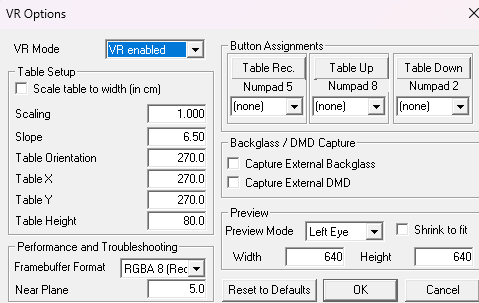
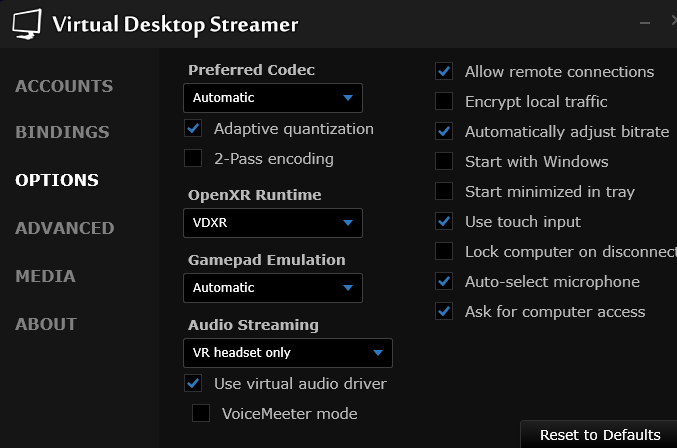
Been using VPX for some time now and really enjoy it. Eventually picked up Quest 3 headset to dip my toes into the 3D pool. Honestly, my eyes are tired from reading, and I still cannot figure it out. Most data references Steam or some such, or is otherwise outdated. What I have done: Original install was done using Popper. Currently using: VPinballX_GL64 10.8.0 2058 Virtual Desktop 1.34.18 VPinMAME 3.6 These are my VPX settings: Note: I've tried it with Capture External Backglass and Capture External DMD selected, and various values in Table orientation, Table X, Table Y and Height, too. Virtual Desktop Windows settings: Note: I manually lunch Virtual Desktop when I intend to use it, not automatically at Windows Startup. I launch the Virtual Desktop client on Windows 11 Pro first, followed by the Virtual Desktop client on the Quest then launch VPXGL executable. I've also tried launching VPX prior to the Quest Virtual Desktop client as well. I've tried several tables that have a VR room (Torpedo Alley, Twilight Zone, Spy Hunter et al) but have yet to see a VR Room. In fact, I'm not even convinced the playfield I see is 3D. I can see a flat playfield and a flat back glass suspended over the background I selected in the Virtual Desktop app, and can play the games (after rotating the playfield 90 degrees each time). However, it looks pretty much the same as what I see on the monitors in my cabinet, with the exception that I can move the playfield and backglass around. Unsure if related, but when I adjust the "height" of the playfield (which is actually a monitor oriented vertically in my cabinet to mimic a real playfield), it doesn't really change height, it simply moves the playfield further right. Yet another reason why I have to rotate the virtual field 90 to play it. I didn't want to start tweaking and eventually break a system that plays perfectly fine in my cabinet, so figured it best to reach out to you, the VR VPin Gods. This is all installed in a VPin cabinet with 3 monitors: Monitor 1 Playfield - installed vertically (which is rotated by the software to mimic a properly oriented playfield) Monitor 2 DMD Monitor 3 Backglass Surely there has to be something "obvious" that I am overlooking. Y'all will either have a great laugh at my expense (I am perfectly ok with that), or shake your head, or maybe even a combination. Ha! Thanks in advance!ac Thomas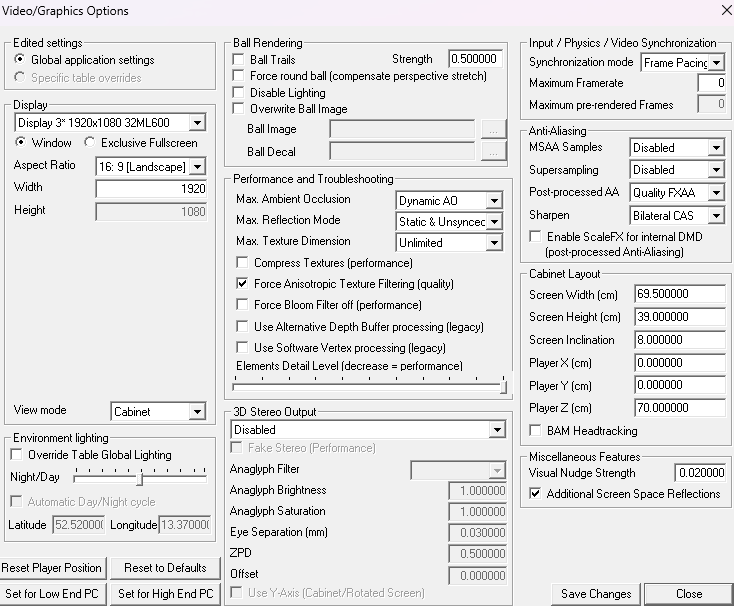
-

Version 1.0.0
163 downloads
Hi! here you have a wheel version of Qbert's Quest (Gottlieb 1983) Enjoy!