-
SYSTEM SEARCH
System Scanners Online:
Username: Guest
>> System Scan?
>> The Universe >
Incoming Message:
Due to system limitations searching with words of 3 or less characters will not return results. For instance; Doctor Who. This will not return results as the system is trying to search for both Doctor AND Who in which Who will not be found as it's a 3 character word. To find Doctor Who; you'd search for either Doctor or "Doctor Who".
Search Tips:
For specific searches; enclose your search with quotes. Example: "Doctor Who" or "Addams Family".
Search the Community
Showing results for tags 'mark paulik'.
Found 3 results
-
Version FULLDMD PUP Edition
3053 downloads
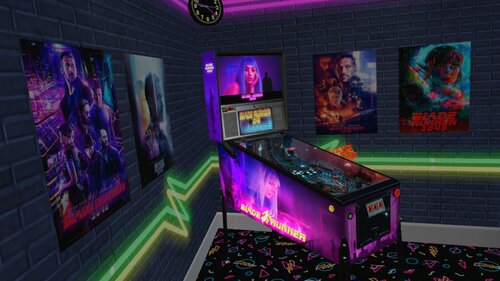
I want to share a VR Room Conversion of Blade Runner 2049 with you today. I converted this table for VR because it is a Beauty from "wpilot" and should not be missing in any VR collection. I hope someone has as much fun with it and like it as I do, so I'm going to share it with you guys now. I had to adjust a few little things, prettify and hide them, but the table works quite well now in VR. Edit 10/03/2024: New Version Blade Runner 2049 (2021) FULLDMD PUP Edition.zip Attention: If the Ball is too bright open in VPX->Preferences->Video/Graphics Options and activate under Ball Rendering "disable Lighting" then click on the left "Specific table overrides" and save. For all of you with VPMFlips Error open Script and look at Line 79 "Const UseSolenoids = 2" turn it to 1 and try again. Thanks to Panasony, one of our Community Members from "VR Pinball Group." (https://discord.gg/dKSP9eTPt7) we can present you a better looking Full DMD now. Hopefully this is the last update at least for now. You should definitely use the linked pup pack (and leave a like) so that the new FuLL DMD works properly. Then copy the pup files from my .zip file into your pup folder (make a backup). Sorry guys for the inconvenience but the Full DMD update is worth it, I didn't want to withhold it from you. '********************* VR OPTIONS ************************************************** '*********************************************************************************** 'VR PuP/Backglass - Switch the VRBackglass with your right MagnaSafe !BEFORE! you start a Game! 'If you want to use the Pup-Pack hit 3 times the right MagnaSafe Button to switch to PuP Backglass! 'LUT Change - Switch the LuT Options with your left MagnSafe! 'VR Logo - Set VRLogo = 0 to turn off VR Logo. VRLogo = 1 'VR Poster-Right - Set VRPosterR = 0 to turn off VR Poster-Right. VRPosterR = 1 'VR Poster-Left - Set VRPosterL = 0 to turn off VR Poster-Left. VRPosterL = 1 'VR table Glass - Set Glass = 0 to turn off VR playfield Glass. Glass = 1 'VR Playfield glass Scratches - Set to 0 if you want to turn them off. GlassScratch = 1 '*********************************************************************************** If you want to use the Pup Pack follow this Link! A big thanks to wpilot for creating such a beautyfull table and Rajo Joey for the LUT Template and more importantly the elimination of the annoying Flex DMD error and the possibility to change the backglass via Magnasave button and some other fixes. I also want to thank Rawd for his VR toys and Sixtoe for his great templates and of course Studlygoorite and Solters for beta testing . And not to forget JP Salas for making the Original 'Pokemon Pinball' Table. And a big THANKS to Apophis for his nice tutorials! Link to the original Blade Runner Table: https://www.vpforums.org/index.php?app=downloads&showfile=14820&st=50#commentsStart- 64 comments
- 7 reviews
-
- 74
-

-
- vpx blade runner 2049
- vr room
- (and 12 more)
-
 View File Blade Runner 2049 (2021)(VR ROOM ) I want to share a VR Room Conversion of Blade Runner 2049 with you today. I converted this table for VR because it is a Beauty from "wpilot" and should not be missing in any VR collection. I hope someone has as much fun with it and like it as I do, so I'm going to share it with you guys now. I had to adjust a few little things, prettify and hide them, but the table works quite well now in VR. Edit 10/03/2024: New Version Blade Runner 2049 (2021) FULLDMD PUP Edition.zip Attention: If the Ball is too bright open in VPX->Preferences->Video/Graphics Options and activate under Ball Rendering "disable Lighting" then click on the left "Specific table overrides" and save. For all of you with VPMFlips Error open Script and look at Line 79 "Const UseSolenoids = 2" turn it to 1 and try again. Thanks to Panasony, one of our Community Members from "VR Pinball Group." (https://discord.gg/dKSP9eTPt7) we can present you a better looking Full DMD now. Hopefully this is the last update at least for now. You should definitely use the linked pup pack (and leave a like) so that the new FuLL DMD works properly. Then copy the pup files from my .zip file into your pup folder (make a backup). Sorry guys for the inconvenience but the Full DMD update is worth it, I didn't want to withhold it from you. '********************* VR OPTIONS ************************************************** '*********************************************************************************** 'VR PuP/Backglass - Switch the VRBackglass with your right MagnaSafe !BEFORE! you start a Game! 'If you want to use the Pup-Pack hit 3 times the right MagnaSafe Button to switch to PuP Backglass! 'LUT Change - Switch the LuT Options with your left MagnSafe! 'VR Logo - Set VRLogo = 0 to turn off VR Logo. VRLogo = 1 'VR Poster-Right - Set VRPosterR = 0 to turn off VR Poster-Right. VRPosterR = 1 'VR Poster-Left - Set VRPosterL = 0 to turn off VR Poster-Left. VRPosterL = 1 'VR table Glass - Set Glass = 0 to turn off VR playfield Glass. Glass = 1 'VR Playfield glass Scratches - Set to 0 if you want to turn them off. GlassScratch = 1 '*********************************************************************************** If you want to use the Pup Pack follow this Link! A big thanks to wpilot for creating such a beautyfull table and Rajo Joey for the LUT Template and more importantly the elimination of the annoying Flex DMD error and the possibility to change the backglass via Magnasave button and some other fixes. I also want to thank Rawd for his VR toys and Sixtoe for his great templates and of course Studlygoorite and Solters for beta testing . And not to forget JP Salas for making the Original 'Pokemon Pinball' Table. Link to the original Blade Runner Table: https://www.vpforums.org/index.php?app=downloads&showfile=14820&st=50#commentsStart Submitter Ahr1man Submitted 12/07/22 Category VR - Virtual Reality Pinball Modified by Ahr1man/Panasony
 -

Version 1.0.0
82 downloads
This is a front end media pack for "Mystery Science Theater 3000: Pinball Peril". Thanks go out to all the people who worked on that table: Mark Paulik JP Salas Gary Spradling Table link: https://www.vpforums.org/index.php?app=downloads&showfile=16849 This media pack includes the following files gathered from YouTube and Internet Archive, which have been altered, and formatted by myself. MST3K - Audio MST3K - AudioLaunch (Short) MST3K - AudioLaunch MST3K - Backglass MST3K - Loading Sign (Short) MST3K - Loading Sign MST3K - Wheel These load screens are an edit of the "movie sign" hallway with the doors opening, finally leading to the table. For those who experience shorter load times, the "(Short)" variant is only a few seconds long, and should allow you to see the table revealed in the final vault door. Either use the "(Short)" variants of "Loading Sign" and "AudioLaunch" together, or use the regular versions together. The audio is from the 2nd or 3rd season of the show after "Mike" became the prisoner on the satellite of love. The backglass is a simple screen of the three main characters against the backdrop with the MST3K Moon logo. The wheel file has been included because after much searching, I simply cannot find any place where this particular wheel exists online. It very well may be that I created it, but I can't remember. If someone else made it, you have my apologies. I am not trying to steal your image, only to make it readily available for use with this table. Please send me the link to where you have it posted and I will gladly update this section to include it. ============================================================= Each file should be copied and then pasted in the media manager under the section with which it shares its nomenclature label. As far as I'm aware these items do not require permissions as they do not alter the game in any way. If I am incorrect in that, I'm sure someone will correct me. I will never ask for money. I will however ask that if you download these files that you thank the original creators in the comments and/or leave a review. This lets everyone know what the community appreciates. Enjoy.-
- 2
-
-
- mst3k
- front end media
- (and 4 more)