
-
SYSTEM SEARCH
System Scanners Online:
Username: Guest
>> System Scan?
>> The Universe >
Incoming Message:
Due to system limitations searching with words of 3 or less characters will not return results. For instance; Doctor Who. This will not return results as the system is trying to search for both Doctor AND Who in which Who will not be found as it's a 3 character word. To find Doctor Who; you'd search for either Doctor or "Doctor Who".
Search Tips:
For specific searches; enclose your search with quotes. Example: "Doctor Who" or "Addams Family".
Search the Community
Showing results for tags 'gotg'.
Found 5 results
-

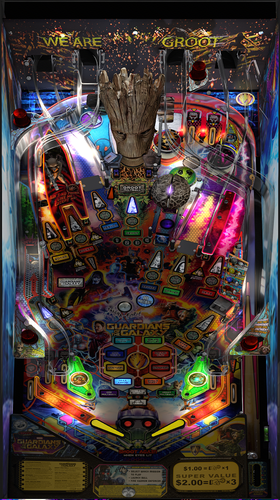
Version 2.1.1
47160 downloads
**************************************************************** Guardians of the Galaxy 2.1.0 By: Pincredibles **************************************************************** Special thanks: Arngrim, MPT3k, Mr H, Nailbuster, Rik, Harlan, Orbital Group, VAAS, wAxx, Ashtone6, Al, Terry VPW Team, namely Apophis, PinStratsDan, BountyBob, Sixtoe, Wylte, Hauntfreaks and many more... **************************************************************** Intro: This is my first table and I really want to thank everyone for all the help. The table script was hand coded to match the original table. I tried to replicate every detail on the gameplay with exact scoring, bonuses, modes, pinup interactions and so forth I am sure there are things I missed in the 11K lines of code but I am hoping the hundreds of hours we put into the making of this will bring something the community will enjoy and show there are no limits to what can be done. NOTES: - Make sure your PINUP is up to date: https://www.nailbuster.com/wikipinup/doku.php?id=release_notes - VPX Version: I tested in VPX 10.6 but works in 10.7. Some users identified some stutter in 10.7 so try 10.6 if you see this. - Enabling Orbital Scoreboard will hide your local scores but not achievement scores. **************************************************************** INSTALL: 1) Copy VPX to your VPX Tables directory 2) Copy GOTG_2020 insize the pup zip to your <drive>:\PinUPSystem\PUPVideos directory 3) Run the batch file in the pup pack that matches your config. It should make all necessary script changes for you. 4) Update DOF (If necessary) **************************************************************** 2.1.0 PUP Pack location https://mega.nz/file/DVoQRTrZ#FxQg78RY0W5rgEg2DHnLoUEp78fpm6Zh7lqcGxD7jQ8 **************************************************************** MPT3K Scorbit Setup and Tutorial **************************** Manu made a great step by step on how to setup and use Scorbit https://youtu.be/Sb6GF_3wDtc Version History: 2.1.0 - See Changelog for the 2nd 2.0.0 in the dropdown. 2.0.0 Massive update to bring it up to where it should be. Too many changes to list but here is a summary: - Added missing sores, mode animations, displays and major bug fixes and core table capabilities 1.2.1 - Fixed cherry bomb so you can do it again after finishing. - Fixed hole where ball could bounce through to shooter lane - Bug fix where DOF was getting left on. - Added desktop backdrop that MrFireshots created - Added pup script for desktop mode - Incorporated wAxx changes for the following - Physics changes to give it a more realistic feel. - Updated slingshots - Added changes needed for Desktop mode - Moved Stern button on the actual lockbar - Updated missing details on playfield (magnet position, rocket strength, flipper position, missing 3d prims and rubbers, metal holding Orb, GI and many more..) 1.2.0 - Fixed billboard/standup above scoop so it doesn’t look blurry (Also fixed blur on Groot) - Added small wall to prevent ball from getting stuck in left Outlane - Quills Quest didn’t give progress the first time you hit the scoop - DOF Enhancements - Thanks James D. - Music leveling - I didnt get it all in but thanks to Rajo for the help - Trimmed game over song to 30 seconds like original game - VR Support – Thanks Toby!!! - Locked all objects in editor so that they were not inadvertently moved. - Changed 12 primitives on layer 9 called "Post Plastic+Fluro(OnlyScrewCap)" to "PostFluroOSC(num)" as the original name was too long and was crashing the editor (thanks to DJRobX for compiling a version of VPX which let you edit out-of-range filenames). - Changed layers assets were on to free up layer 11 for VR stuff and to organise them for better visibility, dropped editor detail for some primitives. - Changed cabinet blade primitive and added new higher res blade image, added script switch to change back to old sideblades. - Added Stern Spike 2 cabinet and VR Room primitives to Layer 11, including importing images and materials. - Added "VRStuff" collection and put all of the VR objects in it. - Added VR Room switch to turn on or off the vr room primitives (Line 36) and the code to control (Lines 97-136) - Added lockdown bar "fire" button, switchable between Apron (cabinet/desktop) and lockdown bar (VR mode) (lines 97-136) - Added timer plunger code (Lines 1226-1229) so sync VR shooter rod with table plunger. - Added -15 height wall called "trigger" and assigned all playfield triggers to use it as a surface to drop them to the correct height. - Repositioned all flasher primitives to correctly sit on the plastics. - Replaced "Flasherlight" lights with secondary "FlasherFlash" flashers so they can be angled with the table slope, you shouldn't even notice. (5157 - 5375) - Made MetalPost(Point)4 (Layer 9) visible as it wasn't (hidden underneath right ramp), was a "floating" rubber. - Added deeper wood for all playfield holes. - Updated apron primitive including UVmap so that it looked OK in reverse angle. - Made apron wall visible, changed material and tidied up apron underneath. - Fixed plunger audio and positional sound. - Repositioned billboard and all assets on billboard aligned. - Changed depth bias settings for ramps, blades and flashers. - Changed Groot mouth wall (Wall017) to stop losing balls under plastics. - Change height of wall001 and wall005 ramp triggers to match ramp height, removed collidable status. - Repositioned ramp rubber bungs (Primitive2) - Added missing flathead screws to ramp entrances - Added missing mounting poles to left and right slings, added pole to right inlane guide, removed old redundant screwheads. - Adjusted spinner to stop it clipping through the plastics. - Added sleeves to hexpoles on playfield level, removed doubled up sleeves. - Cut GI so it doesn't stick out sides of cabinet -

Version 1.0.3
2251 downloads
This table is a Mod of the original Guardians of the Galaxy virtual table posted by daphishbowl and created by Pincredibles and VPin Workshop. Original Table Link A huge thank you to them for creating the original table and granting me permission to modify and distribute it! This is the first table I have ever created/modified to this level so any feedback/guidance is welcome! I set out to make my own mod of this table with a few goals in mind: Adjust gameplay scoring/lighting/modes to match most recent physical Stern table code/gameplay as closely as possible (performed in person testing and reviewed YouTube videos from within the last few years, see links and details below) Fix numerous bugs that users had posted on the original table page comments/reviews that have not yet been fixed by the original table creator (not updated since 2022) Add additional quality of life features such as various F12/Tweak Menu options (ball count, ball save, credit/free play, audio mixing by music/vfx/sfx/mechanical, control options, rules, etc.) Implement full traditional DMD support (this ended up entirely replacing the PUP pack code so this version does not currently support the PUP pack from the original) Implement audio music/sfx/vfx extracted from PUP pack into native VPX sound manager to be played back within the table itself Updated Rules and Complete Changelog: GOTG Rules.txt GOTG Rules - Short.txt GOTG Mod - Consolidated Changes.txt Currently working on the next version which will add some options and patch a few issues (still working on it sorry!): - Add Reset High Scores option to F12 menu - Add Competition Mode option to F12 menu - Add Extra Ball Enable/Disable option to F12 menu - Add Dynamic/Static Replay Value option to F12 menu - Add DMD color preset options to F12 menu - Add creator credits to final attract mode DMD screen - Correct front Orb drop target image (currently misaligned, too high) - Remove Add-A-Ball as a mystery reward if a Wizard mode is lit at the scoop (add-a-ball was wasted, now get Mystery reward other than add-a-ball and then start wizard mode) - Add "Hadron Enforcer Charged" as Mystery reward - Fix scoop billboard light flash frequency (sometimes the Mode Select light would blink wayyy too fast due to rapid restarts) - Cap number of add-a-ball rewards within Immolation Initiative wizard mode - Adjust Groot Multiball jackpot/super jackpot/double super jackpot award values to match real table - Add Save Xandar qualification sound effect to each mode completion - Change Immolation Initiative progress DMD screen from "X/8" to "X/10" since it requires the 8 character modes 50% AND 2 multiball modes at least started to qualify - And lotss more! Scorbit, VR, and DOF code from the original table was preserved (a few Scorbit bugs were fixed and I was able to confirm it is working but I am not able to test VR/DOF). I have attached the full consolidated change list for this new 1.0.0 version (too long to post here) as well as the final rules that have been implemented. Gameplay Demo Video: Resources Used: YouTube Videos Used: Stern's Guardians of the Galaxy Pro gameplay and PAPA recap by Pinbolls (Sept 2025, v1.14.0) Link Guardians of the galaxy pinball tutorial // 9 Billion point game by The Pinball Zone (Sept 2024, likely v1.13.0 based on video upload date) Link Stern v1.15.0 Release Notes also used for reference (does not contain all details but some useful gameplay/scoring confirmations) Link Many, many play sessions at my local arcade. (took place from Sept-Nov 2026, will try to check game code version next time I'm there) Note: A few design choices were made in opposition to the physical table design for the sake of fun: Quill's Quest Level 1 Upgrade had no discernable change to scoring or shot availability (unlike the other modes) during my research and testing. To compensate for this inconsistency I modified the Upgrade for Quill's Quest Level 1 to add 1 additional random shot (normally there are 2 random shots plus the scoop lit). Escape Kyln Level 1 Upgrade also had no discernable change to scoring or shot availability (unlike the other modes) during my research and testing. To compensate for this inconsistency I modified the Upgrade for Escape Kyln Level 1 so the Rocket shot spots 2 remaining Nova shots (instead of only 1). Disclaimer: Claude was used in the creation of the code for this mod. Works with the newly updated VPX iOS app! After downloading/importing the table into the app and launching it once I recommend setting View Mode to Cabinet under Graphics Settings, adjusting the DMD size/placement under Display Settings/ScoreView Display, and adjusting the Point Of View under Point Of View (I recommend Window, Manual, 0.0cm Horizontal Offset, -1.1 cm Vertical Offset, 15.2% X/Y scale, 39.4 cm Window Top Z Offset, 0.0 cm Window Bottom Z Offset, 0.0cm Player X, -10.0cm Player Y, 69.9cm Player Z). Be sure to click the save icon on the top right of each screen to save your changes for that table! I also recommend disabling 'tilt' and enabling 'right magna save launch/hadron' under Table Options because touchscreen nudging is finicky and the right magna save must be used for mission select and hadron since there is no action button. Scorbit Setup Instructions: Copy sToken.exe and sQRCode.exe (from the original PuP pack) into <Visual Pinball>\User\Scorbit (the table creates the data folder User\Scorbit\GOTG itself) Set ScorbitActive = 1 in the script and start the table once. Open <Visual Pinball>\User\Scorbit\GOTG\QRcode.png and scan it with the Scorbit phone app to register the machine (one time). During a game, join the live game from the Scorbit app to claim your score. You can also use the Scorbit web app/dashboard to generate and display a permanent QR code for joining an existing game or show as a scoreboard on another monitor. (https://console.scorbit.io/mymachines/ and https://console.scorbit.io/vision/) After pairing, the table connects by itself on every start and a game can be joined through the app or by scanning the QR code created through the Scorbit web app (https://console.scorbit.io/mymachines/) If Scorbit cannot connect (no internet, missing exe files, wrong PC clock) at launch it stays off until the table is restarted; if the connection is lost during play after initial successful connect it tries to reconnect by itself (10s, 20s, 30s, then every 60s, also in attract) and plays the 'scorbit_login' sound when it reconnects. FAQ: Q: Why did you remove PUP functionality? A: During the time I was getting into the VPX community and was attempting to set up PinUP Popper/Player there was a Windows patch that essentially bricked the entire program. I was able to eventually get PinUP Player working for a few days before it broke again. I’ve also never really been a huge fan of modern LCDs in pinball compared to DMDs and find the video clips usually distract from the game more than enhance it. My setup is also a fairly simple one, an AtGames Legends Pinball HD cabinet with the VIBS + arcade control panel upgrades (I enjoy using the machine for arcade games as well, hence the Retrobat/EmulationStation setup instead of PinUP Popper) and flipper solenoids. I really like the consistency this setup gives me across arcade games, pinball fx, zaccaria, and vpx all working seamlessly with the 2 screen setup + DMDs and Retrobat frontend. Thus I set out to create DMD versions of some of my favorite PUP-only tables. Q: Will you re-add PUP functionality in the future? A: Yes. Because the entire audio system was moved from PinUP Player to native VPX and much of the old PUP code was removed, I am not certain how difficult/feasible it would be to re-implement it while still keeping all of the gameplay/scoring/bug fix changes that were also done. Regardless, after first completing some tweaks/bug fixes I will be starting to work on reimplementing/modifying the PUP pack and/or the user Precise will be creating an entirely new PUP pack for this table. Q: Any other plans for this project? A: Patch any new bugs that pop up, improve DMD visuals/graphics -

Version 1.0.0
750 downloads
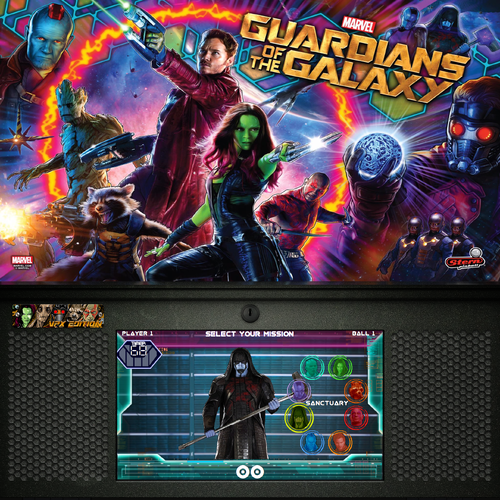
This is for those with 1x1 (or 9x16) 2-screen setups to mimic three screens. Users can set the Pup pack for 3-screen setup, overlay the pup backglass over the existing one, then place the full DMD in the designated opening. This gives it a more authentic look. I have a 4k TV as my backglass, covering the bottom portion during play, so here are my settings: B2S Backglass size: 2160x2160 Grill set to visible PinUp screen setup Backglass width: 2016 height: 1215 Xpos: 1440 (my playfield is 2k) Ypos: 0 Apron/FullDMD width: 1150 Height: 646 Xpos: 1945 Ypos: 1428- 4 comments
-
- 14
-

-
- guardians of the galaxy pro
- stern
- (and 1 more)
-
 View File Guardians of the Galaxy (Mod) This table is a Mod of the original Guardians of the Galaxy virtual table posted by daphishbowl and created by Pincredibles and VPin Workshop. Original Table Link A huge thank you to them for creating the original table and granting me permission to modify and distribute it! This is the first table I have ever created/modified to this level so any feedback/guidance is welcome! I set out to make my own mod of this table with a few goals in mind: Adjust gameplay scoring/lighting/modes to match most recent physical Stern table code/gameplay as closely as possible (performed in person testing and reviewed YouTube videos from within the last few years, see links and details below) Fix numerous bugs that users had posted on the original table page comments/reviews that have not yet been fixed by the original table creator (not updated since 2022) Add additional quality of life features such as various F12/Tweak Menu options (ball count, ball save, credit/free play, audio mixing by music/vfx/sfx/mechanical, control options, rules, etc.) Implement full traditional DMD support (this ended up entirely replacing the PUP pack code so this version does not currently support the PUP pack from the original) Implement audio music/sfx/vfx extracted from PUP pack into native VPX sound manager to be played back within the table itself Updated Rules and Complete Changelog: GOTG Rules.txt GOTG Rules - Short.txt GOTG Mod - Consolidated Changes.txt Currently working on the next version which will add some options and patch a few issues: - Add Reset High Scores option to F12 menu - Add Competition Mode option to F12 menu - Add Extra Ball Enable/Disable option to F12 menu - Add Dynamic/Static Replay Value option to F12 menu - Add DMD color preset options to F12 menu - Add creator credits to final attract mode DMD screen - Correct front Orb drop target image (currently misaligned, too high) - Remove Add-A-Ball as a mystery reward if a Wizard mode is lit at the scoop (add-a-ball was wasted, now get Mystery reward other than add-a-ball and then start wizard mode) - Add "Hadron Enforcer Charged" as Mystery reward - Fix scoop billboard light flash frequency (sometimes the Mode Select light would blink wayyy too fast due to rapid restarts) - Cap number of add-a-ball rewards within Immolation Initiative wizard mode - Adjust Groot Multiball jackpot/super jackpot/double super jackpot award values to match real table - Add Save Xandar qualification sound effect to each mode completion - Change Immolation Initiative progress DMD screen from "X/8" to "X/10" since it requires the 8 character modes 50% AND 2 multiball modes at least started to qualify - And lotss more! Scorbit, VR, and DOF code from the original table was preserved (a few Scorbit bugs were fixed and I was able to confirm it is working but I am not able to test VR/DOF). I have attached the full consolidated change list for this new 1.0.0 version (too long to post here) as well as the final rules that have been implemented. Gameplay Demo Video: Resources Used: YouTube Videos Used: Stern's Guardians of the Galaxy Pro gameplay and PAPA recap by Pinbolls (Sept 2025, v1.14.0) Link Guardians of the galaxy pinball tutorial // 9 Billion point game by The Pinball Zone (Sept 2024, likely v1.13.0 based on video upload date) Link Stern v1.15.0 Release Notes also used for reference (does not contain all details but some useful gameplay/scoring confirmations) Link Many, many play sessions at my local arcade. (took place from Sept-Nov 2026, will try to check game code version next time I'm there) Note: A few design choices were made in opposition to the physical table design for the sake of fun: Quill's Quest Level 1 Upgrade had no discernable change to scoring or shot availability (unlike the other modes) during my research and testing. To compensate for this inconsistency I modified the Upgrade for Quill's Quest Level 1 to add 1 additional random shot (normally there are 2 random shots plus the scoop lit). Escape Kyln Level 1 Upgrade also had no discernable change to scoring or shot availability (unlike the other modes) during my research and testing. To compensate for this inconsistency I modified the Upgrade for Escape Kyln Level 1 so the Rocket shot spots 2 remaining Nova shots (instead of only 1). Disclaimer: Claude was used in the creation of the code for this mod. Works with the newly updated VPX iOS app! After downloading/importing the table into the app and launching it once I recommend setting View Mode to Cabinet under Graphics Settings, adjusting the DMD size/placement under Display Settings/ScoreView Display, and adjusting the Point Of View under Point Of View (I recommend Window, Manual, 0.0cm Horizontal Offset, -1.1 cm Vertical Offset, 15.2% X/Y scale, 39.4 cm Window Top Z Offset, 0.0 cm Window Bottom Z Offset, 0.0cm Player X, -10.0cm Player Y, 69.9cm Player Z). Be sure to click the save icon on the top right of each screen to save your changes for that table! I also recommend disabling 'tilt' and enabling 'right magna save launch/hadron' under Table Options because touchscreen nudging is finicky and the right magna save must be used for mission select and hadron since there is no action button. Scorbit Setup Instructions: Copy sToken.exe and sQRCode.exe (from the original PuP pack) into <Visual Pinball>\User\Scorbit (the table creates the data folder User\Scorbit\GOTG itself) Set ScorbitActive = 1 in the script and start the table once. Open <Visual Pinball>\User\Scorbit\GOTG\QRcode.png and scan it with the Scorbit phone app to register the machine (one time). During a game, join the live game from the Scorbit app to claim your score. You can also use the Scorbit web app/dashboard to generate and display a permanent QR code for joining an existing game or show as a scoreboard on another monitor. (https://console.scorbit.io/mymachines/ and https://console.scorbit.io/vision/) After pairing, the table connects by itself on every start and a game can be joined through the app or by scanning the QR code created through the Scorbit web app (https://console.scorbit.io/mymachines/) If Scorbit cannot connect (no internet, missing exe files, wrong PC clock) at launch it stays off until the table is restarted; if the connection is lost during play after initial successful connect it tries to reconnect by itself (10s, 20s, 30s, then every 60s, also in attract) and plays the 'scorbit_login' sound when it reconnects. FAQ: Q: Why did you remove PUP functionality? A: During the time I was getting into the VPX community and was attempting to set up PinUP Popper/Player there was a Windows patch that essentially bricked the entire program. I was able to eventually get PinUP Player working for a few days before it broke again. I’ve also never really been a huge fan of modern LCDs in pinball compared to DMDs and find the video clips usually distract from the game more than enhance it. My setup is also a fairly simple one, an AtGames Legends Pinball HD cabinet with the VIBS + arcade control panel upgrades (I enjoy using the machine for arcade games as well, hence the Retrobat/EmulationStation setup instead of PinUP Popper) and flipper solenoids. I really like the consistency this setup gives me across arcade games, pinball fx, zaccaria, and vpx all working seamlessly with the 2 screen setup + DMDs and Retrobat frontend. Thus I set out to create DMD versions of some of my favorite PUP-only tables. Q: Will you re-add PUP functionality in the future? A: Yes. Because the entire audio system was moved from PinUP Player to native VPX and much of the old PUP code was removed, I am not certain how difficult/feasible it would be to re-implement it while still keeping all of the gameplay/scoring/bug fix changes that were also done. Regardless, after first completing some tweaks/bug fixes I will be starting to work on reimplementing/modifying the PUP pack and/or the user Precise will be creating an entirely new PUP pack for this table. Q: Any other plans for this project? A: Patch any new bugs that pop up, improve DMD visuals/graphics Submitter JoeShmoee Submitted 11/07/26 Category Modified (MOD) Games Modified by JoeShmoee
-


Version 1.0.0
73 downloads
Guardians of the Galaxy animated glass orb wheel art
