-
SYSTEM SEARCH
System Scanners Online:
Username: Guest
>> System Scan?
>> The Universe >
Incoming Message:
Due to system limitations searching with words of 3 or less characters will not return results. For instance; Doctor Who. This will not return results as the system is trying to search for both Doctor AND Who in which Who will not be found as it's a 3 character word. To find Doctor Who; you'd search for either Doctor or "Doctor Who".
Search Tips:
For specific searches; enclose your search with quotes. Example: "Doctor Who" or "Addams Family".
Search the Community
Showing results for tags '6474'.
Found 3 results
-

Version 1.0.3
1912 downloads
This table is a Mod of the original Guardians of the Galaxy virtual table posted by daphishbowl and created by Pincredibles and VPin Workshop. Original Table Link A huge thank you to them for creating the original table and granting me permission to modify and distribute it! This is the first table I have ever created/modified to this level so any feedback/guidance is welcome! I set out to make my own mod of this table with a few goals in mind: Adjust gameplay scoring/lighting/modes to match most recent physical Stern table code/gameplay as closely as possible (performed in person testing and reviewed YouTube videos from within the last few years, see links and details below) Fix numerous bugs that users had posted on the original table page comments/reviews that have not yet been fixed by the original table creator (not updated since 2022) Add additional quality of life features such as various F12/Tweak Menu options (ball count, ball save, credit/free play, audio mixing by music/vfx/sfx/mechanical, control options, rules, etc.) Implement full traditional DMD support (this ended up entirely replacing the PUP pack code so this version does not currently support the PUP pack from the original) Implement audio music/sfx/vfx extracted from PUP pack into native VPX sound manager to be played back within the table itself Updated Rules and Complete Changelog: GOTG Rules.txt GOTG Rules - Short.txt GOTG Mod - Consolidated Changes.txt Currently working on the next version which will add some options and patch a few issues: - Add Reset High Scores option to F12 menu - Add Competition Mode option to F12 menu - Add Extra Ball Enable/Disable option to F12 menu - Add Dynamic/Static Replay Value option to F12 menu - Add DMD color preset options to F12 menu - Add creator credits to final attract mode DMD screen - Correct front Orb drop target image (currently misaligned, too high) - Remove Add-A-Ball as a mystery reward if a Wizard mode is lit at the scoop (add-a-ball was wasted, now get Mystery reward other than add-a-ball and then start wizard mode) - Add "Hadron Enforcer Charged" as Mystery reward - Fix scoop billboard light flash frequency (sometimes the Mode Select light would blink wayyy too fast due to rapid restarts) - Cap number of add-a-ball rewards within Immolation Initiative wizard mode - Adjust Groot Multiball jackpot/super jackpot/double super jackpot award values to match real table - Add Save Xandar qualification sound effect to each mode completion - Change Immolation Initiative progress DMD screen from "X/8" to "X/10" since it requires the 8 character modes 50% AND 2 multiball modes at least started to qualify Scorbit, VR, and DOF code from the original table was preserved (a few Scorbit bugs were fixed and I was able to confirm it is working but I am not able to test VR/DOF). I have attached the full consolidated change list for this new 1.0.0 version (too long to post here) as well as the final rules that have been implemented. Gameplay Demo Video: Resources Used: YouTube Videos Used: Stern's Guardians of the Galaxy Pro gameplay and PAPA recap by Pinbolls (Sept 2025, v1.14.0) Link Guardians of the galaxy pinball tutorial // 9 Billion point game by The Pinball Zone (Sept 2024, likely v1.13.0 based on video upload date) Link Stern v1.15.0 Release Notes also used for reference (does not contain all details but some useful gameplay/scoring confirmations) Link Many, many play sessions at my local arcade. (took place from Sept-Nov 2026, will try to check game code version next time I'm there) Note: A few design choices were made in opposition to the physical table design for the sake of fun: Quill's Quest Level 1 Upgrade had no discernable change to scoring or shot availability (unlike the other modes) during my research and testing. To compensate for this inconsistency I modified the Upgrade for Quill's Quest Level 1 to add 1 additional random shot (normally there are 2 random shots plus the scoop lit). Escape Kyln Level 1 Upgrade also had no discernable change to scoring or shot availability (unlike the other modes) during my research and testing. To compensate for this inconsistency I modified the Upgrade for Escape Kyln Level 1 so the Rocket shot spots 2 remaining Nova shots (instead of only 1). Disclaimer: Claude was used in the creation of the code for this mod. Works with the newly updated VPX iOS app! After downloading/importing the table into the app and launching it once I recommend setting View Mode to Cabinet under Graphics Settings, adjusting the DMD size/placement under Display Settings/ScoreView Display, and adjusting the Point Of View under Point Of View (I recommend Window, Manual, 0.0cm Horizontal Offset, -1.1 cm Vertical Offset, 15.2% X/Y scale, 39.4 cm Window Top Z Offset, 0.0 cm Window Bottom Z Offset, 0.0cm Player X, -10.0cm Player Y, 69.9cm Player Z). Be sure to click the save icon on the top right of each screen to save your changes for that table! I also recommend disabling 'tilt' and enabling 'right magna save launch/hadron' under Table Options because touchscreen nudging is finicky and the right magna save must be used for mission select and hadron since there is no action button. Scorbit Setup Instructions: Copy sToken.exe and sQRCode.exe (from the original PuP pack) into <Visual Pinball>\User\Scorbit (the table creates the data folder User\Scorbit\GOTG itself) Set ScorbitActive = 1 in the script and start the table once. Open <Visual Pinball>\User\Scorbit\GOTG\QRcode.png and scan it with the Scorbit phone app to register the machine (one time). During a game, join the live game from the Scorbit app to claim your score. You can also use the Scorbit web app/dashboard to generate and display a permanent QR code for joining an existing game or show as a scoreboard on another monitor. (https://console.scorbit.io/mymachines/ and https://console.scorbit.io/vision/) After pairing, the table connects by itself on every start and a game can be joined through the app or by scanning the QR code created through the Scorbit web app (https://console.scorbit.io/mymachines/) If Scorbit cannot connect (no internet, missing exe files, wrong PC clock) at launch it stays off until the table is restarted; if the connection is lost during play after initial successful connect it tries to reconnect by itself (10s, 20s, 30s, then every 60s, also in attract) and plays the 'scorbit_login' sound when it reconnects. FAQ: Q: Why did you remove PUP functionality? A: During the time I was getting into the VPX community and was attempting to set up PinUP Popper/Player there was a Windows patch that essentially bricked the entire program. I was able to eventually get PinUP Player working for a few days before it broke again. I’ve also never really been a huge fan of modern LCDs in pinball compared to DMDs and find the video clips usually distract from the game more than enhance it. My setup is also a fairly simple one, an AtGames Legends Pinball HD cabinet with the VIBS + arcade control panel upgrades (I enjoy using the machine for arcade games as well, hence the Retrobat/EmulationStation setup instead of PinUP Popper) and flipper solenoids. I really like the consistency this setup gives me across arcade games, pinball fx, zaccaria, and vpx all working seamlessly with the 2 screen setup + DMDs and Retrobat frontend. Thus I set out to create DMD versions of some of my favorite PUP-only tables. Q: Will you re-add PUP functionality in the future? A: Yes. Because the entire audio system was moved from PinUP Player to native VPX and much of the old PUP code was removed, I am not certain how difficult/feasible it would be to re-implement it while still keeping all of the gameplay/scoring/bug fix changes that were also done. Regardless, after first completing some tweaks/bug fixes I will be starting to work on reimplementing/modifying the PUP pack and/or the user Precise will be creating an entirely new PUP pack for this table. Q: Any other plans for this project? A: Patch any new bugs that pop up, improve DMD visuals/graphics -
 View File Guardians of the Galaxy (Mod) This table is a Mod of the original Guardians of the Galaxy virtual table posted by daphishbowl and created by Pincredibles and VPin Workshop. Original Table Link A huge thank you to them for creating the original table and granting me permission to modify and distribute it! This is the first table I have ever created/modified to this level so any feedback/guidance is welcome! I set out to make my own mod of this table with a few goals in mind: Adjust gameplay scoring/lighting/modes to match most recent physical Stern table code/gameplay as closely as possible (performed in person testing and reviewed YouTube videos from within the last few years, see links and details below) Fix numerous bugs that users had posted on the original table page comments/reviews that have not yet been fixed by the original table creator (not updated since 2022) Add additional quality of life features such as various F12/Tweak Menu options (ball count, ball save, credit/free play, audio mixing by music/vfx/sfx/mechanical, control options, rules, etc.) Implement full traditional DMD support (this ended up entirely replacing the PUP pack code so this version does not currently support the PUP pack from the original) Implement audio music/sfx/vfx extracted from PUP pack into native VPX sound manager to be played back within the table itself Updated Rules and Complete Changelog: GOTG Rules.txt GOTG Rules - Short.txt GOTG Mod - Consolidated Changes.txt Currently working on the next version which will add some options and patch a few issues: - Add Reset High Scores option to F12 menu - Add Competition Mode option to F12 menu - Add Extra Ball Enable/Disable option to F12 menu - Add Dynamic/Static Replay Value option to F12 menu - Add DMD color preset options to F12 menu - Add creator credits to final attract mode DMD screen - Correct front Orb drop target image (currently misaligned, too high) - Remove Add-A-Ball as a mystery reward if a Wizard mode is lit at the scoop (add-a-ball was wasted, now get Mystery reward other than add-a-ball and then start wizard mode) - Add "Hadron Enforcer Charged" as Mystery reward - Fix scoop billboard light flash frequency (sometimes the Mode Select light would blink wayyy too fast due to rapid restarts) - Cap number of add-a-ball rewards within Immolation Initiative wizard mode - Adjust Groot Multiball jackpot/super jackpot/double super jackpot award values to match real table - Add Save Xandar qualification sound effect to each mode completion - Change Immolation Initiative progress DMD screen from "X/8" to "X/10" since it requires the 8 character modes 50% AND 2 multiball modes at least started to qualify Scorbit, VR, and DOF code from the original table was preserved (a few Scorbit bugs were fixed and I was able to confirm it is working but I am not able to test VR/DOF). I have attached the full consolidated change list for this new 1.0.0 version (too long to post here) as well as the final rules that have been implemented. Gameplay Demo Video: Resources Used: YouTube Videos Used: Stern's Guardians of the Galaxy Pro gameplay and PAPA recap by Pinbolls (Sept 2025, v1.14.0) Link Guardians of the galaxy pinball tutorial // 9 Billion point game by The Pinball Zone (Sept 2024, likely v1.13.0 based on video upload date) Link Stern v1.15.0 Release Notes also used for reference (does not contain all details but some useful gameplay/scoring confirmations) Link Many, many play sessions at my local arcade. (took place from Sept-Nov 2026, will try to check game code version next time I'm there) Note: A few design choices were made in opposition to the physical table design for the sake of fun: - Quill's Quest Level 1 Upgrade had no discernable change to scoring or shot availability (unlike the other modes) during my research and testing. To compensate for this inconsistency I modified the Upgrade for Quill's Quest Level 1 to add 1 additional random shot (normally there are 2 random shots plus the scoop lit). Disclaimer: Claude was used in the creation of the code for this mod. Works with the newly updated VPX iOS app! After downloading/importing the table into the app and launching it once I recommend setting View Mode to Cabinet under Graphics Settings, adjusting the DMD size/placement under Display Settings/ScoreView Display, and adjusting the Point Of View under Point Of View (I recommend Window, Manual, 0.0cm Horizontal Offset, -1.1 cm Vertical Offset, 15.2% X/Y scale, 39.4 cm Window Top Z Offset, 0.0 cm Window Bottom Z Offset, 0.0cm Player X, -10.0cm Player Y, 69.9cm Player Z). Be sure to click the save icon on the top right of each screen to save your changes for that table! I also recommend disabling 'tilt' and enabling 'right magna save launch/hadron' under Table Options because touchscreen nudging is finicky and the right magna save must be used for mission select and hadron since there is no action button. Scorbit Setup Instructions: Copy sToken.exe and sQRCode.exe (from the original PuP pack) into <Visual Pinball>\User\Scorbit (the table creates the data folder User\Scorbit\GOTG itself) Set ScorbitActive = 1 in the script and start the table once. Open <Visual Pinball>\User\Scorbit\GOTG\QRcode.png and scan it with the Scorbit phone app to register the machine (one time). During a game, join the live game from the Scorbit app to claim your score. You can also use the Scorbit web app/dashboard to generate and display a permanent QR code for joining an existing game or show as a scoreboard on another monitor. (https://console.scorbit.io/mymachines/ and https://console.scorbit.io/vision/) After pairing, the table connects by itself on every start and a game can be joined through the app or by scanning the QR code created through the Scorbit web app (https://console.scorbit.io/mymachines/) If Scorbit cannot connect (no internet, missing exe files, wrong PC clock) at launch it stays off until the table is restarted; if the connection is lost during play after initial successful connect it tries to reconnect by itself (10s, 20s, 30s, then every 60s, also in attract) and plays the 'scorbit_login' sound when it reconnects. FAQ: Q: Why did you remove PUP functionality? A: During the time I was getting into the VPX community and was attempting to set up PinUP Popper/Player there was a Windows patch that essentially bricked the entire program. I was able to eventually get PinUP Player working for a few days before it broke again. I’ve also never really been a huge fan of modern LCDs in pinball compared to DMDs and find the video clips usually distract from the game more than enhance it. My setup is also a fairly simple one, an AtGames Legends Pinball HD cabinet with the VIBS + arcade control panel upgrades (I enjoy using the machine for arcade games as well, hence the Retrobat/EmulationStation setup instead of PinUP Popper) and flipper solenoids. I really like the consistency this setup gives me across arcade games, pinball fx, zaccaria, and vpx all working seamlessly with the 2 screen setup + DMDs and Retrobat frontend. Thus I set out to create DMD versions of some of my favorite PUP-only tables. Q: Will you re-add PUP functionality in the future? A: Yes. Because the entire audio system was moved from PinUP Player to native VPX and much of the old PUP code was removed, I am not certain how difficult/feasible it would be to re-implement it while still keeping all of the gameplay/scoring/bug fix changes that were also done. Regardless, after first completing some tweaks/bug fixes I will be starting to work on reimplementing/modifying the PUP pack and/or the user Precise will be creating an entirely new PUP pack for this table. Q: Any other plans for this project? A: Patch any new bugs that pop up, improve DMD visuals/graphics Submitter JoeShmoee Submitted 11/07/26 Category Modified (MOD) Games Modified by JoeShmoee
-
Version 1.2
486 downloads
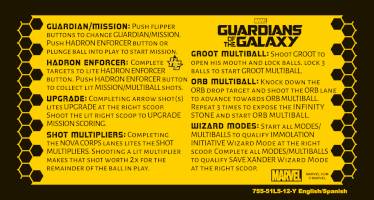
Includes reproductions of the English language factory card and promo card as found in the flyers. Also includes coinage card, US currency only. Type, layout, assembly, vectorization, and colorization to simulate print out on Solar Yellow stock in Adobe Illustrator. Fonts include Stormfaze by Typodermic Fonts and Alegreya Sans from Heurta Tipográfica. GOTG vector-based logo and hi-rez metallic logo from commons.wikimedia.org The wikimedia logo included as a hi-rez wheel image Also included the hi rez color logo from sternpinball.com. Main reference images are from my own photos of a Pro machine at Pinballz, Austin Texas. Thanks to Pinsider robin for uploading table reference images from which I extracted the Hadron Enforcer logo Thanks to MBPC (RIP) and amusements4kids.com.au for additional reference images Special thanks to Inkochnito for being the original host of the card reproductions. Flyers - raw image extracted directly from the factory PDFs using xpdfbin and converted to lossless PNG using ImageMagick. Added Promo Video as supported by PinballX and perhaps other front-ends. Source: Stern Pinball's YT channel. Videos are in native format and unmodified. I'll point to TerryRed's conversion scripts here, if you need to rotate the videos for your specific hardware setup: This work is free to use by the community without attribution. All sources are trademarks / copyrights of their respective owners. This is to be privately used in front-ends or for other non-commercial (or at least non-profit) pinball-related applications. I hold no responsibility for their misuse.