
Jump to content

Blood Machines (VPW Original 2022)

  • Get Support
  • Create an account or sign in to download this
download_no_perm
168961 Views
30407 Downloads
5 From 98 reviews
1.23 GB File Size
None ROM Name
VPW Created by
VPW Artwork by
VPW Scripting by
Original Manufacturer
2022 Year

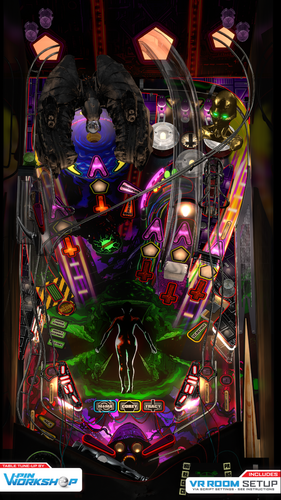
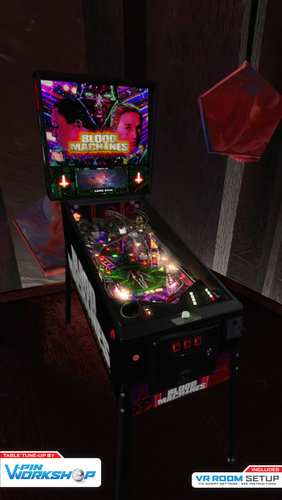
2 Screenshots

**************************************

Version 2.0 Additional instruction:

  • This needs VPX 10.7.3 or later and for VR it is optimized for 10.8 #814. Lighting works a bit differently per revision
  • Scorbit uses 3 extra EXE files that should be but into VPX tables folder. Same place where you put the VPX file and BloodMachinesDMD-folder.
    • Notice that some of these EXE files may need to be unblocked
    • 2 of the EXE's are same than previous Scorbit tables, but this time they are just stored in tables folder.
    • 3rd one is QRView which is made to enable QR code to be seen in VPX table. VPX doesn't normally support loading of external image files.
      • Sources: https://github.com/iaakki/VPXQRView
  • By default it runs still with FlexDMD. You must enable PUP from script and also remember to use options batch files under pup folder.


**************************************


Alright, let’s do this old school…


VPinWorkshop are proud to present our very first original table, “Blood Machines”, based on the movie from Seth Ickerman with music by Carpenter Brut.


After watching Blood Machines iaakki thought that it would make a great theme for a pinball table, so we started talking about it in VPW and decided that if we were going to do it as our first completely original VPW table, that we wanted to do it properly.
With this in mind we contacted Seth Ickerman to see if they would be interested in the project and to see if there was any chance they would be able to provide any assets that we could use. Thankfully Not only were they amazed at what we were doing, but they supplied us with 70gig of 3D models and textures which were used in the film!
The only issue now was that these were so high detail that a huge amount of work was needed to optimize them so they would even load in VPX, but thankfully Flupper came to the rescue and did a fantastic job optimising the models and textures so we could put them in the table without setting your PC on fire (for example the ship went down from 8 million polygons to 130,000!)


At the time of writing this the table was at revision 335 (release candidate 1.5) with *well* over 1000 man-hours sunken into it, the amount of work has been staggering but we hope that you’ll agree that it was worth it.
The table itself has loads of features that have never been seen before in other VPX tables and we have tried our best to keep most/all of it secret as we want everyone to experience it for themselves firsthand, which is why until very recently we’ve kept details very close to our chest.


*IMPORTANT*
In order to fully enjoy the table and play it as it was designed to be played, you will need to purchase the awesome soundtrack by Carpenter Brut (about £5/$5/5e) and place the MP3s in your vpinball music directory:
C:\Visual Pinball\Music\BLOOD MACHINES OST
We really hope people do support the artist and purchase it from;
https://carpenterbrut.bandcamp.com/album/blood-machines-ost


VPW Blood Machines

  • Project Lead – iaakki
  • Table Layout Design – iaakki, Dapheni
  • Art Lead & 2D Graphics – Astronasty
  • 3D Objects & Textures – Tomate, Flupper, iaakki, Sixtoe, D.J.
  • Scripting & Coding – iaakki, Apophis, oqqsan, Wylte, Lumigado, fluffhead35
  • DMD – Oqqsan, eMBee, Astronasty, Lumigado.
  • Pupdmd - Frank H, HeartbeatMD
  • VR – Sixtoe, leojreimroc, iaakki
  • Table Rules – Apophis, iaakki, VPW Team.
  • Shot Tester – gtxjoe
  • Testing – Rik, PinStratsDan, VPW Team


Installation Instructions

===================

VPX 10.7
https://github.com/vpinball/vpinball/releases


VPVR 10.7.3

https://github.com/vpinball/vpvr/releases/


FlexDMD v1.8.0

https://github.com/vbousquet/flexdmd/releases/


Windows 11 Crashing with oPlayer1 error?
Go into windows11 apps>optional features>more windows features and check "media features"


Riks Cabinet WIP Video


PinStratsDan Desktop Video


Rawds VR video:


You can watch the film on Shudder, AMC’s streaming service;

https://www.shudder.com/series/watch/blood-machines/033e95260abc2604?season=1

 

https://vpuniverse.com/files/file/9848-blood-machines-db2s-vpw-original-2022/
https://vpuniverse.com/files/file/9849-blood-machines-fulldmd-video-background-vpw-original-2022/
Contact Author First.
v10.7 required
Yes

What's New in Version 2.0   See changelog

Released

  • Scorbit support
    • works without PUP too
    • Use script option to enable
  • PUPpack from Frank H and HeartbeatDM
    • Use script option to enable the PUP, flex is still the default
    • See puppack folder for 6 different options for the setup
  • New SSF audios from Fleep
  • New visual effects and improvements
  • Updated physics
  • New VRRoom

User Feedback

Recommended Comments


TontonChelou

Posted

Hey there, I'm rebuilding my pincab from scratch, and everything was working very well. I don't recall I changed anything, but this table is a good example. I played a lot previously with no problem whatsoever.

I cable managed this afternoon, and this started to happen on Blood Machine:


I have just updated my backup for the pincab as it was working very well so I try here, if someone has an idea for this issue, before reinstalling everything from scratch. I tried to put the settings to minimal and it still happens.

I tried disabling the SSF, and went back to 2.1, with same result. I don't think it comes from that.


All software versions are from the latest Pinup Popper installer. No update done as this table was working fine.


Thanks!

80sRkadeguy70

Posted (edited)

EDIT: I found the solution a couple of pages back. I had to set Has Pup and Force Flex On in the script to true and now the pup is working again.


Every since I recently updated VPX / VpinMame and Freezy, my Bloodmachines pup pack stopped working properly. It keeps blacking out and or disappearing and is missing the pup score display. It was working great before I updated. I tried it with VPX 10.7.2 32bit all the way up to 10.8 64bit and I tried deleting and reinstalling both the table, Ultra DMD, pup pack and re-selecting the Desktop.bat option in the pup pack folder and it's still the same.

How do I fix this?


Edited by 80sRkadeguy70
DJOMaverick

Posted

Having an odd issue in final 10.8 builds (GL 64 and DX 64) that I don't recall ever seeing previously.  It appears to be a coin-flip (just about even 50/50 split) of loading the DMD PUP properly.  Sometimes it loads completely fine and normal.  The rest of the time, the PUP overlay frame loads and works, but the splash videos don't.  I can hear the audio from the attract mode videos, but it's just the blank scoring frame.


I can't find any rhyme or reason to why it happens...  just launching and closing it repeatedly, in one testing set it went good, bad, good, bad, good, good, bad...  Anyone encountered this?

iwantpinball

Posted

Is it just me or is the recording of high scores broken on this table?  Can't seem to get it to update/track them properly.


Looks like it is set for 4, only logging 3 and doesn't seem to update when higher scores are obtained.

Korg82

Posted (edited)

Anyone figure out the solution to this error yet? It occurs in both 2D cabinet and VR.

 "bass music sound library cannot load" (error 2). 

Edited by Korg82
Msila28

Posted

Usually, I'm stubborn — I never give up until I find the solution… but this time, there are just too many problems on this table. I'm throwing in the towel.😔

philbury

Posted (edited)

Amazing table but I've now lost the flippers!  The shadow of the flipper is just visible but the flippers themselves are not showing. Running basic desktop with no PUP. 

Edited by philbury
Msila28

Posted

She’s Alive ! She’s Alive !


J'ai pensé qu'il fallait retenter ma chance avec cette table !


Comme beaucoup de monde, j'ai eu le fameux problème pour faire fonctionner les morceaux de musiques 


La dernier fois, j'ai complètement oublié de modifier  le "MusicDirectory" dans le script                                                                 C:\Vpinball\VisualPinball\Music\BLOOD MACHINES OST


Car mon VPinball se trouve dans le lecteur "H" et aussi modifier les titres de musiques ...😵


Capturedcran2025-10-18010200.png.1f43b7746cefd7c524cb913ff211b9ae.png

tomservo6

Posted

I installed everything using the baller installer. Tables, including this one, load up just fine in VR but many are missing the DMD. It's showing out on the desktop but not in the VR room. Even after closing the table, the DMD still shows on the desktop and I have to close it separately. I've tried different solutions but nothing seems to be working. Yes, I do have "Capture External DMD" checked.


It's not consistent either. The DMD in Lord of the Rings shows up in VR. But in Leprechaun King and Blood Machines, the dmd is out on the desktop only.

tomservo6

Posted

It seems to be only games that have DMDs in separate folders. Any thoughts?

Ricovand

Posted

On 4/19/2025 at 8:59 PM, TontonChelou said:

Hey there, I'm rebuilding my pincab from scratch, and everything was working very well. I don't recall I changed anything, but this table is a good example. I played a lot previously with no problem whatsoever.

I cable managed this afternoon, and this started to happen on Blood Machine:


I have just updated my backup for the pincab as it was working very well so I try here, if someone has an idea for this issue, before reinstalling everything from scratch. I tried to put the settings to minimal and it still happens.

I tried disabling the SSF, and went back to 2.1, with same result. I don't think it comes from that.


All software versions are from the latest Pinup Popper installer. No update done as this table was working fine.


Thanks!

TonTon, I have the exact same problems. Only Blood Machines has this behaviour.
Tried everything I know and all the things you said, nothing helps... Very frustrating.
Do you have sorted it out yet?
 

deadmanworking

Posted

13 minutes ago, Ricovand said:

TonTon, I have the exact same problems. Only Blood Machines has this behaviour.
Tried everything I know and all the things you said, nothing helps... Very frustrating.
Do you have sorted it out yet?


Looks like you need to update your Vpinmame, check with updater or update manually to VPX 10.8 2051, Vpinmame 3.6 or 3.7 beta, and B2Sserver 2.1.3 or 2.1.4 mashup

Ricovand

Posted (edited)

36 minutes ago, deadmanworking said:


Looks like you need to update your Vpinmame, check with updater or update manually to VPX 10.8 2051, Vpinmame 3.6 or 3.7 beta, and B2Sserver 2.1.3 or 2.1.4 mashup

Thanks for your reply Deadman,
I checked all the versions you mentioned and I was all up to date but my b2s was 2.1.2. Updated b2s but unfortunately still the same issue :(

Edited by Ricovand
RubberDuck

Posted

Great table, I love the VR mode. Thank you very much for your fantastic work.

kilazz

Posted

Is it working with Pinup 2.0 ? I can't start / launch the ball anymore

philbury

Posted

Playing in VR I wasn't able to get a DMD with score with any of the PUP options except {Option 3 - flexdmd_noPuP}. What I would like is to get the video playing in the backglass area and keep the DMD, albeit not in colour. Any genius out there who can tell me what options I have if any?

rob046

Posted

I have pup player set to false in the script but I still get this error...

ActiveX component can't create object: 'PinUpPlayer.PinDisplay'
Any suggestions?


Create an account or sign in to comment

You need to be a member in order to leave a comment

Create an account

Sign up for a new account in our community. It's easy!

Register a new account

Sign in

Already have an account? Sign in here.

Sign In Now
×
  • Create New...