
Jump to content

Cactus Canyon (& Continued) (Bally 1998) VPW Mod

  • Get Support
  • Create an account or sign in to download this
download_no_perm
116692 Views
25953 Downloads
5 From 51 reviews
101.13 MB File Size
Ninuzzu, Tom Tower, VPW Created by
Ninuzzu, Tom Tower, VPW Scripting by
Bally Manufacturer
1998 Year

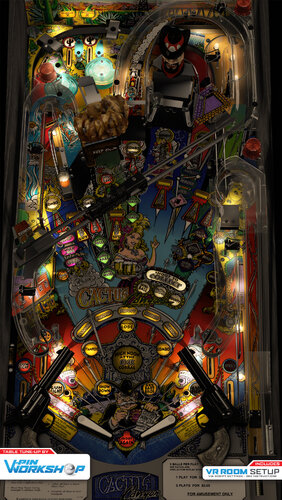
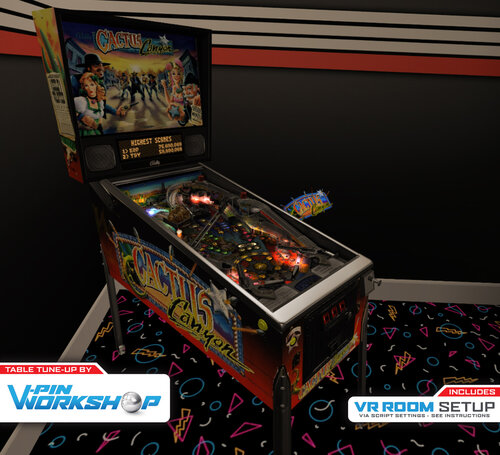
2 Screenshots

Welcome CACTUS CANYON, Partner!!

The VPin Workshop Discord members present this table tune-up.

This started out as a "quick" physics update, but we ended up adding so much more!
•    Inserts & Lighting Overhaul: Skitso
•    nFozzy physics: apophis
•    Roth Drop Targets: rotherbauerw, Sixtoe, apophis
•    Fleep Sounds: apophis
•    Fluppers Flashers & VR Room: Sixtoe
•    Miscellaneous tweaks: Skitso, apophis, oqqsan, Sixtoe, tomate, iaakki
•    Testing: Rik, Panik Flip gaming, VPW team
 
This release would not have been possible without the legacy of those who came before us including, most notably, Ninuzzu and Tom Tower.

Thank you to Rothbauerw for nFozzy physics. Thanks you to Fleep for sounds. Thanks to all before us.


' 000 - Skitso -  Updates to lighting, inserts, some flashers and LUT
' 001 - apophis - nFozzy flippers, rubber dampening, and materials applied. Adjusted plunger physics settings
' 002 - apophis - Added Fleep sounds package
' 003 - apophis - Added ramp sounds, fixed an issue with my implementation of flipper sounds, and hopefully fixed the stuck ball issue inside Bart 
' 004 - apophis - Cabinet POV adjusted. Ramp rolling volume decreased, ball rolling volume increased slightly. Updated controller loading code,
' 005 - apophis - Adjusted autoplunger physics parameters. Removed duplicate flipper collision functions. 
' 006 - apophis - Fixed GameTimer bug that prevented ball shadow from working. Added ShowBallShadows option. Fine-tuned autoplunger (thanks oqqsan)
' 006a - oqqsan - Added dynamic instruction card
' 007 - apophis - Added BartHatSoundEffects option. Removed unnecessary beer mug from game.
' 008 - skitso - Improved GI and inserts
' 009 - apophis - Updated flipper tricks to the latest version
' 010 - Sixtoe - Added vr cabvinet and room, fluppers flashers & roths droptargets, which are currently broken.
' 011 - apophis - Fixed drop targets. Change the method to check when target was successfully hit.
' 012/3 - Rotherbauerw - Fixed drop targets.
' 014 - Sixtoe - Added sound effects for drop targets, tried to fix ball traps, tidied up VR stuff, fixed rails, added rollover holes, changed rubber holder prims, adjusted a few minor things.
' 015 - iaakki - Fixed Desktop POV, 
' 016 - Skitso - Remade all GI, altered some DL/DLFB values and modified textures for more accurate lighting.
' 017 - Sixtoe - Added Bart & hat to GI, adjusted to right GI so it doesn't look broken in GI, tweaked a few things including decals on  traintrack
' 018 - apophis - Adjusted Cabinet POV

' 019 - Sixtoe - VR specific fixes and automatic switches, combined some timers, GI tweaks

https://www.ipdb.org/machine.cgi?id=4445
Contact Author First.
v10

What's New in Version 1.1   See changelog

Released

' 1.03    - Wylte        - Ball shadows, slingshot correction, updated flipper/cor/physics dampeners, added TargetBouncer to Targets and dPosts/dSleeves, DT nudge weakened
' 1.04    - Wylte        - Global ball array, narnia ball check, PoV update
' 1.05    - apophis    - Fixed issue where balls can get stuck in the Bart subway
' 1.1 Release

User Feedback

Recommended Comments


MikeDASpike

Posted (edited)

I played CCC a lot on the cabinet. I just have my VR and even P-roc display is VR !
Great job guys !
Only one request
Can the logo and the backglass be changed to CCC when running P-roc ?
@Wildman created a nice one for CCC


It could show something like this :
image.png.3721b6cb93dd20ea3f250cb37b0cf916.png


 Anyway. Great and fun to play CCC in VR as well !

Edited by MikeDASpike
IOIIOOO

Posted

Sorry if this is a naive question but how do I make it Cactus Canyon Continued vs Cactus Canyon?  There is only the one VPX file in the download.

PoppSickle

Posted

Is there a reason why the X and Y scales arent 1:1?

robertms

Posted

16 hours ago, PoppSickle said:

Is there a reason why the X and Y scales arent 1:1?


POV is subjective and each author has their preferences. Depending on how the table was built 1:1 is not always ideal, however you can change the POV values to whatever your heart desires. Use F6 in the editor to launch the table in camera mode, make your changes using flipper and magna buttons, don't forget to save.

miguelcerca

Posted

what a great table!

curious if anyone out there has figured a way to get their chime unit working in DOF for the Marshall Multiball mode.

thanks!

mikepmcs

Posted

Thank you.

Krondorf

Posted (edited)

Seems to look and play great!

But how do i get CCC out of freeplay mode?

I have tried to go into the rom settings, i go into standard settings, but after pressing the key to go right about 6 times (hoping that there's an option in there), but the table exits/crashes with no error message, just goes straight to desktop..

And the DMD seems to randomly choose whether to be on top or not, even with dmd_always_on _top: true


TIA

Edited by Krondorf
duck1156

Posted

nice work


mikepmcs

Posted

VPW GODS! That is all. Carry on.

bombaj344

Posted

On 9/6/2022 at 1:15 PM, RobbyKingPin said:

Another masterpiece from the VPW guys. I do run into a small problem though. The Ninuzzu version never ran at all but now I got both the original as Continued running on my desktop now but I cannot get the DMD for Continued in front. It always seems to be stuck behind the playfield.

To set the DMD you need to edit this file:
C:\P-ROC\Games\cactuscanyon(orgamename)\config\user_settings.yaml
Open it with notepad and go to the end, where it says:

The last one is for desktop mode (only one screen,):
Color Display Pixel Size: 4, Color Display X Offset: 25, Color Display Y Offset: 25

Provencher

Posted

I've read thru all the comments and I haven't seen anyone else report this issue, so clearly it is something specific to me.


When I launch the table the mine shaft toy just continuously rotates and the Keep Out sign just floats up and off the screen.  I deleted my pov and have tried several different VPX versions.  Any ideas?

Takeo

Posted

CCC is one of my favorites games. Its is awesome. Phyton and PROC run perfectly on my Windows 10 system, but everyone knows that at some point we will need to upgrade to Windows 11, and the installation package I have gives an error when trying to install it on W11. Has anyone tried? Any workaround?

Cliffy

Posted

3 hours ago, Takeo said:

CCC is one of my favorites games. Its is awesome. Phyton and PROC run perfectly on my Windows 10 system, but everyone knows that at some point we will need to upgrade to Windows 11, and the installation package I have gives an error when trying to install it on W11. Has anyone tried? Any workaround?

runs fine on win 11 for me but the game is unplayable with current version of core.vbs which was broken sometime in February I believe

xYx

Posted (edited)

On 4/4/2024 at 10:36 AM, Cliffy said:

runs fine on win 11 for me but the game is unplayable with current version of core.vbs which was broken sometime in February I believe

Thank you Cliffy, you are a god!  I did the update through PinUP Popper Config and it broke a bunch of tables.  Registering the new FlexDMD fixed most tables but not Cactus Canyon.  I replaced the updated vbs files with the old ones and I can now shoot gunfighters again.  THANK YOU!


Edited by xYx
Cliffy

Posted

2 hours ago, xYx said:

Thank you Cliffy, you are a god!  I did the update through PinUP Popper Config and it broke a bunch of tables.  Registering the new FlexDMD fixed most tables but not Cactus Canyon.  I replaced the updated core.vbs [and all the other vbs] with the old one and I can now shoot gunfighters again.  THANK YOU!


Update:  the vbs fixed Cactus Canyon but broke others.  Undid the update and all is well.....  THANK AGAIN FOR YOU SERVICE!

You can have the best of both worlds now, thanks to @jarr3 Vpinballx.Starter! https://vpuniverse.com/files/file/17134-vpinballxstarter/


just rename the old core.vbs to coreproc.vbs and add it to your scripts folder. Setup the ini files per jarr3's guide and rename the cactus canyon continued you're using to match the included .cmd filename (or vice versa) and bingo bango it just works perfectly. The cmd files renames the vbs file while running proc and copies back when done.  Even better, vpinballx.starter will automagically pick the correct version of vpinballx to match the tables requirements. Now you can have just one exe in your frontend. Or even when running from explorer just double click the table and starter will again run the appropriate version of vpinballx. Amazing little bit of kit :)

xYx

Posted

On 4/28/2024 at 12:57 PM, Cliffy said:

You can have the best of both worlds now, thanks to @jarr3 Vpinballx.Starter! https://vpuniverse.com/files/file/17134-vpinballxstarter/


just rename the old core.vbs to coreproc.vbs and add it to your scripts folder. Setup the ini files per jarr3's guide and rename the cactus canyon continued you're using to match the included .cmd filename (or vice versa) and bingo bango it just works perfectly. The cmd files renames the vbs file while running proc and copies back when done.  Even better, vpinballx.starter will automagically pick the correct version of vpinballx to match the tables requirements. Now you can have just one exe in your frontend. Or even when running from explorer just double click the table and starter will again run the appropriate version of vpinballx. Amazing little bit of kit :)

Now this is something that I need to try.  I have been using PinUp Popper as a frontend and that takes care of picking my vpx version, but this would help with the vbs issue.  Someday I will need to update vbs for all my other tables, but I also need my Cactus Canyon!  Thank you for finding this option!!

htamas

Posted

I started to have a weird problem with this table while using P-ROC. 

I used to have it running fine on the same exact hardware, but I recently had to reinstall Windows, and copied over all pinball files from a backup. I went through the reinstallation of P-ROC, step 1 and 2 finished correctly and got the confirmation message that "P-ROC works fine, enjoy". However, when I start the game, the music is playing, DMD is on but there is no ball added to the shooter lane and the flippers are not working either.

If I turn off P-ROC in the script and use VPinMAME, everything is OK.


Did anyone have something like this happening? What could be the solution?


Edit: Never mind... if I would read more carefully before posting, I would have found right above that the most current core.vbs breaks the table. I reverted to an earlier version (with the date of December 20th 2023) and it works again. 

I played several other tables, and they seem to be working still, so I wonder what will be broken by using an older core.vbs...

InfntyX2

Posted

On 5/21/2024 at 9:20 PM, htamas said:

I started to have a weird problem with this table while using P-ROC. 

I used to have it running fine on the same exact hardware, but I recently had to reinstall Windows, and copied over all pinball files from a backup. I went through the reinstallation of P-ROC, step 1 and 2 finished correctly and got the confirmation message that "P-ROC works fine, enjoy". However, when I start the game, the music is playing, DMD is on but there is no ball added to the shooter lane and the flippers are not working either.

If I turn off P-ROC in the script and use VPinMAME, everything is OK.


Did anyone have something like this happening? What could be the solution?


Edit: Never mind... if I would read more carefully before posting, I would have found right above that the most current core.vbs breaks the table. I reverted to an earlier version (with the date of December 20th 2023) and it works again. 

I played several other tables, and they seem to be working still, so I wonder what will be broken by using an older core.vbs...

Find any glaring issues by running on an old core.vbs?

htamas

Posted

On 10/5/2024 at 1:28 PM, InfntyX2 said:

Find any glaring issues by running on an old core.vbs?

Yes, certain things introduced in the latest VPX 10.8 RCs don't work, affecting tables that rely on them. So while this solution fixes CCC, it is not good in general. We can only hope that these problems will be resolved in as soon as possible.

GSadventure

Posted

With 10.8, Vpinmame 3.6 table doesnt work anymore. Even if i use 10.72 again, no ball is launched anymore, but table in general gets loaded.

Maybe also core.vbs problem

sakumi

Posted

Is there an option to get the beer mug to play a sound as if it were hitting the glass? (crack!) The one I play at the arcade does that, but not sure if that's just a thing on the remake cabinet or what.

fiftythreefly

Posted

On 4/28/2024 at 12:57 PM, Cliffy said:

You can have the best of both worlds now, thanks to @jarr3 Vpinballx.Starter! https://vpuniverse.com/files/file/17134-vpinballxstarter/


just rename the old core.vbs to coreproc.vbs and add it to your scripts folder. Setup the ini files per jarr3's guide and rename the cactus canyon continued you're using to match the included .cmd filename (or vice versa) and bingo bango it just works perfectly. The cmd files renames the vbs file while running proc and copies back when done.  Even better, vpinballx.starter will automagically pick the correct version of vpinballx to match the tables requirements. Now you can have just one exe in your frontend. Or even when running from explorer just double click the table and starter will again run the appropriate version of vpinballx. Amazing little bit of kit :)

thanks for this @cliffy, instead of your way i did like the user below and just used an older version of core.vbs (10.7.4) to be exact.  working great now other than i get an error when closing out of the table,  line 310

Cliffy

Posted

36 minutes ago, fiftythreefly said:

thanks for this @cliffy, instead of your way i did like the user below and just used an older version of core.vbs (10.7.4) to be exact.  working great now other than i get an error when closing out of the table,  line 310

You'll have to swap it back for every table that came after that core but as long as you're up to it. Yes that error is well known but doesn't happen every time

fiftythreefly

Posted

4 minutes ago, Cliffy said:

You'll have to swap it back for every table that came after that core but as long as you're up to it. Yes that error is well known but doesn't happen every time

yes i just came across some other tables that aren't working now.  will have to do the harder way lol

fiftythreefly

Posted

12 minutes ago, Cliffy said:

You'll have to swap it back for every table that came after that core but as long as you're up to it. Yes that error is well known but doesn't happen every time

where do i find jarr's guide that you reference?


Create an account or sign in to comment

You need to be a member in order to leave a comment

Create an account

Sign up for a new account in our community. It's easy!

Register a new account

Sign in

Already have an account? Sign in here.

Sign In Now
×
  • Create New...