
Jump to content

Show Boat (Gottlieb 1961)

    Create an account or sign in to download this
download_no_perm
1389 Views
389 Downloads
5 From 4 reviews
18.93 MB File Size
none ROM Name
PinRich (aka XFL) Created by
PinRich (aka XFL) Artwork by
PinRich (aka XFL) Scripting by
Gottlieb Manufacturer
1961 Year

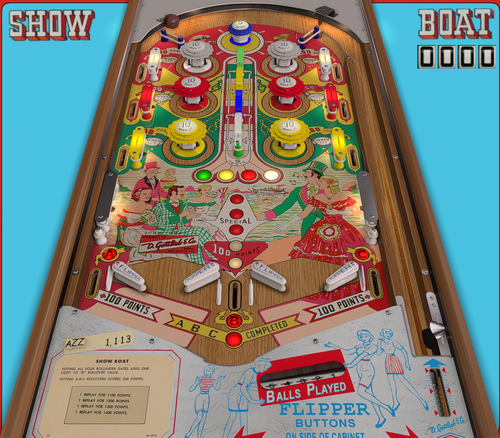
2 Screenshots

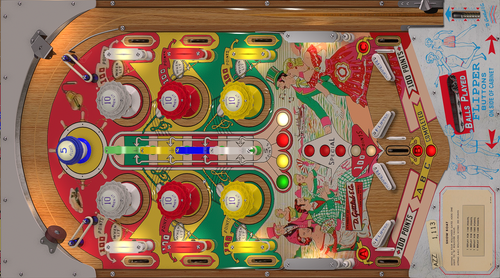
It's show boat!  An interesting table that tried some innovative ideas.  Four Flippers on the bottom, six pop bumpers, and 4 gates turned so that they are pretty much impossible to hit from the flippers.  There's also a chance to earn a second match number at the end, by hitting all three A, B, and C outlanes.


I could only find a couple videos on YouTube but they did have some good details.  I guessed the rules based on what was shown, so hopefully I'm mostly accurate.


There are some options on the F12 menu, including showing high score and using the manual ball lifter.  It looks like the real game has a manual ball lift, but I defaulted it to do an automatic one because many people are confused by it.  I know I was at one time.


Let me know if you find anything that is broken or isn't accurate.  There's always something...


Thanks to others, there are a couple nice looking B2S backglass files available.  Thanks!


*Feel free to modify or improve this table.

Edited by PinRich
note others have created B2s files

https://www.ipdb.org/machine.cgi?id=2130

What's New in Version 0.1   See changelog

Released

By default the "score to beat" on the backglass will be the previous high score.  There's an option on the F12 menu to leave it constant instead - which I think is more like the real machine.

Other Minor changes:

I updated the lighting a bit to make the bumper tops brighter

The A, B, and C lights at the bottom are more orange now, which I think is a little more accurate.

I redid the Blue passive bumper.  I also changed the colors on the flippers a bit to not be so plain.

User Feedback

Recommended Comments

PEandS1Ws

Posted

Nice work again! Hopefully @hauntfreaks , or @Wildman can make a b2s for this beauty.

Upscaled flyer, IC, and Wheels for your front end if neededShowBoat(Gottlieb1961).thumb.jpg.97f64bca51b10b2c2677cce7d88d3bf4.jpg


ShowBoat(Gottlieb1961)IC.thumb.jpg.6093423db211747d4814b35e078dca18.jpg


ShowBoat(Gottlieb1961)Wheel.thumb.png.19efbda08e62b5be3c2547285a747c2a.png


ShowBoatLogo.thumb.png.8d6723230f30f565546ec0d81553d41f.png


Autobott

Posted (edited)

Made a wheel before I saw PEandS1Ws lol


Edited by Autobott
htamas

Posted

Nice work, thanks for sharing.

Unfortunately, those flippers being fired simultaneously like a first time player kid would do make this table a no-go... at least for me.

Cliffy

Posted

34 minutes ago, htamas said:

Nice work, thanks for sharing.

Unfortunately, those flippers being fired simultaneously like a first time player kid would do make this table a no-go... at least for me.

At least they're not impulse flippers. Ever play Daisy May? Yowza!

Rivermatty

Posted

Thanks for the update, "Score to Beat" fix is very nice, good to have the choice.

Bossman44

Posted

Sorry for the long post....Trying to raise awareness. 


I have a four screen cabinet with Cleveland Software SSF and the DOF solenoid system.  I have been looking into the Sound Manager settings for VPX games.  Since there are a wide range of pinball machine configurations out there, authors generally publish a "generic sound" version of the game.  Sometimes the author may have SSF and DOF options.  


Other option is available, if you have the speaker configuration....


Hidden in Sound Manager (VPX) is the ability to place individual sounds (for your cabinet version) in selected locations on the playfield and backbox . (using Backbox, Playfield Pan and Fade settings). 


For this process, you should be comfortable in editing a VPX table file and keep backups.  This posting is not a tutorial on editing a VPX table and you should be somewhat proficient and confident already. 


So, there is the ability to place Backbox sounds on the Backbox rather than the playfield in Sound Manager.  Conversely, you can place sounds at different places on the playfield. 

If you have the original physical machine, you can hear where the sound is emanating from or alternatively ask AI how the sounds should be routed for a particular machine.  Also, you can interpret the author's "description of the sound" in Sound Manager, so you can bias the placement of sounds (pan and fade) on the playfield. Hints are L, R, Low, apron and obvious descriptions like plunger.  

If you are really dedicated, you can observe the physical table layout with the VPX script and identify where the author thinks the particular sound belongs.  Place it appropriately on the playfield with Pan and Fade feature of the Sound Manager.

I have screenshots of the Sound Manager of this particular table that I have modified for my machine (see above for configuration).  I provided three snapshots of Sound Manager with different sort orders so you can see the changes (only) I did in Backbox, Pan and Fade settings of each individual sound for this table.  These are my best guesses without diving through the script and playfield pictures.

If you have the "speaker system", you can tune the sounds to go to where they were intended.  DOF Solenoids and SSF add to the realism but are not necessary. 

Is it laborious, yes, but it really adds to the realism.  You can change the settings in Sound Manager (per table) to match your speaker arrangement and resave the game.  Yes, it is game by game, and right now you can only share Sound Manager settings with whole game file transfers or snapshots.

Enjoy a more realistic sound experience of PinRich's table with my first shot (not using script and playfield pictures) at locating sounds in an upgraded sound cabinet.     

Showboat Backglass Sound.png

Showboat Sound Manager Pan sort order.png

Showboat Sound Manager Fade sort order.png

Cliffy

Posted

I love that you keep bringing us the little known and underdog tables @PinRich thanks!


I made some corrections and improvements for my own desktop use, add metal side rails, lower all the bumper heights and their lights, changed to better woods and get rid of decals, new upper arch, playfield locks and glass channels and the right certificate, add Hauntfreaks old ass eyeballs ball. You know, little stuff like that.


SHOWBOAT-DESKTOP.JPG

Create an account or sign in to comment

You need to be a member in order to leave a comment

Create an account

Sign up for a new account in our community. It's easy!

Register a new account

Sign in

Already have an account? Sign in here.

Sign In Now
×
  • Create New...