
Jump to content

Crystal Palace Hotel (Original 2026) v 1.1

  • Get Support
  • Create an account or sign in to download this
download_no_perm
4610 Views
802 Downloads
4.9 From 22 reviews
277.23 MB File Size
original ROM Name
Ely_pincab Created by
Ely_pincab Artwork by
Ely_pincab Scripting by
Original Manufacturer
2026 Year

2 Screenshots

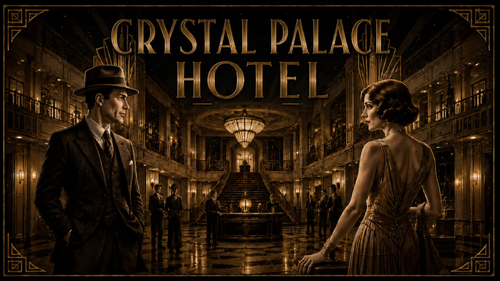
Paris, 1930.

Welcome to the Crystal Palace Hotel, one of the most prestigious hotels in Paris.


Your mission is to upgrade the Crystal Palace Hotel from 0 to 5 stars by completing its many activities and special missions.
But becoming a five-star hotel is no easy task...


Whether it's descending into the basement to repair the failed generators, roaming the corridors in pursuit of a mysterious ghost, or recovering the Countess's stolen diamonds, these are just a few of the tasks the manager will assign to you.

Each completed mission brings you one step closer to the ultimate reward: the final rooftop party.


So put on your finest evening clothes, complete the check-in, ascend the grand staircase or step into the elevator, if you've managed to repair it, and enjoy a night of jazz, mystery, cocktails and adventure in Paris.


But be careful...

Not every guest is what they seem.


Your room is ready. Your adventure begins now.


About the table


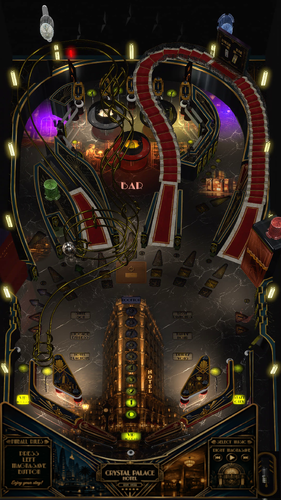
Crystal Palace Hotel is an original Visual Pinball X table inspired by the golden age of Art Deco, luxury hotels and 1930s Paris. Developed by me, @ely_pincab , starting from the amazing VPW Example Table v1.7.


The table has been designed with a strong emphasis on atmosphere, combining custom artwork, animations, music, lighting and dynamic effects to recreate the feeling of stepping inside a glamorous 1930s hotel.


Features include:

 A complete 0–5 star hotel progression system
🏨 Multiple hotel missions
🎷 Jazz Time
🛗 Interactive elevator
🧳 Luggage Express
👻 Suite 501 ghost hunt
💎 Lost Diamonds investigation
🍸 Happy Hour
🎰 Mystery Bag with good or bad rewards
🔐 Room Service and Secret Room Multiball
 Hotel Blackout
💃 Rendezvous missions
🥂 Rooftop Party final objective
🎨 Custom FlexDMD animations (FlexDMD required)
💡 Dynamic DOF effects (download the latest version in DOFConfigTool)
🏛️ Original Art Deco artwork and environment
🎵 Custom music and sound design
🚫 No VR support yet
📖 Rules available at any time with the left MagnaSave button
🎵 Change the song with the right MagnaSave button
🍸 Open or close the bar doors with the Fire button to have easier access to bumpers area
⚙️ Mission difficulty level available in the F12 options


This is my first table ever, so even though I have done my best to test it extensively, there are surely still some bugs.

If you find one, please let me know and provide as much detail as possible to help me reproduce it. I will do my best to fix it in a future version.


A big thank you to everyone who helped me debug the table and improve its gameplay.
And a huge thank you also to the entire VPW team for making their Example Table available to the community. Without it, I would never have been able to achieve this result !


I hope you will enjoy your stay at the Crystal Palace Hotel !

Edited by ely_pincab
Minor changes


Permission from ORIGINAL Author(s)?

This is my own creation.

Allow file to be included on a VPUniverse downloader app?

Yes

VPX Standalone

No
Yes
10.8 required
No

What's New in Version 1.1.2   See changelog

Released

Disable the debug shot tester, which can interfere with some configurations

User Feedback

Recommended Comments


Tikimaster

Posted

Very nice Table. Please, can you add art nouveau colored sidewalls and back-panel  - that would be nice. Side-Rails made of wood whould be nice. 
Thanks very much for the time you spend on that...

crystalcab.jpg

Cliffy

Posted

Very slick @ely_pincab! Amazing for a first table. It does feel like a mix of nouveau and deco but richly done. Love the period jazz, really helps with the atmosphere. Can't wait to see what @PEandS1Ws come up with for media :)

This is not an easy game folks. Yes it's nice and open but man there are some deadly shots. Had to LOL at "gravity wins" :) You know what would really add to the atmosphere? If the lady had a french accent. Just a thought. 

Thanks for sharing what is obviously a passion project Ely- thanks!

crystal-palace-dt.jpg

PEandS1Ws

Posted

@ely_pincab Thank you for sharing this with all of us. Great start! I have made some front end media for my setup. Instruction Card, Flyer, and Full DMD

CrystalPalaceHotel(Original2026)IC.thumb.jpg.cc8644559dda352b3fe9ef19a6735e16.jpg


CrystalPalaceHotel(Original2026).thumb.jpg.8484ae76d3c7aaea4913b2070d3294fe.jpg


CrystalPalace(Original2026)FullDMD.thumb.jpg.8a6ea181caf4fdab4ace8865b5604c0f.jpg

Harley-Boy

Posted

It looks like it's very well made 🤩, I can't wait to install it 
I immediately created a Wheel Diagonal 🙃

awaiting approval.


Crystal Palace Hotel (Original 2026).jpg

iwantpinball

Posted

dumb question -- after picking the mission, how do I select it?

silentkat

Posted (edited)

Great table. very well done and great concepts. But I seem to have found a couple table crashes. I know the table is set to free play but when pressing the credit button 3 times crashes the table in attract mode. also I made it to the mode where it was telling me to go to the 5th floor to look for the ghost. once the timer ran out the table lights all turned off and the table froze. I was able to replicate both crashes 2 times. perhaps someone else can test and verify. 

Edited by silentkat
silentkat

Posted (edited)

I believe I figured out the credit button crash. 

this was the error I was getting

Runtime error

Line: 7819
This key is already associated with an element of this collection


At line 7819, replace: qItems.Add key, item


with this

If qItems.Exists(key) Then

qItems.Remove key

If qCurrentItem = key Then qCurrentItem = ""

End If

qItems.Add key, item


now i can press the credit key all I want and it stays stable. Hope this helps!  

And now the queue safely handles the duplicate and no more crash.

Edited by silentkat
ely_pincab

Posted

10 hours ago, Tikimaster said:

Very nice Table. Please, can you add art nouveau colored sidewalls and back-panel  - that would be nice. Side-Rails made of wood whould be nice. 
Thanks very much for the time you spend on that...

crystalcab.jpg

Thanks for your feedback. Good idea for the wood side rails, I will try to add this in a future update

ely_pincab

Posted

5 hours ago, iwantpinball said:

dumb question -- after picking the mission, how do I select it?

Hi, thanks for having downloaded my table.

Select your mission with the fire button, or wait for the 15 sec to start the selected mission :)

ely_pincab

Posted

6 hours ago, PEandS1Ws said:

@ely_pincab Thank you for sharing this with all of us. Great start! I have made some front end media for my setup. Instruction Card, Flyer, and Full DMD

CrystalPalaceHotel(Original2026)IC.thumb.jpg.cc8644559dda352b3fe9ef19a6735e16.jpg


CrystalPalaceHotel(Original2026).thumb.jpg.8484ae76d3c7aaea4913b2070d3294fe.jpg


CrystalPalace(Original2026)FullDMD.thumb.jpg.8a6ea181caf4fdab4ace8865b5604c0f.jpg


Wow ! these media are amazing !

I think I actually prefer them to my originals ! :) 


ely_pincab

Posted

3 hours ago, silentkat said:

I believe I figured out the credit button crash. 

this was the error I was getting

Runtime error

Line: 7819
This key is already associated with an element of this collection


At line 7819, replace: qItems.Add key, item


with this

If qItems.Exists(key) Then

qItems.Remove key

If qCurrentItem = key Then qCurrentItem = ""

End If

qItems.Add key, item


now i can press the credit key all I want and it stays stable. Hope this helps!  

And now the queue safely handles the duplicate and no more crash.

Thanks for your feedback.

Yes, bug of duplicate keys when pressing multiple time on add credit button :( 
I will make an update asap

jejevpuniverse

Posted

Thank you for this game.

I think you don't use PinUpPlayer, so you need to disable it :

In Table1_Init, comment or remove the line PuPInit
The table crashes because of that on my setup. I also have the error in line 7819.

ely_pincab

Posted

51 minutes ago, jejevpuniverse said:

Thank you for this game.

I think you don't use PinUpPlayer, so you need to disable it :

In Table1_Init, comment or remove the line PuPInit
The table crashes because of that on my setup. I also have the error in line 7819.

Thank you for your feedback. I will comment it in future version ;) 

licwip

Posted

Cool table! Would you consider the voice-over lady to be a Parisienne and have a French accent (but still speak English)?

ely_pincab

Posted

1 hour ago, licwip said:

Cool table! Would you consider the voice-over lady to be a Parisienne and have a French accent (but still speak English)?

Thanks ! Yes, this is definitively one of the table improvement I will work on ;) 

80sRkadeguy70

Posted

Thank you for this awesome table! Just one question though. The lighting seems a little dark. Is there a way to make the tables a little brighter? I pressed the control keys to see if there were any lute settings as well as checked in the table setting via F12, but no luck. 

Screenshot_1.png

ely_pincab

Posted

2 hours ago, 80sRkadeguy70 said:

Thank you for this awesome table! Just one question though. The lighting seems a little dark. Is there a way to make the tables a little brighter? I pressed the control keys to see if there were any lute settings as well as checked in the table setting via F12, but no luck. 

Screenshot_1.png

Hi, thanks for downloading my table.
Indeed, it seems very dark on your setup, which is strange, because, even if the lightning has been designed to be darker than other tables, it should be a little bit brighter than what you have.
I take a note to add a brightning option in a future version ;) 
Meantime, you can maybe try to increase some value in the table parameter in VPX, see screenshotimage.png.26db6091e535cba5355dd2093f48962d.png

80sRkadeguy70

Posted

4 hours ago, ely_pincab said:

Hi, thanks for downloading my table.
Indeed, it seems very dark on your setup, which is strange, because, even if the lightning has been designed to be darker than other tables, it should be a little bit brighter than what you have.
I take a note to add a brightning option in a future version ;) 
Meantime, you can maybe try to increase some value in the table parameter in VPX, see screenshotimage.png.26db6091e535cba5355dd2093f48962d.png

Thank you for the reply. I'll give it a try and let you know how it worked. 

jejevpuniverse

Posted

16 hours ago, 80sRkadeguy70 said:

Thank you for this awesome table! Just one question though. The lighting seems a little dark. Is there a way to make the tables a little brighter? I pressed the control keys to see if there were any lute settings as well as checked in the table setting via F12, but no luck. 

Use the Day/Night percentage to obtain more brightness :

daynight.jpg.ee1ab806074a8c516bcfced71545cc5d.jpg

80sRkadeguy70

Posted

4 hours ago, jejevpuniverse said:

Use the Day/Night percentage to obtain more brightness :

daynight.jpg.ee1ab806074a8c516bcfced71545cc5d.jpg

It's much better now, thank you! It was at 10% so I set it to 21%

Screenshot_1.png

loop

Posted

Great job if this is your first table.

I like the atmosphere and the soundtrack. It goes well together.


BillOz2024

Posted

A very beautiful table. Plays perfectly in portrait mode in Mac Standalone (Beta 10.8.1. rev 5379 de52c9517). Adjusting brightness was easy too. Thank you for your contribution to our hobby. Well done!

  • Content Provider
Itchigo

Posted

Great table! How do I get rid of the lockdown bar?

ely_pincab

Posted

12 minutes ago, Itchigo said:

Great table! How do I get rid of the lockdown bar?

Hi, set 'show pincab rails' to NO in F12 options 😉


Create an account or sign in to comment

You need to be a member in order to leave a comment

Create an account

Sign up for a new account in our community. It's easy!

Register a new account

Sign in

Already have an account? Sign in here.

Sign In Now
×
  • Create New...