
Jump to content

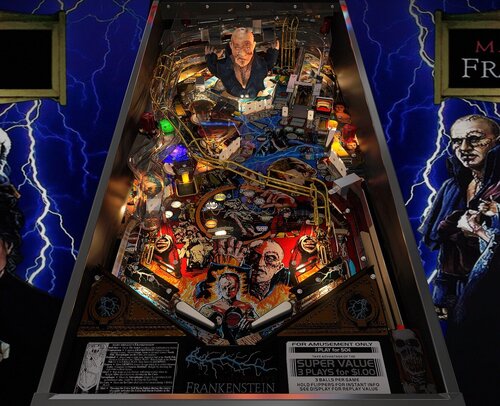
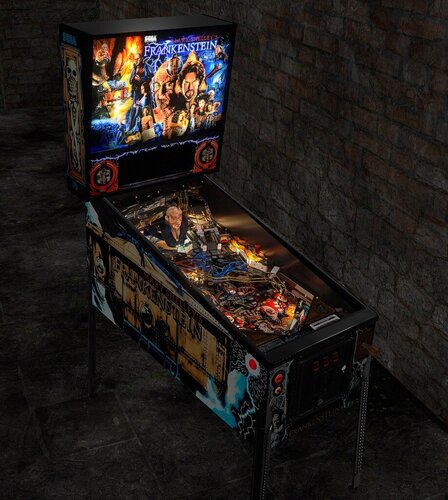
Mary Shelley's Frankenstein (Sega 1995)

  • Get Support
  • Create an account or sign in to download this
download_no_perm
10265 Views
3016 Downloads
5 From 23 reviews
336.98 MB File Size
frankst ROM Name
Schlabber34 Created by
Schlabber34 Artwork by
Herweh, Burger Scripting by
Sega Manufacturer
1995 Year

5 Screenshots

2.0 table credits:


- Burger & Schlabber34 - Thanks to Burger for bringing this table back to life. He asked me if he could update the physics and all the table creators know how this usually ends. Then we needed a nice F12 menu, then Burger mentioned VR, the ramps were prerendered so i had to make VR optimized ramps but the meshes were shitty so i cleaned them up and then you need new renders for VR refraction and the prerandered ramps. After a ton of bugs that we killed we finally had V2.0!


@burgerIt was a pleasure! Thanks my friend!


- UnclePaulie - A ton of help on bug fixing and sticking his head deep into the VR table.

- DGrimmreaper - VR cabinet primitives, VR animations and lights including VR flipper cabinet button/start button/plunger, ported DMD and b2s to VR, VR scripting, VR hallway

- Studleygoorite – Identified missing details and provided solutions to several tricky issues

- Hauntfreaks - B2S backglass update that brings the table together visually

- masonm- cabinet textures for VR cabinet

- DaRdog- UV maps in VR that made texturing possible

- Thalamus - Careful playtesting and valuable feedback throughout development

- Robby King Pin – physics support

- Tombg - playtesting


Original table credits:


-Herweh: Script allmost from scratch

- Dark: We all know what he did! Frank is just jawdropping!!

- Dids666: For starting all of this and his awesome meshes. Thanks for letting us finish this!!

- Sheltemke: For stitching together the PF image and playtesting

- Mlager8: For PS help on the sling plastics

- RothbauerW: For his awesome physics' guide at vpinball.com and some more help on the physics

- Mark70, Bord, Thalamus: For beta testing and some good hints

- Batch: For the DT background image (Sorry for making it a bit darker! Batch's original is in the image manager for those who like more pop)


Permission from ORIGINAL Author(s)?

This is my own creation.

Allow file to be included on a VPUniverse downloader app?

Yes

VPX Standalone

No
https://www.ipdb.org/search.pl?any=mary+shelley&sortby=name&search=Search+Database&searchtype=quick
https://vpuniverse.com/files/file/12754-mary-shelleys-frankenstein-sega-1995-b2s-full-dmd/
Contact Author First.
10.8 required
Yes

What's New in Version 2.0.4   See changelog

Released

- I had to split a few transparent parts to make the Depth Bias and the Depth Mask work. Burger added all of that to the script.

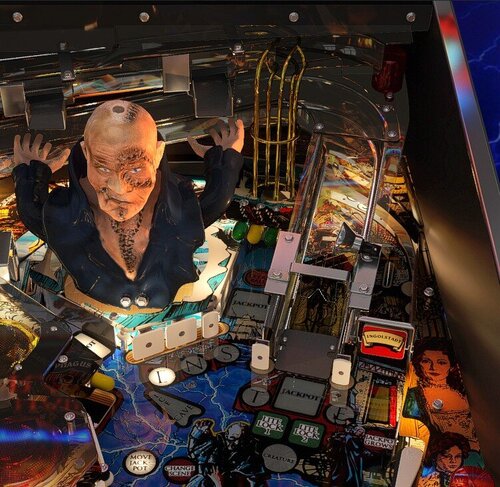
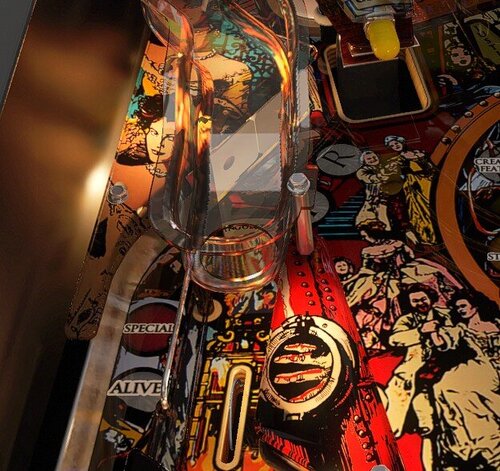
- To the right of the VUK - wire ramp (DT / cab): Now the transparent ramps and the transparent plastic that prevents the ball from jumping of the ramp are showing the transparency correctly and the ugly black reflection is gone. You can now see the ball travel through that are.

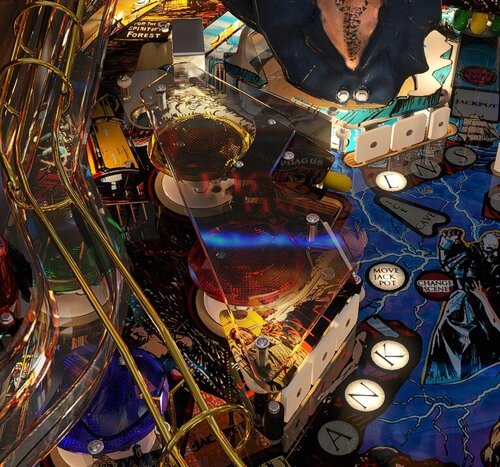
- New prim and render for that transparent plastic above the red and yellow bumpers (DT / cab).

- The hole that feeds the ball into the inlane is now visible through the ramps sidewall (mostly DT perspective).

- Rendered textures are now showing front and backside reflections through transparency (DT/ cab).

- Sad but true for the VR guys, the VPX refraction doesen't allow for double refraction. You can't see the lower VRrefraction ramp through the upper refraction ramp or the ball jump protector. It doesen't even show refraction through transparency. Looks like the old render engine has reached it's limits.

- Changes to the credits. Sorry @RobbyKingPin. Updated credits for @DGrimmReaper .

User Feedback

Recommended Comments


Cliffy

Posted (edited)

Wow what an upgrade! Finally plays and looks fantastic. Thanks for the gift @Schlabber34 @burger and friends!

Shown here with @hauntfreaks updated b2s

msf-2.0-desktop.jpg

Edited by Cliffy
  • Content Provider
Schlabber34

Posted

For the VR guys:


If you have graphic bugs in VR, turning of PF reflection (balls only should work) or turning of flashers in the F12 menu should help!

  • Content Provider
Schlabber34

Posted

I updated the credits!

  • Content Provider
Schlabber34

Posted

I just wanted to thank everybody who worked on this! Thanks guys! This turned out great!


I have to separate a few transparent parts in a future update because the depth bias is not working in a few areas.

GordonJames

Posted

Thanks everyone for sharing your work!

@Schlabber34  What line in the script enables VR in desktop mode?

  • Content Provider
Schlabber34

Posted

If i remember it right VR Test was at around line 2700.

GordonJames

Posted (edited)

43 minutes ago, Schlabber34 said:

If i remember it right VR Test was at around line 2700.

Line 3008. Thank you sir! The table is awesome. 

Edited by GordonJames
ddwall

Posted

This table has come along ways from the one I had a few years ago. It plays and looks great now.

Thank you to all involved in this table.

Matteo

Posted

thank's

masonm

Posted

This table plays and looks great. Thank you to everyone involved. 

LordTheRon

Posted

3 hours ago, Schlabber34 said:

For the VR guys:


If you have graphic bugs in VR, turning of PF reflection (balls only should work) or turning of flashers in the F12 menu should help!

Yeah turning of flashers did it for me. I'll check PF reflection as well, but I generally like that better.

IcyFruity

Posted (edited)

Looks great and plays well, thanks. I do wish it had VLM lighting effects though, that would make it top tier.

Edited by IcyFruity
TNT2

Posted (edited)

Plays great! Thanks to everyone who contributed.

Edited by TNT2
  • Content Provider
Schlabber34

Posted

I forgot something when i saved the table for the upload:


Start the table, exit the table and click on live editor. On the left side click on layer_2. Expand the layer. Look for "pPlasticRamp" click on it and deselect "depth mask". Hit the disk / save symbol next to it. It should be ghosted out when successfully saved. Do the same on layer_3 for "pPlasticRampGIOff". Save the table.


What it does, it let's the transparent stuff see through itself if that makes sense. You can see it on the ramp exit over the left outlane. You can now see the drop hole through the side of the ramp. And it will also change the visible reflections.


I will implement that in an future update!

SlippyTpoad

Posted

Wow - looks amazing


Oddly enough I was looking at this table a couple of days ago thinking that I need to download it and today it's been updated.


looking forward to trying it - I know its going to be fantastic

bobydatzeul

Posted

Merci beaucoup !!!

Panasony

Posted

Applying PuPpack to VR


VirtualDesktop.Android-20251223-175032-0.mp4_snapshot_01.19.333.jpg

Thalamus

Posted

Thanks mate. Planned a pin tournament between x-mas and new years. This will be played for sure !

studly_do_right

Posted

Not just balls only but static & balls works well too.

BIG8Tz

Posted

simply amazing thanks to everyone who has worked on this table 

AlexMM

Posted

Hi I have a little problem  when I run the table, the backglass just cover the dmd in a cabinet 3 screens. I don 't remember how to fix.  Can anyone help me?? 

burger

Posted

1 hour ago, AlexMM said:

Hi I have a little problem  when I run the table, the backglass just cover the dmd in a cabinet 3 screens. I don 't remember how to fix.  Can anyone help me?? 

You could try Alt+tab until the DMD is on top, exit table and come back in. If that doesn't work  try  Alt+tab to the backglass, right click anywhere on the backglass with the mouse, then "bring Forms" dropdown...Form to Back. If not, try loading the table directly without using a front end if you are using one

Loafmeister

Posted

not 100% certain but I think back in the day, Dark modeled Frank's head on pics I sent him of my friend's Frankenstein machine but... it's so long ago he may have redone it.  So no change in the credits, just providing history :)

LOL I remember part of the workload was Dark did a custom version of the bust using my head.  I gotta see if there's a way to do this again in this new version.  Frankenloaf rises again! 

Looking forward to checking this out once I can get past these next two days. Merry Christmas everyone!

  • Content Provider
Schlabber34

Posted

57 minutes ago, burger said:

You could try Alt+tab until the DMD is on top, exit table and come back in. If that doesn't work  try  Alt+tab to the backglass, right click anywhere on the backglass with the mouse, then "bring Forms" dropdown...Form to Back. If not, try loading the table directly without using a front end if you are using one

Background to standard could also help in the ingame right click menu.

buffdriver

Posted

Really awesome version of this table!  Thanks so much!!


Create an account or sign in to comment

You need to be a member in order to leave a comment

Create an account

Sign up for a new account in our community. It's easy!

Register a new account

Sign in

Already have an account? Sign in here.

Sign In Now
×
  • Create New...