Jump to content

Indiana Jones The Pinball Adventure (Williams 1993) VPWmod

  • Get Support
  • Create an account or sign in to download this
download_no_perm
107469 Views
22910 Downloads
5 From 51 reviews
304.23 MB File Size
ij_l7 ROM Name
VPW Created by
VPW Artwork by
VPW Scripting by
Williams Manufacturer
1993 Year

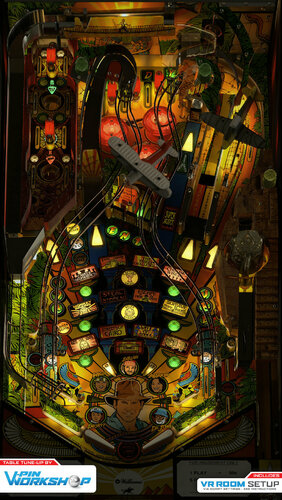
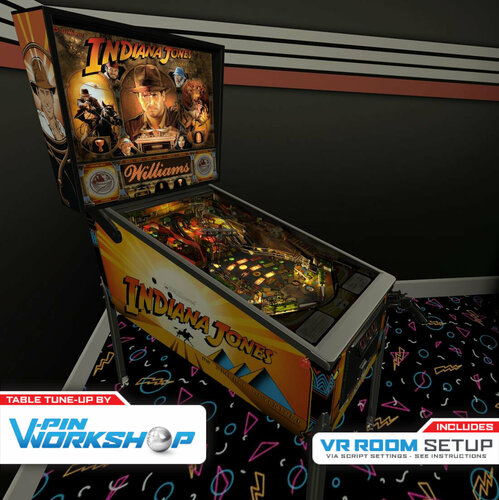
2 Screenshots

You Call This Archeology? -  V-Pin Workshop proudly presents Indiana Jones the Pinball Adventure from Williams.


v.1.1 - Fixed SSF sounds, updated physics, tweaked environmental emission, added LUT changer, numerous other fixes. See changelog for details.


This table has been a WIP since before VPW started. The plastics were modeled fresh but most of the primitives are re-used from the Ninuzzu and Tom Tower’s prior version. Iaakki spent countless hours refining the multilayered inserts over the past year and a half, but when Brad1x offered to completely re-draw the playfield we knew we had to keep working on this table until everything was right. It was the first table where we tried to apply the light baking methods that G5K, Flupper, Bord and others pioneered. Waiting for the redraw meant progressing on other projects and preparing them for release, so this got put off for quite some time and it is exciting to finally get it out to finish the year off in style!


Playfield Redraw - Brad1X
Graphics / 3D Work - Benji, iaakki, Tomate, Sixtoe
Scripting - iaakki, Benji, Apophis, Sixtoe
Sound - Benji, Apophis, Fluffhead, iaakki
Physics - iaakki, Benji, Sixtoe, rothbauerw
Lighting - iaakki, Benji, Skitso, Sixtoe
Shadows - Apophis, Wylte
VR - Sixtoe, Leojreimroc
Testing - Rik, PinStratsDan, CalleV, Astronasty/nicey & VPW team.


VPW Mod based on Ninuzzu / Tom Tower v1.2

Thanks to destruk for original code, knorr and clark kent for the art resources, flupper for bumper caps & flasher domes models and VP Dev team for VPX!
 

A video from Rik showing how to get to wizard mode for competition play;



https://www.ipdb.org/machine.cgi?id=1267
https://vpuniverse.com/forums/files/file/4845-indiana-jones-the-pinball-adventure-williams-1993-2-3-scr-3-scr-lcd/
Contact Author First.

What's New in Version 1.1   See changelog

Released

v1.1 Release Notes

1.01 - iaakki - Rubberizer updated, Sling SSF sounds fixed, environment emis. scale increased, top INDY insert reflections reworked
1.02 - apophis - LUT changer and new ramp textures from Tomate
1.03 - iaakki - Rubberizer rework to make bounce dynamix to collision force
1.04 - Wylte - Fixed left triangle insert bloom light, added _SuperBallD and Calle_MRBALL ball images for testing/comparison, deleted excess shadow objects, changed default visual settings to just SMAA
1.05 - iaakki - ball adjusted, Rothbauerw updates to rubberizer

User Feedback

Recommended Comments


Thalamus

Posted

@Beckland There should not be any issus with the rom sound on this one. I run pinvol, and are able to adjust the rom and the table sound as I like them. I don't remember right now if I at one time had to go into the rom itself and adjust it to play louder. https://www.vpforums.org/index.php?app=tutorials&cat=9 - if it isn't working for you, maybe just rename the ij_xxx hive in pinmame registry for this rom and see if that resolvs it for you. Here, when I add coin, the level is pretty low, but once the game starts, it fine.

naeromagus

Posted

Every single Time, VPW released a new table I have to take time to Admire all of the Graphic Fidelity that is presented, The Continuous Refinement of the RothFozzy Physics, and Lets not leave out the Fleep Sound Package.


Each and Every time I'm Taken back with What the team is doing. BEAUTIFUL . !

Thank you  

mikebunting

Posted

Really, really NICE! Thank you VPW folks!


Maybe a newbie question here...but I do not have a PinDMD2 or PinDMD3...I use a full size LCD DMD.  With that, Is there any way for me to have a multi-color DMD for a table like this (or others)?  Thanks!


Darkstar

Posted

2 hours ago, Beckland said:

Having issue getting the rom sounds to come through. They are there but faint. I went into the rom and the playback in vpmame is right but when running the game i can barely hear it.  Suggestions?


That said, the workshop has done some amazing work.  Thanks.


This era of sound quality aged poorly. I had recorded a bit earlier….if your still having problems give a PM and I’ll hook you up…thus avoiding the ROM audio all together. 


  • Content Provider
Wylte

Posted

27 minutes ago, mikebunting said:

Really, really NICE! Thank you VPW folks!


Maybe a newbie question here...but I do not have a PinDMD2 or PinDMD3...I use a full size LCD DMD.  With that, Is there any way for me to have a multi-color DMD for a table like this (or others)?  Thanks!


https://vpuniverse.com/forums/files/file/5602-indiana-jones-the-pinball-adventure/

0.  Have Freezy's dmdext installed and running for IJ (sounds like you've got this)  1. Download the zip file, extract to /vpinmame/altcolor/ij_l7 (create the folder)  2. Make sure the filenames are: pin2dmd.pal and pin2dmd.vni   3. In-game, press F1 and check "Colorize DMD"  4. Restart and enjoy!

  • Content Provider
astronasty

Posted

39 minutes ago, Darkstar said:

This era of sound quality aged poorly. I had recorded a bit earlier….if your still having problems give a PM and I’ll hook you up…thus avoiding the ROM audio all together. 


Liked your vid, i subbed

mikebunting

Posted

44 minutes ago, Wylte said:

https://vpuniverse.com/forums/files/file/5602-indiana-jones-the-pinball-adventure/

0.  Have Freezy's dmdext installed and running for IJ (sounds like you've got this)  1. Download the zip file, extract to /vpinmame/altcolor/ij_l7 (create the folder)  2. Make sure the filenames are: pin2dmd.pal and pin2dmd.vni   3. In-game, press F1 and check "Colorize DMD"  4. Restart and enjoy!

Thank you so much Wylte!  Worked perfectly!  Can finally add to many of my additional tables as well - Happy New Year!

bietekwiet

Posted

I am using Pinsound on the table and it lifts up sound quality by a lot. Can recommend on this one!

dparks99

Posted

GREAT Table!!  When I start the table (have done in both 10.6 and 10.7) I looks like the playfield is missing the colorization.  Any thoughts?  Thx!  Dave


image.png.2960c08d34f89cdfe25f9d5614b5deb1.png

Gustidelsur

Posted

i havw some question! why the music is in mute?

gubbin

Posted

This is Stunning!  Happy new years to the community with this gift!  Thanks VPW for all your efforts.

robertms

Posted

8 hours ago, iaakki said:

Quite easy. Just open all five p_col_metalsposts_* images into photoshop, find the areas that is uv-mapped to that ramp(use Blender to find them), edit those areas to be more transparent. It will not work perfect either, as at fading state the opacity will be doubled; just because both on and off primitives are visible at the same time.


If you want to make it better, you must rework how the ramp fading is done. Meaning that you take GIOFF image and GION image and make a difference alpha mask. Then apply that to top most primitive and make the giupdate code to shade the correct color on that same transparent ramp. GIOFF image must be that transparent ramp and GION is the alpha masked texture that brings GI lights on it. You need these same difference images and code changes for all the 3 flasher domes too.


So start by learning Blender, easy peasy. Thanks @iaakki for taking the time to explain. LMAO.

robertms

Posted

3 hours ago, Darkstar said:

I had recorded a bit earlier….


@Darkstar nice vid, but looks like you forgot to enable cabinet mode in the script, it raises the cab walls and gets rid of the siderails.

Darkstar

Posted

11 minutes ago, robertms said:


@Darkstar nice vid, but looks like you forgot to enable cabinet mode in the script, it raises the cab walls and gets rid of the siderails.

You are 100 percent correct…heh. I read thus a few times here, and it slipped my mind…a great reminder because frankly it could have been stuck in limbo for eternity….as to say, thank you. 

KrakenByte

Posted (edited)

I had an issue when changed dipswitch to european pressing F6: The script doesn't save the selected ROM options because always it loads at start, it sets dipswitch to USA (line 190). This is the ORIGINAL CODE LINE:


.DIP(0)=&H00	'set dipswitch to USA


I needed set dipswitch to Europe because I wanted change the pricing option to 'SPAIN', or have the possibility to set it to a 'CUSTOM' mode.

To do that, I edited this line of the script with a simple quote symbol to convert this code line into a comment line to stop its automatic load. So, this is the EDITED CODE LINE:


'.DIP(0)=&H00	'set dipswitch to USA is cancelled


I don't know if it was a real issue to be fixed or if this improvised solution could be a problem to the table, in any case, now it works like I want, like a charm.


Cheers and thank you again to all involved in this amazing content creator team whose have chosen wisely a table to finish the year: VPinWorkshop is stunning!!! 🤩


indiana-jones-choose-wisely.gif

Edited by KrakenByte
tomi5577

Posted

Amazing, perfect, thank you.

Matteo

Posted

VPX 10.6, 10.6.2, 10.7:


I still sometimes get a ball, regardless of the resolution of the image.
Anyone have similar experiences?

Yakuza1976

Posted (edited)

Unfortunately, I tend to fall behind when I try on 10.6. When I send the ball up using the left or right ramp, the downward movement of the ball begins to tear. Maybe someone has an idea?


Hardvere
Intel Xeon X5672 x 2
Ram : 32GB
GPU . Sapphire HD 7950 Vapor-X 3Gb 384bit


Edited by Yakuza1976
  • Content Provider
ryguy417

Posted

Am I crazy (yes) or did the apron cards look sharper previously? I’m probably crazy…

  • Content Provider
Wylte

Posted

7 hours ago, Yakuza1976 said:

Unfortunately, I tend to fall behind when I try on 10.6. When I send the ball up using the left or right ramp, the downward movement of the ball begins to tear. Maybe someone has an idea?


Hardvere
Intel Xeon X5672 x 2
Ram : 32GB
GPU . Sapphire HD 7950 Vapor-X 3Gb 384bit


Flupper posted a settings preset for Whirlwind that ran great for me (HD 6950) and I kept it when testing IJ:

"- no brute-force 4x SSAA (is not necessary), but quality SMAA - exclusive full screen with 1 for FPS limiter and 1 for maximum prerendered frames - Ambient occlusion, ball trails, screen space reflections all off"


I suggest starting with that then en/dis-abling things one by one until you've got your perfect balance between performance and appearance.


53f7a94ff12502dde35e38b2c15c9421-screenshot4.jpg

mozzie67

Posted

Thanks so much VPW team for another excellent table….plays super fast and smooth a deadly bounce up super jackpot and it’s down the centre each time just love it…
a duck’s nuts table 👍👍

  • Content Provider
Wylte

Posted

19 hours ago, Gustidelsur said:

i havw some question! why the music is in mute?

Thanks to Apophis for this copy pasta:  "When there are no ROM sounds, its usually because of one of these causes: 1) The ROM volume is too low 2) The ROM is missing sound content 3) The ROM is using an altsound package that is designed to mimic a muted ROM 4) the ROM sounds are turned off in the F1 menu"

scoobie1

Posted

Great update to one of my favorite tables. I can play this one for hours.


One question about the sound package. On other VPW releases, I am able to easily increase the volume of sounds that work with SSF. On this table this is mostly the case, but not all sounds for some reason.


For example, when I lower the sounds of the bumpers (in the sound manager or in the script), there is no change. 

Also, I can't seem to located the sounds for the wire ramps. When the ball is rolling on the ramps, the sound is muted. On the older version of this table, the wire ramp sound are there.


I have saved, closed and reopened vpx when doing this and I'm running 10.6. Hopefully I'm not the only one. Thanks for any help you can provide.


Congrats again on a very nice release.

Yakuza1976

Posted

11 hours ago, Wylte said:

Flupper posted a settings preset for Whirlwind that ran great for me (HD 6950) and I kept it when testing IJ:

"- no brute-force 4x SSAA (is not necessary), but quality SMAA - exclusive full screen with 1 for FPS limiter and 1 for maximum prerendered frames - Ambient occlusion, ball trails, screen space reflections all off"


I suggest starting with that then en/dis-abling things one by one until you've got your perfect balance between performance and appearance.


53f7a94ff12502dde35e38b2c15c9421-screenshot4.jpg

Thanks for the help. I try.! 🙂

Digitalpinball

Posted

Thank you VPW team for this masterpiece! It plays great,well done! 🤩👍


Create an account or sign in to comment

You need to be a member in order to leave a comment

Create an account

Sign up for a new account in our community. It's easy!

Register a new account

Sign in

Already have an account? Sign in here.

Sign In Now
×
  • Create New...