
Jump to content

Batman 66 Stern Tribute 

    Create an account or sign in to download this
download_no_perm
219279 Views
26218 Downloads
5 From 118 reviews
662.09 MB File Size
Daphishbowl, Mr H, MPT3k & Harlan Created by
Daphishbowl Scripting by
Stern Manufacturer
2016 Year

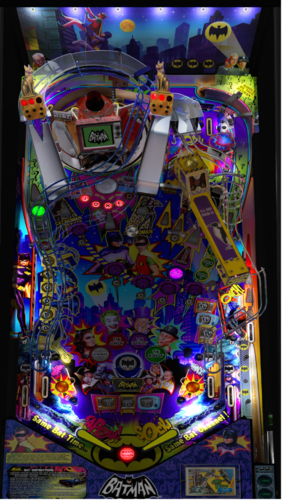
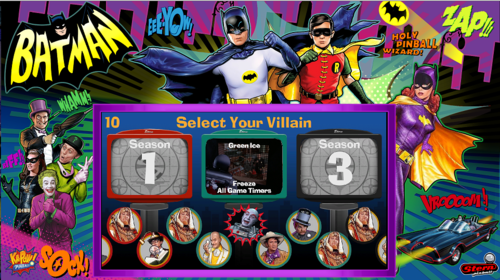
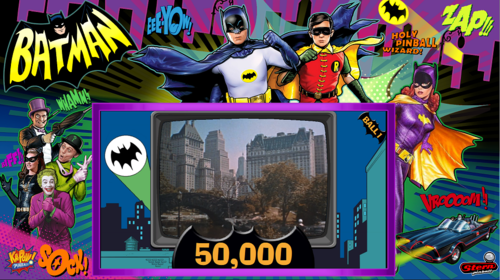
3 Screenshots


BATMAN 66 Stern Tribute

Daphishbowl, Mr H, MPT3k & Harlan 


Special Thanks: 

  • Harlan - Pup help, graphics, sounds 
  • MPT3K - Gameplay, videos, real table comparison, sound and testing  
  • Dimi - Video & resources 
  • Flipstream - Awesome Gameplay videos 
  • EbIsLit - Playfield scan 
  • Nailbuster - Massive Pup help (and VPX code tips!) 
  • Rik - Massive Testing 
  • TerryRed - DOF and lots of support  
  • wAxx - Awesome Physics and detail tweaks 
  • Joey - Backglass graphics 
  • DJRobX - Turntable help 
  • Sixtoe - VR Room  
  • G5K - Turntable help 
  • Pinballfan2018 - Table support 
  • VPW - nFozzy fixes and details (Benji, Apophis, Iaakki, Astronasty, Bord, Sixtoe) 
  • Alpha/Beta Testers - Too many to list 


INTRO:   Huge thanks to everyone for the massive help!  After a year in the making we hope yall enjoy it and feel it was worth the wait.  Nobody can match the amazing code Lyman Sheats did for the original table but this was hand coded and shows how much work it must of taken to make the real table.  We tried to replicate every detail on the gameplay with exact scoring, bonuses, modes, pinup interactions, gadgets, service menus and so forth. 

    In the 27K lines of code I am sure there are a few things we still missed so feel free to let us know.  Our goal is to pay tribute to this amazing table but also show that there are no limits when it comes to originals.  We hope this will bring something the community will enjoy and inspire others to join in on the fun. 


NOTE: YOU WILL NEED THE NEW 1.4.6 PINUP (also included in the Baller Installer):   

https://www.nailbuster.com/wikipinup/doku.php?id=release_notes


PUP Pack:

Run the appropriate batch file and "Read the on screen instructions to know how to setup the script in VPX"

Version 1.1.0   -  https://mega.nz/file/XMIgnRwC#LmRlA5GjAzxrWdjxl4O87PxqjUldOF4kA-fLoU0odFQ

Version 1.0.0 -  https://mega.nz/file/eJh0lARL#BCzPwXZLqc9ylRgwwlLtEFd6FAmdGymNMrrPf_kIiEo


The Rules: 

There is a lot to this table so don’t forget to read the rules so you can enjoy all this has to offer 

http://tiltforums.com/t/batman-66-rulesheet/2463


Ownership: 

This table is collectively owned by all of those that contributed to it in order to give back to the community.  No one author retains the right to pull this table from the community.  If you would like to mod this table you shall obtain permission from one of the authors, leave the list of original authors at the top of the source and finally add your name to the list.  If for some reason we all leave this community and we are unreachable then this table will then become open to anyone in the community. 



https://www.ipdb.org/machine.cgi?id=6354
Contact Author First.
v10

What's New in Version 1.1.0   See changelog

Released

1.1.0 Changelist

  • Draining while villain escape is qualified doesn’t relight it 
  • Qualifying a villain the second time and then switching the qualified villain turn off the insert for the already qualified villain 
  • When doing flipper+start reset instant info was left on the screen at the start of the new game 
  • Hitting batphone when shot multipliers are lit doesn’t register 
  • VMB edge case could wait up to 40 seconds before releasing the balls. 
  • Fixed service menu key mapping and added sounds 
  • Made service menu edit and cancel work like original 
  • Shame is only MB the first time 
  • Shame has a timer the second time you play it 
  • Shame adds +1 MB for each time you completed it 
  • Major Villain lights could go out the second time through before starting villain escape (Visual only) 
  • Fixed Muted scene in Catwoman2, wave2 start 
  • Fixed MrFreeze not adding/showing score when hitting red shots during the first wave  
  • GI-Off image didn’t have visible set so it wasn’t working. 
  • Fixed the left ramp ball stuck issue 
  • Major Villain seasons alternate after completion 
  • Added default scores for other stats 
  • Fixed when "[SCORE]" shows up randomly on DMD 
  • Tilting the table when a ball was in lock disabled everything and waited forever 
  • Added "Calling operator" text to ball search when it moves the ball 
  • Pressing Both Magnas together 3 times, after first ball search calls the Operator 
  • Fixed random bounce-out on right ramp when shooting with the left flipper  
  • Added Variable to support Real Tilt Bobs 
  • Fixed Gameover flicker behind mystery 
  • Fixed attract screen with "Replay at" getting stuck when resetting during gameplay 
  • When ending multiball during a stacked mode there is a slight chance it doesn’t clear all the way. 
  • If Atomic pile is flashing for bat turn or something else during VMB the turntable doesn’t turn for the SJP shot 
  • Added 5x4 screen option 
  • Reduced PF Images to 4k instead of 7K. 
  • Added fix for VPVR kicker issue 
  • Updated back kicker DOF since both kickers were using the same DOF output. 
  • Added constants at the top of the code for the service keys 
  • Added a slight delay for the attract start so the intro video shows up correctly 
  • Fixed Ball stuck halfway down right wire ramp 
  • Shame didn’t add +1 extra balls to MB for each time you completed shame. 
  • End of ball bonus glitch when you drain while bat phone is flashing. City scenes pop up. 
  • Made blue inserts lighter like the original table 
  • Fixed media sizes in the pup that cause the table to crash when in full screen exclusive 

User Feedback

Recommended Comments


ludespeedny

Posted

On 8/26/2025 at 6:58 AM, CinnamonBun said:

Hey @Sinizin, did you ever get this resolved? I have only just installed this table and have the same issue.


Its an amazing table but the micro stutter is frustrating.

For those with stutters, look into disabling HPET timers if enabled on your system.


stevemontuno

Posted

On 1/7/2026 at 9:39 PM, ludespeedny said:

For those with stutters, look into disabling HPET timers if enabled on your system.


Cheers for the heads up on this  ,,,its worked wonders cleaning up the

intermittent micro stutters on my cab ,,much smoother now overall 👍

ludespeedny

Posted

just watch out for windows updates as they like to re-enable. You may be able to turn off in bios, but some newer mobo's don't let you. I've been fighting this for years. lol

Dicentim

Posted

Hi, I see some Scorbit scores for the table. But I can't find how to enable it. Could you please help me ? Thanks. 


Powerus

Posted (edited)

My friend loves this table a bit too much and encountered a runtime error on line 7528 with a score over 6 billions.
Has to do with the "idx" mode multiplier out of range.
Idk how to fix it.

Edit: according to copilot, you could fix this bug simply by adding
Dim ub
ub = UBound(SceneMap, 2)

If idx > ub Then idx = ub

Right after the line idx = Villains(Villain).Progress

I don't know if it's really fixed but I can say that the game works as good as before.
I only managed 1.1b this morning so it won't be me who will push it far enough to know.

Edited by Powerus
Septon

Posted

Thank you for your work on this amazing table! 


But I still get a bug with the PUP pack where the Game Over screen start flashing and cover everything in a middle of a game sadly :(


I have the latest version of the PUP pack (1.1.0) and I'm using the latest version of the player (2.0). I'm in desktop mode (9:16), Option 3 - Desktop.

66GO.png

66 flashing Game Over in-game.jpg

Tikimaster

Posted

1 hour ago, Septon said:

where the Game Over screen start flashing and cover everything

Check this in the table-script:
 

'**************************
'   PinUp Player USER Config
'**************************
Dim bSingleScreen:bSingleScreen=True	   ' when Playfield is in landscape and single screen this will allow PUP to work properly
dim PuPDMDDriverType: PuPDMDDriverType=0   ' 0=LCD DMD, 2=FullDMD
dim useHighResDMD:useHighResDMD=False	   ' if you have a high res FullDMD this will make some animtions look better
dim useRealDMDScale : useRealDMDScale=0    ' 0 or 1 for RealDMD scaling.  Choose which one you prefer.
dim useDMDVideos    : useDMDVideos=True	   ' true or false to use DMD splash videos.
dim b5x4Mode		: b5x4Mode=False	   ' Using 5x4 Screen


Septon

Posted

43 minutes ago, Tikimaster said:

Check this in the table-script:
 

'**************************
'   PinUp Player USER Config
'**************************
Dim bSingleScreen:bSingleScreen=True	   ' when Playfield is in landscape and single screen this will allow PUP to work properly
dim PuPDMDDriverType: PuPDMDDriverType=0   ' 0=LCD DMD, 2=FullDMD
dim useHighResDMD:useHighResDMD=False	   ' if you have a high res FullDMD this will make some animtions look better
dim useRealDMDScale : useRealDMDScale=0    ' 0 or 1 for RealDMD scaling.  Choose which one you prefer.
dim useDMDVideos    : useDMDVideos=True	   ' true or false to use DMD splash videos.
dim b5x4Mode		: b5x4Mode=False	   ' Using 5x4 Screen


Yeah I got the exact same values.


Dim bSingleScreen:bSingleScreen=True       
dim PuPDMDDriverType: PuPDMDDriverType=0   
dim useHighResDMD:useHighResDMD=False      
dim useRealDMDScale : useRealDMDScale=0   
dim useDMDVideos    : useDMDVideos=True       
dim b5x4Mode        : b5x4Mode=False    

Tikimaster

Posted

Gameover is shown on the PupScreen in full size. Tis is a feature, not a bug. 

Slenky

Posted

I've been playing this a lot. Thanks for the hard work. Awesome table.

Septon

Posted (edited)

On 2/26/2026 at 6:21 PM, Tikimaster said:

Gameover is shown on the PupScreen in full size. Tis is a feature, not a bug. 


I know that thank you, the problem is that the Game Over screen suddenly appears in a middle a of game, remains displayed and "covers" everything else. When I'm in the middle of a game.

Edited by Septon
bebz

Posted

hello, Is there a way to adjust the opening of the outlanes?

guybark

Posted

Hi, please could someone advise me how to change the main score font size. I have a slightly weird setup that I have working great apart from some font  sizes. Mainly the player 1 score is bigger than the Batman and I want to make it smaller to fit. Also the upper left pop up window during play and lower right window text is too big for the bubbles. Please could someone tell me which lines in the script I need to edit to make the fonts smaller for these windows. Thanks 

coolball

Posted

I have the same problem and have often asked for ideas, but so far, no one has been able to help me.

guybark

Posted

Hmm, that’s frustrating 


Create an account or sign in to comment

You need to be a member in order to leave a comment

Create an account

Sign up for a new account in our community. It's easy!

Register a new account

Sign in

Already have an account? Sign in here.

Sign In Now
×
  • Create New...