
Jump to content

Cactus Canyon (& Continued) (Bally 1998) VPW Mod

  • Get Support
  • Create an account or sign in to download this
download_no_perm
116713 Views
25955 Downloads
5 From 51 reviews
101.13 MB File Size
Ninuzzu, Tom Tower, VPW Created by
Ninuzzu, Tom Tower, VPW Scripting by
Bally Manufacturer
1998 Year

2 Screenshots

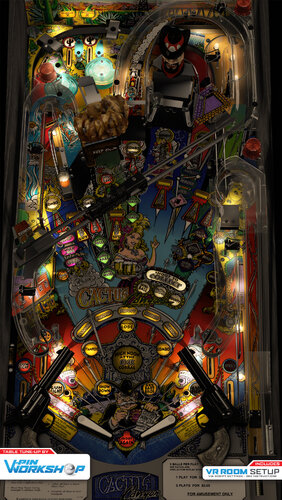
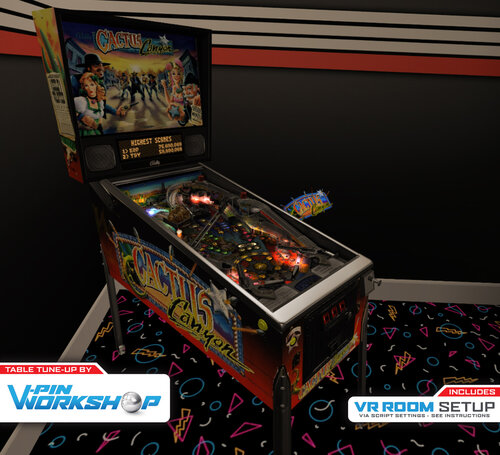
Welcome CACTUS CANYON, Partner!!

The VPin Workshop Discord members present this table tune-up.

This started out as a "quick" physics update, but we ended up adding so much more!
•    Inserts & Lighting Overhaul: Skitso
•    nFozzy physics: apophis
•    Roth Drop Targets: rotherbauerw, Sixtoe, apophis
•    Fleep Sounds: apophis
•    Fluppers Flashers & VR Room: Sixtoe
•    Miscellaneous tweaks: Skitso, apophis, oqqsan, Sixtoe, tomate, iaakki
•    Testing: Rik, Panik Flip gaming, VPW team
 
This release would not have been possible without the legacy of those who came before us including, most notably, Ninuzzu and Tom Tower.

Thank you to Rothbauerw for nFozzy physics. Thanks you to Fleep for sounds. Thanks to all before us.


' 000 - Skitso -  Updates to lighting, inserts, some flashers and LUT
' 001 - apophis - nFozzy flippers, rubber dampening, and materials applied. Adjusted plunger physics settings
' 002 - apophis - Added Fleep sounds package
' 003 - apophis - Added ramp sounds, fixed an issue with my implementation of flipper sounds, and hopefully fixed the stuck ball issue inside Bart 
' 004 - apophis - Cabinet POV adjusted. Ramp rolling volume decreased, ball rolling volume increased slightly. Updated controller loading code,
' 005 - apophis - Adjusted autoplunger physics parameters. Removed duplicate flipper collision functions. 
' 006 - apophis - Fixed GameTimer bug that prevented ball shadow from working. Added ShowBallShadows option. Fine-tuned autoplunger (thanks oqqsan)
' 006a - oqqsan - Added dynamic instruction card
' 007 - apophis - Added BartHatSoundEffects option. Removed unnecessary beer mug from game.
' 008 - skitso - Improved GI and inserts
' 009 - apophis - Updated flipper tricks to the latest version
' 010 - Sixtoe - Added vr cabvinet and room, fluppers flashers & roths droptargets, which are currently broken.
' 011 - apophis - Fixed drop targets. Change the method to check when target was successfully hit.
' 012/3 - Rotherbauerw - Fixed drop targets.
' 014 - Sixtoe - Added sound effects for drop targets, tried to fix ball traps, tidied up VR stuff, fixed rails, added rollover holes, changed rubber holder prims, adjusted a few minor things.
' 015 - iaakki - Fixed Desktop POV, 
' 016 - Skitso - Remade all GI, altered some DL/DLFB values and modified textures for more accurate lighting.
' 017 - Sixtoe - Added Bart & hat to GI, adjusted to right GI so it doesn't look broken in GI, tweaked a few things including decals on  traintrack
' 018 - apophis - Adjusted Cabinet POV

' 019 - Sixtoe - VR specific fixes and automatic switches, combined some timers, GI tweaks

https://www.ipdb.org/machine.cgi?id=4445
Contact Author First.
v10

What's New in Version 1.1   See changelog

Released

' 1.03    - Wylte        - Ball shadows, slingshot correction, updated flipper/cor/physics dampeners, added TargetBouncer to Targets and dPosts/dSleeves, DT nudge weakened
' 1.04    - Wylte        - Global ball array, narnia ball check, PoV update
' 1.05    - apophis    - Fixed issue where balls can get stuck in the Bart subway
' 1.1 Release

User Feedback

Recommended Comments


hotpepper

Posted

One of my favorite tables and you did an awesome job. Thanks!

dopdahl

Posted (edited)

[solved]  It' s "tribute" mode.  I just didn't know how to actually start it.


So I'm playing CCC last night.  All is well, except for Drunken Multiball...  Anyway, all of a sudden the Scared Stiff logo appeared on my DMD and I hear SS music.  Then on every flipper click, it switches between SS, Monster Bash, Medieval Madness, Adams Family and maybe a few other Williams games...


This mode remained until Last Call.


Not sure how I got into it.  Anybody have a clue on this?

Edited by dopdahl
dopdahl

Posted

Here is what fixed the P-ROC B2S Backglass not closing for me when exiting the game...

Move 'Controller.Stop' after 'B2SController.Stop'


Sub Table1_exit()

     'Controller.Stop

     If B2SOn = True and PROC = 1 Then B2SController.Stop


     Controller.Pause = False

     Controller.Stop


     SaveValue TableName,"TrainPos",Train.TransX

End sub

dazzadasha1

Posted

Thanks all involved. Wicked table

Matteo

Posted

Thank's tge update, excellent :)

Matteo

Posted

Just now, Matteo said:

Thank's  the update, excellent :)


ronald71

Posted

Thanks for the update and  ofcource thanks all involved. Wicked table ..👌

mrjcrane

Posted (edited)

First THANKS VPW (and all prior contributors), what an excellent surprise for sure today. The table downloads a single (.vpx not a .zip) version which appears to be just Cactus Canyon (Regular). Is there a flipswitch somewhere in the the table script that brings the CCC version to life, or is that a separate table download somewhere? Thanks all in advance - mrjc.

Edited by mrjcrane
outhere

Posted

Just now, mrjcrane said:

First THANKS VPW (and all prior contributors), what an excellent surprise for sure today. The table downloads a single version which appears to be just Cactus Canyon (Regular). Is there a flipswitch somewhere in the the table script that brings the CCC version to life, or is that a separate table download somewhere? Thanks all in advance - mrjc.

Yes in the table script

movieguy

Posted

Thank you for the update.  This is a really fun table!  I appreciate the fixes to make it work with proc. 

KRAKEN

Posted

.... and thanks for the drop target "glance hits";  those were really buggin me.  ;)


mrjcrane

Posted (edited)

2 hours ago, outhere said:

Yes in the table script

Thank U Outhere, I found the switch. And my hat is really off to the VPW Team, I really like that you folded everything into 1 table including all the P-ROC stuff and all the game options and features switches.  A very thoughtful approach on everything. A great way to move forward building all the stuff in the script and for the VR setup too.  It is a real masterpiece and I'm learning a lot just by studying how you all approached the table script. E_X_C_E_L_E_N_T !!!!! VPW.

Edited by mrjcrane
bietekwiet

Posted

Thank you for the update!


Is there a tutorial around explaining how to install PROC and get CCC running?

  • Content Provider
davadruix

Posted

Thanks

hotpepper

Posted

Awesome job, as always! Thanks!

mrjcrane

Posted (edited)

On 5/30/2021 at 6:31 PM, bietekwiet said:

Thank you for the update!


Is there a tutorial around explaining how to install PROC and get CCC running?

 Biet and others who may try, the P-Roc install is not overly complicated and is worth the time and effort to get CCC running and positioned for P-Roc for future games that use it.


1) Watch Major Frenchy's You tube on P-Roc

2) Obtain the P-Roc installer, extract the installer, and execute STEP1 and STEP2 scripts (installs Python and P-Roc)

3) Flip the P-Roc activation switch in the table script to =1 to activate the CCC version.

LINE 89 ----> Const PROC = 1                  '1=Use PROC, 0=Use VPinMAME

4) Depending on your screen setup you may have to reposition the P-Roc DMD in C:\P-ROC\games\cactuscanyon\config via file user_settings.yaml. I moved my X positioning.

Sample line ---> Color Display Pixel Size: 4, Color Display X Offset: 1924, Color Display Y Offset: 4,


Good luck and have fun, an ECELLENT table thanks again to VPW.


Edited by mrjcrane
KiwiBri

Posted

On 6/1/2021 at 12:44 PM, mrjcrane said:

 Biet and others who may try, the P-Roc install is not overly complicated and is worth the time and effort to get CCC running and positioned for P-Roc for future games that use it.


1) Watch Major Frenchy's You tube on P-Roc

2) Obtain the P-Roc installer, extract the installer, and execute STEP1 and STEP2 scripts (installs Python and P-Roc)

3) Flip the P-Roc activation switch in the table script to =1 to activate the CCC version.

LINE 89 ----> Const PROC = 1                  '1=Use PROC, 0=Use VPinMAME

4) Depending on your screen setup you may have to reposition the P-Roc DMD in C:\P-ROC\games\cactuscanyon\config via file user_settings.yaml. I moved my X positioning.

Sample line ---> Color Display Pixel Size: 4, Color Display X Offset: 1924, Color Display Y Offset: 4,


Good luck and have fun, an ECELLENT table thanks again to VPW.


THANK YOU @mrjcrane!! these steps finally worked for me...  I installed again based on whats shown on the video. 
 

THANK YOU @outhere - I followed your tips on the other thread (Pin2DMD and P-ROC) - I used  Zadig to change the  Pin2DMD driver to WinUSB as suggested.  I then installed the two files as you suggested:  ep_desktop_pygame.py and libusb-1.0.dll  after I unblocked the files.


- put the ep_desktop_pygame.py in the C:\P-ROC\games\cactuscanyon\ep folder over wrote the one that was in there

- Put the libusb-1.0.dll in the C:\python27 folder where the python.exe is located 


-Open a CMD Window, and run pip install pyusb

And it said all is good...


Finally got the DMD showing on the Pin2DMD.  Fantastic!

libusb-1.0.dll ep_desktop_pygame.py

evileman

Posted

Man you guys really have the Midas Touch. Thanks VPW and all previous contributors! Making pinball dreams come true for so many of us. 😁

jbg4208

Posted

33 minutes ago, zebob said:

Hello all, is it possible to play like this video with P-ROC version we have ?

https://youtu.be/2IVz4BtADqc

If you are talking about enabling proc, there is an option in the script. proc=1

zebob

Posted

No, i'm playing P-ROC but in this video we can see "extended mode" with some other options in game, at 1:39 for example, and also some add musics are nice too.

Thalamus

Posted

No. At least not now. From what I know. There is CCC and CCC extended version. "Our" - p-roc is the first one.

naboodiver

Posted

I can't seem to get CCC to work.     I am on 1.02 version of the game.    That game starts but acts like it is looking for lost ball .    Makes noises like it is ejecting and the train and mine move up and down.     Will not start or accept coins (though is makes coin drop sound.    I don't see anyone else is having this problem.    Help is appreciated.      I have set Proc = 1 in the script.

naboodiver

Posted

Sorry for the double post.


Create an account or sign in to comment

You need to be a member in order to leave a comment

Create an account

Sign up for a new account in our community. It's easy!

Register a new account

Sign in

Already have an account? Sign in here.

Sign In Now
×
  • Create New...