
Jump to content

SlugFest (Williams 1991)

  • Get Support
  • Create an account or sign in to download this
download_no_perm
7801 Views
1462 Downloads
5 From 11 reviews
576.32 MB File Size
sf_l1 ROM Name
DancingCan Created by
DancingCan Artwork by
DancingCan Scripting by
Williams Manufacturer
1991 Year

2 Screenshots

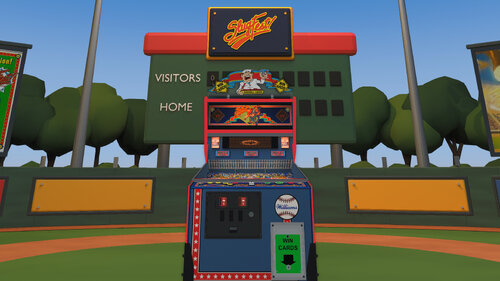
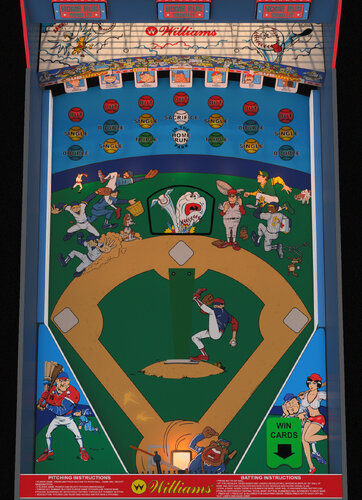
Welcome to SlugFest, a pitch-and-bat baseball game, play ball!  


Lore:
SlugFest was Williams’ final pitch-and-bat baseball game, with only 1,559 machines produced. SlugFest introduced Williams’ first dot-matrix display (DMD). An animated heckler taunted players, who silenced him by launching a ball into the upper balcony. Cabinets could also dispense real baseball cards as prizes.


How to play:

  • SlugFest plays like baseball.
  • Press a pitch button to throw a pitch. Then, press the bat button as the pitch arrives to swing and hit the ball toward scoring targets, while avoiding targets marked OUT.
  • Target hits move your runners around the bases, and each runner who reaches home scores one run.
  • Your goal is to score as many runs as possible.

Requirements and Setup Steps:

  • VPX - 10.8
  • VPinMAME - 3.6 or newer
  • ROM: sf_l1
  • Card_images: Put the baseball card folder in the same folder as your table. (e.g. Tables folder).
  • Included are 2 camera _cabinet.ini and _desktop.ini view files.
    • To use either one, rename the ini file to match the file name of the VPX table. 
    • In other words, remove _desktop or _cabinet from the ini file.


Features:

  • Updated physics; animated bat, home-run ramp, and pitching cover.
  • Baked lighting, GI, flashers, glowing inserts, and reflective metal.
  • Updated images and graphics. Including hand-traced runners and playfield art.
  • Positional mechanical and rolling sound.
  • One and two-player, four pitch types, pinch hitting, stealing bases, and Throw Out Runner/Boo.
  • Desktop and cabinet camera ini files.
  • Baseball field environment can be enabled and activates automatically for VR.
  • Included are 100 embedded baseball cards, randomly selected when card awards are dispensed and shown one at a time with smooth fades. (The on-table card display can be disabled.)
  • DOF features now integrated.


Credits:

  • SlugFest integration and tuning by DancingCan.
  • Physics and mechanical-sound systems are adapted from VPW Example Table 1.7
  • Roccodimarco, Tab, and Destruk — previous SlugFest work.
  • VPin Workshop (VPW) — Example Rom and Table 1.7.
  • nFozzy and Rothbauerw — physics foundations.
  • iaakki, wrd1972, and apophis — Target Bouncer.
  • Fleep — mechanical sounds.
  • nFozzy — ramp-rolling sounds.
  • Visual Pinball, VPinMAME, and VPX Lightmapper teams — development tools.


My Work:

  • This is the first VPX table I’ve ever made, building on the work of earlier creators and tables.
  • I had a blast putting everything together. 
  • Let me know what you think! I’m open to feedback.
  • I hope you enjoy playing it as much as I enjoyed making it.


Controls:

Start:

  • 1 = Start a one-player game.
  • 2 = Start a two-player game.

Batter controls (both modes):

  • Right flipper = Swing the bat.
  • Left MagnaSave = Pinch Hit.
  • Right MagnaSave = Steal Base.
  • One-player pitching: Left flipper = Pitch; the game chooses the pitch type.

Two-player pitching:

  • Left-flipper pitching is disabled.
  • Up arrow = Fastball.
  • Down arrow = Curveball.
  • Left arrow = Changeup.
  • Right arrow = Screwball.
  • Pitcher: F = Throw Out Runner/Boo, depending on the game state.
  • Flipper and MagnaSave buttons follow your VPX assignments.


Table Customization:

To customize the table, open the script, edit the lines below, save, and restart.  These line numbers apply to the 1.0 production release.

Cabinet — line 190: Cabinet = 1

  • 1 = Focused playfield.
  • 2 = Full cabinet without the ballpark.
  • 3 = Full cabinet with the ballpark.


Pitch Buttons and Controls — lines 317–339.

  • Const LeftFlipperPitchIn2P
    • 1 = random pitch. Solo behavior stays unchanged.
    • 0 = disabled
  • Customize 2nd Player pitch buttons by changing the lines below (default shown): 
    • Const PitchKeyFast = 200       ' Up arrow
    • Const PitchKeyCurve = 208      ' Down arrow
    • Const PitchKeyChangeup = 203   ' Left arrow
    • Const PitchKeyScrew = 205      ' Right arrow
    • For more examples refer to https://www.vpforums.org/Tutorials/KeyCodes.html


WinCardsOnTable — line 121: Const WinCardsOnTable = 1

  • 1 = Show the WIN CARDS sign, awarded card images, and their shadows on the right plastic.
  • 0 = Hide those visuals.
  • Card awards, dispenser operation, card stock, and scoring remain active with either setting.

Apron — line 99: Const Apron = 1

  • 1 = Show the apron artwork.
  • 0 = Hide the apron artwork.

Fence — line 128: Const Fence = 1

  • 1 = Show the front playfield fence.
  • 0 = Hide it, with matching shadows and reflections adjusted automatically.

Lockdown bar — line 108: Const Lockbar = 1

  • 1 = Show the lockdown bar.
  • 0 = Hide the lockdown bar.

BatOnlyAtPitch — line 313: Const BatOnlyAtPitch = 1

  • 1 = Allow swings only while a pitch is in flight.
  • 0 = Allow free swings.

Selects the presentation outside VR.

  • For VR, edit line 191: If RenderingMode = 2 Then Cabinet = 3
  • Change the final 3 to 2 for the cabinet without the ballpark. Leave RenderingMode = 2 unchanged.


Baseball Card Customization

Want to put your own cards in the lineup? Use portrait PNG, JPG, or JPEG artwork with a 5:7 aspect ratio.

  • Baseball-card source folder — line 322: Const WinCardRelativeFolder = "card_images"
  • This identifies the source artwork folder used when building the embedded card set.
  • Example 1 — line 325: WinCardFileNames(0) = "Albert Belle — 1992 Donruss.jpg" corresponds to WinCard_001.
  • Example 2 — line 326: WinCardFileNames(1) = "Andy Benes — 1989 Topps USA Baseball.jpg" corresponds to WinCard_002.
  • To swap artwork, replace the corresponding images in VPX’s Image Manager while keeping their existing names, such as WinCard_001 and WinCard_002, then save the table.
  • Changing the folder or catalog filenames alone won’t replace the displayed cards.


---------------------------

Changelog:
1.0 - VPX Release - DancingCan
1.1 - Pitch button fixes

1.2 - DOF

Edited by DancingCan


Permission from ORIGINAL Author(s)?

Yes
written permission received.
Reached out to original author(s) but no response in 60 days or more.

Allow file to be included on a VPUniverse downloader app?

Yes

VPX Standalone

No
https://www.ipdb.org/machine.cgi?gid=3281
https://vpuniverse.com/files/file/31876-slugfest-williams-1991-b2s-full-dmd
Contact Author First.
10.8 required
Yes

What's New in Version 1.2   See changelog

Released

  • included card_images in the zip

User Feedback

Recommended Comments


DancingCan

Posted

34 minutes ago, Dicentim said:

EDIT : I found it ! the folder must go in the Tables' one.
 

Hi, very uncommon table, thanks for porting it.
Where to put the card_images folder please ?

Also, I don't have the display of the 3 Home Run panels like on your picture :
image.thumb.png.27b035bb67d604a030e02288720a3cea.png


Wooo! Thanks for playing it!

In the script, change the following lines. 2 will show the full cabinet including the home run lights/rectangles.
 

Cabinet — line 190: Cabinet = 1

1 = Focused playfield (default).

2 = Full cabinet without the ballpark.

3 = Full cabinet with the ballpark.

Dicentim

Posted

Oh Thanks @DancingCan I've not searched far enough. 

Now I have to learn baseball's rules. 😂 

Rivermatty

Posted

2 hours ago, DancingCan said:


Looking into the loading issue for you. That'll take more time.  

However, for the flipper issue......

  • Set BatOnlyAtPitch = 0
  • Is your flipper assigned to an arrow key, F, or 2?
  • What key is your right flipper assigned to?
  • Are you running any Joy2Key-like software for an encoder by chance?

Hi again,

My Right Flipper is set to Right Arrow, works in every Table

I do use Joy2Key yes

I already have BatOnlyAtPitch = 0 but it doesn't work sadly

DancingCan

Posted

18 minutes ago, Rivermatty said:

Hi again,

My Right Flipper is set to Right Arrow, works in every Table

I do use Joy2Key yes

I already have BatOnlyAtPitch = 0 but it doesn't work sadly


Oof!  There it is. 🤦‍♂️  There is a key-mapping conflict. Since 2-player controls has Right arrow = Screwball and it intercepts your flipper button. 

In the meantime and as a temporary fix for your setup, do this at line 726

  1. Find Function SFControlSlot(ByVal keyCode) .
  2. Immediately after SFControlSlot = -1 on line 727, add this below as the new line 728:
    1.     If keyCode = RightFlipperKey Then Exit Function
  3. The FUNCTION should now look like this:
    1. Function SFControlSlot(ByVal keyCode)
          SFControlSlot = -1
          If keyCode = RightFlipperKey Then Exit Function
          Select Case keyCode
  4. Save the table and compile the script.
  5. Then, restart and test.
  6. **Note: Right arrow key will operate the bat but won't also select Screwball pitch in two-player mode.

Give a few days or so to whip up a change in a new version to make the buttons more interchangeable and scalable across setups.


coolball

Posted

How can I play this nice one in the desktop view?

the desktiop ini, does not work for me.

Rivermatty

Posted

9 minutes ago, DancingCan said:


Oof!  There it is. 🤦‍♂️  There is a key-mapping conflict. Since 2-player controls has Right arrow = Screwball and it intercepts your flipper button. 

In the meantime and as a temporary fix for your setup, do this at line 726

  1. Find Function SFControlSlot(ByVal keyCode) .
  2. Immediately after SFControlSlot = -1 on line 727, add this below as the new line 728:
    1.     If keyCode = RightFlipperKey Then Exit Function
  3. The FUNCTION should now look like this:
    1. Function SFControlSlot(ByVal keyCode)
          SFControlSlot = -1
          If keyCode = RightFlipperKey Then Exit Function
          Select Case keyCode
  4. Save the table and compile the script.
  5. Then, restart and test.
  6. **Note: Right arrow key will operate the bat but won't also select Screwball pitch in two-player mode.

Give a few days or so to whip up a change in a new version to make the buttons more interchangeable and scalable across setups.


Cool thanks will try this tomorrow and get back to you

DancingCan

Posted

3 minutes ago, coolball said:

How can I play this nice one in the desktop view?

the desktiop ini, does not work for me.

Rename the desktop ini file to match the name of the VPX table. Or in other words, remove _desktop from the ini filename.

SlugFest (Williams 1991) v1.0.ini
not, SlugFest (Williams 1991) v1.0_desktop.ini

coolball

Posted

Yes, change this, but the game looks

Slug.jpg

Mistadobalina74

Posted

Really hoping to see this in Legends Unchained. 

jejevpuniverse

Posted (edited)

2 hours ago, coolball said:

Yes, change this, but the game looks "tilted"

For change the rotation of the table :
Toggle Backglass View (Ctrl+Space), tab Camera : choose the view Desktop and the mode Legacy. And change the rotation, maybe to 0°. After that, launch the table with F6 for adapt to your screen.

Edited by jejevpuniverse
Rivermatty

Posted

13 hours ago, DancingCan said:


Oof!  There it is. 🤦‍♂️  There is a key-mapping conflict. Since 2-player controls has Right arrow = Screwball and it intercepts your flipper button. 

In the meantime and as a temporary fix for your setup, do this at line 726

  1. Find Function SFControlSlot(ByVal keyCode) .
  2. Immediately after SFControlSlot = -1 on line 727, add this below as the new line 728:
    1.     If keyCode = RightFlipperKey Then Exit Function
  3. The FUNCTION should now look like this:
    1. Function SFControlSlot(ByVal keyCode)
          SFControlSlot = -1
          If keyCode = RightFlipperKey Then Exit Function
          Select Case keyCode
  4. Save the table and compile the script.
  5. Then, restart and test.
  6. **Note: Right arrow key will operate the bat but won't also select Screwball pitch in two-player mode.

Give a few days or so to whip up a change in a new version to make the buttons more interchangeable and scalable across setups.


Hey, this worked, my Bat is now moving, thanks so much for all the time and effort in working this out.


Only problem  now is it really shows how sluggish my system is with this Table because it's very hard to hit the ball due to a slight lag when activating the flipper button.  Only Table I have with this problem but hey, at least it's working now, thank you :)


bombaj344

Posted

13 hours ago, DancingCan said:

Rename the desktop ini file to match the name of the VPX table. Or in other words, remove _desktop from the ini filename.

SlugFest (Williams 1991) v1.0.ini
not, SlugFest (Williams 1991) v1.0_desktop.ini


13 hours ago, coolball said:

Yes, change this, but the game looks

Slug.jpg

The desktop version works for me. I can send it to you if you want.

Zrzut ekranu (3399).png

coolball

Posted

Works now, thanks for help.

whataguy

Posted

Why can’t I enter initials for scores at the end?

whataguy

Posted

Need more audio in this when it comes to traps and mini games. 

DancingCan

Posted

44 minutes ago, whataguy said:

Need more audio in this when it comes to traps and mini games. 

Great feedback. What specific mini games or trap are you referring to? 

Kevtheguy

Posted

I'm trying to play in VR. When it loads up I get the dreaded hourglass and the VR jitters. Similar to when Johnny Mnemonic when it first was released (if anyone remembers that before it was optimized) I have a 3070 graphic card and can run any table with no problems. I tried changing line 191 to remove the ballpark thinking that would take some demand away but it does the same thing. Any ideas?


This looks very nice and must have been a good deal of work. Thankyou. 

DancingCan

Posted

1 hour ago, whataguy said:

Why can’t I enter initials for scores at the end?

Hmmm! If I recall, Start selects the letter and Bat enters the letter.

DancingCan

Posted

2 minutes ago, Kevtheguy said:

I'm trying to play in VR. When it loads up I get the dreaded hourglass and the VR jitters. Similar to when Johnny Mnemonic when it first was released (if anyone remembers that before it was optimized) I have a 3070 graphic card and can run any table with no problems. I tried changing line 191 to remove the ballpark thinking that would take some demand away but it does the same thing. Any ideas?


This looks very nice and must have been a good deal of work. Thankyou. 

Oh weird!  I have found that it takes 30-45 seconds to load in correctly. I too get an hourglass for bout 45 seconds in VR. I have a 4090.  

Let me poke around to see what could be causing it. Thanks for the feedback! 

Kevtheguy

Posted

2 hours ago, DancingCan said:

Oh weird!  I have found that it takes 30-45 seconds to load in correctly. I too get an hourglass for bout 45 seconds in VR. I have a 4090.  

Let me poke around to see what could be causing it. Thanks for the feedback! 

Thanks. I gave it a good 4 or 5 minutes to resolve itself. I have a metaquest 3 headset. I tried with and without the .ini file renamed to match the table filename.

Kevtheguy

Posted

Just now, Kevtheguy said:

Thanks. I gave it a good 4 or 5 minutes to resolve itself. I have a metaquest 3 headset. I tried with and without the .ini file renamed to match the table filename.

But still no luck

jhoff80

Posted (edited)

This looks and plays great, but I think the sound could use a little bit of work.  It's not just that there's no DOF (I see that says coming soon), but the sound just doesn't give any feedback either (no SSF?).  It just feels kind of dead with no impact, for lack of a better term.


Edit:  My secondary amp got unplugged.  🤦‍♂️

Edited by jhoff80
DancingCan

Posted

5 hours ago, Kevtheguy said:

But still no luck

Curious, does it the table work in desktop or cabinet? AKA, non VR? 

PEandS1Ws

Posted

I have been waiting for this VPX conversion. I was able to play it in real life in Orlando a few years ago and then added the table to Popper as my only VP9 table. You did a great job on it @DancingCan


For those having performance issues you can adjust video settings on a per table basis. In VPX’s Video Options on the slower PCs, try setting the maximum texture size to 2048 or 1024. VPX then downsizes the images as the table loads. The images are huge in size. Turning off reflections and ambient occlusion and lowering the anti-aliasing/supersampling also helps a lot on weak graphics cards. 

Open the Slugfest .vpx in the VPX editor. Don’t launch it from your frontend.
Go to Preferences → Video / Graphics Options.
In the upper left of that window, switch from the global settings to the table-specific ones. Depending on the build it’s labeled “Edited Settings” or “Specific table overrides.”
Change what you need and save. VPX writes the table’s .ini file for you.
Restart the table. Only Slugfest uses the new settings; your other tables are unaffected.

DancingCan

Posted

17 hours ago, jhoff80 said:

This looks and plays great, but I think the sound could use a little bit of work.  It's not just that there's no DOF (I see that says coming soon), but the sound just doesn't give any feedback either (no SSF?).  It just feels kind of dead with no impact, for lack of a better term.


Edit:  My secondary amp got unplugged.  🤦‍♂️

WOOOO. been there before.

If you have any suggestions for DOF, I'm all ears! The actual cabinet doesn't have some of the typical toys. 

Right now I have fan and rear solenoids to fire on a homerun. But could use other examples of what you might want to experience while playing ❤️. 


Create an account or sign in to comment

You need to be a member in order to leave a comment

Create an account

Sign up for a new account in our community. It's easy!

Register a new account

Sign in

Already have an account? Sign in here.

Sign In Now
×
  • Create New...